
AION 2 Server Queue Stuck? 7 Fixes for Long Waits & Login Errors
If the AION 2 server queue is taking too long, you may see a large queue number, a position that stops changing, or get sent back to the login screen after reaching the front. These symptoms can appear during heavy server traffic or after a queue or connection error, while a queue that continues moving normally usually means the server is simply busy.
This guide will explain when to keep waiting and when the queue may actually be stuck, then walk you through seven fixes for long waits, queue resets, login errors, and connection issues.
Why Is the AION 2 Server Queue So Long or Stuck?
A long AION 2 queue does not always mean something is wrong. Check the table below to match your symptoms with the likely issue and first fix.
| Symptom | Possible Cause | First Fix to Try |
|---|---|---|
| Server shows Full, but queue position keeps moving | Heavy server traffic | Stay in the queue |
| Queue stops and many players cannot enter | Maintenance or server-side issue | Check server status |
| Queue resets or returns to the login screen | Temporary queue or launcher error | Restart AION 2 and launcher |
| Login fails after an update or client change | Outdated or incorrect client | Update AION 2 and launcher |
| Queue disconnects or repeatedly reconnects | Unstable network connection | Stabilize your connection |
| Login still fails while servers are online | Firewall block or damaged game files | Check firewall permissions |
How to Fix AION 2 Server Queue Issues
Use the table above to identify the most relevant fix, or work through the steps below in order if the cause is unclear.
Fix 1. Check AION 2 Server Status
Before changing any local settings, check the official AION 2 Steam announcements for maintenance, service issues, or capacity notices. You can also check player discussions on social media to see whether others are experiencing the same queue or login problem. A queue can appear simply because the selected server is full, and NC confirms that queues move as space opens. If the servers are unavailable, wait for service to return before trying local fixes.
Fix 2. Stay in the Queue If Your Position Is Moving
If your queue position continues to decrease, stay in the queue and avoid restarting AION 2 or your launcher. NC confirms that both general and priority queues move as server space becomes available, so waiting time can vary with server capacity and player traffic. Only move to the next fix if the queue resets, throws an error, or sends you back to the login screen.
Fix 3. Restart AION 2 and Steam or PURPLE After a Queue Error
If the queue resets, shows an error, or sends you back to the login screen, a temporary game or launcher session may be stuck. Fully restarting AION 2 and Steam or PURPLE can clear leftover processes before you reconnect. Follow the steps below.
Step 1. Close AION 2 and fully exit Steam or PURPLE.
Step 2. Press Ctrl + Shift + Esc, then end any remaining AION 2, Steam, or PURPLE processes in Task Manager.
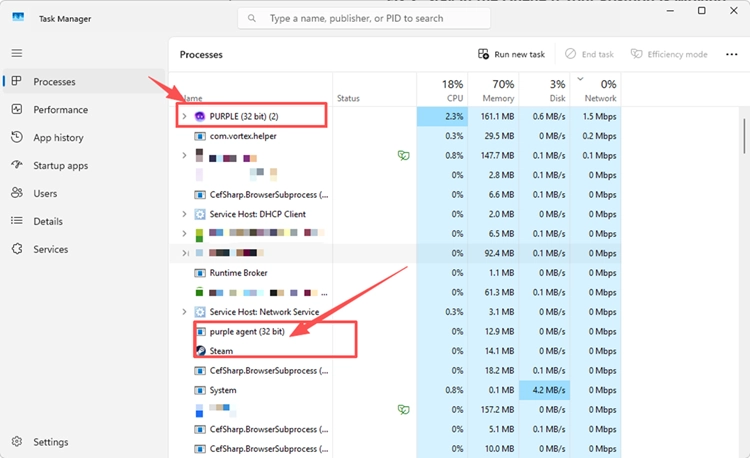
Step 3. Reopen Steam or PURPLE, launch AION 2, and join the server again.
Fix 4. Update the Correct AION 2 Client and Launcher
If you joined the Launch Scale Test, make sure you are using the correct AION 2 client. NC says Steam players must remove the Playtest App and download AION 2 separately for Advanced Access, while PURPLE players do not need to migrate clients. Follow the steps below to check your installation.
Step 1. On Steam, uninstall the old AION 2 Playtest App if it is still installed.
Step 2. Download the official AION 2 client when available and install any pending Steam updates.
Step 3. On PURPLE, keep your existing AION 2 installation, apply any available updates, and relaunch the game.
Fix 5. Stabilize Your Connection Before Rejoining
An unstable connection can cause AION 2 to disconnect while you are waiting or reconnecting, which may send you back to the login screen or queue. Pause large downloads, cloud syncing, and streaming, restart your router if the connection feels unstable, and use Ethernet instead of Wi-Fi when possible. These steps will not shorten a server-side queue, but they can reduce connection drops while you wait.
Fix 6. Check Firewall Access After an AION 2 Queue Error
If your AION 2 server queue reaches the front but the game repeatedly sends you back to the title screen, check whether other players can enter normally. If the problem appears limited to your PC, Windows Firewall may be interfering with AION 2 or its launcher. Check the app permissions before rejoining the queue.
Step 1. Open Windows Security > Firewall & network protection > Allow an app through firewall.
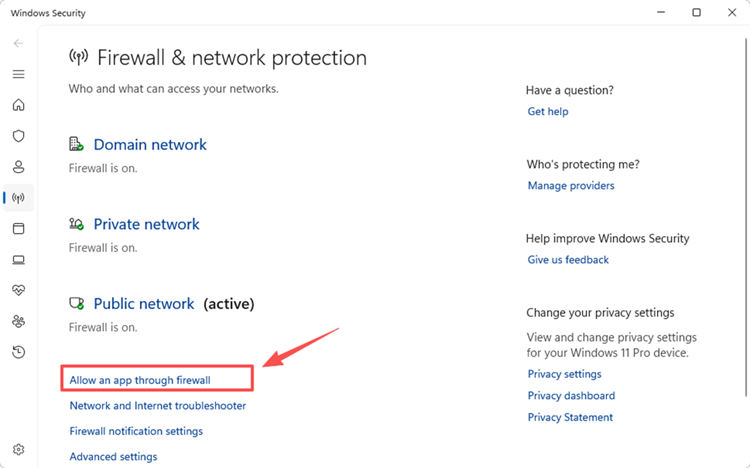
Step 2. Click Change settings. Find AION 2 and Steam or PURPLE; use Allow another app to add any missing executable.
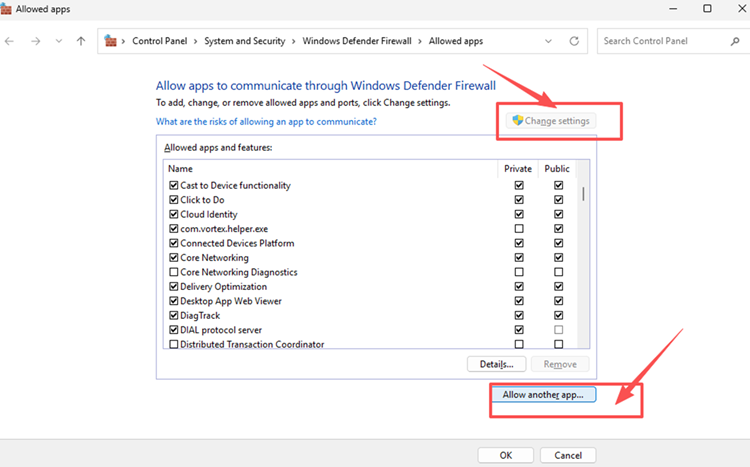
Step 3. Allow both apps on your active network profile, click OK, then relaunch the game and rejoin the queue once.
Fix 7. Verify Game Files If Queue or Reconnect Issues Continue
If AION 2 still shows queue errors or fails to reconnect after the earlier fixes, incomplete or damaged game files may be interfering with the client. Both Steam and PURPLE include built-in tools to check the installation without reinstalling the game. Follow the steps below.
Step 1. Open Steam or PURPLE and select AION 2.
Step 2. On Steam, open Properties > Installed Files > Verify integrity of game files. On PURPLE, open Game Settings and click Initiate File Scan.
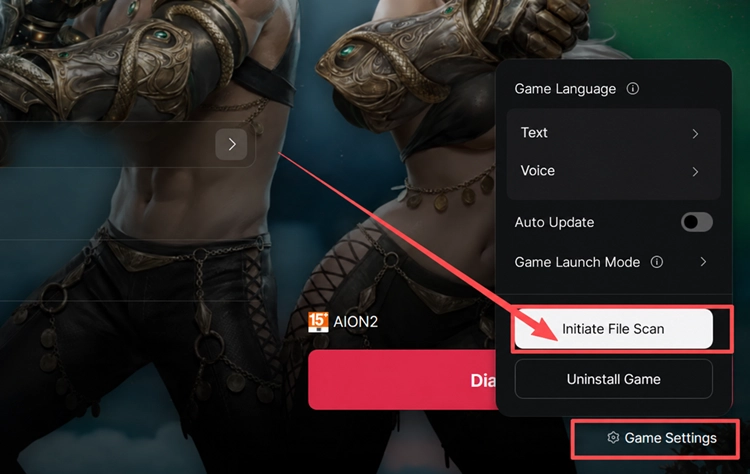
Step 3. Wait for the scan to finish, restart your launcher, and try joining the server queue again.
[Bonus] Reduce AION 2 Connection Instability with LagZapper
Long AION 2 server queue waits can become even more frustrating if high ping, packet loss, or unstable routing causes disconnects while you are waiting or reconnecting. LagZapper can optimize the route between your PC and the AION 2 server to help reduce game lag, lower ping, limit packet loss, and improve connection stability.
Why Use LagZapper for AION 2
LagZapper can help AION 2 players:
- Smart Route Optimization: Finds a more suitable and stable route to the selected AION 2 server.
- Connection Stability: Helps reduce game lag, high ping, packet loss, jitter, and sudden latency changes.
- One-Click Boost: Optimizes the connection without manual router, DNS, or Windows changes.
- 3,000+ Game Support: Works with AION 2 and thousands of other online games.
How to Use LagZapper for AION 2
Follow these three steps to optimize your AION 2 connection before joining or rejoining the server.
Step 1. Download and Install LagZapper
Download LagZapper for Windows and follow the on-screen instructions to complete the installation.
Step 2. Search for AION 2
Open LagZapper, sign in, and enter AION 2 in the search box to find the game.
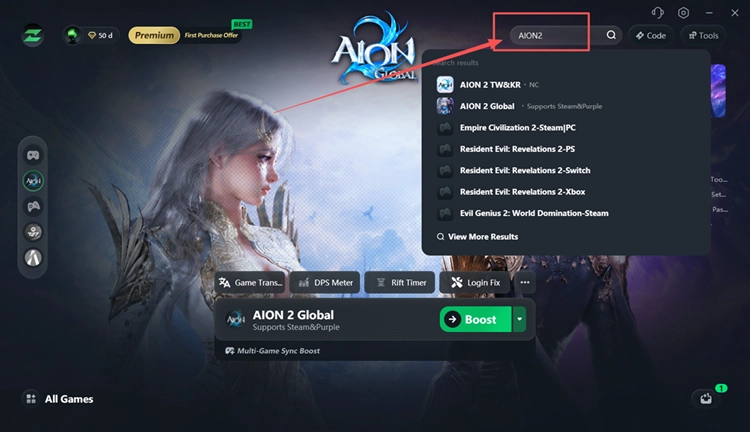
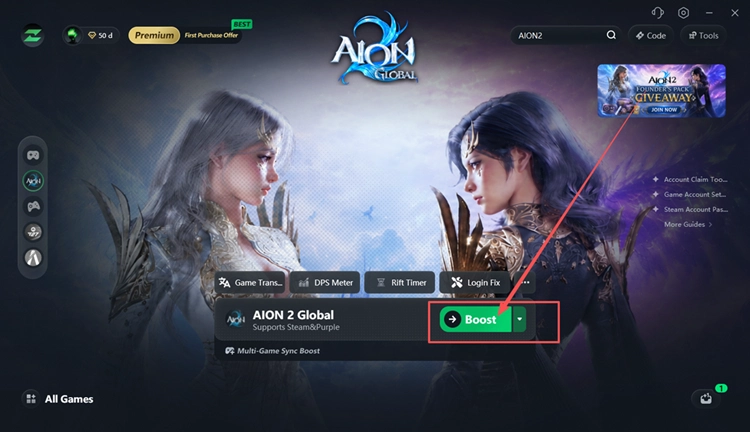
Step 3. Select a Recommended Node and Click Boost
Select your AION 2 server and a recommended node, then click Boost before launching the game through Steam or PURPLE.
The Bottom Line
If the AION 2 server queue is still moving, stay in line instead of restarting the game. If the queue resets, disconnects, or stops working properly, check server status first, then restart the correct client, stabilize your connection, review Windows Firewall permissions, and verify the game files. NC confirms that server queues move as capacity becomes available.
If unstable routing, high ping, or packet loss causes connection drops, download LagZapper to reduce game lag, lower ping, and improve connection stability.
AION 2 Server Queue FAQs
Q1. Why Is the AION 2 Server Queue So Long?
Heavy server traffic can create long waits when the selected server reaches its current capacity.
Q2. Why Is My AION 2 Server Queue Stuck?
A stuck queue may result from server issues, a queue error, or a connection interruption.
Q3. How Long Is the AION 2 Queue Time?
AION 2 queue time varies with server capacity, traffic, and how quickly spaces become available.
Q4. Why Does the AION 2 Login Queue Reset?
Temporary server, launcher, or connection problems can interrupt the queue and return you to login.
Q5. Should I Restart AION 2 When the Queue Stops Moving?
Restart only after a clear queue error, reset, disconnect, or return to the login screen.
Q6. What Does AION 2 Server Full Mean?
It means the selected server has reached its current capacity and may require players to queue.