
AION 2 Servers Down? Check Server Status, Maintenance & Fixes
If you cannot log in to AION 2, get stuck in a queue, or see a maintenance message, you may immediately search for AION 2 servers down to see what is happening. But these signs do not always mean a full outage. Scheduled maintenance, temporary server instability, or a local connection problem can all prevent you from entering the game.
This guide will show you how to check AION 2 server status, identify common causes, and troubleshoot connection issues when the servers are confirmed to be online.
Is AION 2 Down Right Now? Check Server Status
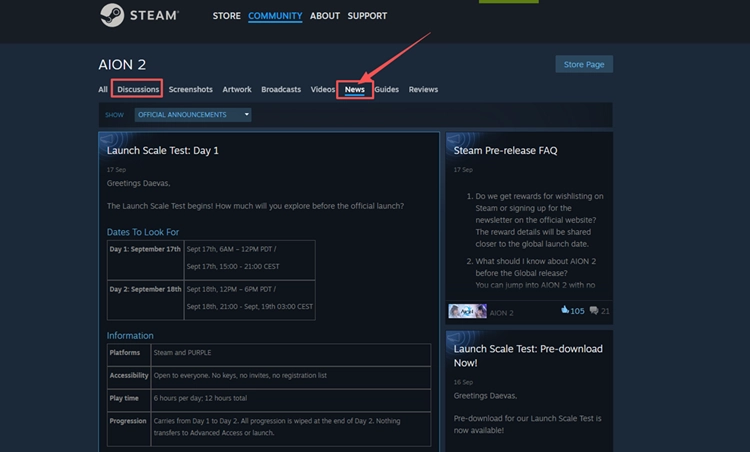
To check the current AION 2 server status, start with the official AION 2 Steam Community page. NC posts official updates, test schedules, and other availability notices there, so check the latest post for maintenance windows or known server issues. If no outage or maintenance is announced and the servers are available, continue with the troubleshooting steps below.
Why Are AION 2 Servers Down or Unavailable?
AION 2 can become unavailable for server-side, client, or local network reasons. Check the table below to match your symptom with a possible cause and the first fix to try.
| Symptom | Possible Cause | First Fix to Try |
|---|---|---|
| Maintenance notice or all servers unavailable | Maintenance or server outage | Check official server updates |
| Login fails while servers are online | Temporary launcher issue | Restart AION 2 and launcher |
| Login fails after a patch | Outdated or incomplete update | Install pending updates |
| Expected server is missing | Wrong client or server region | Check client and region |
| Errors appear after updating | Damaged or incomplete game files | Verify or repair game files |
| Disconnects only on your connection | Local network or Windows network issue | Stabilize your connection |
How to Fix AION 2 Connection Issues
Use the table above to identify the fix that best matches your symptoms. If no row fits your problem, try the seven fixes below in order.
Fix 1. Restart AION 2 and Steam or PURPLE
If the AION 2 servers are online, a temporary launcher session or background process may still interfere with reconnecting. Fully close AION 2, then exit Steam or PURPLE instead of leaving the launcher minimized. Reopen the launcher, sign in again if needed, and start AION 2 to create a fresh connection session.
Fix 2. Install Pending AION 2 and Launcher Updates
An outdated game build or incomplete launcher update can prevent AION 2 from connecting normally after a patch. Check Steam or PURPLE for any pending AION 2 updates and let them finish before launching the game. If the launcher itself has an update available, install it as well, then restart the launcher and try connecting again.
Fix 3. Confirm the Correct AION 2 Client and Server Region
AION 2 Global supports both Steam and PURPLE, and NCSOFT has confirmed launch server locations in North America, South America, Europe, and Japan. If the server you expect is missing or unavailable, confirm that you launched the correct AION 2 client and selected the intended server region. Using a different regional service may show a different server list or availability.
Fix 4. Verify or Scan and Repair AION 2 Game Files
An interrupted update or damaged game files can prevent AION 2 from loading correctly even when the servers are online. Steam can verify installed files, while PURPLE provides a built-in file scan. Follow the steps below to check and repair your AION 2 installation.
👉 For PURPLE
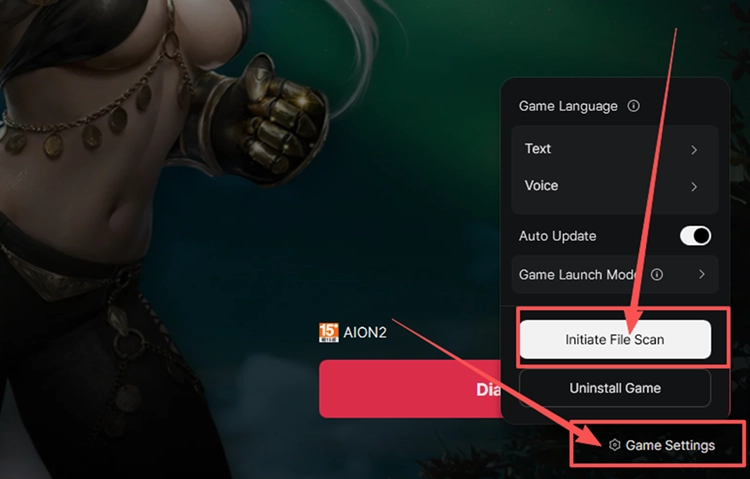
Step 1. Open PURPLE, select AION 2, click the menu beside Play, and select Game Settings.
Step 2. Click Initiate File Scan and wait for PURPLE to finish checking and repairing the installation.
👉 For Steam
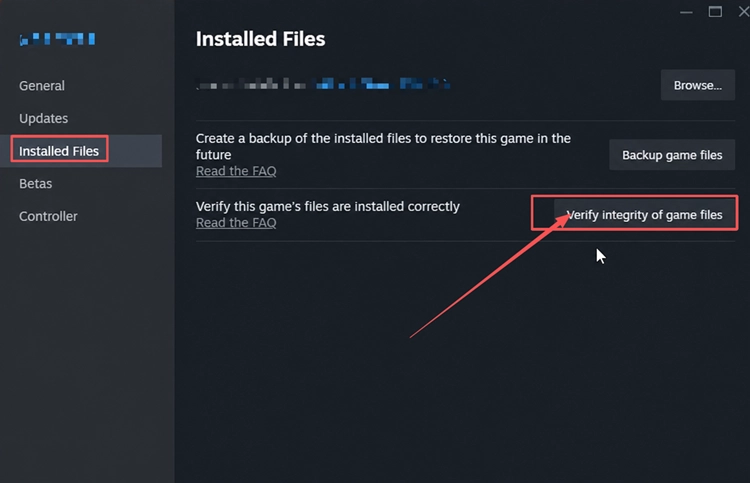
Step 1. Open your Steam Library, right-click AION 2, and select Properties > Installed Files.
Step 2. Click Verify integrity of game files and wait for Steam to finish checking the installation.
Fix 5. Stabilize Your Local Connection
An unstable local network can cause login failures or disconnects even when AION 2 servers are working normally. Pause downloads, cloud syncing, and other bandwidth-heavy apps before launching the game. If you are on Wi-Fi, switch to a wired Ethernet connection when possible. You can also restart your router if the connection remains unstable.
Fix 6. Allow AION 2 and Its Launcher Through Windows Firewall
Windows Firewall rules can prevent AION 2 or its launcher from communicating normally with online services. Add AION 2 and the launcher you use as allowed apps instead of disabling firewall protection. Follow the steps below:
Step 1. Open Windows Security, select Firewall & network protection, and click Allow an app through firewall.
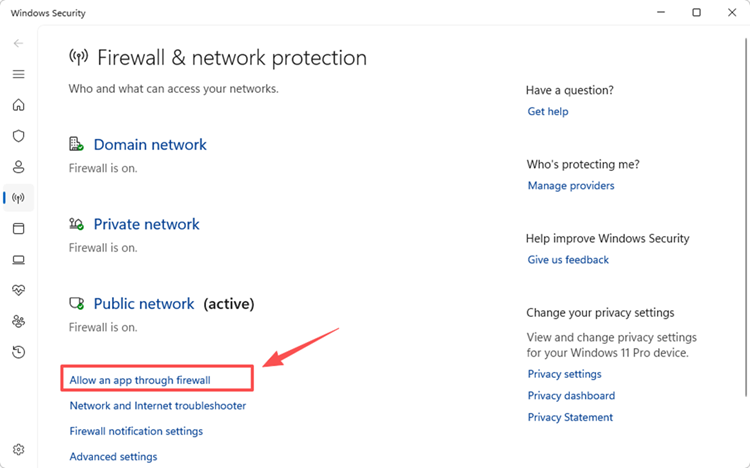
Step 2. Select Change settings, click Allow another app, and add the executable files for AION 2 and the launcher you use - Steam or PURPLE.
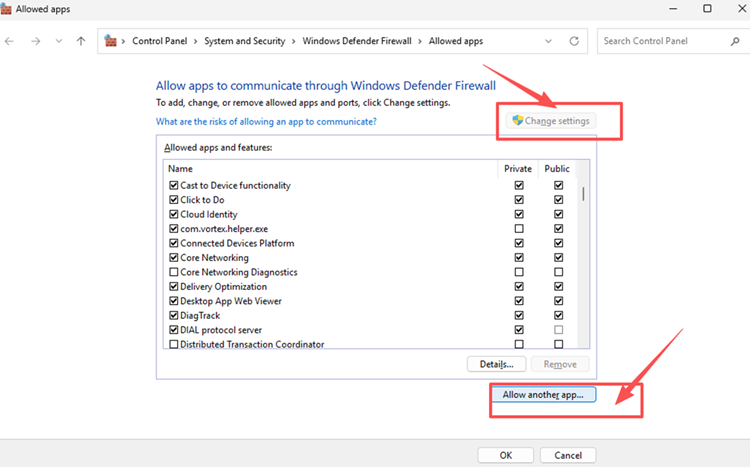
Step 3. Allow AION 2 and the selected launcher on your active network profile, click OK, and restart the launcher before opening the game again.
Fix 7. Flush DNS and Reset Winsock
Temporary DNS cache or Winsock problems can interfere with how Windows handles AION 2 connections. Flushing DNS clears the resolver cache, while resetting Winsock restores the socket catalog to a clean state. Follow the steps below.
Step 1. Search for Command Prompt, right-click it, and select Run as administrator.
Step 2. Run the following commands one at a time:
- ipconfig /flushdns
- netsh winsock reset
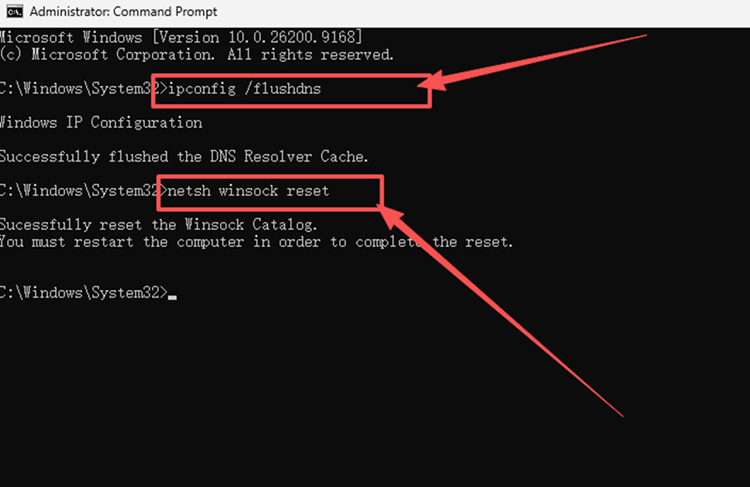
Step 3. Restart your PC, launch AION 2, and test the server connection again.
[Bonus] Improve AION 2 Connection Stability with LagZapper
If AION 2 servers are online but high ping, packet loss, lag spikes, or unstable routing still affect your connection, LagZapper can optimize the route between your PC and the game server. This can help reduce game lag, improve connection stability, and lower ping during dungeons, PvP, and other online activities.
Why Use LagZapper for AION 2
LagZapper can help AION 2 players:
- Smart Route Optimization: Finds a faster and more stable route to AION 2 servers, helping reduce high ping, packet loss, jitter, and unstable routing.
- Reduce Lag & Improve Stability: Helps lower ping, reduce game lag, minimize lag spikes, and improve responsiveness during online gameplay.
- One-Click Boost: Optimizes the AION 2 connection without requiring manual changes to complicated network, DNS, or router settings.
- Support for 3,000+ Games: Supports AION 2 and thousands of other popular online games.
How to Boost AION 2 with LagZapper
Follow the three steps below to optimize your AION 2 connection before entering the game.
Step 1. Download and Install LagZapper
Download LagZapper for Windows and follow the on-screen instructions to complete the installation on your PC.
Step 2. Search for AION 2
Launch LagZapper, sign in, and enter AION 2 in the search box.
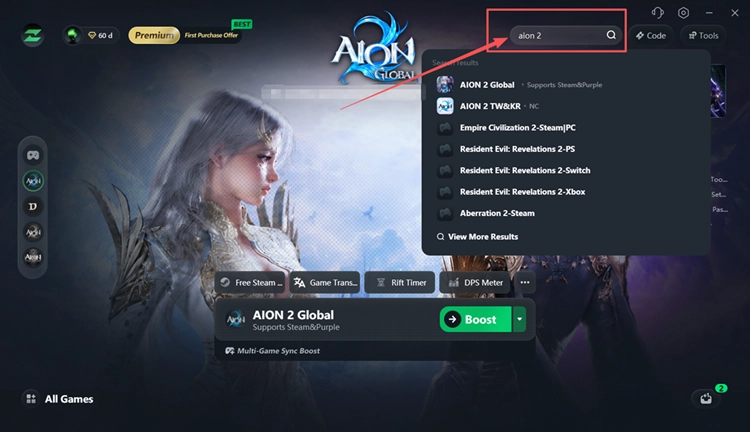
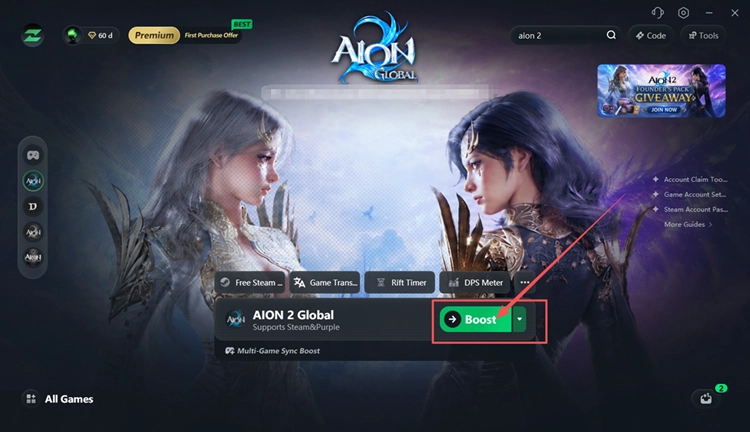
Step 3. Select the Correct Server and Click Boost
Select the AION 2 server you want to connect to and a recommended node, then click Boost. Once the connection is optimized, launch AION 2 through Steam or PURPLE.
The Bottom Line
When AION 2 servers are down, check official server updates and maintenance notices before changing anything on your PC. If the servers are online, work through the seven fixes above for launcher, file, firewall, DNS, or connection problems. If high ping, packet loss, or unstable routing continues, download LagZapper to optimize the connection route.
FAQs About AION 2 Servers Down
Q1. Why Are AION 2 Servers Down?
Maintenance, unexpected server issues, or temporary service instability can make AION 2 unavailable.
Q2. How Do I Check AION 2 Server Status?
Check the latest official AION 2 Steam News for maintenance and service updates.
Q3. How Long Does AION 2 Maintenance Last?
AION 2 maintenance duration varies, so check the official notice for the scheduled end time.
Q4. What Should I Do After AION 2 Server Maintenance Ends?
Restart Steam or PURPLE, install pending updates, then launch AION 2 again.