
AION 2 Twitch Drops: Rewards, Account Linking & How to Claim
AION 2 Twitch Drops are available during the Global Launch campaign from October 5 to October 16, 2026. Players can earn seven rewards by watching participating AION 2 Twitch streams for up to 10 hours. Before watching, link Twitch to the same Steam or NC/PURPLE account you use to play AION 2. Below are the current rewards, event dates, account linking steps, and how to claim your Drops.
AION 2 Twitch Drops Rewards
The Global Launch campaign offers seven rewards across up to 10 hours of watch time.
| Watch Time | Reward | Quantity |
|---|---|---|
| 1 Hour | Odyle Energy (Bound) | ×4 |
| 2 Hours | Skin Chest ×10 (Bound) | ×1 |
| 3 Hours | Enhancement Stone (Bound) | ×5,000 |
| 4 Hours | Head Bow (Skin: Helm) | ×1 |
| 6 Hours | Soul Codex: Reset (Bound) | ×2 |
| 8 Hours | Resurrection Spiritstone (Bound) | ×10 |
| 10 Hours | Adorable Young Elim (Shoulder) | ×1 |
The final reward, Adorable Young Elim (Shoulder), unlocks after 10 hours.
Tip: You can switch between participating channels without losing progress during the same campaign.
AION 2 Twitch Drops Event Dates
AION 2 Global has two launch Twitch Drops campaigns:
| Campaign | Date | Status |
|---|---|---|
| Advanced Access Rewards | September 30–October 4, 2026 | Ended |
| Global Launch Rewards | October 5–October 16, 2026 | Active |
The Advanced Access campaign has ended. The Global Launch Rewards campaign is now active. AION 2 also has separate War for Atreia Twitch Drops with different dates and rewards.
How to Link Your Account for AION 2 Twitch Drops
Link the same game account you currently use to play AION 2 before claiming Twitch Drops. Linking a different account may prevent rewards from reaching your character.
Step 1. Open the AION 2 Twitch Drops Page
Go to the official AION 2 Twitch Drops page and click Link Your Twitch Account.
Step 2. Connect Your Twitch Account
Sign in to Twitch and authorize the connection to AION 2.
Step 3. Link Your AION 2 Account
Choose the platform you currently use to play AION 2:
- Steam: Select Play on Steam and link your Steam account.
- PURPLE: Select Play on Purple and link your NC account.
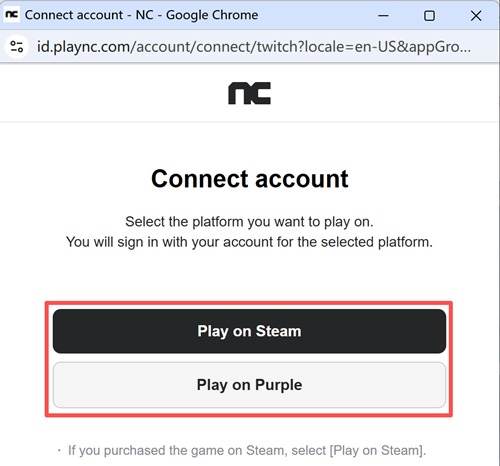
Make sure you link the account containing your current AION 2 character. Steam players should use their Steam account, while PURPLE players should use their current NC/PURPLE account.
Note: If a Twitch Drop is missing, check your existing account link first. Do not create a new link, as it may disconnect your current account.
How to Claim AION 2 Twitch Drops
Step 1. Watch an Eligible Stream
Watch a participating AION 2 Twitch stream while the Drops campaign is active.
Step 2. Check Your Progress
Go to Twitch > Drops & Rewards > Inventory to check your watch progress.
Step 3. Claim the Drop
Once a reward reaches 100%, click Claim in your Twitch Drops Inventory.
Step 4. Check AION 2
Launch AION 2 with your linked Steam or PURPLE account and check for the reward.
If your AION 2 Twitch Drops are not showing, restart the game and verify that you clicked Claim and linked the correct account.
[Bonus] Reduce AION 2 Lag While Playing
High ping, packet loss, or unstable routing can affect AION 2 even after you claim your rewards. LagZapper can optimize the network route between your PC and the game server.
Step 1. Download and Install LagZapper
Download LagZapper for Windows and complete the installation.
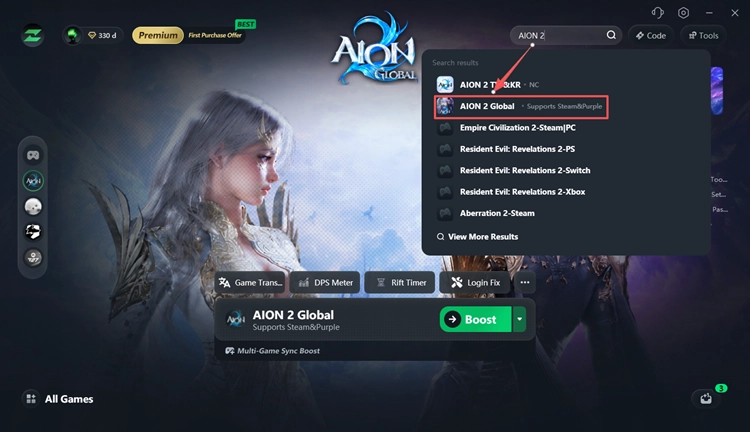
Step 2. Search for AION 2
Open LagZapper, search for AION 2, and select the game.
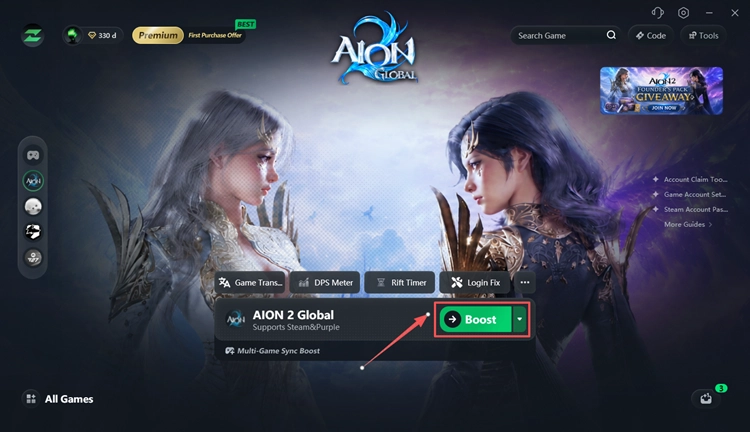
Step 3. Select a Route and Boost
Choose a recommended server or node, then click Boost.
Also Read: AION 2 Server List: NA, EU, Asia & LATAM Servers
The Bottom Line
AION 2 Global Launch Twitch Drops are available from October 5 to October 16, 2026, with seven rewards unlocked across up to 10 hours of watch time. Link the correct Steam or NC/PURPLE account before watching, track progress in Twitch > Drops & Rewards > Inventory, and click Claim once each reward is ready.
If your Drops do not appear in AION 2, first check your account link, claim status, and active campaign before changing any account connections.
AION 2 Twitch Drops FAQ
Q1. Are AION 2 Twitch Drops available now?
Yes. The Global Launch Twitch Drops run from October 5 to October 16, 2026.
Q2. What are the AION 2 Twitch Drops rewards?
Rewards include Odyle Energy, Skin Chests, Enhancement Stones, Head Bow, Soul Codex: Reset, Resurrection Spiritstones, and Adorable Young Elim.
Q3. How do I link my Steam account for AION 2 Twitch Drops?
Open the official AION 2 Twitch Drops page, connect Twitch, and link the Steam account you use to play AION 2.
Q4. Can PURPLE players get AION 2 Twitch Drops?
Yes. Link the NC/PURPLE account you currently use to play AION 2.
Q5. Why are my AION 2 Twitch Drops not showing?
Check that you clicked Claim, linked the correct account, and are viewing an active campaign. Then restart AION 2 and check again.
Q6. How long do I need to watch for all AION 2 Twitch Drops?
You need 10 hours of eligible watch time to unlock all seven Global Launch rewards.