
AION 2 Unable to Connect to Login Server? How to Fix Login Issues
With AION 2 gaining attention ahead of its global PC release, some players may run into "unable to connect to login server" issue when using regional clients, unsupported accounts, or the PURPLE launcher. The login issues may be related to server availability, account verification, DNS settings, firewall settings, or unstable network routing. This guide will explain why the AION 2 login server error happens and show you how to fix this login server error step by step.
Why Does the Aion 2 Login Server Error Happen?
AION 2 login errors can happen for several reasons, and not all of them are caused by your computer. In many cases, the login request simply cannot reach or verify with the correct server. Below are the most common causes behind AION 2 unable to connect to server, login server down, or login error messages.
AION 2 Server Maintenance or Login Server Overload
Maintenance, temporary outages, or launch traffic can stop the login server from accepting authentication requests, even if your local network works normally.
Regional Server or Client Availability Issues
Korea, Taiwan, and global servers may use different clients, accounts, and availability rules, so using the wrong version can cause login failure.
PURPLE Launcher Login or Cache Problems
PURPLE launcher issues may include outdated launcher files, expired login sessions, corrupted cache, or launcher pages failing to load correctly.
Account Authentication or Verification Errors
Incorrect credentials, OTP failure, email verification issues, or device verification problems can prevent the login server from approving your request.
Network Instability or ISP Routing Issues
High ping, packet loss, unstable Wi-Fi, or poor ISP routing may interrupt the login request before authentication is completed.
How to Fix AION 2 Unable to Connect to Login Server
Learn practical steps to resolve login server connection issues quickly and effectively, including network checks, DNS fixes, firewall adjustments, and launcher troubleshooting tips.
Fix 1. Check AION 2 Server Status First
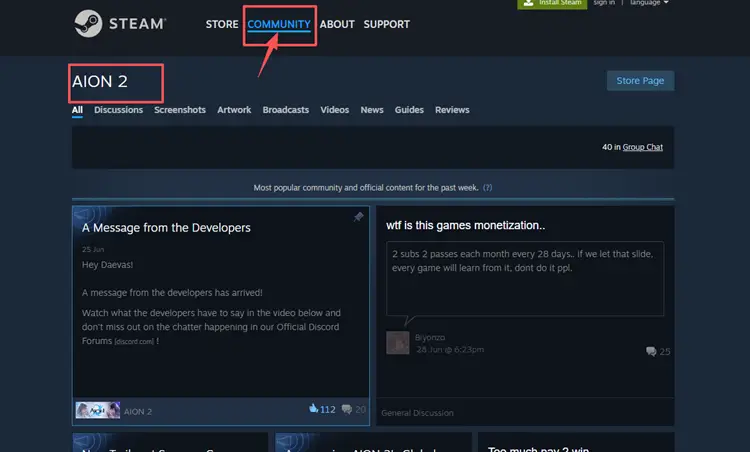
Start by checking PURPLE launcher notices, Steam Community updates, official X account or other official channels to confirm whether the login servers are currently online. If the server is under maintenance or experiencing overload, local fixes will not resolve the issue.
Fix 2. Use the Correct Server and Client
AION 2 servers may differ by region, platform, and account system. If you install the wrong regional client or log in with an unsupported account, the launcher may fail to connect to the login server.
Check whether you are using the correct AION 2 client for your intended server. The Taiwan download page, for example, lists AION2 and PURPLE Windows as separate client-related downloads, so version and region selection matter.
Fix 3. Restart PURPLE Launcher and Re-login
A temporary launcher session error can trigger login failure. Fully close PURPLE instead of only minimizing it, then start it again and sign in with your account.
Fix 4. Run PURPLE Launcher as Administrator
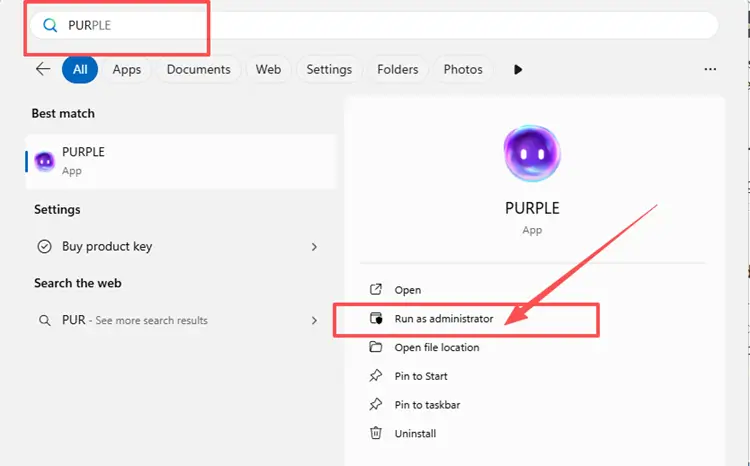
Windows sometimes restricts file access or network permissions for third-party launchers, which can block authentication requests. Running the launcher with administrative privileges can bypass these restrictions and fix login server connectivity issues.
Step 1. Open the Windows search bar, then type PURPLE.
Step 2. Select Run as administrator.
Fix 5. Clear PURPLE Launcher Cache
Corrupted launcher cache can cause login loops, blank pages, failed authentication, or repeated connection errors. Clearing temporary launcher data may refresh your login session and force PURPLE to reload account information.
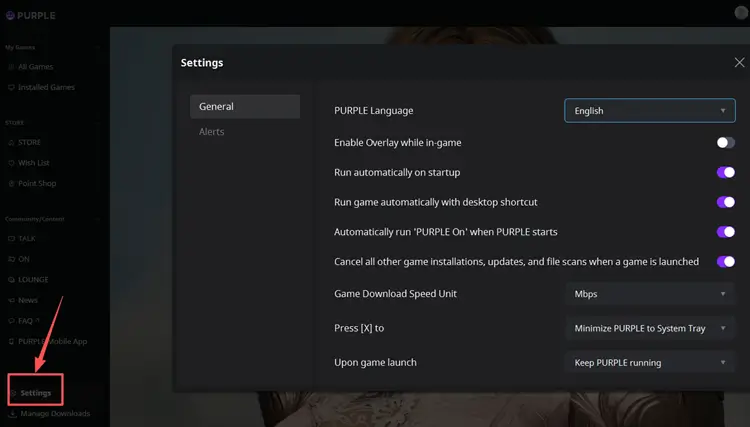
Step 1. Open PURPLE and go to Settings, then click General.
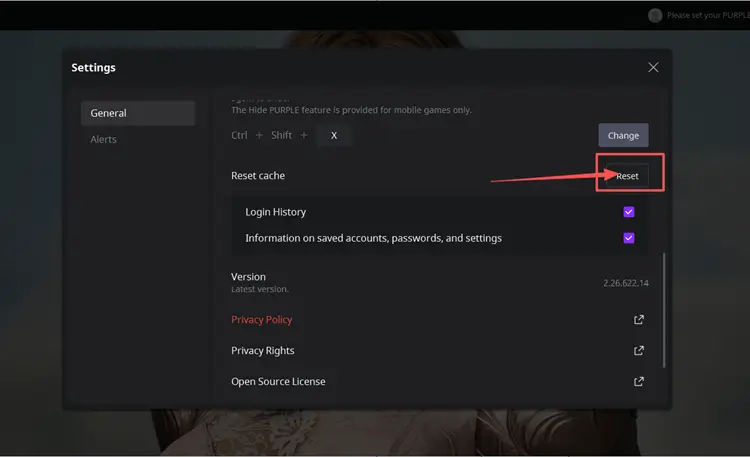
Step 2. Scroll down to Reset cache, select the cache items you want to clear, and click Reset.
Step 3. Reopen PURPLE, sign in again, and test whether AION 2 can connect to the login server.
Fix 6. Restart Your Router or Switch to a Wired Connection
If your network is unstable, restart your router and modem first. A fresh connection may clear temporary routing, NAT, or ISP-side connection issues that affect login requests.
For better stability, switch from Wi-Fi to Ethernet. If the error still appears, test a mobile hotspot briefly. If AION 2 works on another network, your main ISP route may be the problem.
Fix 7. Change DNS Settings
If DNS cannot resolve the login server correctly, AION 2 may fail to connect even when your internet works. You can try Google Public DNS or Cloudflare DNS as a troubleshooting step.
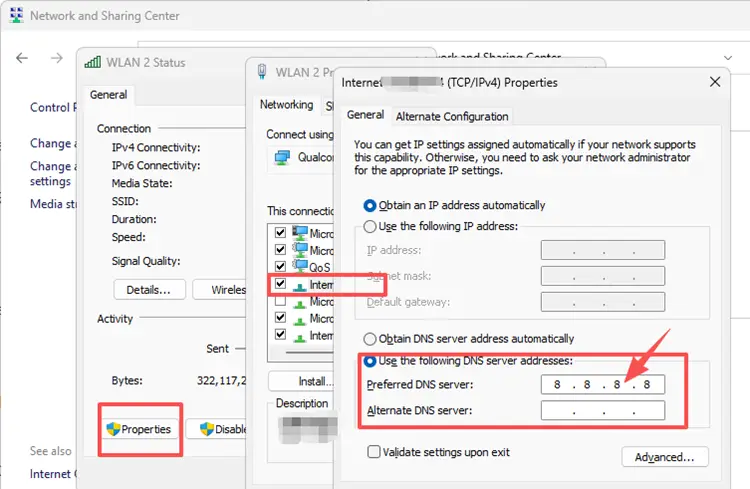
Step 1. Go to Settings, then click Network & Internet, and select your active Wi-Fi or Ethernet connection. Open its Properties, and double-click Internet Protocol Version 4 (TCP/IPv4).
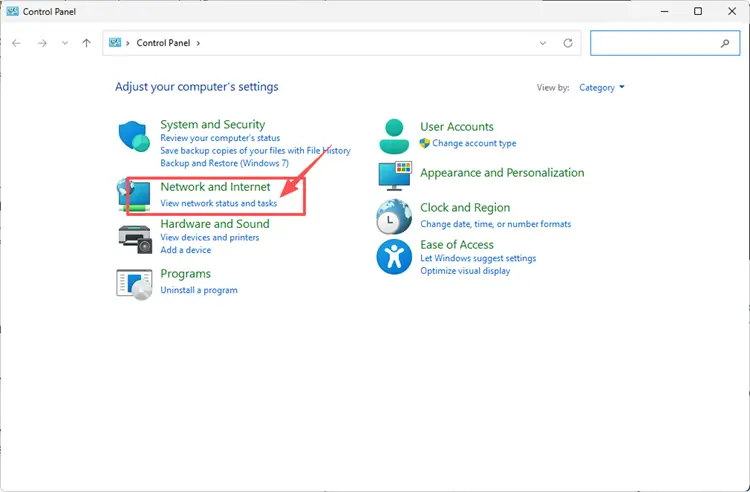
Step 2. Use Google DNS 8.8.8.8 / 8.8.4.4 or Cloudflare DNS 1.1.1.1 / 1.0.0.1, then save changes and reconnect.
Fix 8. Allow AION 2 and PURPLE Through Windows Firewall
Windows Firewall or security software may block PURPLE or AION 2 from sending and receiving network traffic. Adding both programs as allowed apps can prevent firewall rules from interrupting the login connection.
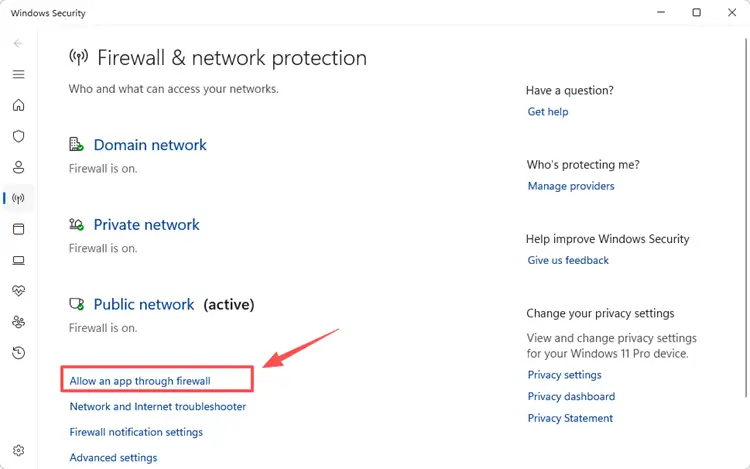
Step 1. Open Windows Security, then click Firewall & network protection, and select Allow an app through firewall.
Step 2. Click Change settings, then select Allow another app, browse to the game installation directory, and choose the game executable file to add it.
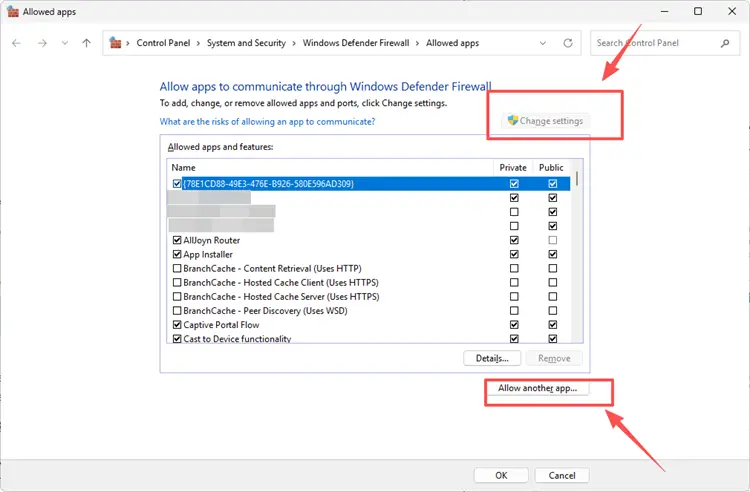
Step 3. Make sure the game is allowed on your active network, then click OK and relaunch the game.
Fix 9. Repair or Reinstall the Game Client
If AION 2 still cannot connect to the login server after checking server status, launcher settings, DNS, and firewall, the game files may be corrupted or incomplete. Using the built-in repair option is the safest way to fix missing or damaged data without reinstalling the full client.
Step 1. Open PURPLE and go to AION 2 settings or File Scan section.
Step 2. Click Initiate File Scan and wait for the process to complete.

Step 3. Restart PURPLE and try launching AION 2 again.
If the issue persists, reinstalling the game from the official launcher may help resolve deeper installation or update errors.
[Bonus] How to Optimize AION 2 Gameplay with LagZapper
Even after applying all the fixes above, some AION 2 players may still experience login failure, or unstable connection issues. In this case, the problem is often related to ISP routing, regional server congestion, or unstable network paths between your device and AION 2 login servers. LagZapper can help optimize your connection route and improve overall stability for a smoother login experience.
As a powerful PC game booster, LagZapper helps optimize routing to AION 2 servers, reduce game lag, and stabilize network performance. Whether you are stuck on the login screen, facing repeated connection failures, or dealing with unstable cross-region access, LagZapper helps you access AION 2 smoothly and stay ready for every session.
[Step-by-Step Guide] How to Boost AION 2 with LagZapper
Step 1. Download and Install LagZapper
Download LagZapper for Windows and follow the on-screen instructions to complete the installation.
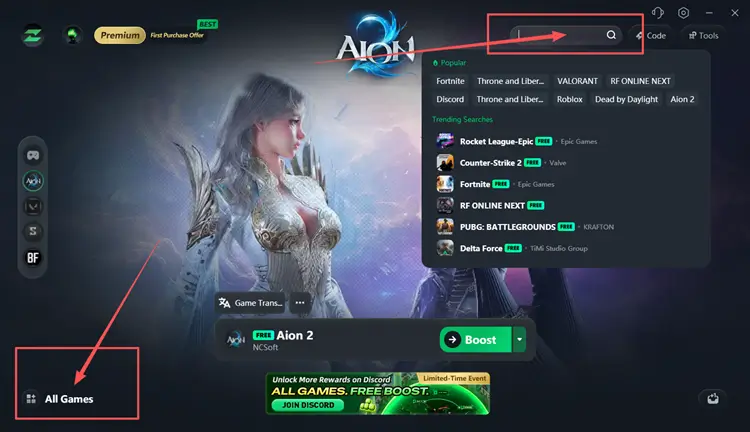
Step 2. Open LagZapper and Search for AION 2
Open LagZapper and use the search bar to find AION 2. Select the game from the list so LagZapper can prepare the correct optimization route.
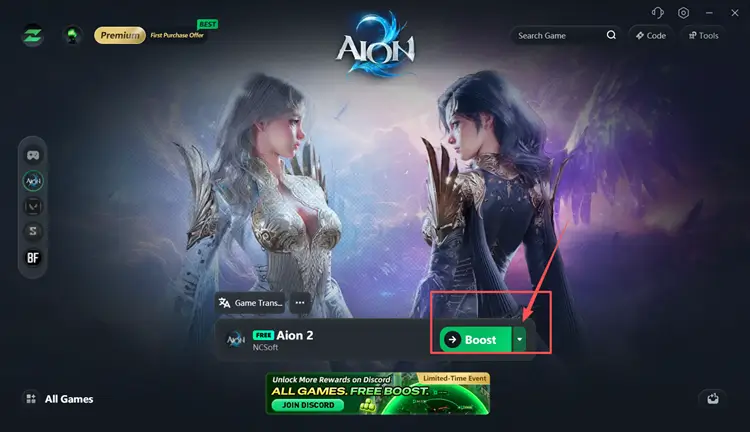
Step 3. Select a Server Route and Start Boosting
Choose the most suitable route or server node, then click boost. After the connection is optimized, reopen PURPLE or Steam and launch AION 2 again.
Tip: LagZapper supports 3,000+ online games, including Destiny 2, VALORANT, and Path of Exile 2.
The Bottom Line
AION 2 unable to connect to login server is usually caused by a combination of factors such as server maintenance, regional access restrictions, PURPLE launcher issues, or unstable network routing. In most cases, players can resolve the problem by checking server status first, then applying basic fixes like restarting the launcher, switching networks, or adjusting DNS and firewall settings.
If you still experience repeated login failures or unstable connections after trying all fixes, downloading LagZapper can help optimize routing to AION 2 servers, reduce game lag, and improve connection stability for a smoother and more reliable login experience.
FAQ about AION 2 Unable to Connect to Login Server
Q1. Why does AION 2 say unable to connect to login server?
Server maintenance, overload, DNS issues, firewall blocks, or incorrect regional client can cause login failure.
Q2. How do I fix AION 2 login server error?
Restart PURPLE, check server status, switch network, clear cache, or change DNS settings.
Q3. Why can’t I log into AION 2 with PURPLE launcher?
PURPLE may have cache issues, outdated files, or authentication session errors requiring restart or cache reset.
Q4. Can firewall block AION 2 login?
Yes. Windows Firewall or antivirus may block PURPLE or AION 2 network access if not allowed.
Q5. Will reinstalling AION 2 fix login issues?
It may help if game files are corrupted, but check server status first before reinstalling.