
How to Link Aniimo Accounts: PC, Mobile, Steam, PS5 & Xbox
Want to use the same Aniimo account on PC, mobile, Steam, PS5, or Xbox? Aniimo account linking lets you continue your character and progress across supported platforms instead of starting over.
Aniimo supports cross progression and cross save, but you need the correct linked account and server. Common issues include “email already linked,” missing characters, or a new account appearing after switching platforms. This guide explains how to link your Aniimo account and fix the most common account linking problems.
Does Aniimo Have Cross-Progression?
Yes. Aniimo supports cross progression and cross save across PC, console, and mobile. With Aniimo Mobile now available, players can continue the same character and game progress across supported platforms by using the same Aniimo account and the same server.
Different servers keep separate data. A character created on Aniimo-America, for example, will not appear on Aniimo-Europe or Aniimo-Apac.
Before treating your progress as missing, check:
- Your Aniimo account email
- The linked Steam, PS5, Xbox, or mobile account
- The selected Aniimo server
- Whether a second Aniimo account was created by mistake
How to Link Your Aniimo Account
Already using another login method or need to connect an existing Aniimo email? Before creating a new character, you can manage your linked email through Account Center.
Note: Use the email associated with the Aniimo account, character, or rewards you want to keep.
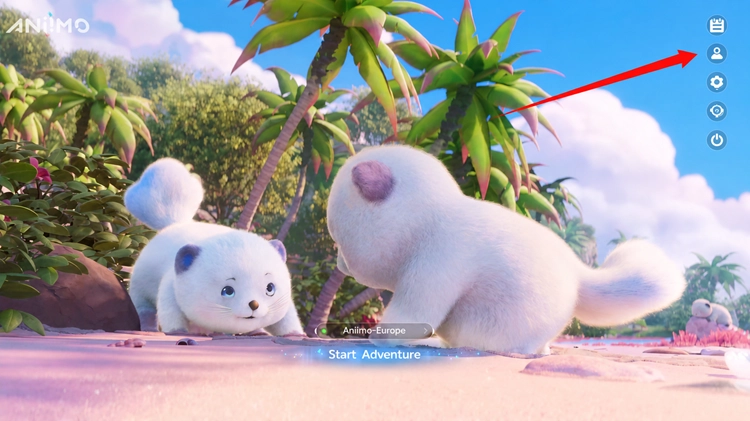
Step 1. Open Account Center
On the Aniimo login screen, select your server and open Account Center.
Step 2. Go to Account Management > Email
Open Account Management, then select Email to manage your linked Aniimo Pass email.
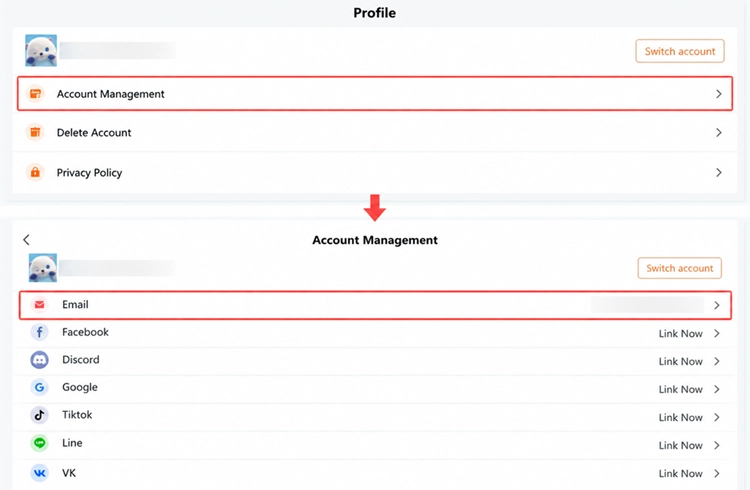
Step 3. Link Your Existing Email
Enter the email connected to your existing Aniimo account and complete the verification. Once linked, use that account to continue your existing progress or claim eligible rewards.
Tip: On mobile or the official Aniimo website, third-party login users can link an email directly from the email linking screen shown during the first login after September 23.
How to Link an Aniimo Steam Account
For Aniimo Steam account linking, launch Aniimo through Steam and use the Link Email prompt to connect your existing Aniimo Pass email.
Already skipped the prompt? Steam users can still open the in-game Email Link page and complete the link later. Players having trouble receiving rewards from an earlier Steam test should contact in-game Customer Support.
How to Link Aniimo on PS5 & Xbox
For Aniimo PS5 or Xbox account linking, sign in with a PSN or Microsoft account that has not previously logged into Aniimo. When the linking popup appears, connect your existing Aniimo Pass email.
Important: Do not skip this screen. Aniimo states that the first login popup is the only chance to connect an existing Aniimo Pass on PS5 or Xbox. Skipping it creates a new Aniimo Pass for that platform account.
How to Link Aniimo Mobile to Your Existing Account
For Aniimo mobile account linking, sign in with the same account used for your existing character and select the same server.
Starting September 23, new users signing in through a third-party account on mobile can link an email directly from the email linking screen shown during first login. Complete this step before continuing - the first-login option does not reappear after being skipped.
Note: Seeing a new character usually means the wrong email or server was selected.
How to Fix Aniimo Account Linking Issues
Aniimo Says “Email Already Linked”
An email may already be connected to another Aniimo or third-party account. Avoid creating another character or repeatedly changing accounts. Check the email and linked platform first, then contact Aniimo Customer Support when the existing link cannot be changed safely.
Your Character Is Missing After Linking
Check that you signed in with the correct Aniimo account and selected the same server as your original character. Progress does not transfer between different Aniimo servers.
You Linked the Wrong Account After Creating a Character
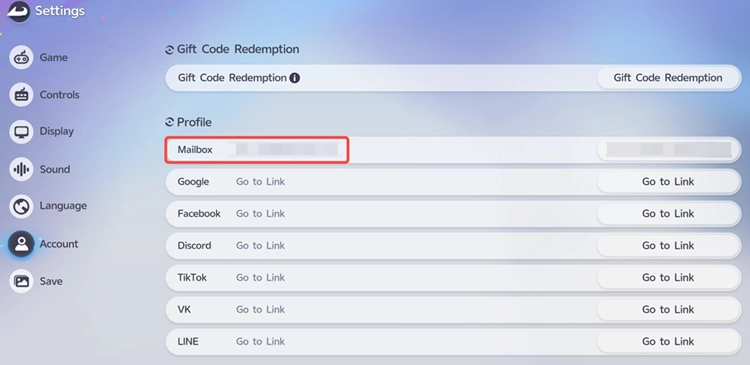
Aniimo provides a relinking process under Settings > Account when losing the current character is acceptable. Players who need to keep the existing character should contact in-game Customer Support instead.
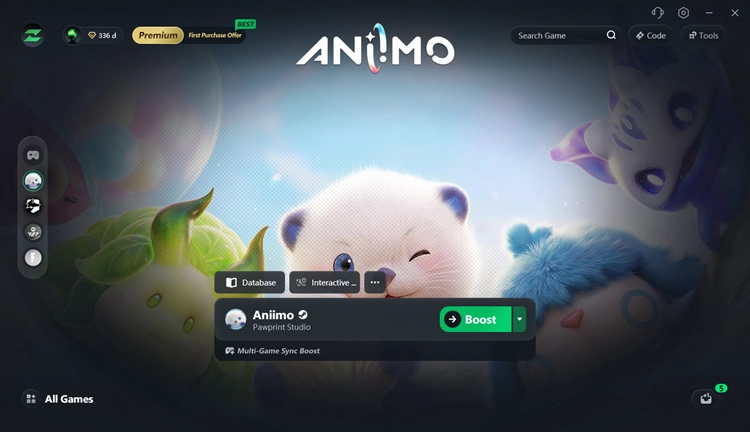
[Bonus] Reduce Aniimo Lag on PC with LagZapper
Account linking keeps your Aniimo progress connected across platforms, but it does not fix network lag. When Aniimo is running normally on PC but you experience high ping, packet loss, or unstable latency, LagZapper can optimize the network route between your PC and the game server.
- Lower ping for Aniimo: Optimize the route between your PC and the Aniimo game server to help lower ping and reduce latency.
- Reduce lag and latency spikes: Stabilize your connection during exploration, combat, and other real-time gameplay to help reduce lag and sudden latency spikes.
- Reduce packet loss: Improve connection stability to help reduce packet loss, stuttering, and sudden delays.
- Optimize the route to the game server: Find a more efficient network path to the Aniimo server when your default ISP route is congested or unstable.
The Bottom Line
Aniimo account linking is straightforward once you use the correct email, platform account, and server. Steam users can link an Aniimo Pass during login or later through Email Link, while PS5 and Xbox players should complete linking during the first-login prompt. Mobile also supports cross-platform progression with PC and console. When your character is missing or an email is already linked, verify the account and server before creating another character.
FAQs About Aniimo Account Linking
Q1. Can I link my Aniimo account between PC and mobile?
Yes. Use the same linked account and the same server to access shared progression.
Q2. Can I use my Aniimo Steam character on mobile?
Yes. Link Steam to the same Aniimo Pass email and select the same server.
Q3. How do I link Aniimo on PS5 or Xbox?
Connect your existing Aniimo Pass when the linking popup appears during the platform account's first login.
Q4. Why does Aniimo say my email is already linked?
The email may already be connected to another account. Check your existing links before creating or linking another account.
Q5. Why is my Aniimo character missing after switching platforms?
The most common causes are signing into a different account or selecting a different server.
Q6. Does Aniimo cross-save work between different servers?
No. Server data is separate. Cross-platform progress is shared only within the same server.