
ARC Raiders High Ping & Lag? 6 Fixes for Ping Spikes & Packet Loss
In ARC Raiders, every raid depends on responsive combat and a stable connection. ARC Raiders high ping can make shots feel delayed, slow down looting and interactions, or cause rubberbanding while moving. ARC Raiders lag may also become noticeable during extraction, where sudden network delays can make movement and combat feel unresponsive.
This guide will explain what causes these connection issues and show you how to check server regions, troubleshoot your local network, and optimize routing in ARC Raiders.
Why Is My Ping So High in ARC Raiders?
ARC Raiders high ping can appear differently from one match or connection to another. Check the table below to identify your symptoms and where to start.
| Symptom | Possible Cause | First Fix to Try |
|---|---|---|
| High ping affects many players at once | Server-side issue | Check server status |
| Ping is much higher in some matches | Incorrect matchmaking region | Check server region |
| Ping spikes during downloads or streaming | Heavy background traffic | Stop bandwidth-heavy traffic |
| Connection suddenly becomes unstable | Temporary router or PC issue | Restart router and PC |
| Rubberbanding or packet loss on Wi-Fi | Unstable wireless connection | Use Ethernet |
| Connection problems continue after other checks | DNS or local network issue | Try a public DNS |
[Quick Way] Lower ARC Raiders Ping with LagZapper
Use LagZapper to help lower ARC Raiders high ping, reduce network lag, and stabilize your connection by optimizing the route between your PC and the game server.
Why Use LagZapper for ARC Raiders?
- Smart Route Optimization: Finds a faster and more stable route for ARC Raiders, helping reduce high ping, packet loss, jitter, and unstable connections.
- Reduce Lag & Improve Stability: Helps lower ping, reduce game lag, minimize ping spikes, and improve connection stability during raids, combat, and extraction.
- One-Click Boost: Optimizes the ARC Raiders connection with one click without manually changing complicated network or router settings.
- Support for 3,000+ Games: Use LagZapper for ARC Raiders and thousands of other popular online games.
How to Boost ARC Raiders with LagZapper
Get started in three steps before entering your next raid.
Step 1. Download and Install LagZapper
Download LagZapper for Windows and follow the on-screen instructions to complete the installation.
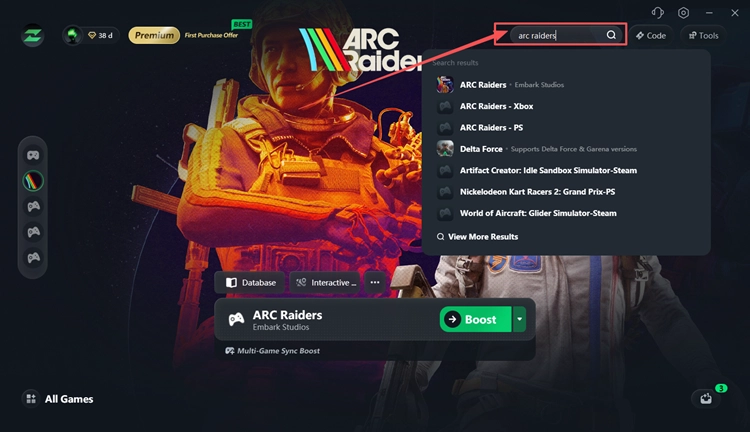
Step 2. Search for ARC Raiders
Open LagZapper, sign in, search for ARC Raiders, and select the game.
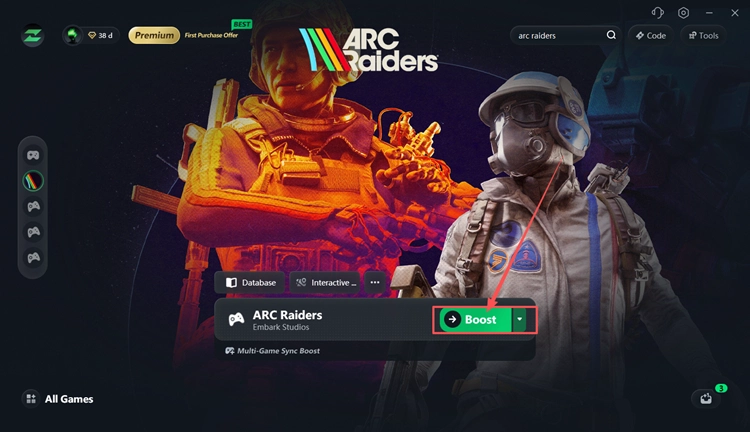
Step 3. Select a Recommended Node and Click Boost
Choose a recommended node and click Boost to optimize the connection route.
How to Fix ARC Raiders High Ping and Lag - 6 Fixes
Players can try the six fixes below in order, starting with quick server and network checks before moving to connection changes for persistent ARC Raiders lag.
Fix 1. Check ARC Raiders Server Status
ARC Raiders high ping can sometimes come from server-side problems rather than your own connection. If many players are seeing lag, disconnects, or matchmaking issues at the same time, changing DNS or other local settings is unlikely to help.
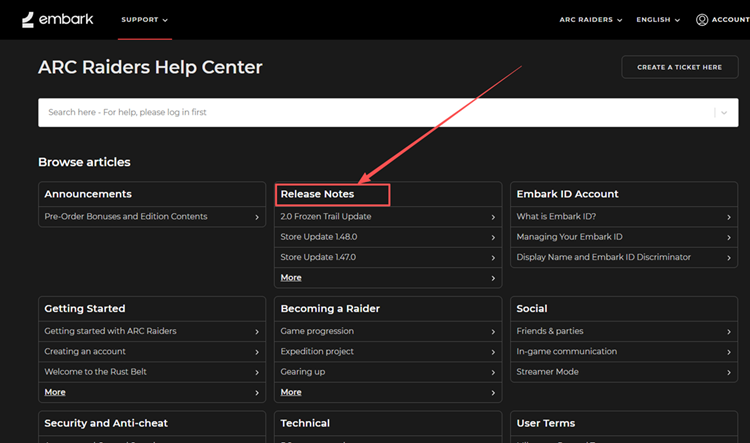
Check the official ARC Raiders Help Center for recent announcements, release notes, and known technical problems. You can also check official ARC Raiders channels for maintenance or service updates. If a widespread service issue is confirmed, wait until Embark restores normal service before trying additional local network fixes.
Fix 2. Check the ARC Raiders Matchmaking Region
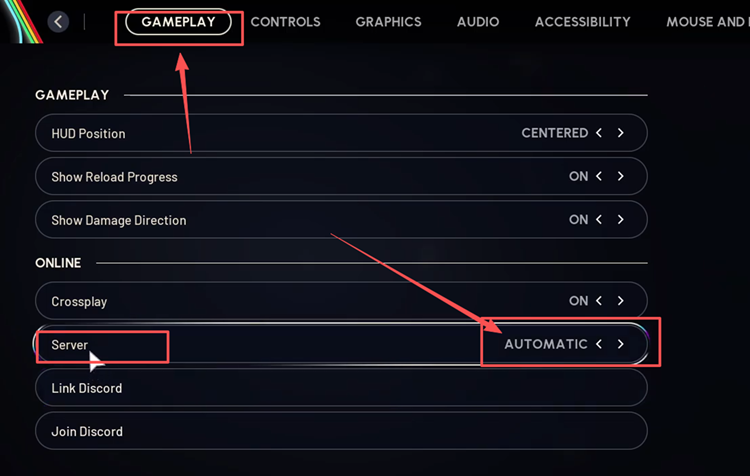
An incorrect matchmaking region can contribute to higher latency or inconsistent ping in ARC Raiders. Using the Automatic server setting helps the game match you in the appropriate region. Follow the steps below to check this setting.
Step 1. Open ARC Raiders and click the gear icon at the bottom-right of the screen.
Step 2. Go to Gameplay > Server.
Step 3. Set Server to Automatic, then join another match and check whether your ping improves.
Fix 3. Stop Bandwidth-Heavy Background Traffic
Downloads, cloud syncing, video streaming, and background updates can compete with ARC Raiders for network bandwidth and cause ping spikes or unstable latency. Windows update sharing can also use bandwidth in the background during gameplay. Follow the steps below to check network usage.
Step 1. Press Ctrl + Shift + Esc to open Task Manager.
Step 2. In the Processes tab, check the Network column for apps using the most bandwidth.
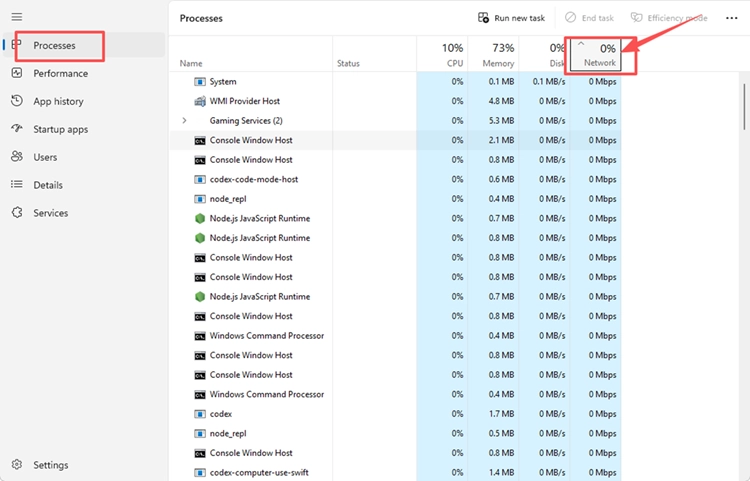
Step 3. Close unnecessary apps and pause active downloads, uploads, streaming, or cloud syncing before launching ARC Raiders again.
Fix 4. Restart Your Router and PC
Temporary network or device issues can sometimes cause ARC Raiders ping spikes or unstable latency. Restarting your router can refresh the local connection, while restarting your PC can clear temporary processes that may interfere with network performance.
Turn off your router for about 60 seconds, then power it back on and wait until the internet connection is fully restored. Restart your PC, launch ARC Raiders, and test another match to see whether the connection becomes more stable.
Fix 5. Use Ethernet Instead of Wi-Fi
Wi-Fi can be affected by interference, distance, and network congestion, which may cause ARC Raiders ping spikes, packet loss, or rubberbanding even when your internet speed looks normal. A wired connection is usually more stable for real-time gameplay.
If possible, connect your PC directly to the router with an Ethernet cable and temporarily disable Wi-Fi. Then launch ARC Raiders and test another match to see whether your ping and connection stability improve.
Fix 6. Try a Public DNS If the Connection Is Still Unstable
If ARC Raiders still has connection problems after the earlier fixes, your current DNS service may be worth checking. A public DNS will not guarantee lower in-game ping, but it can help improve network stability and resolve some connectivity issues. Follow the steps below to change your DNS.
Step 1. Open Settings > Network & Internet, select your active Wi-Fi or Ethernet connection, and find DNS server assignment.
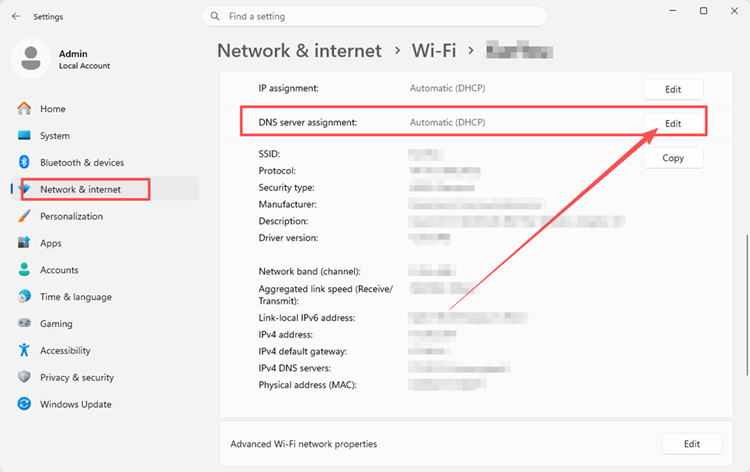
Step 2. Click Edit, change Automatic (DHCP) to Manual, and turn on IPv4.
Step 3. Enter Google DNS (8.8.8.8 / 8.8.4.4) or Cloudflare DNS (1.1.1.1 / 1.0.0.1), click Save, and test ARC Raiders again.
The Bottom Line
ARC Raiders high ping can come from server issues, matchmaking regions, background traffic, unstable Wi-Fi, or other connection problems. Start with the server status, then work through the fixes that best match your symptoms. For persistent ARC Raiders lag, packet loss, or ping spikes, download LagZapper to optimize your game route, lower ping, reduce game lag, and improve connection stability.
FAQs About ARC Raiders High Ping
Q1. Why Is My ARC Raiders Ping So High?
Server issues, matchmaking regions, Wi-Fi instability, or poor routing can increase ARC Raiders high ping.
Q2. Why Am I Lagging So Much in ARC Raiders With Fast Internet?
Fast internet does not guarantee low latency, stable routing, or a reliable game connection.
Q3. How Can I Reduce ARC Raiders Ping Spikes?
Stop background traffic, check your server region, and use Ethernet if possible.
Q4. What Causes ARC Raiders Packet Loss?
Unstable Wi-Fi, network congestion, or poor routing can cause ARC Raiders packet loss.
Q5. Is ARC Raiders Lag Always a Network Problem?
No. Network lag causes delay or rubberbanding, while FPS issues cause visual stuttering.
Q6. Can the Matchmaking Region Affect ARC Raiders High Ping?
Yes. Using the wrong matchmaking region can increase latency, so keep the server setting on Automatic.