
Arknights: Endfield Steam: Release Date, Download Guide & Cross-Save
Arknights: Endfield Steam is officially launching on October 15, 2026, giving PC players a new way to access the game through Valve’s platform. Existing players will not need to start over after switching to Steam, as Gryphline has confirmed cross-platform account data synchronization. By linking the correct Gryphline Account, you can continue your existing progress on the corresponding server.
This guide will cover the Steam release and availability, download steps, account linking, cross-platform progress, and current PC system requirements and storage details before installation.
Is Arknights: Endfield on Steam?
Arknights: Endfield is officially coming to Steam, with its launch date confirmed and the game listed as free to play.
Arknights: Endfield Steam Release Date and Availability
Arknights: Endfield Steam officially launches on October 15, 2026. Gryphline confirmed the date in its Steam launch announcement, with the Steam version arriving alongside the Sanctuary of Ink update. Once the release goes live, players will be able to access the game directly through Steam.
Can You Preload Arknights: Endfield on Steam?
As of October 14, a separate Steam preload has not been announced. Gryphline currently lists pre-download for GRYPHLINK PC, mobile, and PS5, while Steam users can add the game to their Wishlist before launch.
Is Arknights: Endfield Free to Play on Steam?
Arknights: Endfield is free to play on Steam, so you do not need to purchase the base game to download and start playing. The Steam version also includes optional in-game purchases.
Arknights: Endfield Steam System Requirements and Storage
Before downloading Arknights: Endfield on Steam, check the minimum and recommended PC requirements and make sure you have enough available storage.
| Component | Minimum | Recommended |
|---|---|---|
| OS | Windows 10 64-bit | Windows 10 64-bit |
| CPU | Intel Core i5-9400F | Intel Core i7-10700K |
| RAM | 16 GB | 16 GB |
| GPU | NVIDIA GeForce GTX 1060 | NVIDIA GeForce RTX 2060 |
| DirectX | Version 11 | Version 11 |
| Network | Broadband Internet | Broadband Internet |
| Storage | 60 GB available | 60 GB available |
Steam requires 60 GB of available storage, but this is not the confirmed download size. The Steam Store does not currently list a separate download size, so keep extra space available for installation and future updates.
How to Download Arknights: Endfield on Steam
Follow the three steps below to download Arknights: Endfield on Steam, install the game, and complete the first-time account setup.
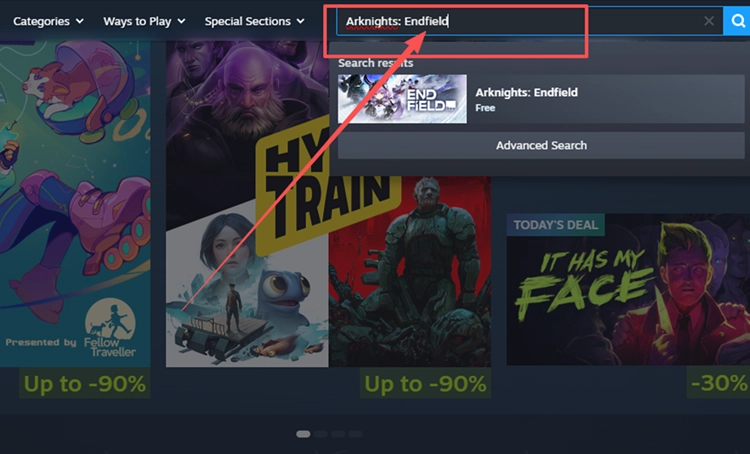
Step 1. Open the Official Arknights: Endfield Steam Page
Open Steam, search for Arknights: Endfield, and select the official store page published by GRYPHLINE.
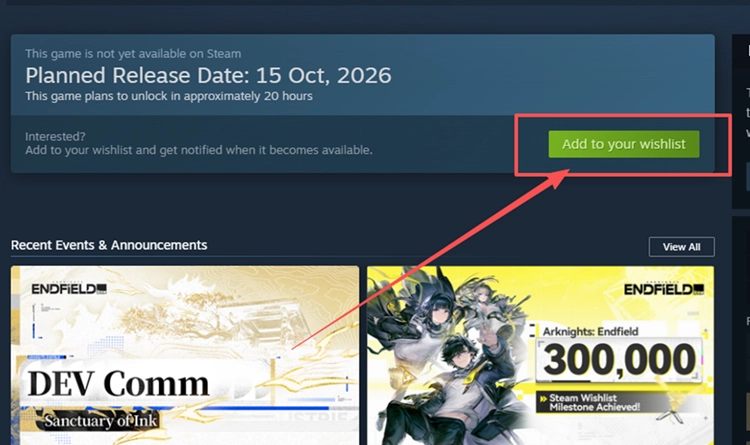
Step 2. Install the Game When Downloads Open
Add Arknights: Endfield to your Steam Wishlist now, then download and install it once the Steam version officially becomes available.
Step 3. Launch the Game and Link Your GRYPHLINE Account
Launch the game, then link Steam to an existing or new GRYPHLINE Account when prompted.
Does Arknights Endfield Steam Support Cross-Save?
Arknights: Endfield Steam supports cross-save, letting existing players continue their progress after linking the same GRYPHLINE Account.
Can You Use Your Existing Endfield Account on Steam?
You can use your existing GRYPHLINE Account on Steam. On your first Steam login, select Log Into Existing Account & Link and sign in with the account that already holds your Arknights: Endfield character and progress.
What Progress Carries Over to Steam?
Your game progress carries over to Steam when you use the same linked GRYPHLINE Account on the corresponding server. Steam shares account data and progress with other supported platforms, but data does not transfer between the Asia and Americas / Europe servers.
[Bonus] Improve Arknights: Endfield Connection Stability with LagZapper
If Arknights: Endfield servers are online but you experience high ping, packet loss, lag spikes, or unstable routing, LagZapper can optimize the connection route between your PC and the game server to help improve connection stability.
Why Use LagZapper for Arknights: Endfield?
LagZapper can help Arknights: Endfield players:
- Smart Route Optimization: Finds a faster and more stable route to Arknights: Endfield servers to help reduce high ping, packet loss, jitter, and routing instability.
- Reduce Lag & Improve Stability: Helps lower ping, reduce game lag, minimize lag spikes, and improve connection stability during gameplay.
- One-Click Boost: Optimizes the Arknights: Endfield connection without manually changing complicated network, DNS, or router settings.
- Support for 3,000+ Games: Supports Arknights: Endfield and more than 3,000 other online games.
How to Use LagZapper for Arknights: Endfield
Follow the three steps below to optimize your Arknights: Endfield connection before launching the game through Steam.
Step 1. Download and Install LagZapper
Download LagZapper for Windows and follow the on-screen instructions to complete the installation.
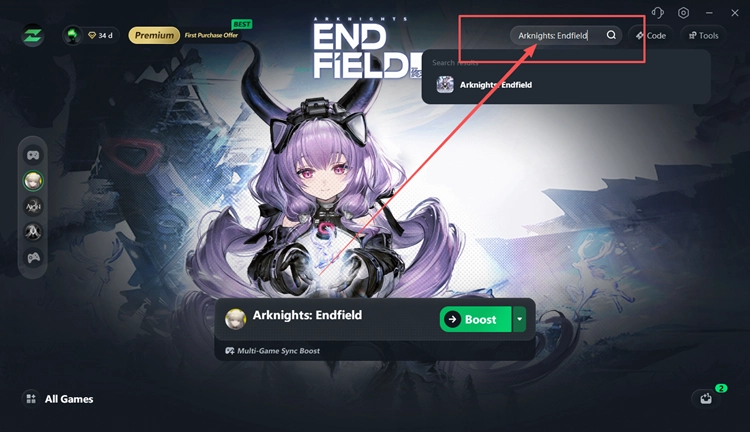
Step 2. Search for Arknights: Endfield
Launch LagZapper, sign in, and enter Arknights: Endfield in the search box.
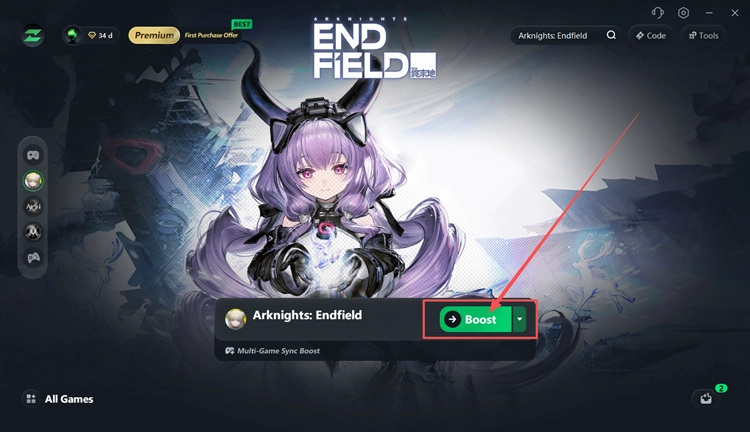
Step 3. Select a Route, Boost, and Launch Through Steam
Choose a recommended Arknights: Endfield node, click Boost, then launch the game through Steam.
The Bottom Line
Arknights: Endfield Steam officially launches on October 15, 2026 as a free-to-play release. Before playing, check the 60 GB storage requirement, download the game through Steam when available, and link the correct GRYPHLINE Account. Existing players can continue their progress through cross-platform account synchronization on the corresponding server.
If connection instability appears during gameplay, download LagZapper to optimize routing, lower ping, and improve stability.
FAQs About Arknights: Endfield on Steam
Q1. Is Arknights: Endfield on Steam?
Yes. The Steam version has been officially confirmed and launches in October 2026.
Q2. When Does Arknights: Endfield Release on Steam?
The official Steam release date is October 15, 2026.
Q3. How Do I Download Arknights: Endfield on Steam?
When the Arknights: Endfield download becomes available, open the Steam page and click Install to download the game.
Q4. Will My Existing Progress Carry Over to Steam?
Yes. Cross-platform account data synchronization is supported with your linked GRYPHLINE Account.
Q5. Is Arknights: Endfield Steam Free to Play?
Yes. Steam lists Arknights: Endfield as a Free to Play game.