
DayZ Badlands Crashing? 6 Fixes for Queue & Loading Crashes
DayZ Badlands crashing can prevent you from entering Nasdara even after a long server queue. Some PC players report a DayZ Badlands crash after queue, where the queue reaches zero, the loading screen appears, and the game suddenly closes to the desktop. Others encounter an Access Violation error, DayZ crashing when joining a server, or DayZ Badlands crashing while loading.
DayZ Badlands launched with Update 1.30 on October 15, and players have continued reporting crashes since release. This guide explains the most common causes and covers 6 fixes for crashes after queue, during loading, or while connecting to a server.
Why Does DayZ Badlands Keep Crashing?
Common reasons for DayZ Badlands crashing include:
- Update 1.30 client issues: Crashes after queue or during loading.
- Graphics conflicts: Crashes while loading Nasdara or entering the map.
- Corrupted game files: Failed loading or crashes when joining servers.
- Outdated mods: Common on community servers after major updates.
- GPU drivers or overlays: Random freezes or crash-to-desktop issues.
- Corrupted configuration files: Repeated startup or loading crashes.
How to Fix DayZ Badlands Crashing
Try the following fixes in order. Test DayZ again after each step to see whether the crash is resolved.
Fix 1. Check DayZ Server and Update Status
Check DayZ server and update status through these official channels:
- Maintenance notices, server updates, and patch information on the DayZ Dev Hub.
- Real-time maintenance, server downtime, and emergency notices on DayZ X.
- General server notices, maintenance schedules, and server changes on the DayZ Forums.
When no active server issue is reported but DayZ Badlands crashing continues after queue or while loading Nasdara, move on to the fixes below.
Fix 2. Verify DayZ Game Files on Steam
Corrupted or incomplete files after Update 1.30 can cause DayZ Badlands crashing while loading or when joining a server. DayZ's official Steam patch notes also recommend verifying the local game files after the update.
Step 1. Open Steam > Library.
Step 2. Right-click DayZ and select Properties.
Step 3. Go to Installed Files > Verify integrity of game files.
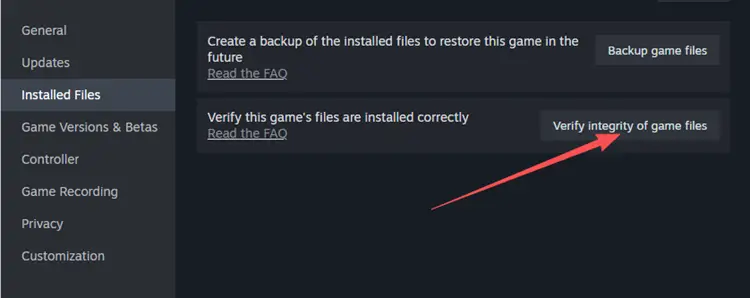
Wait for Steam to finish checking and replacing damaged files, then restart DayZ.
Fix 3. Lower Graphics Settings and Disable NVIDIA Smooth Motion
DayZ Badlands crashing while loading Nasdara may sometimes be related to graphics settings, especially object or terrain visibility.
Step 1. Open DayZ > Options > Video and set the graphics preset to Medium.
Step 2. Lower Object and Terrain visibility distance.
Step 3. For supported NVIDIA GPUs, open NVIDIA App > Graphics > DayZ, disable Smooth Motion, then restart the game.
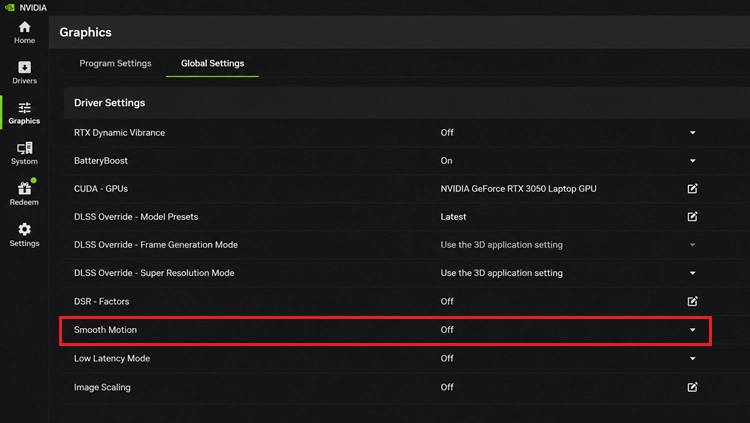
When the crash stops, gradually raise the settings again to identify the setting causing the problem.
Fix 4. Disable DayZ Mods and Test a Vanilla Server
DayZ crashing when joining a server can be caused by outdated or conflicting mods, especially after Update 1.30.
Step 1. Open the DayZ Launcher and disable all active mods.
Step 2. Join an official vanilla server and test the game.
Step 3. When vanilla servers work normally, update the required Workshop mods before reconnecting to the community server.
Mods are not always the cause. DayZ Badlands crashes can also occur on official Nasdara servers, which may point to the current game client instead.
Fix 5. Update Your GPU Driver and Disable Overlays
Outdated GPU drivers or background overlays can contribute to DayZ Badlands crash to desktop issues.
Update your graphics driver through:
- NVIDIA App
- AMD Software: Adrenalin Edition
- Intel Graphics Software
Then restart your PC and temporarily disable:
- Steam Overlay
- Discord Overlay
- NVIDIA Overlay
- MSI Afterburner
- RivaTuner Statistics Server
Launch DayZ again with as few background apps running as possible. When crashes started after a recent driver update, a clean driver reinstall may also help.
Fix 6. Reset the DayZ Configuration Folder
Corrupted configuration files can cause repeated DayZ Badlands crashes even after verifying the game files.
Step 1. Close DayZ and open your Documents folder.
Step 2. Find the DayZ folder and rename it to DayZ_Old.
Step 3. Launch DayZ again to generate a fresh configuration folder.
You may need to reset your graphics and control settings afterward. This can help with configuration-related crashes, but it may not fix every Update 1.30 queue crash.
[Bonus] Reduce High Ping or Packet Loss in DayZ Badlands
After fixing DayZ Badlands crashing, you may still experience high ping, packet loss, lag spikes, or unstable connections when joining Nasdara servers. LagZapper optimizes the network route between your PC and DayZ servers to help reduce latency and improve connection stability.
Why Use LagZapper for DayZ Badlands?
- Lower Ping: Optimize your connection route to help lower ping and reduce latency in DayZ Badlands.
- Reduce Packet Loss: Improve route stability to reduce packet loss and sudden connection drops.
- Reduce Lag: Use a more stable route to reduce lag and improve overall gameplay responsiveness.
How to Boost DayZ With LagZapper
Getting started takes only three steps.
Step 1. Download LagZapper
Download and install LagZapper for Windows.
Step 2. Search for DayZ
Open LagZapper, sign in, and search for DayZ.
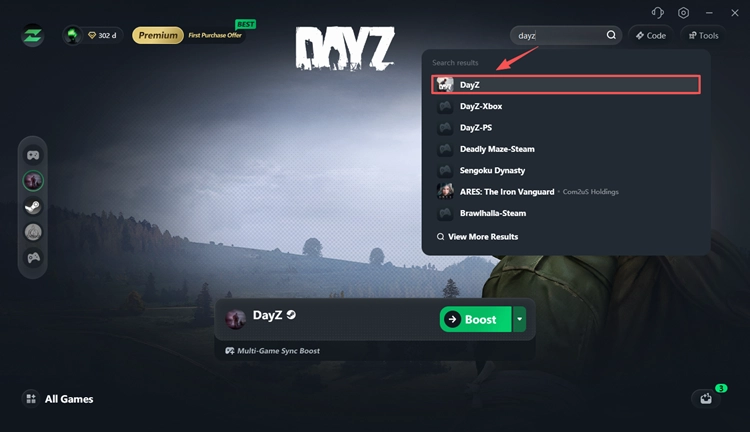
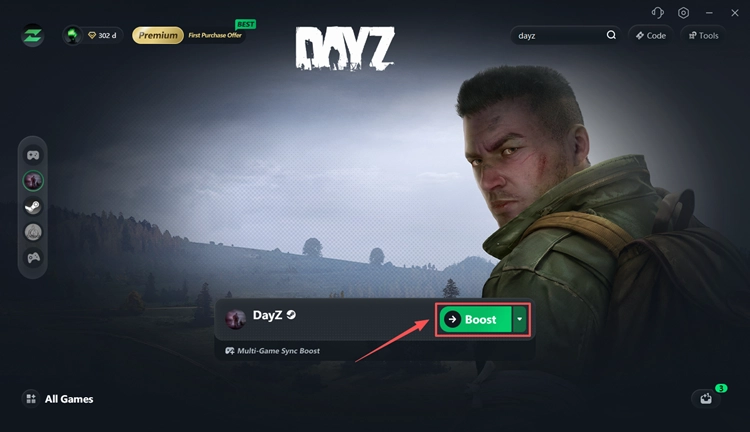
Step 3. Select a Node and Boost
Choose a recommended node and click Boost, then launch DayZ.
The Bottom Line
DayZ Badlands crashing after queue, while loading, or when joining a server can come from game files, graphics settings, mods, GPU drivers, or Update 1.30 client issues. Try the fixes above first, especially verifying files and testing Nasdara with lower settings. When crashes are resolved but connection issues remain, download LagZapper to optimize your route to DayZ servers and improve connection stability.
FAQs About DayZ Badlands Crashing
Q1. Why does DayZ Badlands keep crashing?
Common causes include Update 1.30 client issues, corrupted files, graphics settings, outdated mods, GPU drivers, and damaged configuration files.
Q2. Why does DayZ Badlands crash after queue?
Some players report DayZ crashes after queue when Nasdara starts loading. Try another server, lower graphics settings, and disable NVIDIA Smooth Motion.
Q3. Why does DayZ Badlands crash while loading?
DayZ Badlands crashing while loading can be caused by corrupted files, graphics settings, mods, or a current game client issue.
Q4. How do I fix DayZ crashing when joining a server?
Verify game files, disable mods, lower graphics settings, update your GPU driver, and test another official server.
Q5. Is DayZ Update 1.30 causing Badlands crashes?
Some crash reports appeared after Update 1.30, and later patches included client crash fixes. However, not every DayZ Badlands crash has the same cause.
Q6. What does DayZ Access Violation C0000005 mean?
C0000005 is an Access Violation error related to invalid memory access. Verify game files, disable mods, lower graphics settings, and update your GPU driver first.