
FC 27 Not Launching? 7 Fixes for AntiCheat & EA App Issues
FC 27 not launching on PC may appear in several ways: EA Javelin Anti-Cheat may open and close, the game may return to the EA app, or Steam may switch back to the Play button without starting FC 27. Some players also report startup crashes or errors before FC 27 reaches the main menu. This guide will explain why FC 27 is not launching and walk you through seven fixes for AntiCheat, EA app, Steam, Secure Boot, and startup errors.
Why Is FC 27 Not Launching on PC?
FC 27 can fail at different stages before reaching the main menu. Check the table below to match your launch symptom with a possible cause and the first fix to try.
| Symptom | Possible Cause | First Fix to Try |
|---|---|---|
| AntiCheat opens, then FC 27 closes | Javelin Anti-Cheat issue | Repair or reinstall Javelin |
| FC 27 returns to the EA app | EA app cache or session issue | Restart EA app and clear cache |
| Steam returns to the Play button | Corrupted or missing game files | Verify FC 27 game files |
| FC 27 crashes during startup | Conflicting background software | Close conflicting apps |
| Secure Boot warning appears | Windows security requirement | Check Secure Boot |
| EA app opens but FC 27 does not | Permission-related launch issue | Run EA app as administrator |
How to Fix FC 27 Not Launching on PC – 7 Useful Fixes
Start with the symptom that matches your issue, then work through the remaining fixes if needed.
Fix 1. Update FC 27 to the Latest Version
EA has already released FC 27 Version 1.0.1, which includes fixes for several stability issues. Before changing Windows or AntiCheat settings, make sure Steam or the EA app has installed the latest FC 27 update. Restart the launcher afterward, then try launching the game again.
Fix 2. Restart EA App or Steam and Clear the EA App Cache
A temporary launcher session or corrupted cache can stop FC 27 from opening correctly. EA recommends clearing the EA app cache when games fail to load. If you launch through Steam, restart both Steam and the EA app before trying again. Follow the steps below to refresh the launcher and cache.
Step 1. Fully Close EA App and Steam
Exit the EA app and Steam completely, including any remaining launcher processes.
Step 2. Clear the EA App Cache
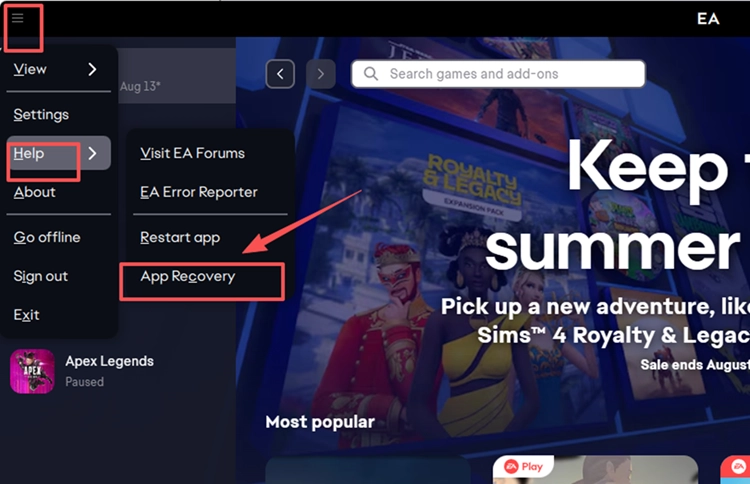
Open the EA app menu and select Help > App Recovery > Clear cache. Wait for the EA app to restart automatically.
Step 3. Launch FC 27 Again
Reopen Steam if needed, start FC 27, and check whether the game now gets past the previous launch point.
Fix 3. Repair or Reinstall EA Javelin Anti-Cheat
If EA Javelin opens but FC 27 still fails to reach the main menu, its Anti-Cheat installation may be damaged or incomplete. Try the Repair option if it is available. If the problem continues, reinstall Javelin for FC 27 by following the steps below.
Step 1. Open the EA Javelin Installer
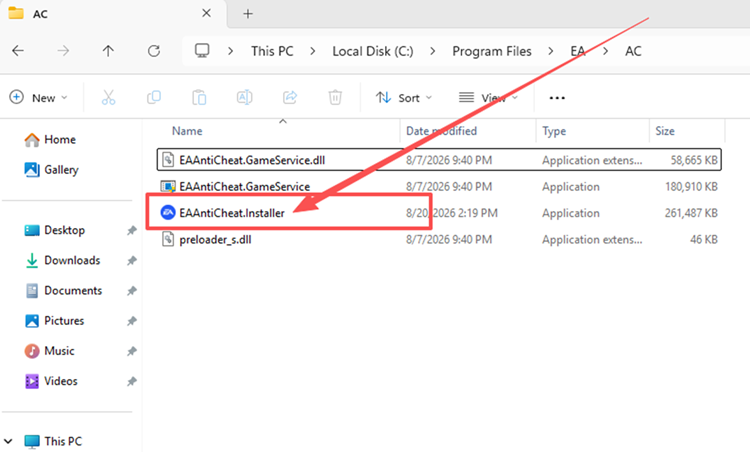
Open File Explorer and go to C:\Program Files\EA\AC, then run EAAntiCheat.Installer.exe.
Step 2. Repair or Reinstall Javelin for FC 27
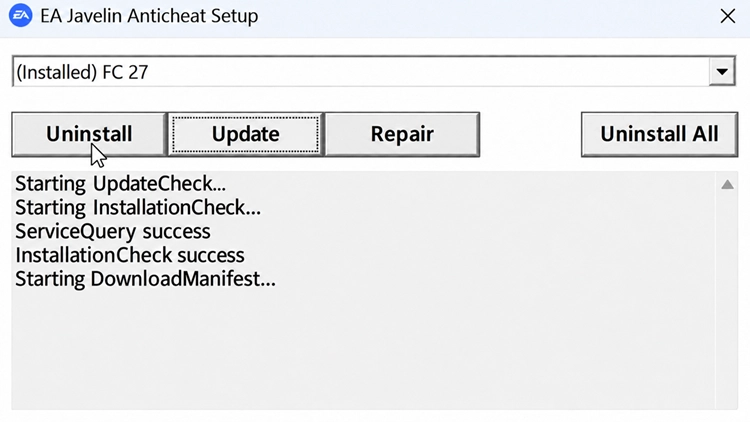
Select FC 27 and choose Repair if available. If FC 27 still won’t launch, choose Uninstall, reopen the installer, select FC 27 again, and choose Install.
Step 3. Restart Your PC and Launch FC 27
Restart Windows after the installation finishes, then open your launcher and test FC 27 again.
Fix 4. Run the EA App as Administrator
Windows permission issues can sometimes interfere with the EA app when launching or loading a game. EA recommends running the app as administrator as part of its PC troubleshooting. Close the EA app, right-click its desktop shortcut, select Run as administrator, then launch FC 27 again to see if it opens normally.
Fix 5. Close Conflicting Anti-Cheat and Background Apps
EA Javelin can block FC 27 if it detects incompatible software, while overlays and monitoring tools may also interfere with game startup. EA recommends updating or disabling the software named in any Javelin warning before trying again.
Close other anti-cheat tools, overlays, monitoring software, and unnecessary background apps, then relaunch FC 27. If you cannot identify the conflicting program, try a Windows clean boot to isolate software that may be interfering with startup.
Fix 6. Verify FC 27 Game Files
Corrupted or missing FC 27 files can stop the game from launching or cause it to close during startup. Both Steam and the EA app provide built-in tools to check and repair installed game files. Follow the steps for the platform you use.
👉 For Steam
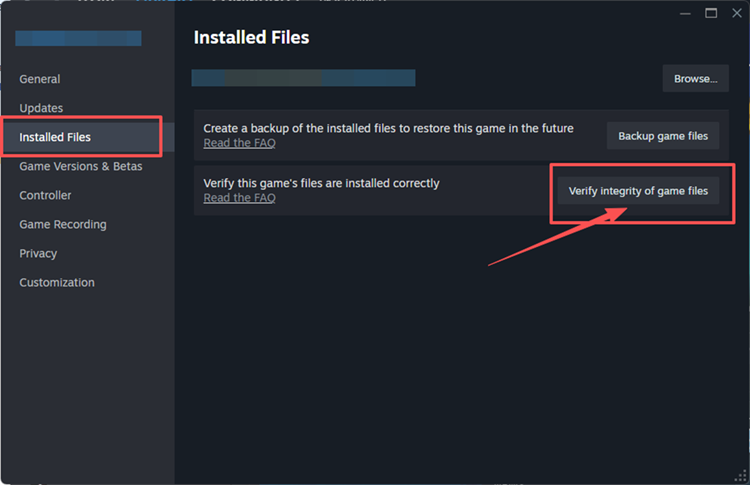
Step 1. Open Steam Library, right-click FC 27, and select Properties > Installed Files.
Step 2. Click Verify integrity of game files and wait for Steam to finish.
👉 For EA App
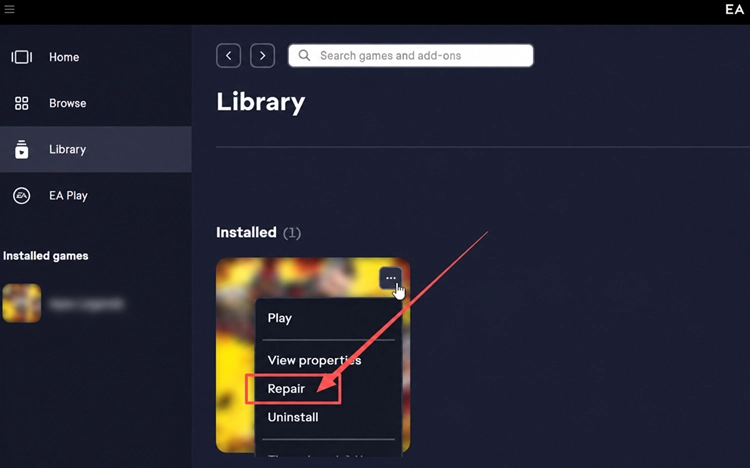
Step 1. Open the EA app Library, find FC 27, and open the game management menu.
Step 2. Select Repair and wait for the process to complete before launching FC 27 again.
Fix 7. Check Secure Boot
EA Javelin relies on Windows security features, and an unsupported or outdated system can prevent FC 27 from launching correctly. FC 27 requires 64-bit Windows 10/11 with the latest updates and DirectX 12. Follow the steps below to check your system.
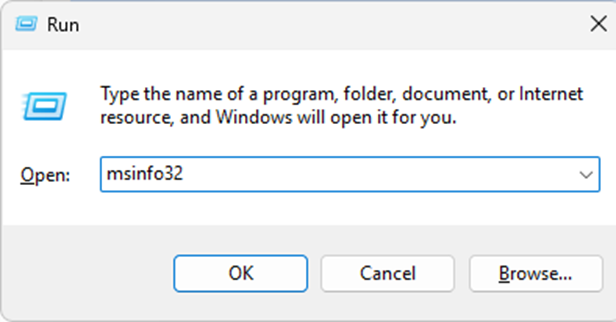
Step 1. Press Windows + R, enter msinfo32, and click OK.
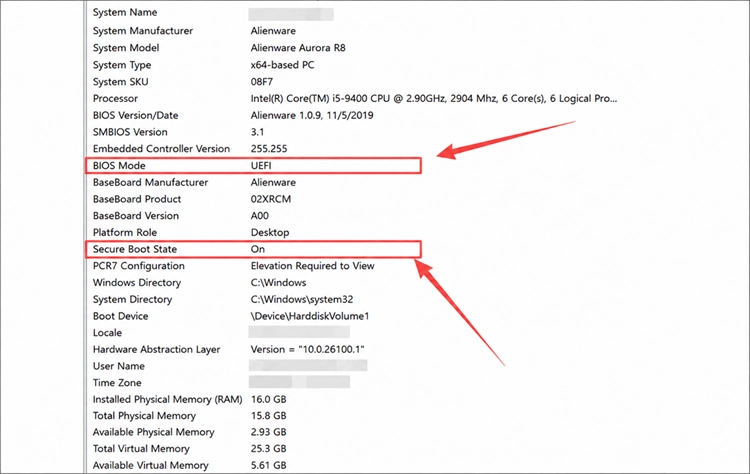
Step 2. Under System Summary, confirm BIOS Mode is UEFI and Secure Boot State is On. If not, follow your PC or motherboard manufacturer’s instructions before changing firmware settings.
[Bonus] Reduce FC 27 Lag with LagZapper
Once FC 27 launches normally, online matches may still suffer from high ping, packet loss, lag spikes, or unstable routing. LagZapper can optimize the connection route between your PC and FC 27 servers to help improve connection stability during online play.
Why Use LagZapper for FC 27
LagZapper can help FC 27 players:
- Smart Route Optimization: Finds a faster and more stable route to FC 27 servers to help reduce high ping, packet loss, jitter, and routing instability.
- Reduce Lag & Improve Stability: Helps lower ping, reduce game lag, minimize lag spikes, and improve responsiveness during online matches.
- One-Click Boost: Optimizes the FC 27 connection without manually changing complicated network, DNS, or router settings.
- Support for 3,000+ Games: Supports FC 27 and more than 3,000 other online games.
How to Use LagZapper for FC 27
Follow the three steps below to optimize your FC 27 connection before entering an online match.
Step 1. Download and Install LagZapper
Download LagZapper for Windows and follow the on-screen instructions to complete the installation.
Step 2. Open LagZapper and Search for FC 27
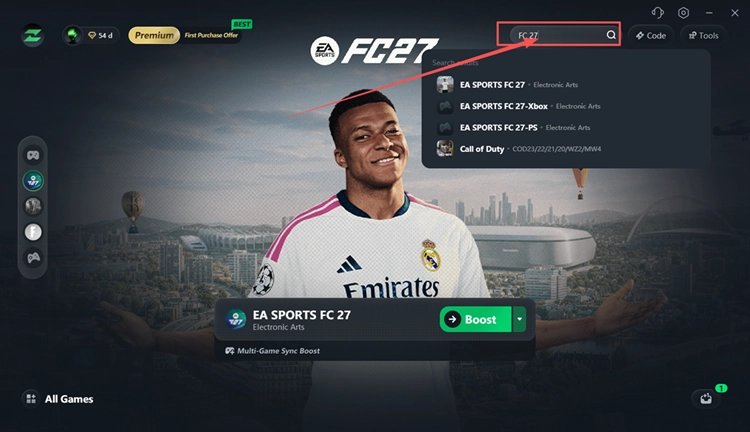
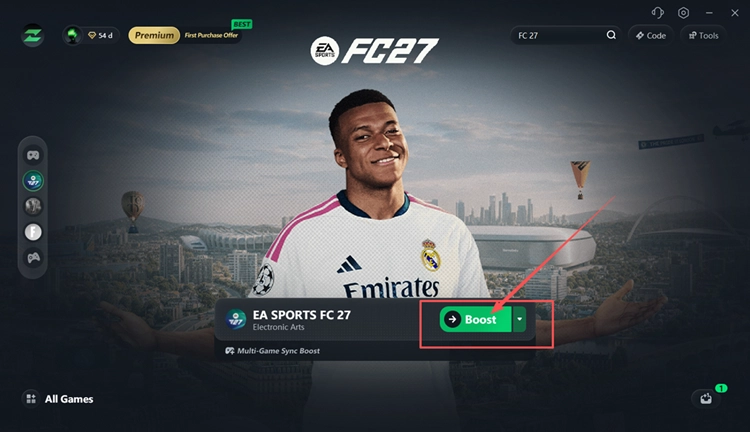
Launch LagZapper, sign in, and enter FC 27 in the search box.
Step 3. Select a Node and Click Boost
Choose a suitable FC 27 node, click Boost, then launch the game through your PC platform.
The Bottom Line
If FC 27 won’t launch, start with the fix that matches your symptom, then check updates, EA Javelin Anti-Cheat, launcher permissions, background conflicts, game files, and Secure Boot. Once FC 27 launches normally, download LagZapper to optimize routing and improve connection stability during online matches.
FAQs About FC 27 Not Launching
Q1. Why Is FC 27 Not Launching on PC?
Outdated files, Javelin errors, launcher problems, background conflicts, or Windows security settings can block startup.
Q2. What Causes an FC 27 Anti Cheat Error?
EA Javelin errors can result from damaged Anti-Cheat files, incompatible software, or Secure Boot problems.
Q3. Why Is FC 27 Not Launching on Steam?
Steam may start FC 27 briefly, then fail because of launcher handoff or damaged files.
Q4. Why Is FC 27 Returning to the EA App?
EA app cache, session, or permission issues can return FC 27 to the launcher instead of starting.
Q5. How Do I Fix FC 27 Crashing on Startup?
Verify game files, close conflicting background apps, and update FC 27.
Q6. Does Secure Boot Affect FC 27 Launching?
Yes. Secure Boot can affect EA Javelin checks and prevent supported games from launching correctly.