
FFXIV Servers Down? Check Status & How to Fix It
Are FFXIV servers down today, or are you seeing login or connection errors while other players are online? FFXIV maintenance, Data Center issues, login congestion, ISP problems, and unstable network routes can all cause FFXIV login issues or FFXIV connection issues.
Wondering “is FFXIV down?” Start by checking the official FFXIV server status. Ongoing FFXIV server maintenance or technical difficulties usually require waiting for Square Enix to restore service. When the servers are online but FFXIV still will not connect, try the 6 fixes below.
Are FFXIV Servers Down Right Now? Check Server Status
The fastest way to check whether FFXIV is down is through the official FFXIV Server Status page. It shows the current FFXIV server status for each World, including Online, Partial Maintenance, and Maintenance states.
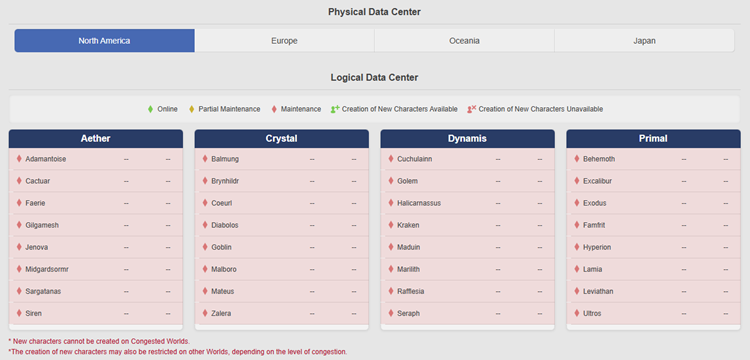
Tip: You can also check the Lodestone News page for the latest Maintenance, Status, Technical Difficulties, and Recovery notices.
Check whether the issue affects:
- All Worlds
- Your physical Data Center
- Your logical Data Center
- Only your World
- Only your connection
Multiple Worlds under FFXIV maintenance usually point to a server-side issue, while an Online World with no maintenance notice suggests a local launcher, ISP, firewall, DNS, or network problem.
Recent FFXIV Maintenance: Patch 7.56 HotFixes
On September 9, 2026, Square Enix performed emergency maintenance across all Worlds to deploy Patch 7.56 HotFixes. The HotFix addressed an issue involving Beastmaster where a player disconnecting at a specific moment could cause the server to crash.
The scheduled maintenance window was:
| Region | Maintenance Window |
|---|---|
| GMT | Sep. 9, 6:00–10:00 |
| BST | Sep. 9, 7:00–11:00 |
| PDT | Sep. 8, 11:00 PM–Sep. 9, 3:00 AM |
| UTC+8 | Sep. 9, 2:00–6:00 PM |
| AEST | Sep. 9, 4:00–8:00 PM |
During this maintenance, FINAL FANTASY XIV and related services were unavailable; the maintenance has now ended, so check the latest FFXIV server status before troubleshooting login or connection issues.
Why Do FFXIV Servers Go Down?
FFXIV connection problems can come from server-side outages, maintenance, heavy traffic, or local network issues. Some affect all players, while others impact only one World, Data Center, region, or connection.
Common causes include:
- Scheduled maintenance: Patches, updates, and server work can temporarily take Worlds offline.
- Emergency maintenance: Square Enix may shut down servers to deploy urgent hotfixes.
- World or Data Center issues: Server problems may affect one World or an entire region.
- Login congestion: Heavy traffic after updates can cause long queues or login failures.
- Network routing problems: Issues along the route to Square Enix servers can disrupt connections.
- Local network issues: Wi-Fi, routers, firewalls, ISPs, or background apps can interfere with FFXIV.
How to Fix FFXIV Server Connection Issues
Use the fixes below when the FFXIV servers are online, but you still cannot log in, connect, or stay connected.
Fix 1. Restart FFXIV and the Launcher
A temporary launcher or login session issue can prevent FFXIV from reconnecting properly after maintenance or a short server interruption.
Step 1. Close FINAL FANTASY XIV and the FFXIV launcher.
Step 2. Open Task Manager and end any remaining FFXIV or launcher processes.
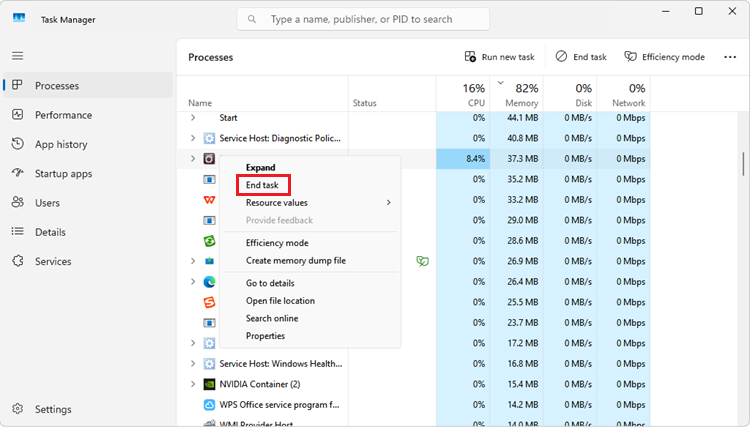
Step 3. Reopen the launcher and try logging in again.
This can refresh an expired session and resolve simple FFXIV login issues after maintenance.
Fix 2. Restart Your Router and Test the Connection
Restarting your router can clear temporary connection problems between your PC, ISP, and the FFXIV servers.
Step 1. Close FFXIV and turn off your router or modem.
Step 2. Wait about 30 seconds, then turn it back on and wait for the internet connection to fully restore.
Step 3. Launch FFXIV and test the connection again.
Square Enix also recommends checking network hardware and router settings when disconnects continue. For a more stable connection, use Ethernet instead of Wi-Fi when possible.
Fix 3. Close Bandwidth-Heavy Background Apps
Background apps can consume bandwidth and make FFXIV connection issues worse, especially during downloads or network congestion.
Close unnecessary apps such as:
- Game downloads and updates
- Cloud synchronization tools
- Streaming services
- Torrent clients
- Other game launchers
- Bandwidth-heavy browser tasks
Square Enix recommends closing other running applications when troubleshooting connectivity problems. After closing them, test your FFXIV connection again.
Fix 4. Check Windows Firewall and Security Software
Windows Firewall or security software can block FFXIV network traffic and cause connection problems.
Step 1. Open Windows Security > Firewall & network protection.
Step 2. Select Allow an app through firewall and make sure FINAL FANTASY XIV and the FFXIV launcher are allowed.
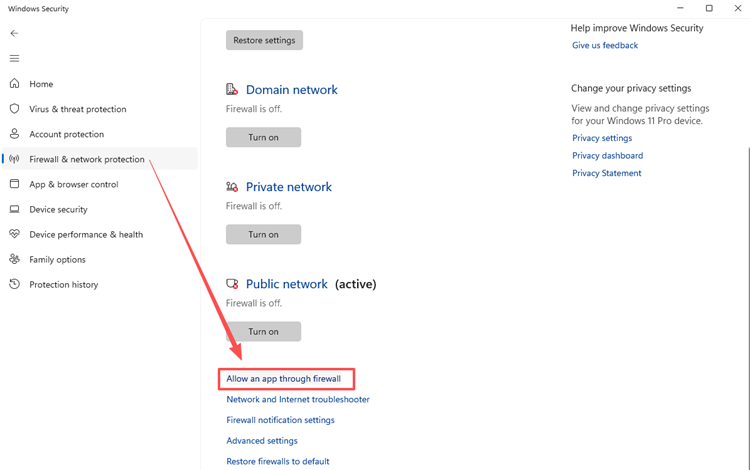
Step 3. Save the changes, then restart FFXIV.
Square Enix also lists firewall settings, security software, and ISP security services as possible causes of connectivity problems.
Tip: Avoid disabling Windows Firewall permanently. Allowing FFXIV through the firewall is the safer option.
Fix 5. Check Your Router Settings and FFXIV Ports
Router security settings or blocked ports can cause persistent FFXIV connection issues when basic fixes do not help. Square Enix lists these TCP port ranges for FINAL FANTASY XIV:
- 54992–54994
- 55006–55007
- 55021–55040
Also, check router security features such as SPI, and only change port or router settings when necessary by following your router manufacturer’s instructions to avoid additional network problems.
Fix 6. Check for an Unstable Route to the FFXIV Server
Your internet may work normally while the route between your ISP and the FFXIV Data Center remains unstable.
Common signs include:
- High ping or ping spikes
- Packet loss
- Delayed actions
- Frequent disconnects
- Connection timeouts
- Poor cross-region performance
Test another connection, such as a mobile hotspot. When FFXIV works normally on another network, your ISP or network route may be the cause.
[Bonus] Reduce FFXIV Lag and Connection Instability with LagZapper
Official FFXIV maintenance or a Square Enix outage must be resolved on the server side. When the servers are online but you still experience high ping, packet loss, lag spikes, or unstable routing, LagZapper can help optimize the connection between your Windows PC and the FFXIV server.
LagZapper uses route optimization to avoid inefficient or congested network paths and improve connection stability.
Highlights of LagZapper for FFXIV
- Lower and Stabilize Ping: Optimize your route to lower ping and reduce unstable latency during FFXIV sessions.
- Reduce Lag and Connection Instability: Improve routing to reduce lag, delays, and connection instability caused by poor network paths.
- Reduce Packet Loss: Maintain a more stable connection and reduce packet loss when network routes become unstable.
- Improve Cross-Region Connections: Optimize long-distance routes for more stable connections to overseas game servers.
How to Use LagZapper for FFXIV
Follow the steps below to optimize your FFXIV connection with LagZapper.
Step 1. Download and Install LagZapper
Download LagZapper for Windows and complete the installation.
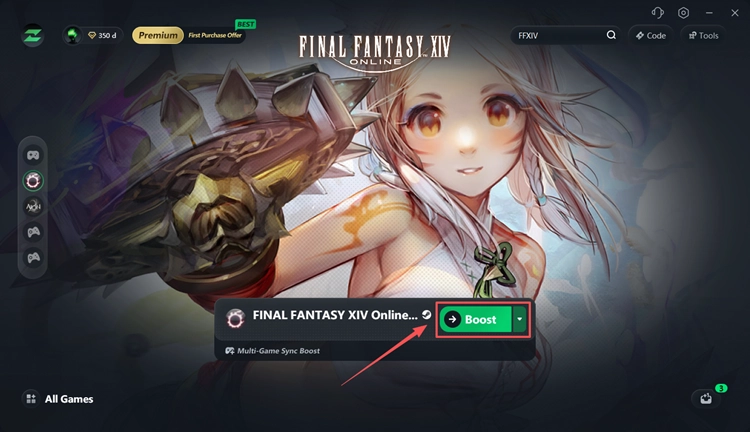
Step 2. Search for FINAL FANTASY XIV
Open LagZapper and search for FINAL FANTASY XIV in the game list.
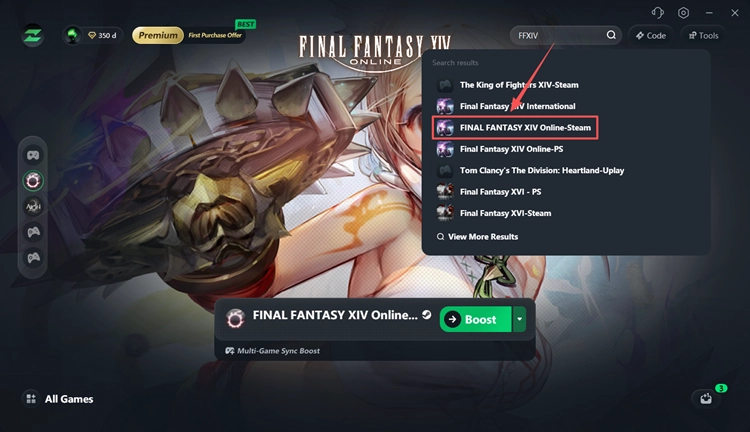
Step 3. Select a Server and Boost
Choose your FFXIV server region and a recommended network node, then start boosting.
The Bottom Line
When FFXIV servers are down, check the official Server Status and Lodestone pages first. When no outage or maintenance is active, restart FFXIV and your router, close bandwidth-heavy apps, and check firewall, router, ISP, or routing issues.
For high ping, packet loss, lag spikes, or unstable routes while FFXIV is online, download LagZapper to optimize your connection route and improve stability.
FAQs About FFXIV Servers Down
Q1. How do I check FFXIV server status?
Check the official FFXIV Server Status page for World and Data Center status, and the Lodestone for maintenance or outage notices.
Q2. Was there FFXIV maintenance on September 9, 2026?
Yes. Square Enix scheduled All Worlds Emergency Maintenance from 6:00 to 10:00 GMT for Patch 7.56 HotFixes.
Q3. Why can't I log into FFXIV when the servers are online?
Common causes include ISP issues, router problems, firewall settings, background apps, or unstable network routing.
Q4. Why does FFXIV keep disconnecting me?
Frequent disconnects can result from packet loss, Wi-Fi instability, ISP problems, firewall settings, or poor routing to the FFXIV Data Center.
Q5. How long does FFXIV maintenance usually last?
Maintenance length varies by update. Check the Lodestone maintenance notice for the scheduled start and end time, as maintenance may occasionally finish early or be extended.
Q6. Can FFXIV be down for only one Data Center or World?
Yes. Some technical issues affect only a specific World or Data Center. Check the official Server Status page to see whether the problem is global or limited to your server.