
Fortnite Middle East High Ping? How to Fix Lag and Packet Loss
Players connecting to Fortnite Middle East servers may experience unusually high ping, sudden latency spikes, packet loss, or delayed builds and shots. Even when home internet appears stable, regional service disruptions and server rerouting can leave in-game ping much higher than usual.
This guide will explain whether the Fortnite Middle East server issue comes from regional routing, ISP congestion, or your local connection, then provide practical fixes to reduce lag and improve stability.
Why Is My Fortnite Ping So High on Middle East Servers?
Fortnite Middle East high ping can occur when regional disruptions, rerouting, or inefficient ISP paths delay data reaching servers, worsened by unstable Wi-Fi and heavy bandwidth usage.
Regional Internet Disruptions and Temporary Rerouting
Epic has confirmed ongoing internet service disruptions in the Middle East and is rerouting connections to nearby local servers within the region.
Poor or Congested ISP Routing
Congested or inefficient ISP routes can send game traffic through extra network hops, creating ping spikes before it reaches Fortnite.
Unstable Wi-Fi or Router Connection
Weak signals, wireless interference, or router instability can delay data locally and make existing Fortnite server latency feel even worse.
Background Downloads and Bandwidth Usage
Downloads, cloud syncing, and streaming can consume available bandwidth, causing extra latency and packet loss during Fortnite matches.
How to Fix Fortnite Middle East High Ping - 5 Useful Fixes
The following methods help diagnose the route and reduce local network problems that may add extra latency to the current Middle East connection issue.
Before Trying Fixes: Test Your Middle East Connection
Epic provides regional test addresses that can be used to measure latency to its Fortnite data centers. Run the Middle East ping command in Command Prompt, and Windows will automatically perform 50 tests before displaying the average round-trip time and packet-loss results.
Lower average latency is generally better, but compare the result with your usual Middle East ping. If the Middle East result is suddenly much slower while other regional tests remain normal, regional or ISP routing may be involved. If every result is slower than usual, check your local network or ISP connection.
| Fortnite Region | CMD Command |
|---|---|
| Middle East | ping ping-me.ds.on.epicgames.com -n 50 |
| Asia | ping ping-asia.ds.on.epicgames.com -n 50 |
| Europe | ping ping-eu.ds.on.epicgames.com -n 50 |
| Oceania | ping ping-oce.ds.on.epicgames.com -n 50 |
| NA-East | ping ping-nae.ds.on.epicgames.com -n 50 |
| NA-Central | ping ping-nac.ds.on.epicgames.com -n 50 |
| NA-West | ping ping-naw.ds.on.epicgames.com -n 50 |
| Brazil | ping ping-br.ds.on.epicgames.com -n 50 |
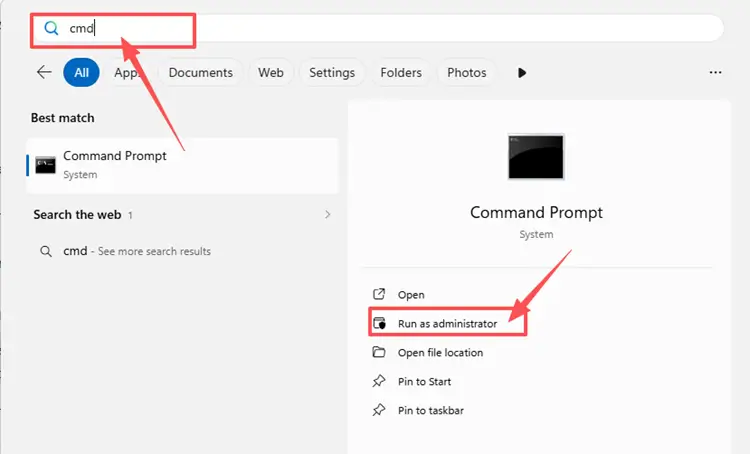
Step 1. Press the Windows key, type cmd, and open Command Prompt.
Step 2. Copy the Middle East command from the table, paste it into CMD, and press Enter.
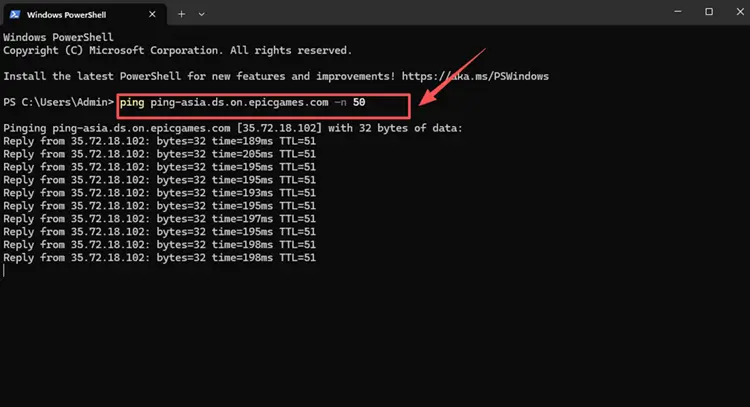
Step 3. After the 50-packet test finishes, check the average latency and lost packets, then test another region for comparison.
Fix 1. Restart Your Router and Modem
Your router or modem may worsen Fortnite Middle East high ping if it has been running for a long time or the connection becomes unstable during matches. Restarting your network equipment can refresh the local connection and help reduce temporary ping spikes or packet loss, although it cannot fix regional server disruptions.
Turn off your router and modem, wait 30–60 seconds, then power them back on. Once the internet connection is fully restored, launch Fortnite and test the Middle East server Ping again.
Fix 2. Use a Wired Ethernet Connection
Wi-Fi can worsen Fortnite Middle East high ping when the signal is weak, congested, or blocked by walls. A wired Ethernet connection usually provides a more stable local connection and may reduce packet loss, ping spikes, and rubberbanding during matches. Connect your device directly to the router with an Ethernet cable, then launch Fortnite and test your Ping again.
Fix 3. Close Background Downloads and Apps
Cloud syncing, video streaming, browser downloads, or voice chat apps can continue using bandwidth while you play. When these tasks run during a match, Fortnite Ping may become less stable, especially if your connection is already affected by regional routing issues. Follow the steps below to close unnecessary background activity:
Step 1. Press Ctrl + Shift + Esc to open Task Manager and view running apps and background processes.
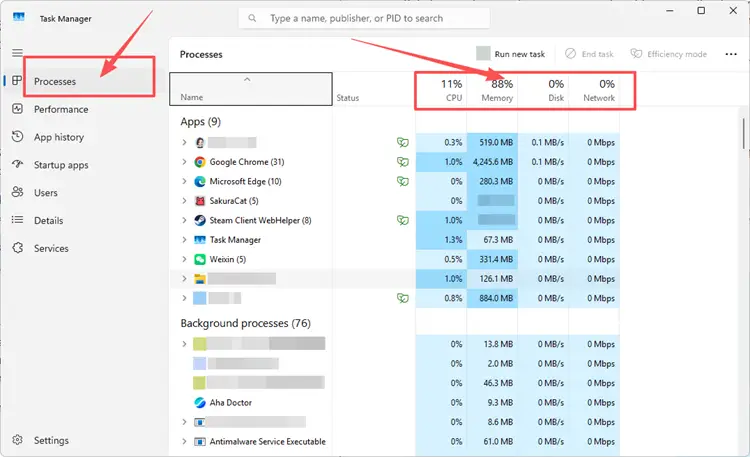
Step 2. Check the Processes tab for apps using high Network including browsers, sync tools, launchers, video apps, and downloads.
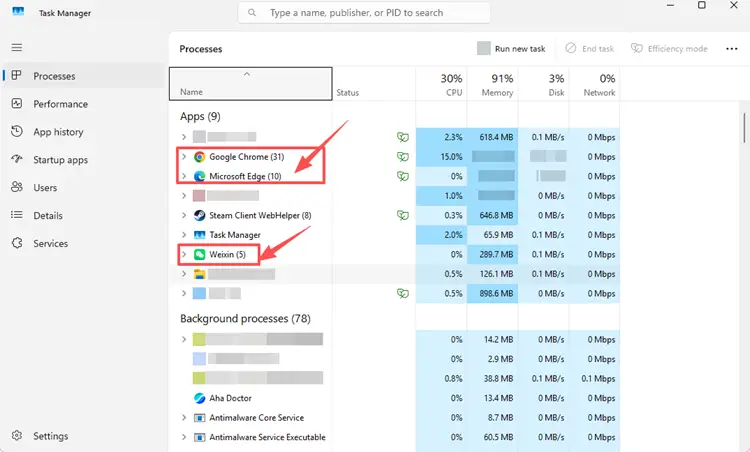
Step 3. Select any non-essential app and click End task.
Fix 4. Update Your Network Adapter Driver
An outdated or corrupted network adapter driver may cause unstable Wi-Fi, random disconnects, or packet loss, making Fortnite Middle East high ping feel worse. If the connection remains unstable after basic network checks, update the driver through Device Manager to improve local network stability. However, this will not fix regional server disruptions or ISP routing problems.
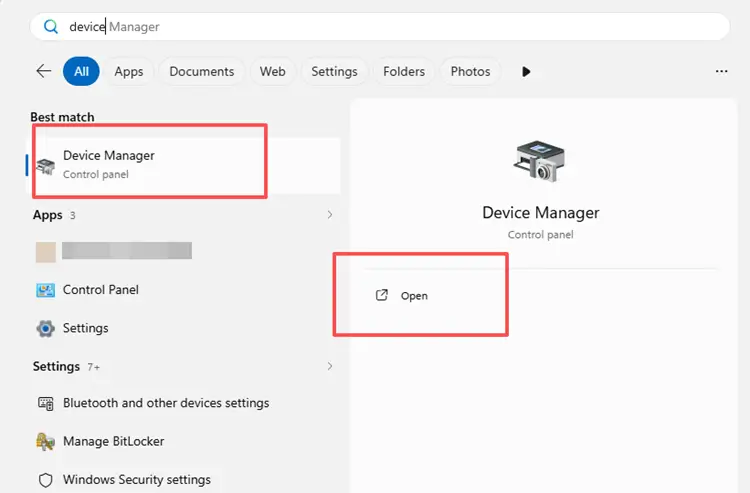
Step 1. Open Device Manager through the Windows search bar.
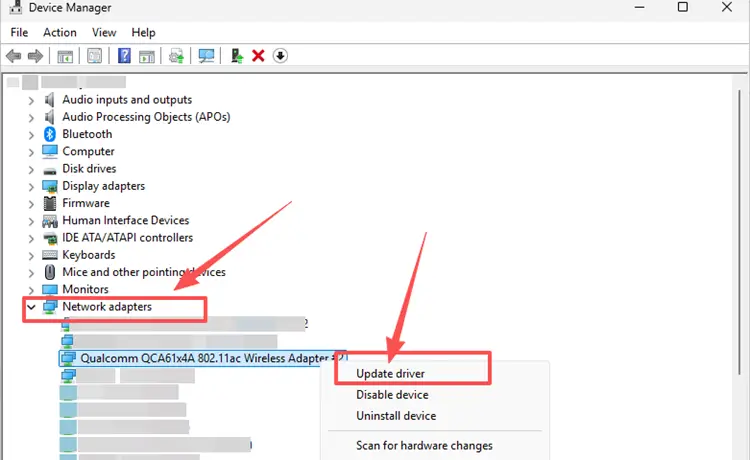
Step 2. Expand Network adapters, right-click your Wi-Fi or Ethernet adapter, and select Update driver.
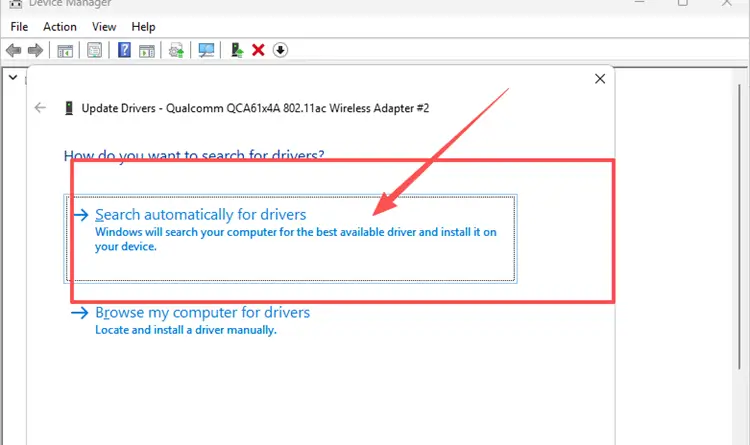
Step 3. Click Search automatically for drivers and install any available update.
Fix 5. Change Your Matchmaking Region
When the Middle East route is unstable, another matchmaking region may provide a lower or more consistent ping. Compare the estimated latency shown for each region and test the best available option.
Step 1. Click Settings, and enter the Game tab.
Step 2. Under Language and Region, find Matchmaking Region and select Auto or the region showing the lowest ping.
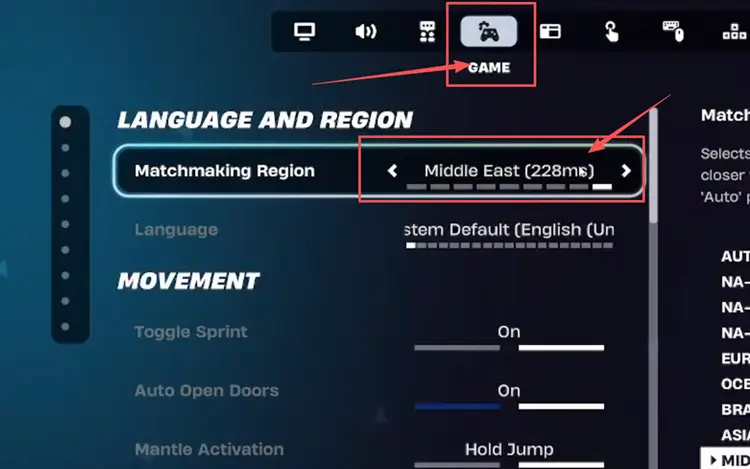
Step 3. Click Apply, start a match, and check whether your in-game latency becomes more stable.
[Bonus] How to Reduce Fortnite Middle East High Ping with LagZapper
Fortnite matches depend on fast reactions, accurate building, and stable timing during close fights. If local network fixes do not resolve high ping, packet loss, or unstable routing, LagZapper can help optimize the connection route between your device and Fortnite’s online services.
Why Use LagZapper for Fortnite Middle East Ping Issues?
- Smart Route Optimization: Automatically finds a faster and more stable route for Fortnite, helping reduce high ping, packet loss, jitter, and unstable connections.
- Reduce Lag & Improve Stability: Lower ping spikes, reduce lag, and make matches feel more responsive when building, editing, aiming, or switching weapons.
- One-Click Boost: Optimize your Fortnite connection in seconds with one click. No complicated setup or manual network adjustments are required before playing.
- Support for 3,000+ Games: Use LagZapper to improve connection stability across 3,000+ online games, including Fortnite, VALORANT, and other popular multiplayer games.
How to Boost Fortnite with LagZapper [Step-by-Step Guide]
Follow the steps below to prepare a smoother connection in one click with LagZapper.
Step 1. Download and Install LagZapper
Download LagZapper for Windows and follow the on-screen instructions to complete the installation.
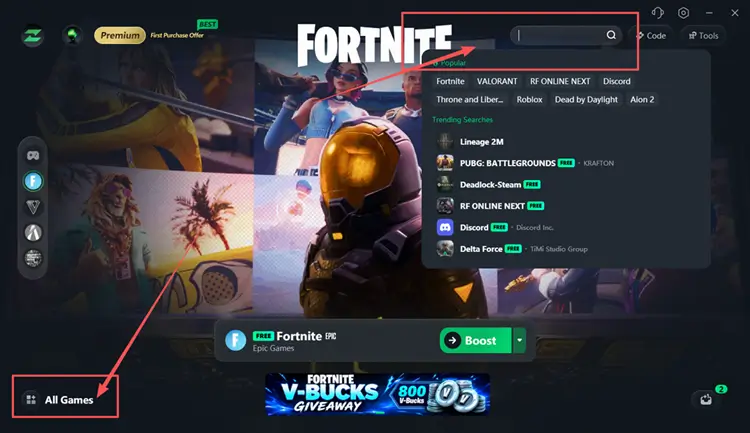
Step 2. Open LagZapper and Search for Fortnite
Launch LagZapper, then use the search bar or supported games list to find Fortnite.
Step 3. Boost and Play Fortnite
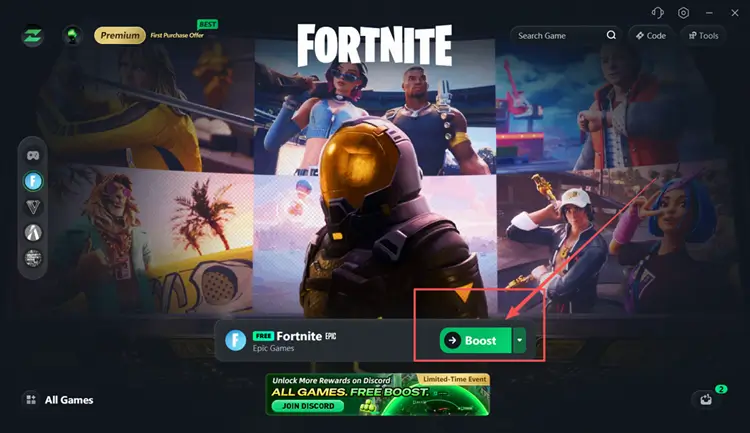
Select your preferred server or node if needed, then click Boost to optimize your connection before launching the game.
The Bottom Line
Fortnite Middle East high ping may result from regional network disruptions, server rerouting, congested ISP paths, unstable Wi-Fi, or background bandwidth usage. Test the Middle East connection first, then try another network and complete the relevant local fixes. To improve routing before your next match, download LagZapper to reduce lag, packet loss, and unstable connection issues.
FAQs About Fortnite Middle East High Ping
Q1. What is the current Fortnite Middle East server status?
Epic confirms regional internet disruptions and rerouting, not an outage of individual Fortnite Middle East servers.
Q2. Why is my Fortnite Ping so high on Middle East servers?
Regional disruptions, server rerouting, congested ISP routes, unstable Wi-Fi, or background traffic can all raise Fortnite Middle East Ping.
Q3. Can Ethernet reduce Fortnite Middle East high Ping?
Ethernet may reduce Wi-Fi interference and local packet loss, but it cannot fix regional server or ISP routing problems.
Q4. Can a mobile hotspot identify the cause?
It can help. Much lower ping on a mobile hotspot suggests the issue may involve your fixed-line ISP route, router, or home network.