
Ghost Recon Future Soldier Free Not Working? 6 Fixes for Claim Errors
To celebrate Ghost Recon’s 25th anniversary, Ubisoft is giving away the PC Standard Edition of Ghost Recon Future Soldier until 1 PM UTC on August 13, 2026. Once claimed, the game is yours to keep. However, the Ghost Recon Future Soldier free claim may not work, showing an invalid CD key, failed access verification, a server unavailable message, or the game missing from your Library.
This guide will explain why the Ghost Recon Future Soldier free claim is not working and provide six practical ways to add it to your Ubisoft Connect library.
Before Trying Fixes: Is Ghost Recon Future Soldier Still Free?
This promotion is a PC-only giveaway rather than a free weekend. You need a Ubisoft account and must complete the claim through Ubisoft’s official PC channels during the offer window. It does not include Steam or console versions, and the game’s retired online features are not restored. Check the key giveaway conditions below before troubleshooting.
| Giveaway Detail | Information |
|---|---|
| Free Claim Period | August 6–13, 2026 (ends at 1 PM UTC) |
| Edition | PC Standard Edition |
| Platform | Ubisoft Store / Ubisoft Connect PC |
| Price | Free / 100% off |
| Ownership | Permanent after a successful claim |
| Steam and Consoles | Not included in this PC giveaway |
| Online Features | No longer available |
Why Is Ghost Recon Future Soldier Free Not Working?
Several website, account, and Ubisoft Connect issues can prevent the free copy of Ghost Recon Future Soldier from being claimed successfully. Five common causes are explained below.
Heavy Giveaway Traffic and Ubisoft Server Errors
Heavy traffic may overload Ubisoft services, causing server errors, failed requests, or registration problems.
Incorrect Claim Page and Redemption Flow
Wrong claim pages may open Ubisoft Connect without adding the game entitlement.
Account Authentication and Access Verification Errors
Expired sessions or mismatched accounts may block access verification and game registration.
Game Entitlement and Library Synchronization Delays
Synchronization delays may leave the claimed game temporarily missing from your Library.
Ubisoft Connect Cache and Browser Session Problems
Stale sessions may cause blank pages, endless loading, or missing games.
How to Fix Ghost Recon Future Soldier Free Claim Not Working – 6 Fixes
Start with Ubisoft’s official claim methods, then try the remaining fixes in order until Ghost Recon Future Soldier appears in your Library.
Fix 1. Claim It Through Ubisoft’s Official Store Website
The official Ubisoft game page provides the primary claim path for the PC Standard Edition. It opens the Ubisoft Connect redemption flow and can add the game to your intended account. Follow the steps below to complete the claim.
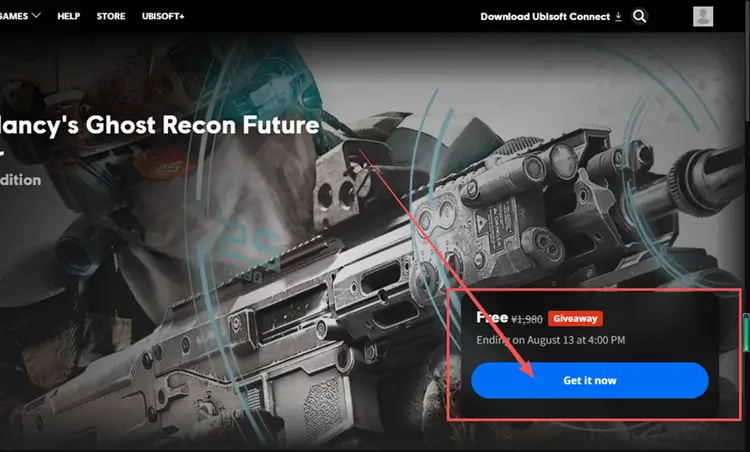
Step 1. Open the official Ghost Recon Future Soldier game page and click Get it now.
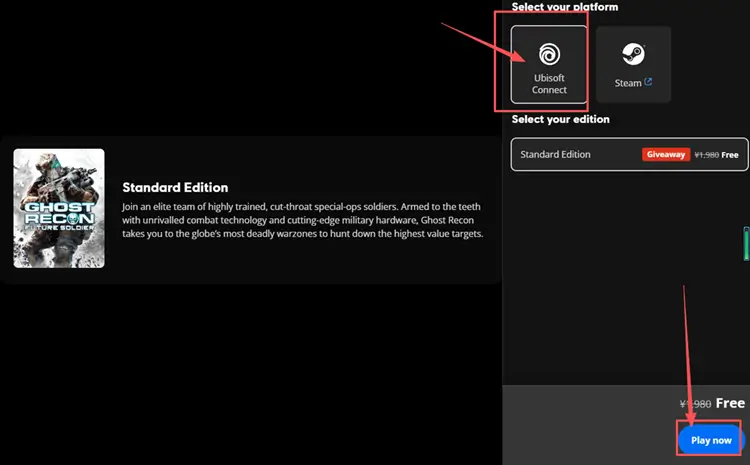
Step 2. Select Ubisoft Connect and Standard Edition, then click Play now.
Step 3. Allow the page to open Ubisoft Connect, sign in to the intended account, and click Add to my Games.
Fix 2. Add It from the Ubisoft Connect Free Games Tab
If the website redirects incorrectly or does not register the giveaway, Ubisoft Connect provides a second claim path inside Library. This method opens the game’s launcher listing directly, so you can add it without repeating the browser flow. Follow the steps below.
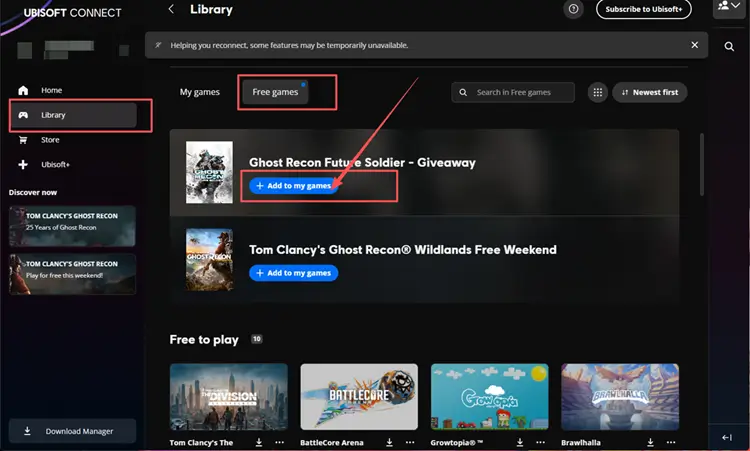
Step 1. Open Ubisoft Connect, sign in to the account that should own the game, and select Library.
Step 2. Select Free games, then find Ghost Recon Future Soldier.
Step 3. Click Add to my games to register the giveaway, then confirm the title appears in your Library.
Fix 3. Restart Ubisoft Connect and Sign In to the Correct Account
Closing only the Ubisoft Connect window may leave the client running in the system tray, so its current session remains active. Exit it completely, reopen the launcher, and sign in to the Ubisoft account that should own the game. Retry the claim, then check Library under that account.
Fix 4. Clear Ubisoft Connect Cache and Refresh the Library
Ubisoft Connect rebuilds its cache after restarting, which can restore a Library that remains blank or fails to display a successfully claimed game. Ubisoft recommends renaming the existing cache folders instead of deleting them, preserving a backup if you need to reverse the change. Follow the steps below.
Step 1. Log out and close Ubisoft Connect completely, including from the system tray.
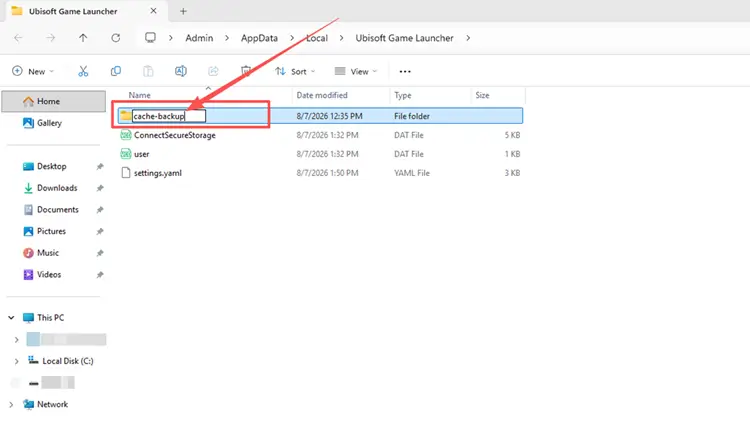
Step 2. Press Windows + R, enter %ProgramFiles(x86)%\Ubisoft\Ubisoft Game Launcher, and press Enter. Rename the cache folder cache_backup.
Step 3. Press Windows + R again, enter %LocalAppData%\Ubisoft Game Launcher, and press Enter. Rename its cache folder cache_backup.
Step 4. Restart Ubisoft Connect and check Library.
Fix 5. Try Another Browser or Network
Stored cookies or an outdated browser session can interrupt the claim request even when the giveaway page opens normally. Retry the official claim page in a private window or another updated browser, sign in again, and check whether the game registers successfully.
If the error remains, connect through another stable network, such as a phone hotspot, and submit the claim once more. A successful request there points to the original connection timing out or filtering the Ubisoft request.
Fix 6. Wait and Retry If Ubisoft Claim Services Are Unavailable
If both the official website and Ubisoft Connect say the claim service is unavailable, the failure is likely on Ubisoft’s side. Local changes will not restore a temporarily unavailable service, so wait and retry later. Claim the game before the giveaway ends, then confirm it appears in Library.
[Bonus] Improve Connection Stability in Supported Ubisoft Games with LagZapper
After adding Ghost Recon Future Soldier to your Library, you may continue using Ubisoft Connect for other Ubisoft games. If supported online games experience high ping, packet loss, or unstable routing, LagZapper can optimize their connection routes for smoother matchmaking and gameplay.
Why Use LagZapper for Ubisoft Games?
- Smart Route Optimization: Finds a stable route to help reduce high ping, packet loss, jitter, and routing problems.
- Lower Ping: Helps reduce game lag, lower ping, and limit sudden latency changes in supported Ubisoft online games.
- One-Click Boost: Optimizes the connection without manual router, DNS, or Windows changes.
- 3,000+ Supported Games: Boost supported Ubisoft games and thousands of other online games.
How to Boost Ubisoft Games with LagZapper
Follow these three steps to optimize the connection before launching a supported Ubisoft game.
Step 1. Download and Install LagZapper
Download LagZapper for Windows and follow the on-screen instructions to complete the installation on your PC.
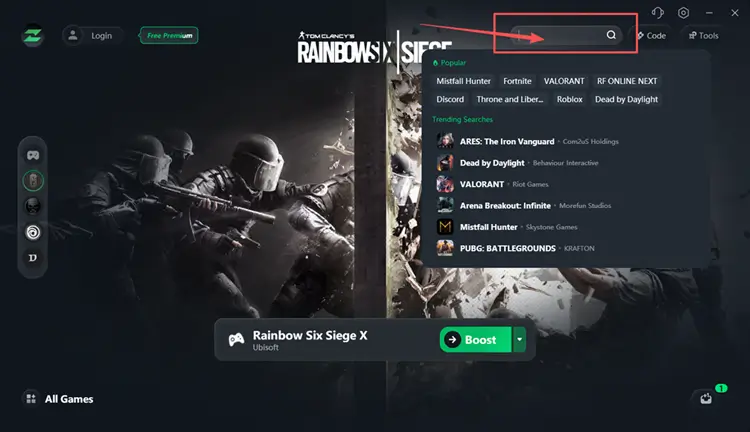
Step 2. Search for Your Ubisoft Game
Launch LagZapper, then use the search bar or browse the supported games list to find your Ubisoft game.
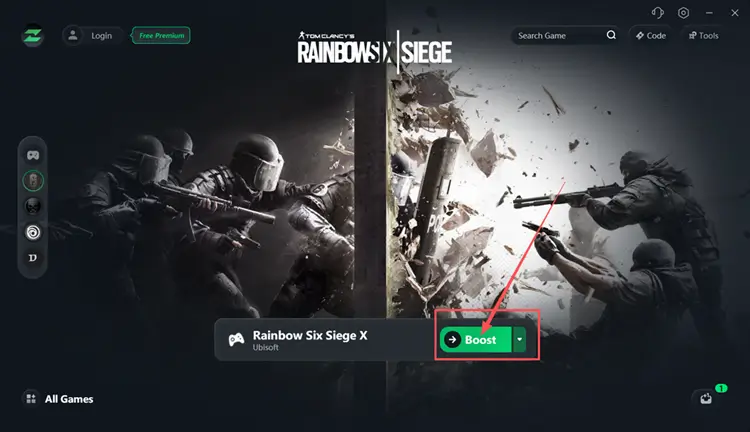
Step 3. Select a Server and Click Boost
Select a suitable server or recommended node, then click Boost before launching the game.
The Bottom Line
Ghost Recon Future Soldier claim errors usually involve Ubisoft services, account sessions, or entitlement delays. Claim through the official Store or Free Games tab, restart Ubisoft Connect, verify the correct account, clear its cache, and test another browser or network. Retry later if services remain unavailable. Download LagZapper to help lower ping and reduce game lag and packet loss while playing supported Ubisoft games.
FAQs About Ghost Recon Future Soldier Free Not Working
Q1. Why Am I Unable to Claim Ghost Recon Future Soldier?
Wrong claim pages, overloaded services, expired authentication, or account mismatches can prevent successful entitlement registration.
Q2. How to Claim Ghost Recon Future Soldier for Free?
Use the Ubisoft Store or Free Games tab before 1 PM UTC on August 13.
Q3. Why Is Ghost Recon Future Soldier Not Showing in Library?
The entitlement may be synchronizing; restart Ubisoft Connect and refresh your Library after several minutes.
Q4. Why Does Ubisoft Say “We Couldn’t Verify Your Access to the Game”?
An expired login session or mismatched Ubisoft account may block entitlement verification during the claim.
Q5. Why Are Ubisoft Claim Services Unavailable?
Heavy giveaway traffic may interrupt Ubisoft requests; wait briefly, then retry the official claim page.