
Grounded 2 Russian Language: How to Translate into Russian
Grounded 2 does not currently include Russian among its officially supported languages. This leaves Russian-speaking players without a native option for understanding menus, quests, item descriptions, and other in-game text. LagZapper offers built-in translation features that provide another way to play Grounded 2 in Russian without manually installing localization files.
This guide will show you how to set up Grounded 2 Russian translation with LagZapper and use its Game Translation and Screenshot Translator features.
Does Grounded 2 Support Russian?
Grounded 2 does not currently offer official Russian language support. Steam lists 9 supported languages, but Russian is not included. This means changing the normal Grounded 2 language settings alone cannot enable Russian for players looking for Grounded 2 Russian language support.
| Language Support | Languages |
|---|---|
| Full Audio + Interface + Subtitles | English, French |
| Interface + Subtitles | Italian, German, Spanish - Spain, Spanish - Latin America, Simplified Chinese, Japanese, Portuguese - Portugal |
| Russian | Not officially supported currently |
To play in Russian, players currently need an alternative solution. One option is a community-made Grounded 2 Russian localization, which adds translated game content through localization files. Another option is to use LagZapper, which includes built-in translation features for players who want to experience Grounded 2 in Russian.
How to Play Grounded 2 in Russian with LagZapper
Follow the guide below to translate Grounded 2 into Russian with LagZapper. Importantly, Grounded 2 must be set to English before you enable translation, or the feature may not work properly.
Step 1. Change Grounded 2 Language to English
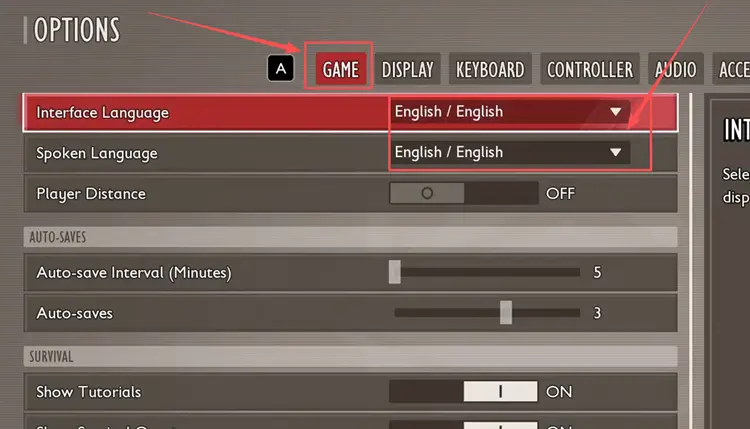
Start by switching Grounded 2's interface language to English so LagZapper can use it as the source for translation.
#1. Launch Grounded 2 and open Options.
#2. Go to Game > Interface Language.
#3. Select English and apply the setting.
Step 2. Download LagZapper and Select Grounded 2
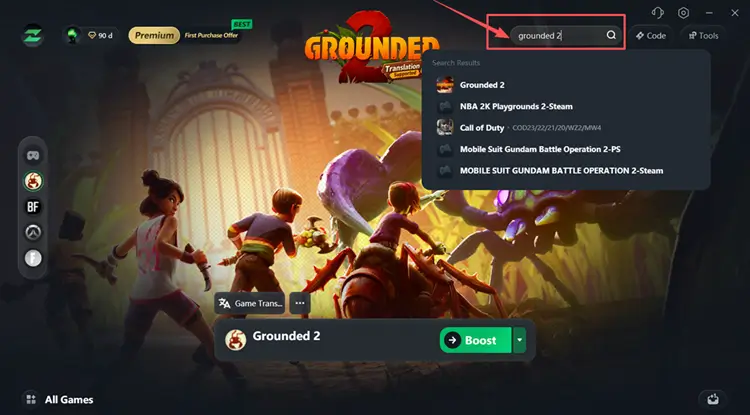
Next, open Grounded 2 in LagZapper to access the translation features built into the app.
#1. Download and install LagZapper, then launch the app.
#2. Search for Grounded 2 and select it from the search results.
Step 3. Enable Game Translation Before Launching Grounded 2
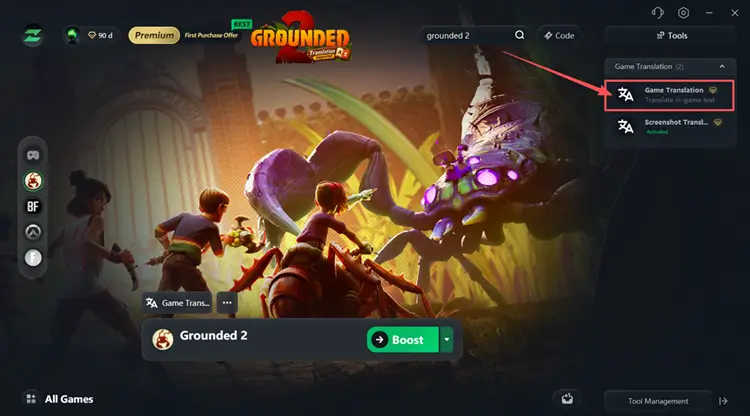
With Grounded 2 selected, turn on Game Translation before starting the game.
#1. Open Game Translation on the Grounded 2 page.
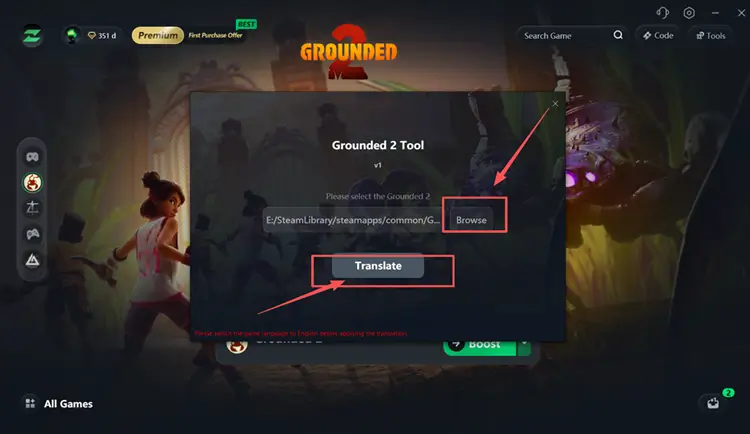
#2. Click Browse and select the folder where Grounded 2 is installed.
#3. Confirm the correct game path, then click Translate to apply the Russian translation.
Step 4. Launch Grounded 2 and Check the Russian Translation
Once Game Translation is active, launch Grounded 2 and check that the Russian translation appears correctly in the game.
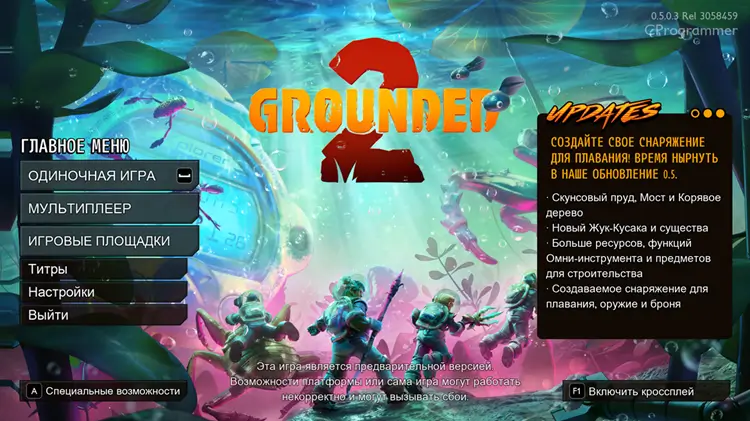
Optional: Use Screenshot Translator for Other On-Screen Text
For text that appears elsewhere on the screen, Screenshot Translator provides an additional on-demand way to translate what you are currently viewing.
#1. Open Screenshot Translator in LagZapper.
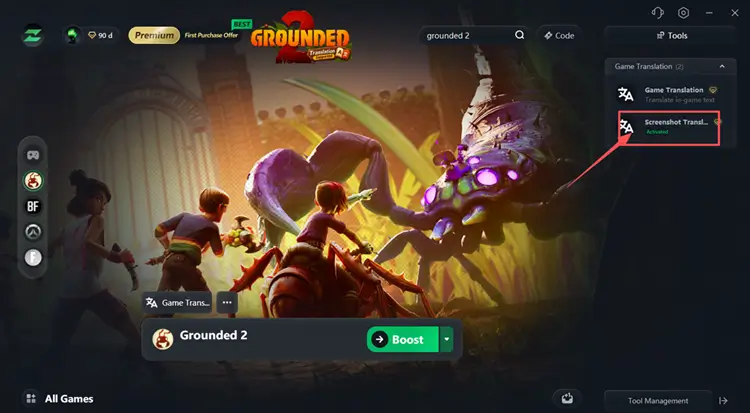
#2. Set your preferred translation shortcut key.
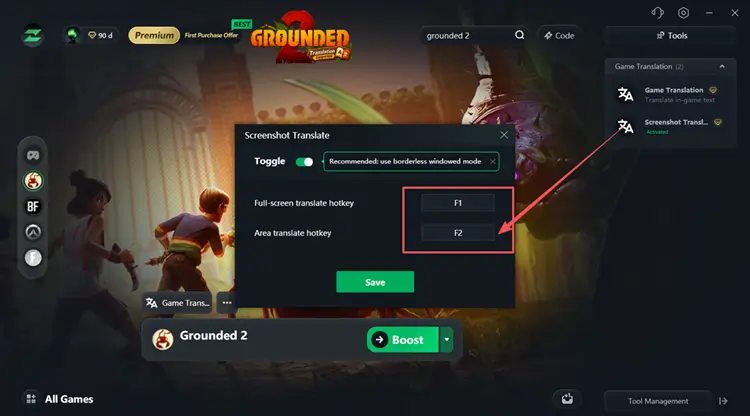
#3. While playing Grounded 2, press the shortcut whenever you want to translate text shown on the current screen.
Tip: Screenshot Translator supports multiple target languages, including English, Russian, German, French, Turkish, Thai, and Vietnamese, so you can switch languages based on what you need while playing.
LagZapper vs. a Traditional Grounded 2 Russian Localization
Traditional Russian localization and LagZapper both provide alternatives to the missing official Russian support, but they work differently.
Traditional Grounded 2 Russian Localization: Traditional Russian localizations usually require downloading a community-made package and manually installing translation files. Some may also need updates after new Grounded 2 patches.
LagZapper Translation: LagZapper enables translation directly inside the game booster without requiring a separate Russian localization package.
| Method | Traditional Russian Localization | LagZapper Translation |
|---|---|---|
| Download localization files | Usually required | No |
| Manually install localization files | Often required | No |
| Set Grounded 2 to English first | Depends | Yes |
| Translation method | Installed localization files | Built-in translation features |
| On-demand screen translation | Usually not included | Screenshot Translator |
| Setup | Manual file installation | One click to enable translation in LagZapper |
[Bonus] How to Reduce Lag in Grounded 2 with LagZapper
Grounded 2 supports online co-op, where high ping, packet loss, or unstable routing can make movement and multiplayer sessions feel less responsive. Besides its translation features, LagZapper can optimize the connection route to Grounded 2 servers, helping reduce game lag, lower ping, and improve connection stability while playing online.
Why Use LagZapper for Grounded 2
- Smart Route Optimization: Automatically finds a faster and more stable route for Grounded 2, helping reduce high ping, packet loss, jitter, and unstable connections.
- Reduce Lag and Improve Stability: Lower ping, reduce game lag, minimize ping spikes, and improve connection stability during Grounded 2 co-op sessions.
- One-Click Boost: Optimize your Grounded 2 connection in seconds without manually changing complicated router or Windows network settings.
- Support for 3,000+ Games: Use LagZapper to improve connection stability across more than 3,000 online games, including Grounded 2 and other popular multiplayer games.
The Bottom Line
Grounded 2 does not officially support Russian currently, so players need an alternative way to translate the game. Set Grounded 2 to English first, then use LagZapper's built-in Game Translation or Screenshot Translator without manually installing localization files. For smoother online gameplay as well, download LagZapper to lower ping, reduce game lag, and reduce packet loss while playing Grounded 2.
FAQs about Grounded 2 Russian Language
Q1. Does Grounded 2 have Russian language support?
No. Russian is not currently included in the official Grounded 2 language list on Steam.
Q2. How can I play Grounded 2 in Russian?
Set Grounded 2 to English, select its installation folder in Game Translation, and click Translate.
Q3. Why is Grounded 2 translation not working?
Check that Grounded 2's interface language is set to English before starting the LagZapper translation feature.
Q4. Do I need to download a Grounded 2 Russian localization?
Not with LagZapper. Traditional Russian localizations usually require downloading and manually adding files to the game folder.
Q5. Did Into the Abyss add Russian to Grounded 2?
No. Into the Abyss launched on August 11, 2026, but Steam's current supported-language list still does not include Russian.