
GTA 6 Preload Guide: Date, Size & How to Download on PS5 and Xbox
The countdown to Vice City is on! The GTA 6 preload kicks off on November 10, 2026, for digital preorders on PS5 and Xbox Series X|S. Rockstar says preloading may require up to 212 GB of free storage, depending on your console. Clear some space now, download early, and get ready for the November 19 launch.
This guide will explain GTA 6 preload times by region, download size and storage requirements, how to preload on PS5 and Xbox, and what to check before starting.
GTA 6 Preload Date and Start Times
Rockstar confirms the digital GTA 6 preload starts November 10, 2026: PS5 at local midnight, Xbox globally at 00:00 GMT.
| Time Zone | PS5 Preload Start | Xbox Preload Start |
|---|---|---|
| US Pacific (PST) | Nov 10, 12:00 AM | Nov 9, 4:00 PM |
| US Eastern (EST) | Nov 10, 12:00 AM | Nov 9, 7:00 PM |
| UK (GMT) | Nov 10, 12:00 AM | Nov 10, 12:00 AM |
| Central Europe (CET) | Nov 10, 12:00 AM | Nov 10, 1:00 AM |
| China / Singapore (UTC+8) | Nov 10, 12:00 AM | Nov 10, 8:00 AM |
| Japan (JST) | Nov 10, 12:00 AM | Nov 10, 9:00 AM |
| Australia East (AEDT) | Nov 10, 12:00 AM | Nov 10, 11:00 AM |
Note: Code-in-box copies are expected November 12; redeem upon receipt. Preloading isn't early access: GTA 6 unlocks November 19 at local midnight.
GTA 6 Preload Size and Storage Requirements
Rockstar confirms the GTA 6 preload requires up to 212 GB of available storage, depending on your device.
This figure refers to the required free space, not a fixed GTA 6 download size for every console. Download size is the amount of data transferred, while installed size is the space the game occupies afterward. Actual download and installation sizes may vary between PS5 and Xbox Series X|S.
Tip: Before preloading, check your console's available storage, delete or move unused games if needed, and leave some extra room for future updates.
How to Preload GTA 6 on PS5 and Xbox
Sign in to the account used to preorder GTA 6, confirm your purchase or redeem your download code, and start when preloading opens.
👉 How to Preload GTA 6 on PS5
Step 1. Open Game Library > Your Collection using the PlayStation account that preordered GTA 6, then select the game.
Step 2. Select the release countdown timer and enable auto-download, or choose Download once preloading becomes available.
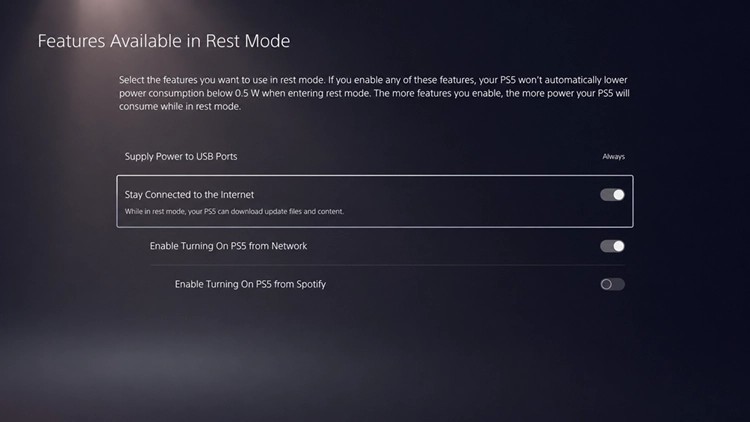
Step 3. Enable Stay Connected to the Internet under Settings > System > Power Saving > Features Available in Rest Mode, then enter Rest Mode.
👉 How to Preload GTA 6 on Xbox Series X|S
Step 1. Open My games & apps > Full library > Owned games using your preorder account, then select GTA 6.
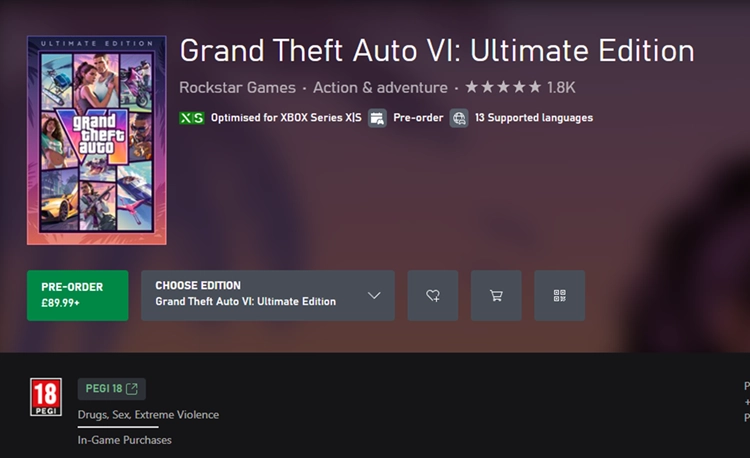
Step 2. Select Install once GTA 6 preloading becomes available, and follow the prompts to begin downloading.
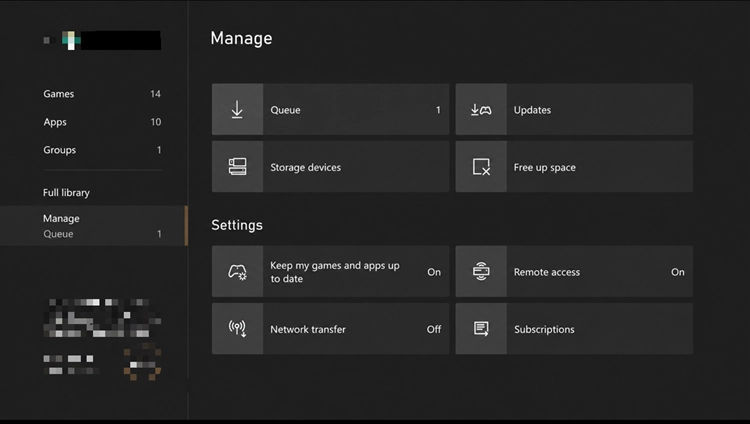
Step 3. Check My games & apps > Manage > Queue, enable automatic updates under Settings > System > Updates, and use Sleep mode.
Can You Preload GTA 6 on PC?
No, GTA 6 cannot be preloaded on PC. Rockstar has confirmed the November 19, 2026 launch for PS5 and Xbox Series X|S only. A PC release date, preload schedule, download size, and system requirements have not been announced. PC players should follow Rockstar's official updates for future announcements.
[Bonus] Play GTA Online While Waiting for GTA 6 With LagZapper
While waiting for GTA 6 to launch, you can return to GTA Online to explore Los Santos, complete heists, race, and play with friends. If high ping, packet loss, or unstable routing disrupts your sessions, LagZapper can optimize the connection route between your Windows PC and GTA Online to help lower ping, reduce game lag, and improve connection stability.
Why Use LagZapper for GTA Online?
LagZapper can help improve connection stability during GTA Online missions, heists, and multiplayer activities:
- Smart Route Optimization: Finds a faster and more stable route to game servers, helping reduce high ping, packet loss, jitter, and unstable routing.
- Reduce Lag & Improve Stability: Helps lower ping, reduce game lag, minimize ping spikes, and improve responsiveness during races, heists, and multiplayer sessions.
- One-Click Boost: Optimizes your game connection without requiring manual changes to complicated network, DNS, or router settings.
- Support for 3,000+ Games: LagZapper supports GTA 5 and thousands of other popular online games across multiple genres.
How to Use LagZapper for GTA Online
Follow these three steps to optimize your PC connection before starting GTA Online.
Step 1. Download and Install LagZapper
Download LagZapper for Windows and follow the on-screen instructions to complete the installation on your PC.
Step 2. Find GTA 5 in LagZapper
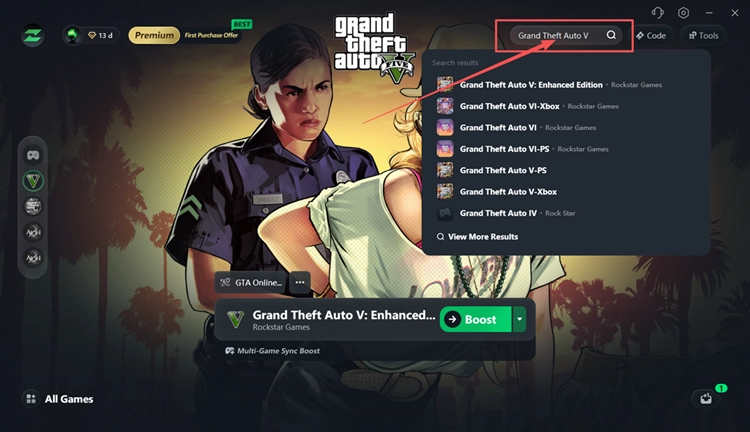
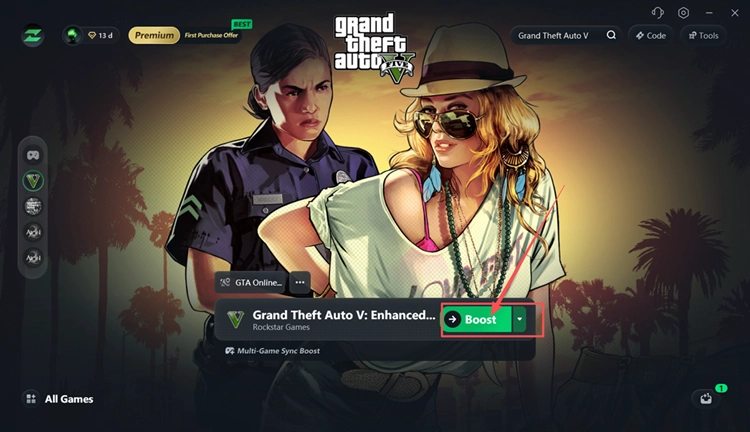
Launch LagZapper, sign in, and search for Grand Theft Auto V in the search box.
Step 3. Choose a Node and Click Boost
Select a suitable server or recommended node, click Boost, then launch GTA 5 and enter GTA Online.
The Bottom Line
The GTA 6 preload begins November 10, 2026, on PS5 and Xbox Series X|S, with up to 212 GB of available storage required depending on your device. Preloading lets you download the game before its November 19 launch. Check your preorder, prepare enough storage, and follow the steps for your console.
While waiting, players can download LagZapper to optimize their GTA Online connection, lower ping, reduce game lag, and enjoy more stable multiplayer sessions.
FAQs About GTA 6 Preload
Q1. When Is the GTA 6 Preload Date?
Digital preloading begins November 10, 2026, for players on PS5 and Xbox Series X|S.
Q2. What Time Does GTA 6 Preload Start on PS5?
The GTA 6 preload time on PS5 is 12:00 AM local time on November 10, 2026.
Q3. When Does GTA 6 Preload Begin on Xbox Series X|S?
The GTA 6 preload Xbox window opens globally at 00:00 GMT on November 10, 2026.
Q4. How Much Storage Does the GTA 6 Preload Require?
The GTA 6 preload size requirement is up to 212 GB of available storage, depending on your device.
Q5. Is the GTA 6 Download Size Exactly 212 GB?
No. Rockstar specifies up to 212 GB of available storage, not an exact download file size.
Q6. Can You Preload GTA 6 on PC?
No. Rockstar has not announced a PC release date or a GTA 6 PC preload schedule.