
Helldivers 2 Crashing on PC After Warhammer 40K Update? 7 Fixes
Is Helldivers 2 crashing on PC after the latest update or on launch? Reports of Helldivers 2 crashes increased around the August 12 Warhammer 40,000 Legendary Warbond release, including crashes on startup and while loading the Super Destroyer. Arrowhead has also confirmed a crash linked to Alt-Tab and the Democracy Terminal, recommending players avoid Alt-Tab for now. If Helldivers 2 keeps crashing on PC or starts crashing after the update, try the seven fixes below.
Why Does Helldivers 2 Keep Crashing After the Latest Update?
Crashes appearing after the latest update are not necessarily caused by the Warhammer 40K Warbond itself. Players have reported Helldivers 2 crashes on startup, after launch, and while loading the Super Destroyer, including cases where the game worked normally before updating. Common causes of Helldivers 2 crashing on PC include:
- Newly introduced game bugs
- Alt-Tab or Democracy Terminal crash issues
- Corrupted game files after an update
- GameGuard conflicts
- Outdated or unstable GPU drivers
- Corrupted shader cache
- DirectX launch option conflicts
- Incompatible graphics settings
- Background overlays or applications
- Unstable CPU or GPU overclocks
How to Fix Helldivers 2 Crashing on PC After the Warhammer 40K Update
To troubleshoot Helldivers 2 crashing on PC after the Warhammer 40K update, work through the fixes below in order.
Fix 1. Avoid Alt-Tab and the Democracy Terminal Temporarily
Arrowhead has confirmed that Helldivers 2 crashes may occur when players Alt-Tab out of the game or enter the Democracy Terminal. The developer recommends avoiding Alt-Tab while the issue is being investigated.
Step 1. Launch Helldivers 2 and avoid pressing Alt + Tab during gameplay.
Step 2. Avoid switching to other apps, and temporarily stay away from the Democracy Terminal if it appears to trigger a crash.
Step 3. Restart the game and check whether Helldivers 2 keeps crashing.
If the crashes stop, the issue is likely related to the confirmed game-side bug rather than your PC hardware.
Fix 2. Verify Helldivers 2 Game Files
Damaged or missing game files are another possible cause of crashes after an update. Verifying the installation can replace corrupted files and fix launch or in-game crashes.
Step 1. Open Steam > Library, right-click HELLDIVERS 2, and select Properties.
Step 2. Go to Installed Files > Verify integrity of game files.
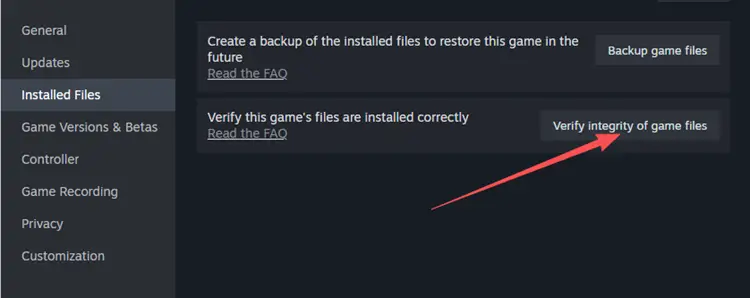
Step 3. Wait for Steam to finish, then restart Steam and launch the game again.
If Steam repairs or replaces any files, test whether Helldivers 2 still crashes before moving to the next fix.
Fix 3. Clear the Shader Cache
An outdated or corrupted shader cache can also conflict with newly updated game files or graphics settings, leading to repeated PC crashes.
Step 1. Open Settings > System > Storage > Temporary Files.
Step 2. Select DirectX Shader Cache, then click Remove files.
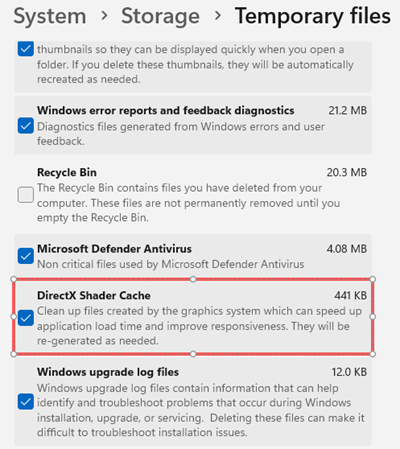
Step 3. Restart your PC and launch Helldivers 2 again.
The game may stutter briefly at first while the shader cache is rebuilt.
Fix 4. Repair GameGuard
Helldivers 2 uses nProtect GameGuard, and corrupted or malfunctioning GameGuard files may cause Helldivers 2 crashing on startup or prevent the game from launching properly.
Step 1. Close Helldivers 2 and Steam, then open the Helldivers 2 installation folder.
Step 2. Locate the GameGuard files or uninstall tool and repair or reinstall GameGuard.
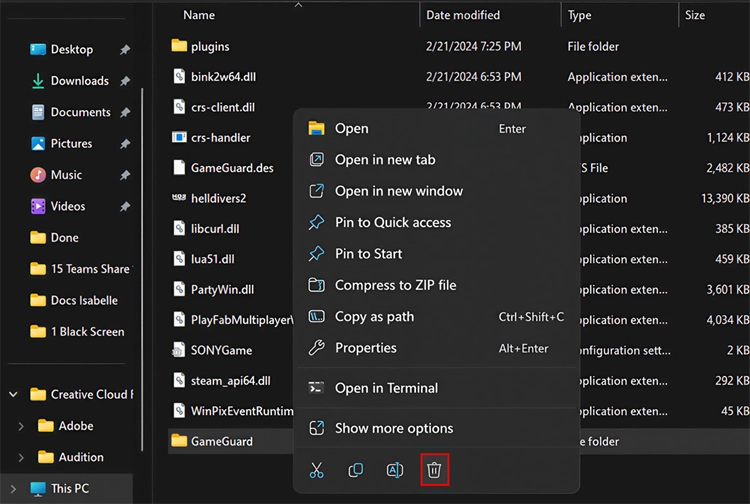
Step 3. Restart your PC, verify the game files in Steam, and launch Helldivers 2 again.
Fix 5. Remove DX11 Launch Options
Old DirectX 11 launch commands may conflict with the latest game update and cause Helldivers 2 crashes or launch problems.
Step 1. Open Steam > Library, right-click HELLDIVERS 2, and select Properties.
Step 2. Under General, find Launch Options and remove any custom DX11 commands.
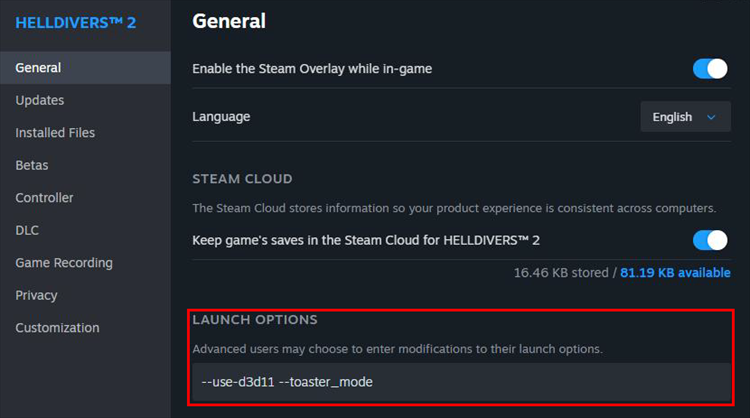
Step 3. Leave the Launch Options field empty, close the window, and restart Helldivers 2.
If you added DX11 parameters from an older troubleshooting guide, test the game again without them.
Fix 6. Update or Reinstall Your GPU Driver
Crashes on startup, during loading, or shortly after entering the Super Destroyer may be related to an outdated or unstable GPU driver.
Step 1. Open the NVIDIA App or AMD Software: Adrenalin Edition and check for driver updates.
Step 2. Install the latest stable or recommended graphics driver for your GPU.
Step 3. Restart your PC and launch Helldivers 2 again.
When the problem begins immediately after a GPU driver update, try a clean driver installation or roll back to the previous stable version.
Fix 7. Lower Graphics Settings and Disable Overlays
For crashes that occur after entering the Super Destroyer or starting a mission, reduce GPU load and disable background overlays that may conflict with the game.
Step 1. Disable overlays such as Steam Overlay, Discord Overlay, NVIDIA Overlay, Xbox Game Bar, MSI Afterburner, and RivaTuner.
Step 2. Lower demanding graphics settings such as Texture Quality, Shadow Quality, Reflection Quality, Volumetric Fog, and Screen-Space Global Illumination.
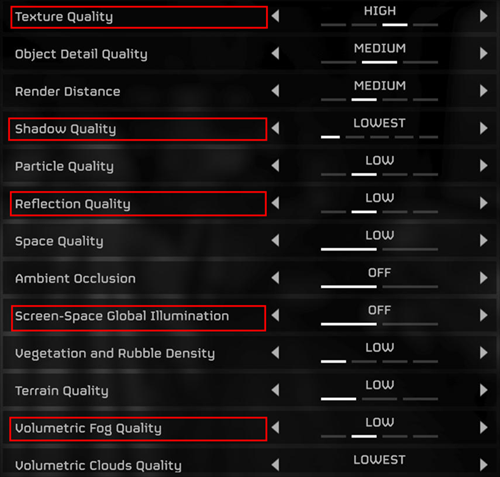
Step 3. Restart Helldivers 2 and test the game after changing only a few settings at a time.
[Bonus] Improve Helldivers 2 Connection Stability With LagZapper
Game-side bugs, driver problems, and GameGuard errors should be addressed with the fixes above first. For connection-related problems such as high ping, packet loss, unstable routing, or frequent disconnects, LagZapper can optimize the network route between your PC and the game server.
Highlights of LagZapper for Helldivers 2
- Reduce Lag: Optimize unstable routes to reduce lag during multiplayer missions.
- Lower Ping: Find a more efficient route to the game server and lower ping during online play.
- Reduce Packet Loss: Improve connection stability and help reduce packet loss during matches.
- Reduce Disconnects: Avoid congested or unstable network paths for a more consistent connection.
How to Boost Helldivers 2 With LagZapper
Here is a step-by-step guide on how to use LagZapper for Helldivers 2 to optimize your connection, lower ping, and reduce packet loss during online play.
Step 1. Download and Install LagZapper
Download LagZapper for Windows and complete the installation.
Step 2. Open LagZapper and Select Helldivers 2
Launch LagZapper, sign in, and search for Helldivers 2 in the supported games list.
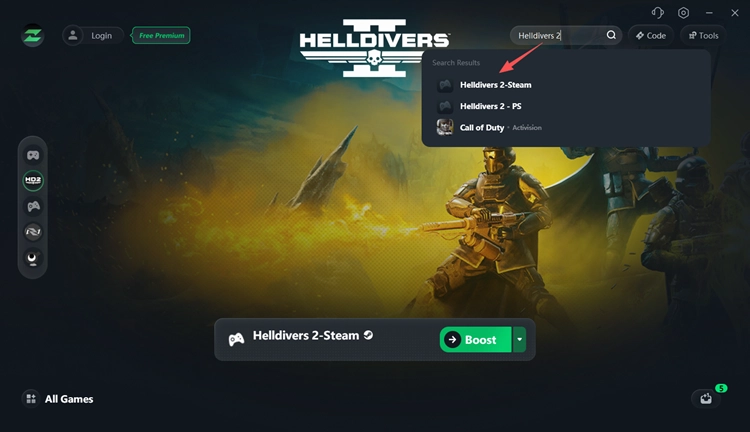
Step 3. Boost and Play Helldivers 2
Choose your preferred server or node, click Boost, then launch Helldivers 2 and play with a more stable, optimized network connection.
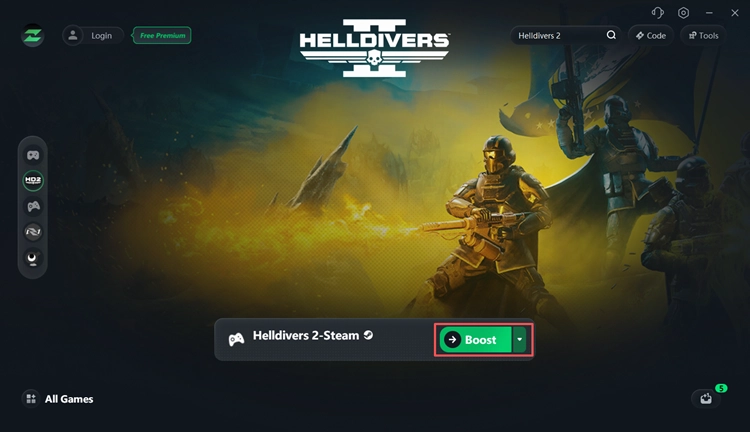
The Bottom Line
Helldivers 2 crashes after the latest update may come from corrupted game files, driver problems, shader cache conflicts, or other software issues. Start with the seven fixes above and check Arrowhead's latest known issues for game-side bugs. For high ping, packet loss, frequent disconnects, or unstable multiplayer connections, download LagZapper to optimize your network route and improve connection stability while playing Helldivers 2.
FAQ on Helldivers 2 Crashing on PC
Q1. Why Does Helldivers 2 Keep Crashing on PC?
Helldivers 2 may crash because of game bugs, corrupted files, GPU drivers, GameGuard conflicts, shader cache issues, overlays, or unstable graphics settings.
Q2. How Do I Fix Helldivers 2 Crashing on PC?
Verify the game files, update your GPU driver, clear the shader cache, repair GameGuard, remove custom launch options, and disable unnecessary overlays.
Q3. Why Is Helldivers 2 Crashing After the Latest Update?
Updates can introduce new bugs or conflicts with existing files and settings. Players have reported startup, loading, and random crashes after recent updates.
Q4. How Do I Fix Helldivers 2 Crashing on Startup?
Verify game files, repair GameGuard, update your graphics driver, remove old launch options, and temporarily disable background overlays.
Q5. Can GameGuard Cause Helldivers 2 to Crash?
GameGuard-related errors or corrupted files can contribute to startup and launch problems. Repairing or reinstalling GameGuard has helped some players.
Q6. Why Does Helldivers 2 Crash When Loading Into a Mission?
Mission-loading crashes may be related to game bugs, corrupted files, graphics settings, GameGuard, or conflicts introduced by a recent update.