
How to Play Palworld 1.0: Beginner Guide to Pals, Bases & Progression
Palworld is an open-world survival crafting game where players capture mysterious creatures called Pals, gather resources, build bases, and explore dangerous regions. With the recent 1.0 release introducing Sunreach, the World Tree, new Pals, and major progression changes, new players have more content to explore and a clearer path through the game.
This Palworld beginner guide will walk you through how to play Palworld, progress efficiently, and build a strong foundation for your adventure.
What’s New in Palworld 1.0 for Beginners
Palworld 1.0 reshapes how new players begin and progress, making it important to understand the changes before exploring the expanded world and following its new adventure.
New Main Missions and Story Progression
Palworld 1.0 reshapes progression around new main missions that connect exploration, tower bosses, and the route to the World Tree more naturally. Instead of wandering without direction, beginners receive a clearer sequence of objectives that introduces major systems and gradually leads toward harder regions and story milestones.
Sunreach, the World Tree, and New Exploration Features
Palworld 1.0 expands the world with Sunreach, a mysterious group of floating islands, and opens the World Tree as a major story destination. New Watchtowers also reveal surrounding map areas and serve as fast travel points, making the expanded Palpagos Islands easier to navigate.

72 New Pals, Awakening, and Mutation
Palworld 1.0 adds 72 Pals, raising the total number to 287 and providing more choices for combat, travel, and base work. It also introduces Awakening, which uses Radiant Gems from the World Tree to strengthen Pals, and Mutation, which can produce unusually powerful offspring through breeding.

Palworld Beginner Guide 2026: How to Play Palworld
Getting started in Palworld 1.0 becomes much easier when you understand the early progression path and make the right choices before expanding your adventure across the Palpagos Islands.
Choose Your World Settings and Follow Main Missions
Start with the default world settings so combat, gathering, hunger, and capture rates remain balanced while you learn the basics. Players who prefer a lighter survival experience can reduce the death penalty or slightly raise resource and capture rates without removing the game’s core progression.
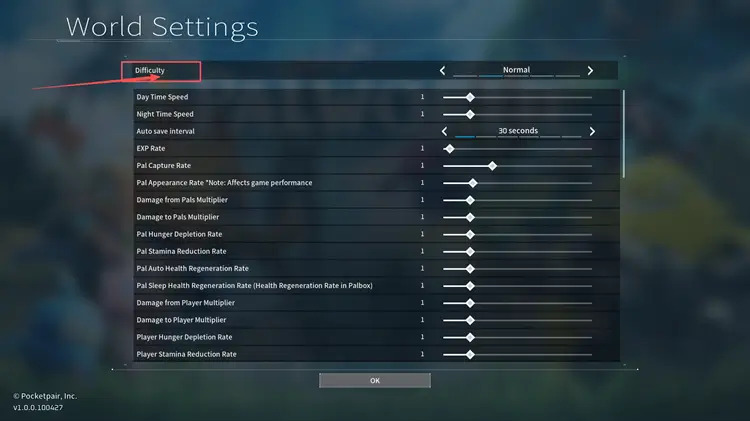
Once you enter the world, follow the main mission markers instead of wandering without direction. They introduce important systems at a steady pace, lead you toward settlements and new regions, and help you judge when your equipment and Pal team are ready for major challenges.
Gather Resources and Craft Essential Gear
Collect wood, stone, Paldium Fragments, and food as you move through the starting area, while opening nearby chests for extra supplies. Use these materials to build a Primitive Workbench and craft a pickaxe, axe, basic weapon, armor, and enough Pal Spheres for early encounters.

A bow is useful for weakening Pals from a safer distance without defeating them too quickly. Continue gathering materials during every trip, since tools, repairs, base facilities, ammunition, and Pal Spheres can drain your supplies faster than expected as you move farther from the starting area.
Catch Useful Early-Game Pals
Weaken low-level Pals before throwing a Pal Sphere, then build an early team that supports both combat and base work. Prioritize Pals with useful Work Suitabilities such as Mining, Lumbering, Transporting, Planting, and Watering instead of choosing every team member only by appearance or damage.

Learn to summon, recall, and switch Pals during combat so they help without knocking out creatures you want to catch. A balanced roster makes exploration safer, covers different combat needs, and gives your first base enough workers to begin producing essential resources for different jobs.
Complete Capture Bonuses and Strengthen Your Team
Palworld 1.0 reduces the Capture Bonus requirement from 12 catches to 5 for each Pal species, making repeated captures one of the fastest early sources of experience. Check your Paldeck progress and complete bonuses naturally while exploring instead of catching only one of every Pal.
Keep duplicates with useful skills, passives, or Work Suitabilities and use your growing roster to improve both combat and base production. This approach raises your level, unlocks more technologies, and strengthens your options without forcing you to depend entirely on defeating enemies for experience during the opening levels.
Manage Hunger and Expand Your Inventory
Carry food for both yourself and your active Pals, and eat before hunger becomes a problem during longer trips. Berries and other basic foods are easy to collect early, while a Feed Box keeps working Pals supplied once your base starts operating and producing materials.
Carry Weight and Stamina are practical early stat choices for longer gathering and exploration trips, although not every point needs to go there. Store heavy resources regularly, organize chests by item type, and use quick storage tools to avoid becoming overencumbered during longer trips away from base.
Set Up and Automate Your First Base
Choose a relatively flat location with nearby wood, stone, and preferably ore, then place the Palbox where its boundary leaves enough usable building space. Add a Workbench, storage, Pal Beds, and a Feed Box before assigning several Pals to work around the base.

Match each Pal’s Work Suitability with the right task and place storage close to production areas to shorten transport routes. Once Mining, Lumbering, and Transporting are covered, the base can generate essential materials while you explore, complete missions, and search for stronger Pals without constant manual gathering.
Explore Nearby Areas and Activate Fast Travel
Explore beyond the starting point after preparing basic gear, but activate every Fast Travel point you pass to reduce repeated travel. In Palworld 1.0, Watchtowers also reveal surrounding map areas and become teleport locations after activation.

Open chests, visit settlements, and gather resources while following the main route. Nearby dungeons may offer valuable materials, schematics, and other rewards, but enter only when your equipment and Pal team can handle the enemies and still carry the resources you collect before returning safely to your base.
Unlock Key Technologies and Prepare for Early Bosses
Spend Technology Points on upgrades that support immediate progress, including better tools, Pal Spheres, armor, Pal Gear, storage, and production facilities. Avoid unlocking every available recipe at once, since some technologies provide little value before you have the materials or facilities to use them.
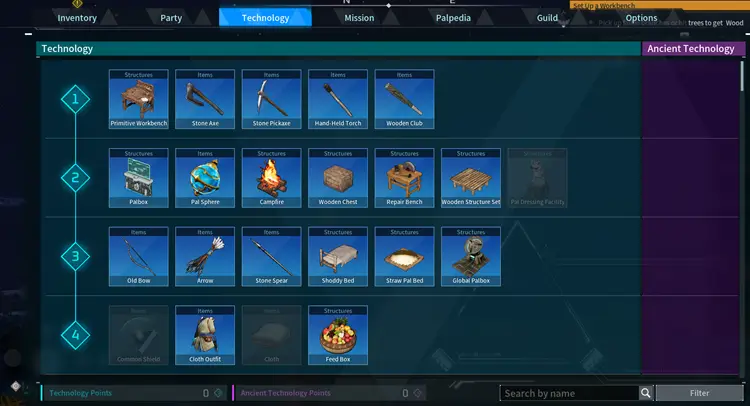
Before challenging an Alpha Pal or tower boss, repair your equipment, bring food and Pal Spheres, and build a team suited to the encounter. Major boss progression also helps open the route toward later missions, regions, and stronger technologies, so preparation supports long-term progress throughout the early game.
How to Improve Palworld Multiplayer with LagZapper [No Lag]
Players searching for how to play Palworld with friends may discover that getting friends into the same world is only the beginning. When teammates connect across regions, long-distance routing, packet loss, or network congestion can cause high ping, delayed actions, rubberbanding, and disconnects during exploration, base building, or boss fights. LagZapper helps optimize the connection route between your PC and the multiplayer server.
Why Use LagZapper for Palworld?
- Smart Route Optimization: Automatically finds a faster and more stable network route for Palworld, helping reduce packet loss, jitter, and connection instability when joining multiplayer worlds or servers.
- Reduce Lag & Improve Stability: Reduce game lag, ping spikes, delayed actions, rubberbanding, and disconnects caused by unstable routing or network congestion during exploration, base building, and boss fights with friends.
- One-Click Boost: Optimize your Palworld connection in seconds with one click, without manually changing complicated router or Windows network settings.
- Support for 3,000+ Games: Use LagZapper to improve connection stability across more than 3,000 supported online games, including Palworld, Fortnite, VALORANT, and Path of Exile 2.
How to Boost Palworld with LagZapper [Step-by-Step Guide]
Before joining your next Palworld multiplayer session, follow these steps to optimize your connection with LagZapper.
Step 1. Download and Install LagZapper
Download LagZapper for Windows and follow the on-screen instructions to complete the installation.
Step 2. Open LagZapper and Search for Palworld
Launch LagZapper, use the search bar to find Palworld, and select the game from the supported list.

Step 3. Boost and Play Palworld
Choose a suitable server or node when available, then click Boost before launching Palworld. LagZapper will optimize the connection route to help lower ping, reduce packet loss, and keep multiplayer sessions more stable.

Tip: LagZapper also includes one-click MOD cleanup for Palworld 1.0, plus quick access to a breeding tree, interactive map, and Pal tier list for easier planning and progression throughout your adventure.
The Bottom Line
Learning how to play Palworld 1.0 starts with following the main missions, catching useful Pals, and building a base that produces essential resources automatically. Spend Technology Points carefully, activate Fast Travel points, and strengthen your equipment and team before exploring harder regions or challenging powerful bosses.
For multiplayer affected by high ping, packet loss, or unstable routing, downloading LagZapper can help optimize the connection route and provide a smoother Palworld experience with friends.
FAQ About How to Play Palworld
Q1. How to start Palworld 1.0 as a beginner?
Start with default settings, craft essential gear, then follow mission markers toward early progression goals.
Q2. What should beginners spend Palworld Technology Points on?
Prioritize tools, Pal Spheres, armor, storage, Pal Gear, and immediately useful production facilities.
Q3. What are the best Palworld beginner tips?
Complete Capture Bonuses, activate Fast Travel, manage hunger, and match Pals with suitable base jobs.
Q4. How many captures complete a Capture Bonus in Palworld 1.0?
Palworld 1.0 requires five captures of each species to complete its Capture Bonus.
Q5. How to play Palworld with friends with fewer connection problems?
Use LagZapper to reduce ping, packet loss, rubberbanding, and multiplayer connection instability.