
MW4 Preload: Date, Time, Download Size & How to Preload
The MW4 preload begins on PC on October 15, 2026 at 9:00 AM PT, ahead of Campaign Early Access on October 16 and the worldwide launch on October 23. PC players can preload Modern Warfare 4 through Battle.net, Steam, and Xbox on PC. Some Battle.net users have already reported seeing MW4 content packages under Modify Install, but the official preload schedule remains unchanged. Below are the regional preload times, expected download size, storage requirements, and preload steps for each PC platform.
When Does the MW4 Preload Start?
The official MW4 preload time on PC is October 15, 2026 at 9:00 AM PT for digital pre-purchases. Campaign Early Access starts October 16, followed by DMZ Early Access on October 20 and the full release on October 23.
MW4 Preload Time by Region
| Region | MW4 Preload Date & Time |
|---|---|
| US West | October 15, 9:00 AM PT |
| US East | October 15, 12:00 PM ET |
| UK | October 15, 5:00 PM BST |
| Central Europe | October 15, 6:00 PM CEST |
| Turkey | October 15, 7:00 PM TRT |
| China | October 16, 12:00 AM UTC+8 |
| Japan | October 16, 1:00 AM JST |
| South Korea | October 16, 1:00 AM KST |
Modern Warfare 4 Launch Timeline
| Event | Date |
|---|---|
| PC Preload | October 15, 9:00 AM PT |
| Campaign Early Access | October 16 |
| DMZ Early Access | October 20 |
| Full Release | October 23 |
How to Preload Modern Warfare 4
Modern Warfare 4 will be available on PC through Battle.net, Xbox on PC, and Steam. The exact MW4 pre-download steps vary slightly by platform.
How to Preload MW4 on Battle.net
Some players can already access MW4 preload Battle.net packages through the installation settings.
Step 1. Open Battle.net and select Call of Duty.
Step 2. Click Modify Install and look for Modern Warfare 4 content packages.
Step 3. Select the MW4 content you want to install and confirm the download.
Tip: Some MW4 packages may appear before the official MW4 preload time. Restart Battle.net and check Modify Install again once the preload window opens.
How to Preload MW4 on Steam
Once the Modern Warfare 4 preload becomes available on Steam:
Step 1. Open Steam, go to Library, and select Call of Duty: Modern Warfare 4.
Step 2. Click the preload option and choose your installation drive.
The preload option may not appear immediately for every account when the rollout begins. Restart Steam and check the game page again after the official preload time.
How to Preload MW4 on Xbox on PC
Modern Warfare 4 is officially available on Xbox on PC. Once the preload opens:
Step 1. Open the Xbox app on your PC and go to My Library.
Step 2. Find Call of Duty: Modern Warfare 4 and open the game page.
Step 3. Select the available install or preload option, choose your installation drive, and start the download.
How Big Is the MW4 Preload?
Modern Warfare 4 officially requires 115 GB of SSD storage, but this is not a fixed MW4 preload size. The actual download varies by platform and selected content.
Early player-reported download sizes include:
- Around 110GB for selected MW4 packages
- Around 124GB for Campaign, DMZ, and Multiplayer
- Around 156GB for a larger installation
The final MW4 preload size may change with installed game modes, shared Call of Duty files, language packs, and optional content. For the MW4 pre download, keep more than 115GB of free SSD space available.
Before preloading, also check these key PC requirements:
| Requirement | PC Requirement |
| Storage | 115GB SSD |
| TPM | TPM 2.0 required |
| Secure Boot | Required |
| DirectX | DirectX 12 compatible system |
| Internet | Broadband connection |
Modern Warfare 4 also requires DirectX 12 compatibility. Checking storage, TPM 2.0, and Secure Boot before Campaign Early Access can help avoid setup issues after the download finishes.
[Bonus] Optimize Your Connection for MW4 with LagZapper
Once MW4 Multiplayer and DMZ go live, high ping, packet loss, unstable routing, and connection spikes can affect online matches. LagZapper is designed to optimize the network route between your PC and the game server, helping improve connection stability while playing Modern Warfare 4.
Why Choose LagZapper for MW4?
- Reduce MW4 Lag: Improve route stability to reduce lag spikes, delayed actions, and unstable online connections.
- Lower MW4 Ping: Use optimized routing to lower ping and improve responsiveness when connecting to game servers.
- Reduce MW4 Packet Loss: Stabilize your connection to reduce packet loss, rubberbanding, and sudden network interruptions.
- Smart Route Optimization: Automatically select a more stable route based on current network conditions and server connections.
How to Use LagZapper for MW4
Using LagZapper only takes a few steps:
Step 1. Download and install LagZapper on your Windows PC.
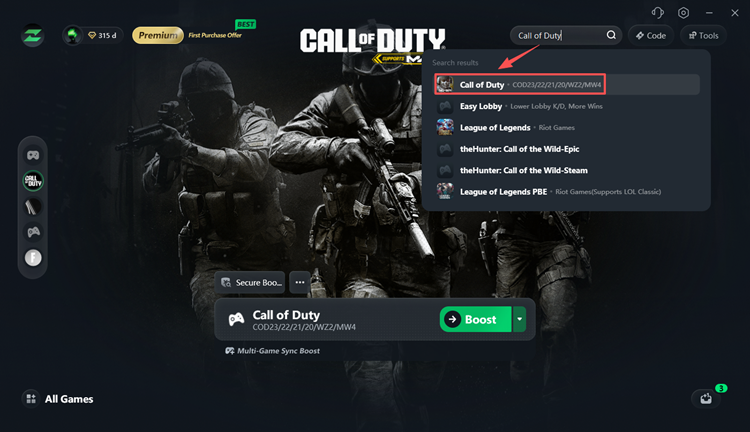
Step 2. Open LagZapper, search for Call of Duty, and select the MW4 entry.
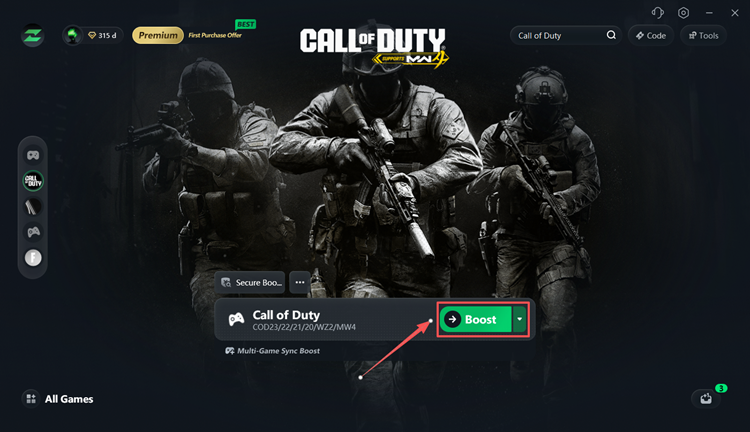
Step 3. Choose a recommended server or node, then click Boost before launching Modern Warfare 4.
The Bottom Line
The MW4 preload starts October 15 at 9:00 AM PT on PC, ahead of Campaign Early Access on October 16. Modern Warfare 4 requires 115GB of SSD storage, while the actual preload download may vary by launcher and selected content. Preload the game through Battle.net, Steam, or Xbox on PC and leave additional SSD space available for installation and updates.
FAQs About MW4 Preload
Q1. When can I preload MW4?
The official MW4 preload starts October 15, 2026 at 9:00 AM PT on PC for eligible digital pre-purchases.
Q2. What time is the MW4 preload?
The MW4 preload time is 9:00 AM PT / 12:00 PM ET on October 15. Europe and Asia begin later the same day or early October 16.
Q3. Can I preload MW4 on Battle.net?
Yes. Battle.net is an official MW4 PC platform. Once preload becomes available, check Call of Duty > Modify Install for Modern Warfare 4 content packages.
Q4. Can I preload Modern Warfare 4 on Steam?
Yes. Steam is one of the official MW4 PC platforms. Check the MW4 game page or Library after the official PC preload begins.
Q5. Why is my MW4 preload not showing?
Restart the launcher and check again after the official preload time. On Battle.net, open Modify Install to look for MW4 content packages.
Q6. How big is the MW4 preload?
The official PC storage requirement is 115GB SSD, but the actual MW4 preload size varies. Player reports currently range from about 110GB to 156GB depending on selected content.