
Path of Exile 2 Account Link: Steam, PS5 & Xbox Guide
The Path of Exile 2 account link system lets you connect Steam, PS5, and Xbox to the same Path of Exile account and use Path of Exile 2 cross-progression across supported platforms. PoE 2 also uses sub-accounts, so linked platforms may show different characters when a different sub-account is selected. This guide explains how to link a Steam account to Path of Exile 2, connect PS5 and Xbox, manage sub-accounts, and understand how Path of Exile 2 merge accounts works.
Can You Link Your Path of Exile 2 Account?
Yes. Path of Exile 2 supports account linking and cross-progression across Steam, PlayStation 5, and Xbox Series X/S. To access the same characters, connect your platform logins to the same Path of Exile account and select the correct PoE sub-account.
| Platform | Account Linking | Cross-Progression |
|---|---|---|
| Steam | Yes | Yes |
| PlayStation 5 | Yes | Yes |
| Xbox Series X/S | Yes | Yes |
One limitation applies to PlayStation: character progress can move across platforms, but some purchases, Points, microtransactions, and stash tab functionality remain platform-restricted.
How to Link Path of Exile 2 to Steam, PlayStation, and Xbox
You can link Steam, PlayStation, and Xbox through the official Path of Exile account page. The steps are similar for each platform, including players looking for how to link a Steam account to Path of Exile 2.
Step 1. Log In to Your PoE Account
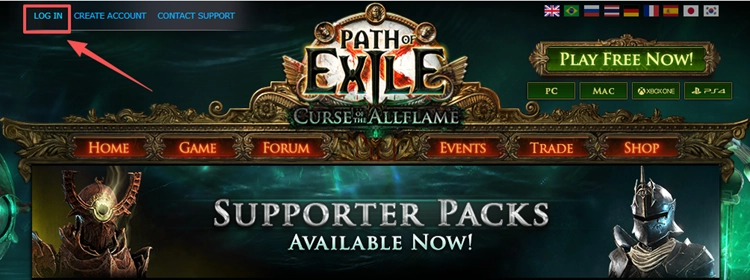
Go to the official Path of Exile website and click LOG IN in the top-left corner. Sign in to the PoE account that contains your main characters, purchases, or progress before linking another platform.
Step 2. Open Manage Account
From your account page, click Manage Account.

Step 3. Connect Your Steam, PlayStation, or Xbox Account
Under Secondary Login, click CONNECT next to Steam, Sony, or Microsoft. To link your Steam account to Path of Exile 2, select Steam, sign in, and authorize the connection.
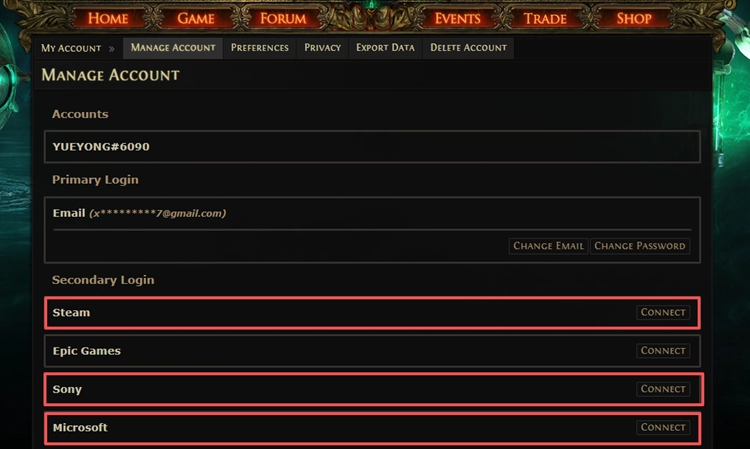
Tip: Confirm the request through email when required, and make sure you are linking the correct Steam, PlayStation, or Xbox account.
Step 4. Check Your PoE Sub-Account
Launch Path of Exile 2 and select the correct sub-account. Use the same sub-account across platforms to access the same characters and progress.
How Does Path of Exile 2 Cross-Progression Work?
Path of Exile 2 cross-progression lets you continue with the same characters across supported PC, PlayStation 5, and Xbox Series X/S platforms. After linking your accounts, select the same PoE sub-account on each platform to access the same characters and progress.
PlayStation has separate purchase restrictions. Character progress can carry across platforms, while PlayStation Points and certain microtransactions remain restricted to PlayStation.
Can You Merge Path of Exile 2 Accounts?
You can link multiple existing Path of Exile accounts under the same account structure, but their characters and progress are not combined into one sub-account. This may happen when you have separate accounts from:
- Steam
- PlayStation
- Xbox
- The standalone Path of Exile client
After linking them, the original accounts remain as separate sub-accounts. You can switch between them from the character selection screen, but characters and progress stay with their original sub-account.
For a Path of Exile 2 merge accounts request involving existing characters or purchases, check which sub-account owns the content before changing account connections. Contact Grinding Gear Games Support when the account setup is unclear.
[Bonus] Optimize Your PoE 2 Connection With LagZapper
After your account is linked correctly, network quality can still affect login, area loading, and online gameplay. LagZapper optimizes the route between your PC and the PoE 2 server, which can help with high ping, packet loss, unstable routing, or frequent connection drops.
Key Features of LagZapper for PoE 2
- Help lower ping during Path of Exile 2 gameplay
- Help reduce packet loss and connection instability
- Optimize routing between your device and the selected PoE 2 server
- Select a suitable network node for more stable cross-region connections
How to Use LagZapper for Path of Exile 2
Follow these three steps to optimize your PoE 2 network route before launching the game.
Step 1. Download and Install LagZapper
Download LagZapper, complete the installation, and sign in to your account.
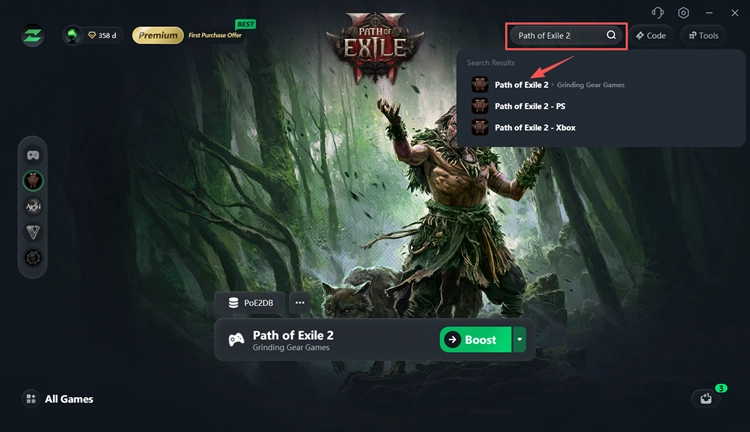
Step 2. Search for Path of Exile 2
Enter Path of Exile 2 in the search bar and select the game.
Step 3. Select a Server and Boost
Choose your PoE 2 server region and a recommended node, then click Boost Now before launching the game.
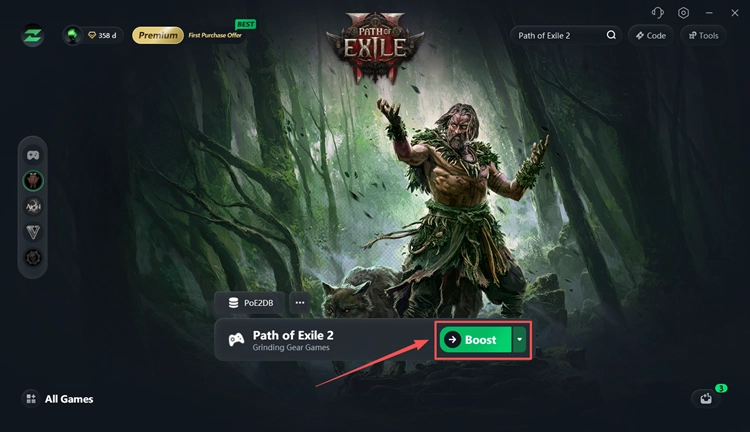
In addition to boosting Path of Exile 2 on PC, you can also optimize the connection for PlayStation and Xbox:
- Search for Path of Exile 2 - PS or Path of Exile 2 - Xbox, select the corresponding version, and click Boost.
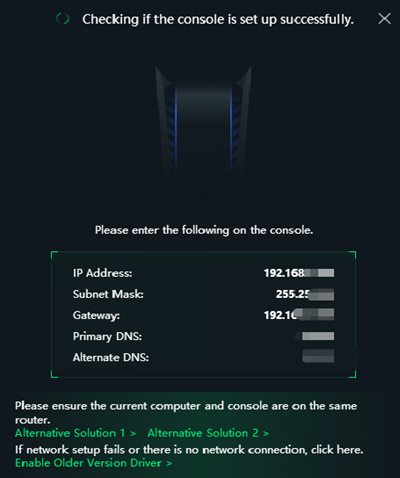
- Click Network Settings and follow the on-screen instructions to complete the console network setup.
Also Read: PoE 2 0.5 Connection Failed? Fix Server & Gateway Errors
The Bottom Line
The Path of Exile 2 account link system lets you connect Steam, PS5, and Xbox and continue the same characters through cross-progression. Make sure each platform is linked to the correct account and that you select the same PoE sub-account. For network-related problems after linking, such as high ping, packet loss, or unstable routing, download LagZapper to optimize your connection route before launching PoE 2.
Path of Exile 2 Account Link FAQ
Q1. Does Path of Exile 2 have cross-progression?
Yes. You can use the same characters across supported platforms with the same PoE sub-account.
Q2. Why are my PoE 2 characters missing after linking accounts?
You may have selected the wrong sub-account. Switch to the one containing your characters.
Q3. Can I merge two Path of Exile 2 accounts?
You can link them under one account structure, but characters stay in separate sub-accounts.
Q4. Can I transfer PoE 2 characters between sub-accounts?
No. Characters cannot currently be moved between sub-accounts.
Q5. Do PoE 2 stash tabs and purchases transfer between PS5 and PC?
Not fully. PlayStation purchases and some stash tab access remain platform-restricted.