
Phantom Blade Zero System Requirements: Minimum & Recommended PC Specs
Phantom Blade Zero is coming to PC as an Unreal Engine 5 action RPG built around fast-paced wuxia combat, making stable frame rates important during fights. The official Phantom Blade Zero system requirements start with a GTX 1660 or RX 5500 XT, 16 GB RAM, and an SSD, while the recommended tier targets 1440p at 60 FPS with upscaling enabled.
This guide will cover the minimum and recommended PC specs, storage requirements, performance targets, and how to check whether your PC is ready for Phantom Blade Zero.
Phantom Blade Zero System Requirements for PC
S-GAME has published the official PC requirements for Phantom Blade Zero, covering minimum and recommended hardware targets.
| Component | Minimum Requirements | Recommended Requirements |
|---|---|---|
| OS | Windows 10/11 (64-bit) | Windows 10/11 (64-bit) |
| Processor | Intel Core i7-8700K / AMD Ryzen 5 3600 | Intel Core i5-10600K / AMD Ryzen 5 5600X |
| Memory | 16 GB RAM | 16 GB RAM |
| Graphics | NVIDIA GeForce GTX 1660 6GB / AMD Radeon RX 5500 XT 8GB | NVIDIA GeForce RTX 3060 Ti 8GB / AMD Radeon RX 6700 XT 12GB |
| DirectX | Version 12 | Version 12 |
| Storage | SSD required | SSD required |
| Performance Target | 1080p / 30 FPS with upscaling enabled | 1440p / 60 FPS with upscaling enabled |
Phantom Blade Zero Minimum Requirements
The Phantom Blade Zero minimum requirements target 1080p at 30 FPS with a GTX 1660 or RX 5500 XT and 16 GB RAM. This is the entry-level PC target, but keep in mind that S-GAME’s stated performance assumes upscaling is enabled.
Phantom Blade Zero Recommended Specs
The Phantom Blade Zero recommended specs target a smoother 1440p experience at 60 FPS with an RTX 3060 Ti or RX 6700 XT and 16 GB RAM. Like the minimum target, the official 1440p performance figure is based on upscaling being enabled.
Phantom Blade Zero Storage Requirements and Download Size
Both the minimum and recommended requirements explicitly state that SSD installation is required. The official Phantom Blade Zero download size has not been announced yet. Steam currently provides no storage-capacity figure, so any specific GB estimate would be unofficial. Check the Steam page again closer to preload or launch for the final installation size.
Can Your PC Run Phantom Blade Zero?
Before buying or installing Phantom Blade Zero, compare your PC hardware with the official requirements to see which performance tier best matches your system.
How to Check Your PC Specs
Follow the steps below to check your PC’s key specifications.
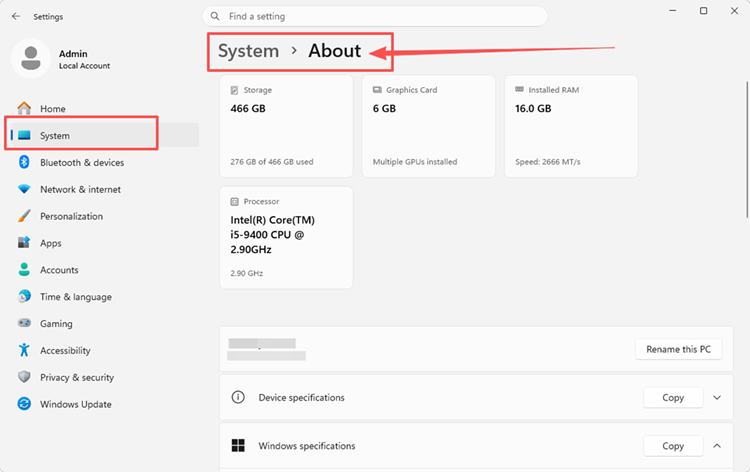
Step 1. Open Settings > System > About to check your CPU, installed RAM, Windows version, and system type.
Step 2. Press Ctrl + Shift + Esc, open Performance > GPU, and check your GPU model and dedicated GPU memory.
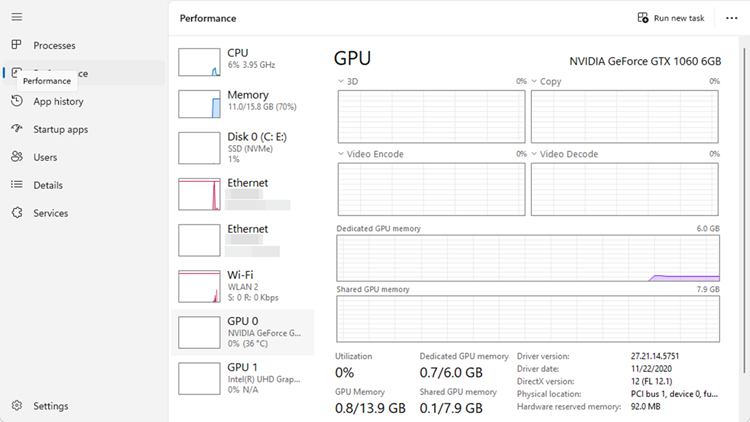
Step 3. Open Task Manager > Performance > Disk to confirm your drive is an SSD, then open File Explorer > This PC to check its available space.
Compare Your PC with the Official Requirements
Once you know your hardware, use the official performance tiers below to estimate the experience your PC is designed to target.
| Performance Tier | GPU Target | Official Performance Target |
|---|---|---|
| Minimum | GTX 1660 6GB / RX 5500 XT 8GB | 1080p / 30 FPS |
| Recommended | RTX 3060 Ti 8GB / RX 6700 XT 12GB | 1440p / 60 FPS |
| Ray Tracing Recommended | RTX 5060 8GB | 1080p / 60 FPS |
| Path Tracing Recommended | RTX 5080 16GB | 2160p / 60 FPS |
If your hardware is close to the minimum tier, start with the 1080p/30 FPS target. Stronger systems can aim for the recommended or ray-tracing tiers. Remember that all four official performance targets assume upscaling is enabled, so they should not be treated as native-resolution benchmarks.
How to Prepare Your PC for Phantom Blade Zero
Meeting the system requirements is only the first step. Prepare your PC before launch to reduce unnecessary performance load and choose settings that fit your hardware.
Update Your Graphics Driver and Close Heavy Background Apps
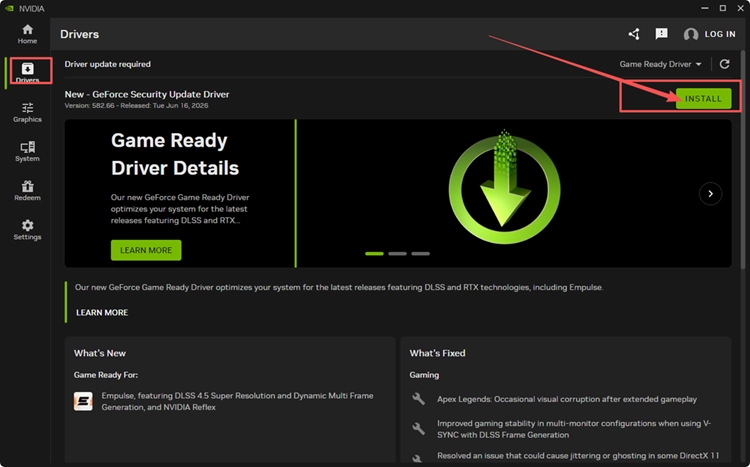
Update your graphics driver before playing, then close unnecessary background apps and overlays that consume CPU, RAM, or GPU resources. This gives Phantom Blade Zero more system resources to work with and helps reduce potential performance conflicts.
Choose a Starting Point That Matches Your Hardware
Use the official performance tier closest to your hardware as your starting point. PCs near the minimum requirements should begin around the 1080p/30 FPS target, while systems closer to the recommended specs can aim for 1440p/60 FPS instead.
Use Supported Upscaling and Test Frame-Rate Stability
Keep supported upscaling enabled when targeting the official performance figures, since S-GAME’s minimum, recommended, ray tracing, and path tracing targets all assume upscaling is active. Once the game is available, test actual combat and adjust resolution or graphics settings if frame rates are unstable.
[Bonus] Boost Phantom Blade Zero FPS with LagZapper FPS Master
LagZapper includes the FPS Master plugin to optimize relevant game settings based on your PC configuration, helping improve low FPS, frame drops, and overall gameplay smoothness in Phantom Blade Zero.
Why Use LagZapper for Phantom Blade Zero?
- One-Click FPS Boost: FPS Master can optimize relevant game settings based on your PC configuration without requiring multiple manual adjustments.
- Smart Route Optimization: Finds a faster and more stable route to game servers, helping reduce high ping, packet loss, jitter, and unstable routing.
- Reduce Lag & Improve Stability: Helps lower ping, reduce game lag, minimize lag spikes, and improve overall responsiveness.
- Support for 3,000+ Games: Use LagZapper with Phantom Blade Zero and thousands of other online games.
How to Boost Phantom Blade Zero FPS with LagZapper
Follow these three steps to use FPS Master and optimize Phantom Blade Zero settings based on your PC configuration.
Step 1. Download and Install LagZapper
Download LagZapper for Windows and follow the on-screen instructions to complete the installation on your PC.
Step 2. Search for Phantom Blade Zero
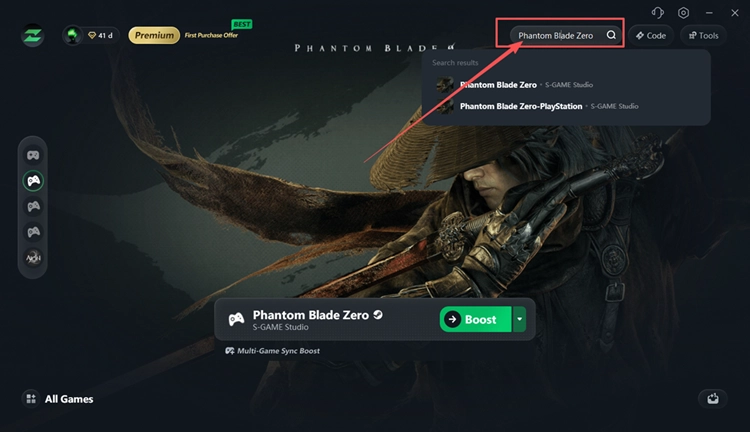
Launch LagZapper, enter Phantom Blade Zero in the search bar, and select the game from the results.
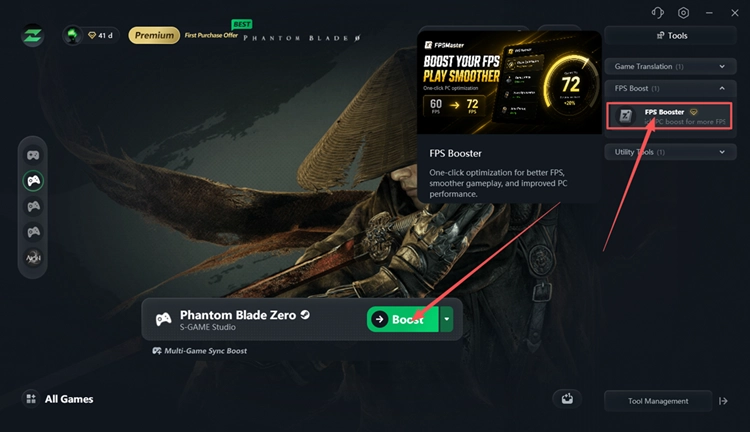
Step 3. Open FPS Master and Apply FPS Boost
Open Tools > FPS Boost > FPS Booster, click Try Now, then use FPS Master to optimize relevant game settings based on your PC configuration.
The Bottom Line
The official Phantom Blade Zero system requirements start with 16 GB RAM, an SSD, and a GTX 1660 or RX 5500 XT, while the recommended specs target 1440p at 60 FPS with upscaling enabled. Compare your hardware first, prepare your PC, then download LagZapper and use FPS Master for a quicker performance setup.
FAQs About Phantom Blade Zero System Requirements
Q1. What Are the Phantom Blade Zero Minimum Requirements?
You need 16 GB RAM, an SSD, and at least a GTX 1660 or RX 5500 XT.
Q2. What Are the Phantom Blade Zero Recommended Specs?
S-GAME recommends an RTX 3060 Ti or RX 6700 XT for 1440p at 60 FPS.
Q3. Can My PC Run Phantom Blade Zero?
Compare your CPU, GPU, RAM, Windows version, and SSD with the official requirements.
Q4. Is 16 GB RAM Enough for Phantom Blade Zero PC?
Yes. Both the minimum and recommended Phantom Blade Zero PC requirements specify 16 GB RAM.
Q5. What GPU Does Phantom Blade Zero Need for Ray Tracing?
S-GAME lists an RTX 5060 8GB for its 1080p/60 FPS ray-tracing target.