
SAND: Raiders of Sophie Server Down? Check Server Status & Fix Connection Issues
SAND: Raiders of Sophie is an open-world survival PvP extraction game where players pilot custom Tramplers, loot resources, fight rival players, and extract across the desert world of Sophie. Since its Early Access launch on June 22, 2026, some players have reported server down messages, login errors, matchmaking failures, disconnects, and server-side stability problems.
This guide will show you how to check SAND: Raiders of Sophie server status and fix common PC connection issues. If the servers are online but errors continue, follow the fixes below to resolve login errors, network errors, and other PC connection issues.
Why Is SAND: Raiders of Sophie Server Down?
Several factors may cause SAND: Raiders of Sophie server down errors, from Early Access traffic and Server Slam backend issues to maintenance, DDoS attacks, and local network problems that make the game appear offline.
Launch Day Server Overload
A large number of players joining at launch can overload backend servers, causing login delays, matchmaking failures, or temporary connection errors.
Server Slam and Backend Stability Issues
The Server Slam exposed backend stability and server capacity problems, which contributed to the Early Access delay to June 22.
Scheduled Server Maintenance
Servers may go offline during planned maintenance or emergency hotfixes, especially when developers need to resolve launch-week bugs or stability issues.
DDoS Attacks
DDoS attacks can flood game servers with abnormal traffic, disrupting logins, matchmaking, and gameplay even when the game is technically online.
Local Network Problems
Sometimes the servers are not actually down. Firewall blocks, DNS issues, or unstable routing can make the game appear offline.
VOYAGE Server Crashes
According to a June 24 official Steam update, VOYAGE server memory crashes could cause SAND: Raiders of Sophie players to see a network issue disconnect message or get stuck on the reconnecting screen.
How to Fix SAND: Raiders of Sophie Server Down
If SAND: Raiders of Sophie server down errors keep appearing, start by checking whether the issue comes from official servers or your local connection. The fixes below can help resolve login errors, connection failures, matchmaking issues, and unstable network problems on PC.
Fix 1. Check Server Status
Before changing your PC or network settings, check whether SAND: Raiders of Sophie servers are actually down. Visit the game's Steam Community page, official X account, or other official channels to check if there is maintenance, an outage, or a known connection issue.
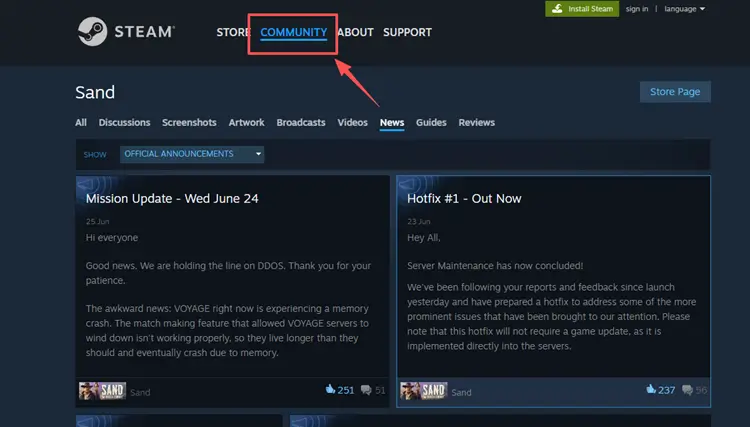
If the servers are offline or under emergency maintenance, local fixes will not solve the problem. Wait for the official status to return to normal, then relaunch Steam and try entering the game again.
Fix 2. Restart Steam and Relaunch the Game
Steam session or authentication errors can sometimes make SAND: Raiders of Sophie fail to connect even when the servers are online. Close the game completely, exit Steam, then reopen Steam and launch the game again to refresh your login session.
This simple restart may help with temporary login errors, backend timeouts, or connection failures during busy periods. SAND has faced launch-week server and connectivity problems, so retrying after restarting Steam is a useful first step before changing deeper network settings.
Fix 3. Verify the Integrity of Game Files
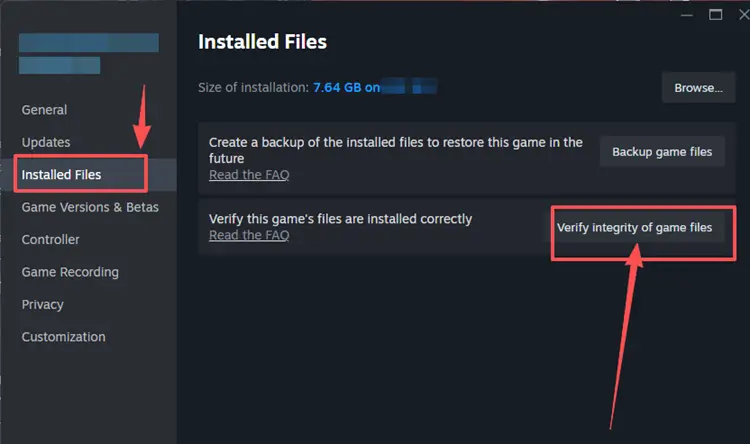
Missing, corrupted, or incomplete game files can cause SAND: Raiders of Sophie to fail during login, loading, or server authentication. Verifying game files helps Steam check the local installation and replace damaged files automatically. Following the steps below to verify the integrity of game files:
Step 1. Find SAND: Raiders of Sophie, right-click the game, and select Properties.
Step 2. Click Verify integrity of game files to let Steam scan the local installation.
Fix 4. Allow the Game Through Windows Firewall
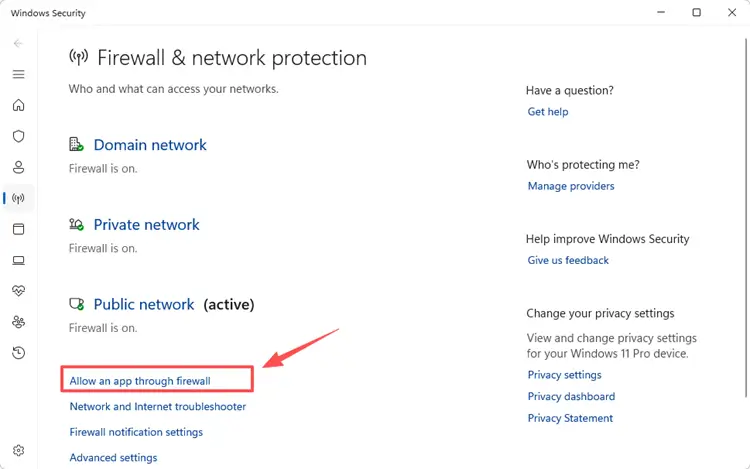
Windows Firewall may block SAND: Raiders of Sophie from connecting to online services, which can lead to login errors, server errors, or failed matchmaking. Instead of turning off the firewall completely, allow the game through Windows Security so it can communicate properly.
Step 1. Go to Firewall & network protection in Windows Security, then click Allow an app through firewall.
Step 2. Click Change settings > Allow another app and browse to the SAND installation folder, then select the game executable file to add it.
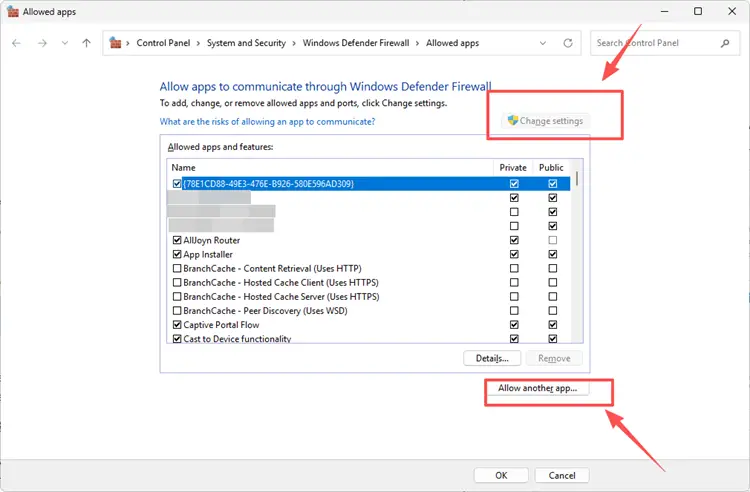
Step 3. Make sure the game is allowed on your active network, then click OK and relaunch the game.
Fix 5. Restart Your Router or Modem
A weak or unstable local connection can make SAND: Raiders of Sophie show server errors even when the game servers are online. Restart your router or modem to refresh the connection, clear temporary network issues, and reconnect your device to your ISP.
Unplug your router or modem, wait about 30 seconds, then plug it back in and let the connection fully restore. If the issue continues, try a mobile hotspot or wired Ethernet connection to check whether your current network is causing the problem.
Fix 6. Flush DNS Cache and Switch to a Public DNS Server
Outdated DNS records may cause SAND: Raiders of Sophie to connect slowly or fail to reach the correct game server. Flushing DNS cache can refresh your network lookup data and help fix temporary connection errors.
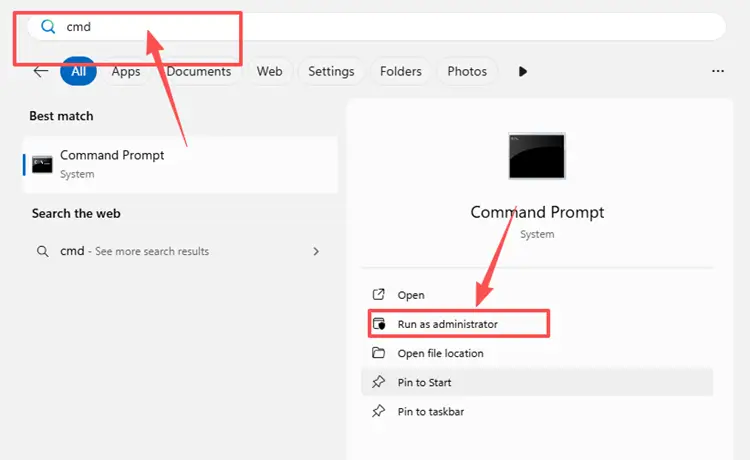
Step 1. Open Command Prompt as administrator by searching cmd in Windows, right-clicking it, and selecting Run as administrator.
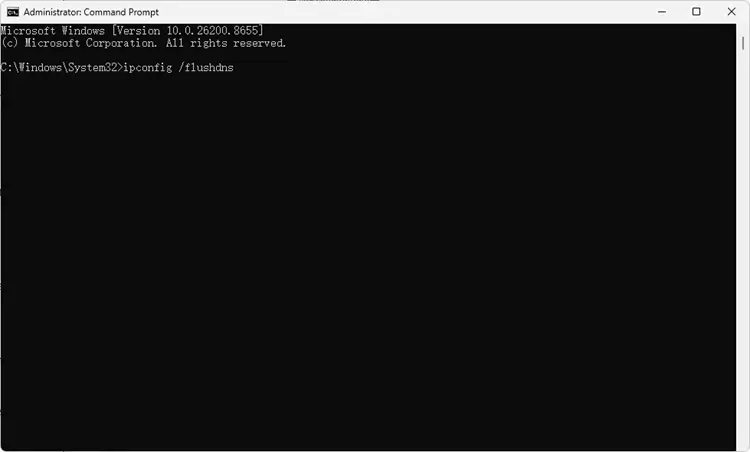
Step 2. Type ipconfig /flushdns, press Enter, then wait for the success message. After that, restart Steam and launch SAND: Raiders of Sophie again.
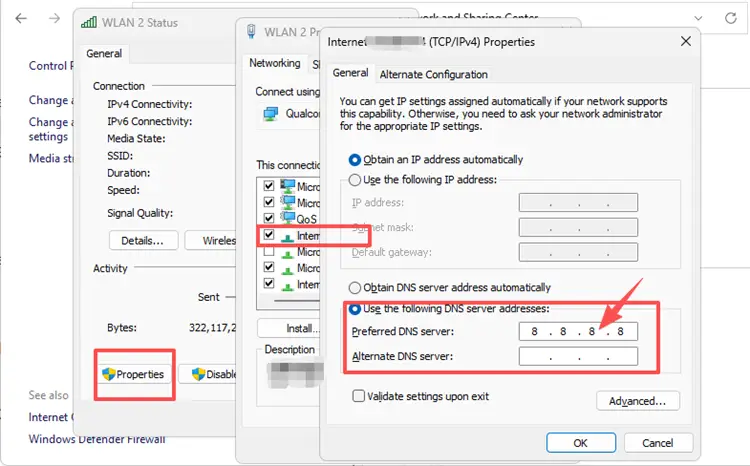
If DNS flushing does not fix the issue, switch to a reliable public DNS server to improve server lookup stability. You can use Google DNS with 8.8.8.8 and 8.8.4.4, or Cloudflare DNS with 1.1.1.1 and 1.0.0.1 for IPv4 setup.
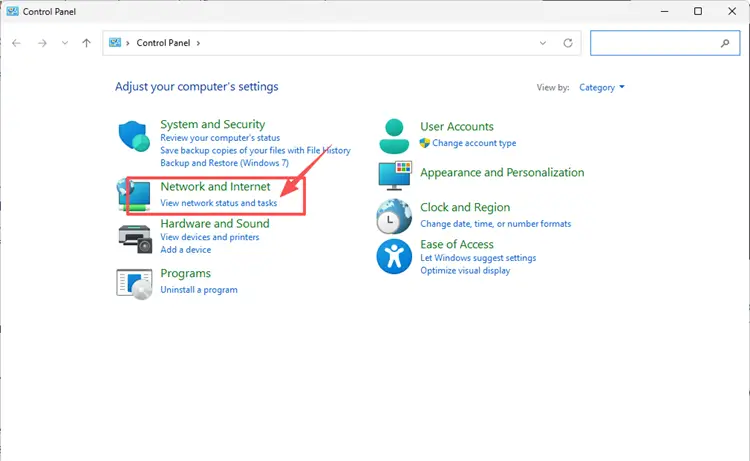
Step 1. Go to Settings > Network & Internet, then select your active Wi-Fi or Ethernet connection.
Step 2. Use Google DNS 8.8.8.8 / 8.8.4.4 or Cloudflare DNS 1.1.1.1 / 1.0.0.1, then save changes and reconnect.
[Bonus] How to Improve SAND: Raiders of Sophie Connection with LagZapper
After checking the server status and trying the fixes above, you may still experience connection issues even when SAND: Raiders of Sophie servers are online. In that case, the problem may come from server distance, packet loss, poor ISP routing, or network congestion. LagZapper can help optimize your route and improve connection stability.
As a powerful PC game booster, LagZapper helps optimize your connection route to SAND: Raiders of Sophie servers, reduce game lag, lower high ping, minimize packet loss, and stabilize your gameplay. Whether you're extracting loot, piloting a Trampler, or fighting rival raiders, LagZapper can help deliver a smoother online experience.
How to Boost SAND: Raiders of Sophie with LagZapper [Step-by-Step Guide]
Step 1. Download and Install LagZapper
Download LagZapper for Windows and follow the on-screen instructions to complete the installation.
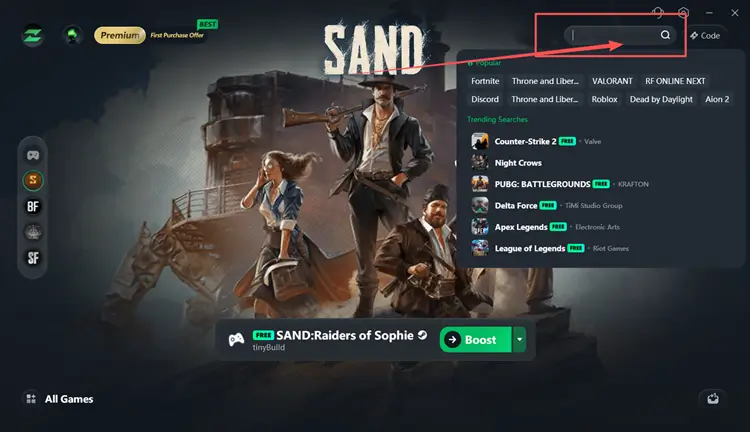
Step 2. Open LagZapper and Search for SAND: Raiders of Sophie
Launch LagZapper, then use the search bar or browse the supported games list to find SAND: Raiders of Sophie.
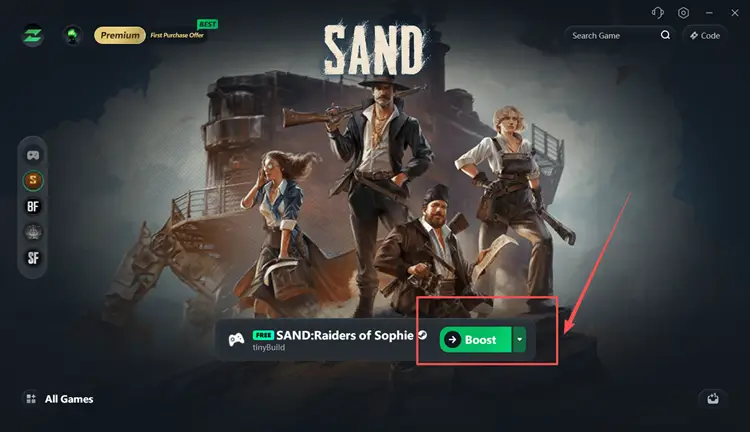
Step 3. Boost and Play SAND: Raiders of Sophie
Select your preferred server or node if needed, then click Boost to optimize your connection route before launching SAND: Raiders of Sophie.
Tip: LagZapper supports 3,000+ online games, covering FPS, MMORPG, MOBA, action, and multiplayer games with route optimization for smoother online gameplay.
The Bottom Line
SAND: Raiders of Sophie server down issues can come from official outages, Early Access server pressure, Server Slam backend problems, DDoS attacks, or local network errors. If the servers are offline, the best solution is to wait for official updates. Steam News and Community pages are useful places to check server maintenance, hotfixes, and known connection problems.
If the servers are online but you still face login errors, network errors, or unstable routing, try the fixes above first. Restart Steam, verify game files, refresh your router, flush DNS, and consider downloading LagZapper to optimize your route and stabilize your connection.
FAQ about SAND: Raiders of Sophie Server Down
Q1. How to check SAND: Raiders of Sophie server status?
Visit the game’s Steam Community page or Steam News Hub for official updates on maintenance, hotfixes, and known server issues.
Q2. Why does SAND: Raiders of Sophie keep showing connection errors?
Connection errors may come from server overload, DDoS disruptions, VOYAGE memory crash, Steam session issues, firewall blocks, DNS problems, or unstable local routing.
Q3. Can I fix SAND: Raiders of Sophie server down errors myself?
Only local connection issues can be fixed. If the official servers are offline or under maintenance, you need to wait.