
WoW Forever Servers Down? Queue, Disconnect & Login Fixes
WoW Forever servers down, stuck in a long queue, or getting “You have been disconnected” after finally reaching the front? The WoW Forever Beta opened on September 17, and players immediately reported long login queues, failed connections, and being sent back into another queue after disconnecting. WoW developers also acknowledged the heavy demand and said services were being scaled up.
Reddit players reported queues above 20,000 and repeated disconnects, while Blizzard Forums also received reports of “Login Servers are Full,” disconnects before character creation, and connection instability after entering the game.
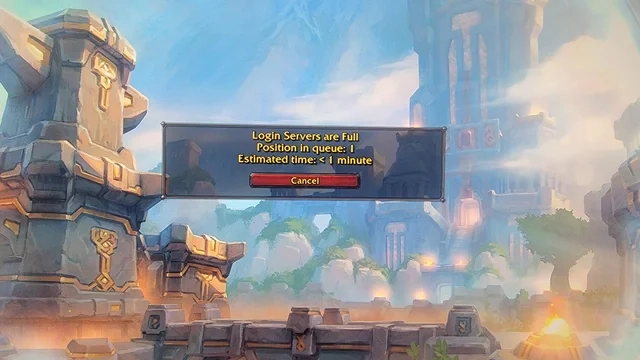
Why Are WoW Forever Servers Not Working?
Current WoW Forever server and login problems include:
- Long WoW Forever queue times.
- Login Servers are Full messages.
- Getting disconnected when the queue reaches zero.
- Connecting to Servers followed by You have been disconnected.
- Being sent back into another queue after disconnecting.
- Getting stuck while retrieving server or character information.
- High World latency or repeated disconnects after entering the game.
The queue-disconnect loop has been widely reported since the Beta opened, while some EU players are also reporting severe World latency, freezing, and disconnects after successfully logging in.
How to Fix WoW Forever Queue, Disconnect & Login Issues
Try these fixes when WoW Forever is stuck in queue, keeps disconnecting, or cannot connect to the login server.
Fix 1. Check WoW Forever Server Status First
Before changing your PC or network settings, check whether the problem is affecting other WoW Forever players. During the Beta launch, WoW developers acknowledged unusually heavy demand and said they were scaling services.
Step 1. Check recent Blizzard WoW Forever announcements, Battle.net service notices, and Blizzard Forum posts.
Step 2. Look for recent reports of queues, disconnects, or Login Servers are Full.
If many players are experiencing the same problem, local troubleshooting cannot remove a server-side queue or outage. Wait for service stability to improve before trying more fixes.
Fix 2. Stay in the WoW Forever Queue
There is no reliable way to bypass a legitimate WoW Forever login queue. Leaving and reconnecting may simply place you at the back again.
Step 1. Keep WoW Forever open while the queue position is decreasing normally.
Step 2. Avoid restarting Battle.net unless the game disconnects or the queue stops responding.
Players have reported waiting through 20K+ queues only to disconnect and return to an even longer queue, so repeatedly reconnecting is unlikely to help during heavy traffic.
Fix 3. Restart WoW Forever and Battle.net After a Disconnect
If WoW Forever repeatedly shows You have been disconnected, restart the current login session.
Step 1. Close WoW Forever completely.
Step 2. Exit Battle.net from the system tray, then reopen it.
Step 3. Launch WoW Forever and try connecting again.
Only do this after an actual disconnect. Do not restart Battle.net while a working queue is still counting down.
Fix 4. Update WoW Forever in Battle.net
An outdated Beta client may cause launch or connection problems after new updates are deployed.
Step 1. Open Battle.net > World of Warcraft. Make sure the WoW Forever Beta version is selected.
Step 2. Install any available update, then launch the game again.
Blizzard also directs players experiencing technical Beta problems to its technical troubleshooting resources.
Fix 5. Scan and Repair WoW Forever
If other players can connect normally but your client repeatedly fails to launch or disconnects after an update, check the game files.
Step 1. Open Battle.net > World of Warcraft.
Step 2. Click the gear icon next to Play and select Scan and Repair.
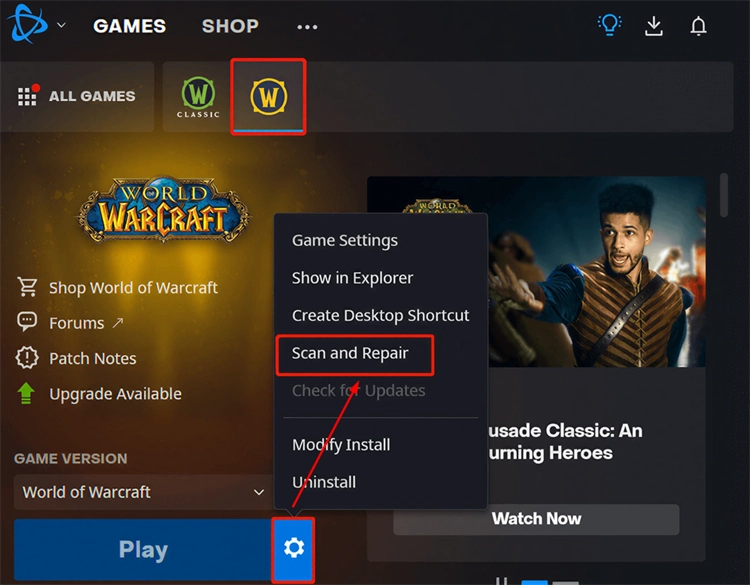
Step 3. Complete the repair, restart Battle.net, and launch WoW Forever again.
This fix is more useful for client-specific problems than widespread server queues.
Fix 6. Restart Your Network Connection
If WoW Forever servers are available but your own connection keeps dropping, check your local network.
Step 1. Close WoW Forever and restart your router.
Step 2. Reconnect your PC and use Ethernet instead of Wi-Fi when possible.
Step 3. Launch WoW Forever and check whether the connection is more stable.
This will not reduce a Blizzard login queue, but it may help when the disconnect is caused by an unstable local connection.
[Bonus] Reduce WoW Forever Connection Issues With LagZapper
If the queue is moving normally but WoW Forever still suffers from high ping, packet loss, latency spikes, or repeated connection drops, the problem may involve the network route between your PC and the game server.
LagZapper is a Windows game booster designed to optimize game network routes and improve connection stability. It cannot bypass a WoW Forever queue or fix a Blizzard-side outage, but it can help with network-related lag and routing problems.
Key Features of LagZapper for WoW Forever
- Reduce lag and sudden latency spikes while playing WoW Forever.
- Lower ping by optimizing the route between your PC and the game server.
- Reduce packet loss that can contribute to unstable gameplay or disconnects.
- Switch between available nodes to find a more stable connection route.
How to Boost WoW Forever With LagZapper
Follow these three steps to optimize your WoW Forever connection.
Step 1. Download and Install LagZapper
Download LagZapper for Windows, complete the installation, and sign in.
Step 2. Search for World of Warcraft
Open LagZapper and search for World of Warcraft, then select the matching game option.
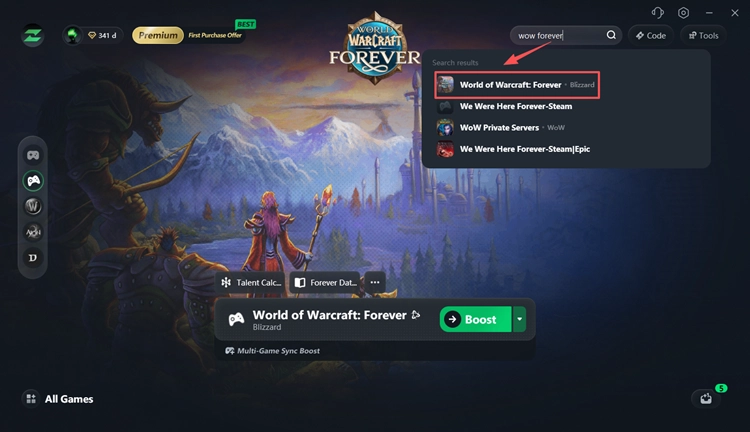
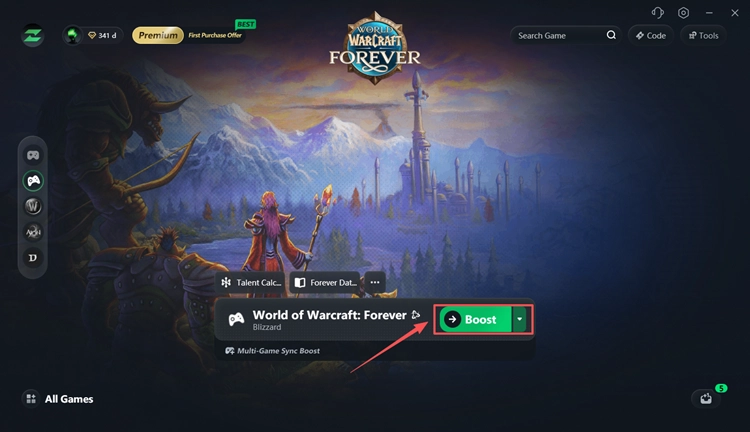
Step 3. Select a Node and Start Boosting
Choose a recommended node, click Boost, and then launch WoW Forever through Battle.net.
The Bottom Line
WoW Forever Beta players are currently reporting long queues, Login Servers are Full, disconnects after reaching the front of the queue, and connection instability after login. Check the server status first, then restart Battle.net, update or repair the game, and test your network when needed. If the servers are online but high ping, packet loss, or unstable routing continues, download LagZapper to optimize your WoW Forever connection.
WoW Forever Servers Down FAQ
Q1. Are WoW Forever servers down right now?
Not necessarily. Long queues and disconnects can occur even while the Beta servers remain online. Check Blizzard notices and recent player reports first.
Q2. Why is the WoW Forever queue so long?
Heavy Beta traffic can exceed available login capacity. Players have reported queues above 20,000 during the opening period.
Q3. Why does WoW Forever disconnect after the queue?
Players are reporting reaching the end of the queue, attempting to connect, and then being disconnected and returned to another queue.
Q4. What does Login Servers are Full mean in WoW Forever?
It means the login service is currently handling more demand than it can immediately admit. You normally need to remain in the queue and wait.
Q5. Why does WoW Forever keep disconnecting in game?
Server instability, high latency, packet loss, or unstable routing can all contribute. Some EU players are currently reporting severe World latency and repeated disconnects.