
WoW Stuck on Retrieving Character List After 12.1? 7 Fixes
WoW stuck on Retrieving Character List after the 12.1 update? Since Curse of Ula'tek launched on August 11, 2026, many players have reported the WoW character list not loading, freezing before characters appear, or RAM usage climbing until the client crashes. Some cases also resemble a WoW retrieving character list memory leak. When WoW can't load the character list, use the 7 fixes and workarounds below to get back in-game.
Why Is WoW Stuck on Retrieving Character List After Patch 12.1?
The latest WoW Retrieving Character List freeze began after Patch 12.1: Curse of Ula'tek launched on August 11, 2026. Players started reporting WoW stuck on Retrieving Character List and character loading problems shortly after the update.
Common symptoms include:
- WoW freezes on Retrieving Character List
- The character list is not loading
- WoW becomes Not Responding
- RAM usage keeps increasing
- The client crashes with an Out of Memory error
- Character loading stops around 20–40%
- One account works while another fails on the same PC
Some players also report a WoW Retrieving Character List memory leak. Since the freeze can remain after common fixes, the WoW 12.1 Retrieving Character List issue may not be caused by addons, GPU drivers, or local files.
How to Fix WoW Stuck on Retrieving Character List
Try the WoW 12.1 Retrieving Character List fixes below before moving on to general troubleshooting.
Fix 1. Force Close WoW If Memory Usage Keeps Increasing
When WoW is stuck on Retrieving Character List, check whether its RAM usage keeps rising. Some players report increasing memory usage followed by an Out of Memory crash.
Step 1. Press Ctrl + Shift + Esc to open Task Manager, find World of Warcraft, and check its Memory usage.
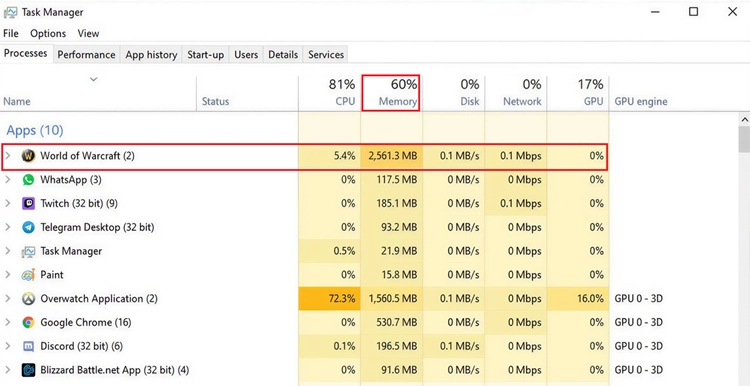
Step 2. When memory usage keeps increasing while the character list remains frozen, select WoW and click End task.
Step 3. Relaunch Battle.net and WoW, then continue with the next fix when the issue returns.
Fix 2. Check Blizzard Support and WoW Server Status
Before changing PC settings, check whether Blizzard is reporting a widespread WoW Retrieving Character List issue or server maintenance. Check:
- Battle.net launcher notifications
- Blizzard Support updates
- WoW Technical Support forums
Blizzard has a dedicated Stuck At Retrieving Character List support article, and forum reports show the issue is widespread. Server-side problems may not be fully fixed with local troubleshooting.
Fix 3. Try the Account-Switch Workaround
Some players report that switching between WoW accounts can temporarily fix the Retrieving Character List freeze. This is a community workaround, not an official Blizzard fix.
Step 1. Launch WoW and cancel automatic login to reach the manual login screen.
Step 2. Sign in to another WoW account that loads normally, then enter the game with a character.
Step 3. Press Esc > Log Out without closing WoW, and then switch back to the affected account.
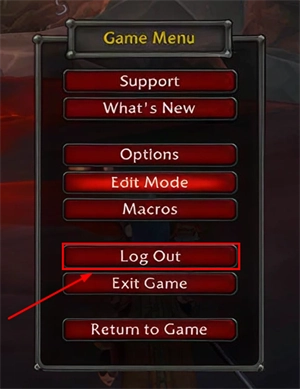
Step 4. Check whether the realm and character list now load normally.
Fix 4. Try Another Realm Before Returning to Your Main Realm
The WoW Retrieving Character List issue may affect some realms or accounts differently. Some players report that another realm loads normally while their main realm remains stuck.
Step 1. Open the realm selection screen.
Step 2. Choose another available realm and let its character list load.
Step 3. Return to your main realm and check whether the character list now loads normally.
This workaround is inconsistent, but it is worth trying before reinstalling WoW.
Fix 5. Disable Addons and Reset the WoW UI
Outdated addons or corrupted UI files can also cause WoW freezes. Reset the interface to rule out local addon problems.
Step 1. Completely close World of Warcraft and open the _retail_ folder in your WoW installation directory.
Step 2. Rename these folders:
- Cache → CacheOld
- Interface → InterfaceOld
- WTF → WTFOld
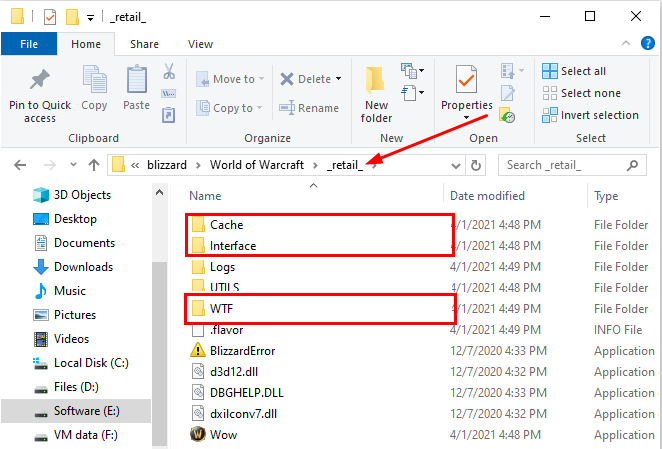
Step 3. Relaunch WoW. The game will automatically create fresh folders.
When WoW is still stuck on Retrieving Character List after a clean UI reset, addons are less likely to be the cause.
Fix 6. Scan and Repair World of Warcraft
Corrupted game files can cause WoW to freeze or fail to load correctly after an update.
Step 1. Open Battle.net and select World of Warcraft.
Step 2. Click the gear icon next to Play, then choose Scan and Repair.
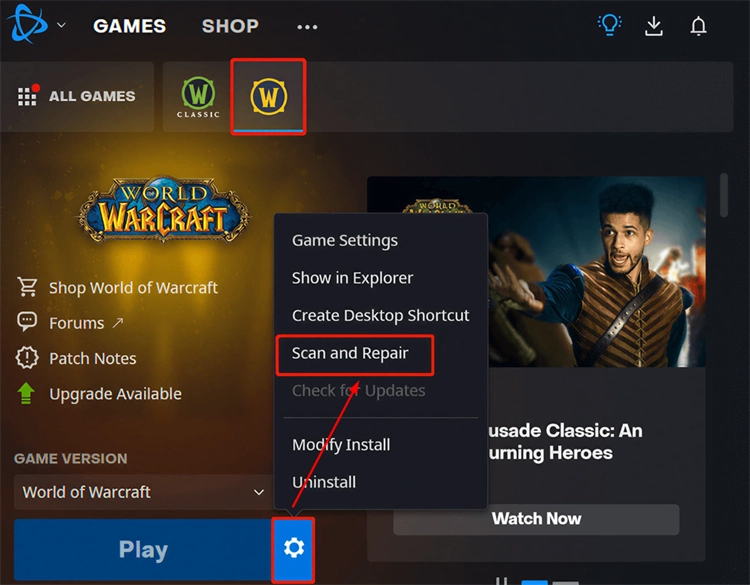
Step 3. Click Begin Scan and wait for Battle.net to finish.
Restart Battle.net and test the character list again. This mainly helps rule out corrupted files, since some Patch 12.1 players report that Scan and Repair does not fix the Retrieving Character List freeze.
Fix 7. Refresh Your Battle.net Network Connection
An unstable network or DNS issue can interfere with WoW login and character list loading.
Step 1. Close WoW and Battle.net, then restart your router.
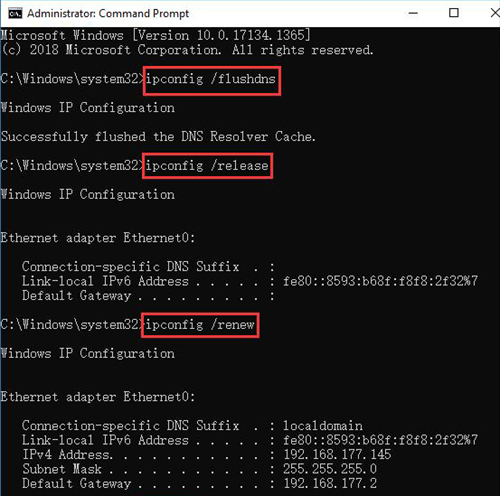
Step 2. Open Command Prompt as administrator and run these commands one at a time:
- ipconfig /flushdns
- ipconfig /release
- ipconfig /renew
Step 3. Restart your PC and launch Battle.net again.
Step 4. Test a wired connection or mobile hotspot. When WoW loads on another network, your local connection or ISP route may be involved.
For more launcher and network fixes, see our Battle.net not connecting guide.
Is WoW Retrieving Character List Caused by Addons?
Not necessarily. Outdated addons can cause WoW UI errors after major updates, so disabling them is still worth testing. However, the WoW 12.1 Retrieving Character List freeze has also affected players with no addons installed.
Some players report that resetting the Interface, WTF, and Cache folders did not fix the issue either. For Patch 12.1, do not assume WeakAuras, Plater, Details, or another addon is the cause unless disabling it actually fixes the Retrieving Character List freeze.
[Bonus] Improve WoW Connection Stability With LagZapper
LagZapper cannot fix a game-side WoW 12.1 Retrieving Character List bug or memory issue. However, it can help with network-related problems such as slow Battle.net connections, packet loss, unstable routing, or disconnects by optimizing the route between your PC and the game server.
Highlights of LagZapper for World of Warcraft
- Reduce Lag: Reduce lag by optimizing unstable routes for smoother online gameplay.
- Lower Ping: Lower ping with a faster route to the game server for better response.
- Reduce Packet Loss: Fix WoW packet loss to improve stability during raids, PvP, and dungeons.
- Reduce Disconnects: Fix Battle.net connection issues and avoid unstable routes while playing WoW.
How to Boost World of Warcraft With LagZapper
Use LagZapper to optimize your WoW connection in just three steps:
Step 1. Download and Install LagZapper
Download LagZapper for Windows and follow the installation instructions.
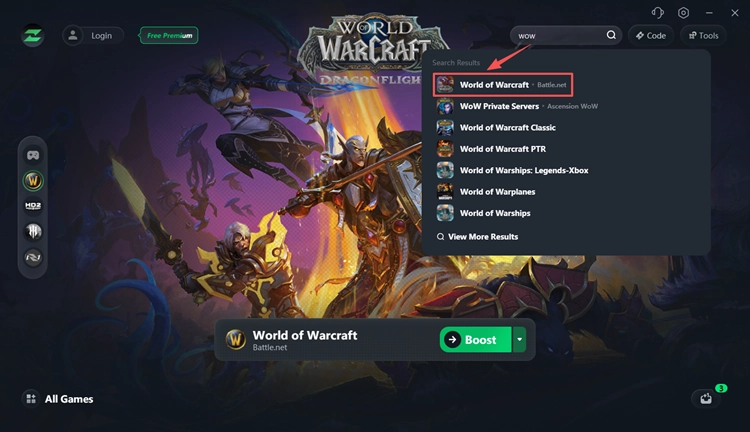
Step 2. Search for World of Warcraft
Open LagZapper and search for World of Warcraft in the supported games list.
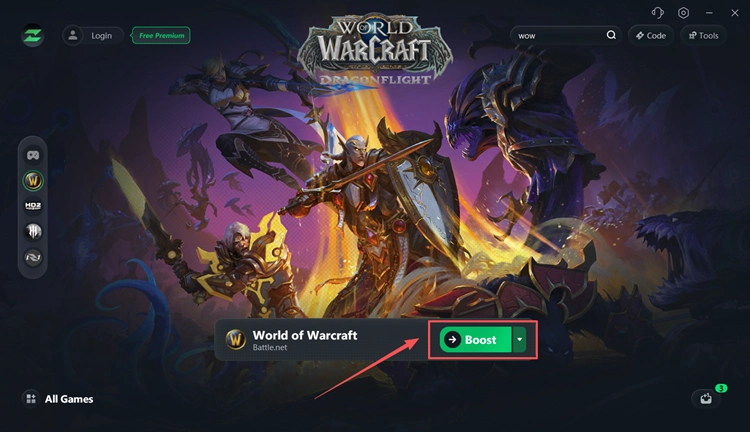
Step 3. Boost and Play World of Warcraft
Select a suitable server or node, click Boost, and launch WoW with an optimized route.
LagZapper also supports more online games from Battle.net, including Diablo 4, Overwatch 2, and more, letting you optimize multiple Blizzard games with one click.
The Bottom Line
When WoW is stuck on Retrieving Character List after Patch 12.1, start with Blizzard status checks, account switching, UI resets, and network troubleshooting. For high ping, packet loss, or unstable connections, download LagZapper to optimize your WoW network route and improve connection stability.
FAQ on WoW Stuck on Retrieving Character List
Q1. Why is WoW stuck on Retrieving Character List?
Patch 12.1 players report freezes, rising RAM usage, crashes, and account-specific character loading problems.
Q2. How do I fix WoW Retrieving Character List not loading?
Check Blizzard status, restart WoW, try another account or realm, reset the UI, and run Scan and Repair.
Q3. Why does one WoW account load while another does not?
Some reports suggest the issue can affect accounts or realms differently, even on the same PC and network.
Q4. Does WoW Retrieving Character List cause a memory leak?
Some players report continuously increasing RAM usage while WoW remains frozen, resembling a memory leak.
Q5. Can WoW Retrieving Character List cause an Out of Memory error?
Yes. Rising memory usage can eventually cause WoW to freeze, crash, or display an Out of Memory error.
Q6. Are WoW addons causing the character list freeze?
Not always. Players with no addons installed have also reported the Patch 12.1 character list issue.