
Download Guide
This guide provides two methods to download and launch ARES: The Iron Vanguard, helping you obtain the game client and get into the game smoothly.
Important Note: The current first‑wave launch regions are: Canada, Brazil, Indonesia, Malaysia, Australia, and New Zealand.
Only users in these regions can directly visit the official website and download the game. Players in other regions are advised to follow the methods provided in this guide to successfully download and launch ARES: The Iron Vanguard.
For users who do NOT have the Crossplay Launcher:
1. Locate the exclusive Crossplay Launcher download link inside the LagZapper client.
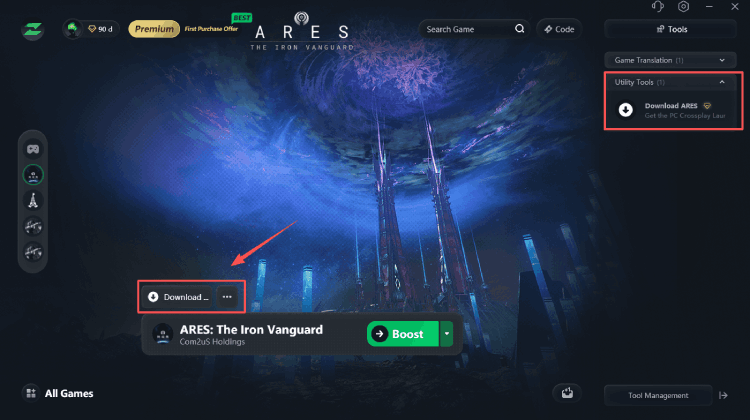
2. Click to download and install the Crossplay Launcher.
3. After installation, launch LagZapper and select ARES: The Iron Vanguard to accelerate.
4. Visit the official website: https://aresglobal.com2us.com/zh-hans?r=p1, and click PC Download to complete the download and installation.
For users who already have the Crossplay Launcher:
1. Open LagZapper and search for ARES: The Iron Vanguard to start acceleration.
2. Once accelerated, visit the official website:https://aresglobal.com2us.com/zh-hans?r=p1 , and click PC Download to complete the download and installation.

🚀 Recommended: LagZapper
Whether you are downloading the game or playing online, LagZapper effectively bypasses regional download restrictions, reduces latency, and ensures a stable network experience. Enjoy ARES: The Iron Vanguard without hassle