
Pre-registration Guide
RF Online Next is coming to the global stage. To make sure you can jump in on day one, pre‑registration is the way to go. The process is simple and can be done in three ways – via AppStore, PC, or email. Follow this guide to get everything ready.
Step 1: Visit the official pre‑registration website
Go to the RF Online Next Global pre‑registration page using the link below:
👉 https://rfonlinenextgb.netmarble.com/en/preorder
Step 2: Choose your pre‑registration method
You have three options:
- AppStore pre‑register – For iOS devices.
- PC pre‑register – Using the Netmarble launcher (recommended for PC players).
- Email pre‑register – Provide your email to receive updates and a launch reminder.
For the best PC experience, follow the remaining steps for PC pre‑registration.
Step 3: Download and install the Netmarble launcher
On the pre‑registration page, click the button to download the Netmarble launcher for PC. Run the installer and follow the on‑screen instructions.
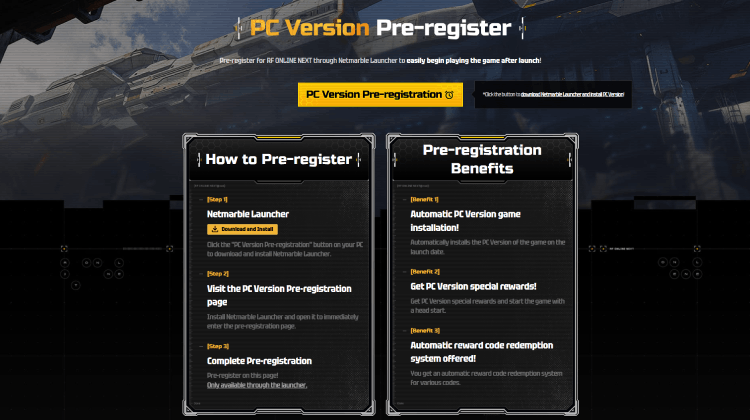
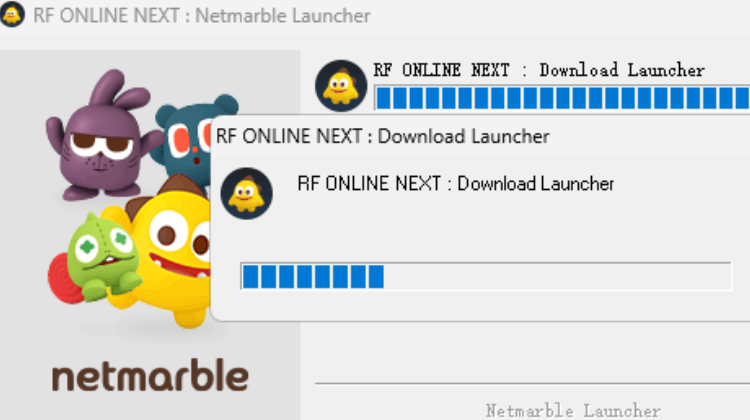
Step 4: Installation in progress
Wait for the launcher to finish installing. This should only take a minute.
Step 5: Click “PC version pre‑register” inside the launcher
Once the launcher is installed, open it. Look for the PC Version Pre‑register button and click it.
Step 6: Sign in with your preferred account
You can log in using one of the following options:
- Apple
Choose the one that’s most convenient for you.
Step 7: Pre‑registration complete – auto‑install on launch
After you successfully pre‑register, the launcher will automatically install RF Online Next on your PC as soon as the game goes live. No extra steps needed – just wait for launch day.