
AION 2 Australia Server: Best Server for OCE Players
Looking for an AION 2 Australia server or the best server for OCE players? AION 2 Global currently lists servers in North America, South America, Europe, and Japan, with no dedicated Australia or AION 2 Oceania server announced.
For Australian and New Zealand players, Japan is one of the most practical regions to test first due to its location and recent OCE player experience. Actual AION 2 Australia ping still depends on your ISP, city, and international routing.
Is There an AION 2 Oceania Server?
No dedicated AION 2 Oceania server has been announced. The confirmed Global server regions are:
| Region | Global Server |
|---|---|
| North America | Yes |
| South America | Yes |
| Europe | Yes |
| Japan | Yes |
| Australia | No |
| Oceania | No |
Players looking for an AION 2 OCE server or AION 2 Australia server will need to choose another available region, such as Japan.
Tip: New to the Global version? Check our guide on how to play AION 2 for platforms, gameplay, classes, and beginner tips.
What Is the Best AION 2 Server for Australia?
For many Australian players, Japan is the first server worth testing. It is closer than North America or Europe and produced lower latency for many OCE players during the recent test.
The AION 2 best server for Australia still depends on:
- Your city or region
- Your internet provider
- International routing
- Current network traffic
- Selected server region
- Your friends or guild region
A player in Sydney may also see different ping from someone in Perth, even when both connect to Japan.
Japan or North America for OCE Players?
Japan is usually the better starting point when latency is the priority. North America can still make sense for players joining an established NA guild or English-speaking community.
Recent player reports also show that routing can change the result: some OCE players received similar latency to Japan and NA West, while others saw a much larger difference.
AION 2 Australia Ping: Japan vs Other Servers
For most Australian players, Japan is the best server to test first, though actual ping still depends on ISP routing and network conditions.
| Server Region | For Australia |
|---|---|
| Japan | Best starting point |
| North America | Good for NA guilds |
| Europe | Usually higher ping |
| South America | Less suitable for OCE |
Community reports commonly put AION 2 Japan server ping at around 100–150 ms+ from Australia. Results vary by location and ISP, and these figures are player reports rather than official data. Lower ping can improve skill response, movement, and PvP responsiveness.
[Quick Way] Optimize AION 2 Routing for Lower Ping
Your ISP may route game traffic through a longer or congested path, especially when connecting from Australia or New Zealand to Japan. LagZapper, a powerful game booster, helps optimize the route between your PC and the AION 2 server to lower ping, reduce lag, and improve connection stability.
Why Choose LagZapper for AION 2?
- Network Optimization: Reduce AION 2 high ping, lag, packet loss, and unstable routing.
- Multi-Game Sync Boost: Boost AION 2 with supported gaming apps in one optimized session.
- Game Translation: Translate supported quests, menus, items, and other AION 2 in-game text.
- Gameplay Tools: Track DPS, check Rift event timers, and optimize PC settings for smoother AION 2 gameplay.
How to Boost AION 2 With LagZapper
Getting started takes only three steps.
Step 1. Download and Install LagZapper
Download LagZapper for Windows and follow the on-screen instructions to complete installation.
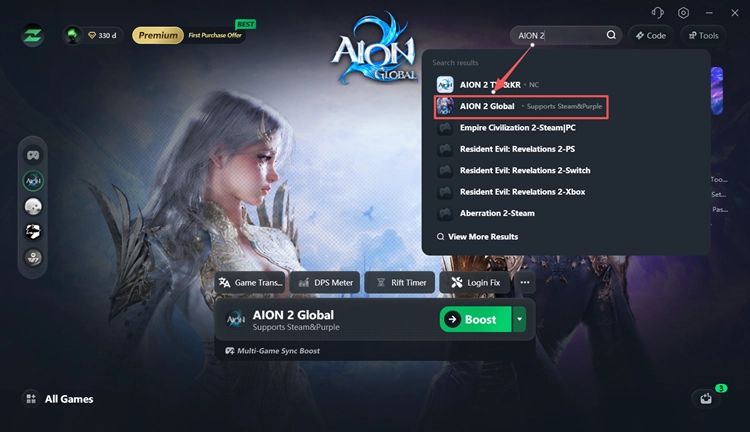
Step 2. Search for AION 2
Open LagZapper, sign in, search for AION 2, and select the game.
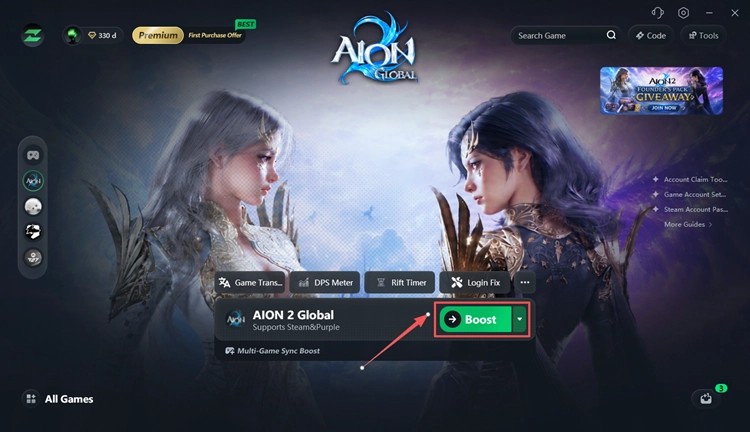
Step 3. Select a Server and Boost
For Australia and OCE players, start with the Asia region in LagZapper and select a recommended node, then click Boost and launch AION 2.
How to Reduce AION 2 Ping from Australia
High AION 2 ping can also come from local network conditions. Try these basic fixes before or alongside route optimization.
1. Use Ethernet
Connect your PC directly to the router when possible. Ethernet is usually more stable than Wi-Fi and can reduce packet loss and latency spikes.
2. Stop Background Network Traffic
Pause large downloads, cloud sync, streaming, and other bandwidth-heavy apps while playing AION 2.
3. Choose the Closest Practical Server
Start with Japan, then compare your real latency with other available regions. Server distance matters, but routing can produce different results between ISPs.
The Bottom Line
A dedicated AION 2 Australia or Oceania server has not been announced, so Japan is currently the most practical region to test first for many OCE players. Actual ping varies by location, ISP, and routing, with recent community reports often around 100–150 ms to Japan. For unstable routing or high latency, download LagZapper to optimize your AION 2 connection and improve network stability.
FAQs About AION 2 Australia and Oceania Servers
Q1. Does AION 2 Have an Australia Server?
No. A dedicated AION 2 Australia server has not been announced. Global servers are confirmed for North America, South America, Europe, and Japan.
Q2. Does AION 2 Have an Oceania Server?
No dedicated AION 2 Oceania server or AION 2 OCE server is currently confirmed for Global launch.
Q3. What Is the Best AION 2 Server for Australia?
Japan is the most practical region to test first for many Australian players. Actual performance still depends on location, ISP, and international routing.
Q4. What Ping Can Australians Expect on AION 2 Japan Servers?
There is no official fixed ping. Recent community reports commonly range around 100–150 ms, with results varying by city, ISP, and routing.
Q5. Should OCE Players Choose Japan or NA West?
Japan usually offers the better starting point for latency, while NA West may suit players joining North American friends or guilds. Actual ping should be tested on your own connection.
Q6. Why Is My AION 2 Ping High from Australia?
Long server distance, inefficient international routing, congestion, unstable Wi-Fi, and background traffic can all increase latency.