
AION 2 High Ping? 7 Fixes for Lag, Ping Spikes & Packet Loss
AION 2 high ping can make combat feel delayed, cause sudden lag, and trigger unstable movement during dungeons or PvP. Players may also notice AION 2 ping spikes or packet loss, especially when connecting to distant servers or playing on an unstable network. This guide will explain why AION 2 high ping happens and provide seven practical AION 2 lag fixes to help improve connection stability and reduce latency.
Why Is My Ping So High in AION 2?
AION 2 high ping can come from distant servers, server congestion, inefficient routing, or an unstable local connection.
Distant or Incorrect AION 2 Server Region
Connecting to a distant AION 2 server increases data travel distance, naturally resulting in higher latency.
Server Congestion or Maintenance
High server load can raise latency, while maintenance may cause temporary connection issues.
Congested or Inefficient ISP Routing
Inefficient ISP routing may send AION 2 traffic along longer or congested paths, increasing latency.
Unstable Wi-Fi and Background Bandwidth Usage
Weak Wi-Fi signals and competing downloads can increase network delay, causing ping spikes during gameplay.
Before Trying Fixes: Identify the Cause of AION 2 High Ping
Different symptoms can point to server distance, congestion, routing problems, or local network issues. Use the table below to identify the most likely cause before trying fixes.
| Symptom | Likely Cause |
|---|---|
| Ping stays high on a distant server region | Long server distance or regional latency |
| Ping rises during peak hours | Server load or ISP congestion |
| Ethernet works better than Wi-Fi | Wi-Fi instability |
| Another network has much lower ping | ISP routing or network path issue |
| Stable ping but low FPS | PC performance or graphics issue |
How to Fix AION 2 High Ping - 7 Useful Fixes
Follow the fixes below in order, starting with quick server checks and moving toward deeper network troubleshooting.
Fix 1. Check AION 2 Server Status and Maintenance
Before changing your network settings, check whether AION 2 is experiencing maintenance, server overload, or regional service issues. Server-side problems can increase ping for many players at the same time, and local fixes will not help until the service becomes stable again. Check the latest AION 2 official announcements for maintenance and service updates before continuing with other fixes.
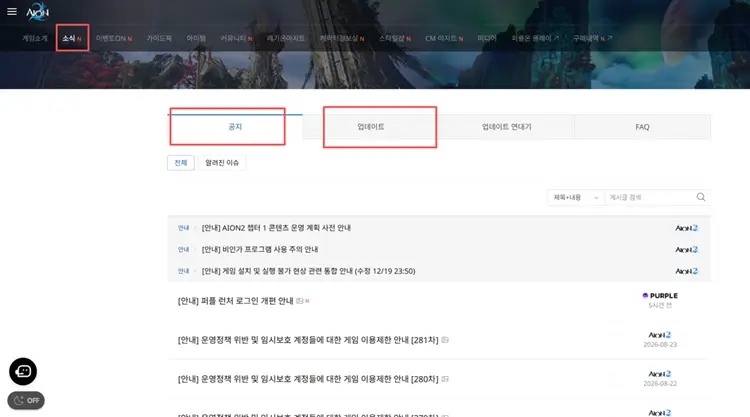
Fix 2. Select the Closest AION 2 Server Region
Your server region has a direct impact on AION 2 latency. Connecting to a server that is far from your location increases the distance data must travel, which can raise your base ping. When choosing a server, select the closest available region whenever possible to reduce delay and improve connection stability during combat.
Fix 3. Close Background Downloads and Reduce Network Traffic
Background downloads, cloud syncing, streaming, and game updates can compete with AION 2 for bandwidth, causing higher ping or sudden ping spikes. Closing unnecessary network-heavy apps can help keep the connection more stable while playing. Follow the steps below to check and reduce background network usage.
Step 1. Press Ctrl + Shift + Esc to open Task Manager.
Step 2. In Processes, check the Network column for apps using the most bandwidth.
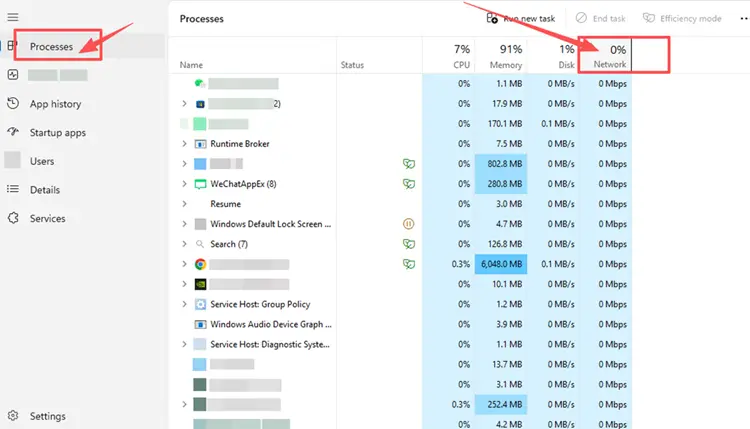
Step 3. Close non-essential apps and pause active downloads, updates, or cloud syncing before launching AION 2.
Fix 4. Restart Your Router and Modem
A router or modem that has been running for a long time can develop temporary connection issues that cause AION 2 ping spikes or unstable latency. Restarting both devices can refresh the connection and clear minor network problems. Turn them off, wait about 30–60 seconds, then power them back on and retest AION 2.
Fix 5. Switch to Wired Ethernet or Improve Wi-Fi Stability
Wi-Fi can become unstable because of weak signals, distance, walls, or interference, leading to AION 2 ping spikes and packet loss. If possible, connect your device directly to the router with an Ethernet cable. If Ethernet is unavailable, move closer to the router and reduce nearby wireless interference to improve connection stability.
Fix 6. Flush DNS and Reset the Windows Network Stack
Temporary Windows networking issues can affect AION 2 connection stability. Flushing DNS and resetting Winsock and TCP/IP can refresh the DNS resolver cache and local network stack. Follow the steps below to reset the Windows network stack.
Step 1. Type cmd in the Windows search box, right-click Command Prompt, and select Run as administrator.
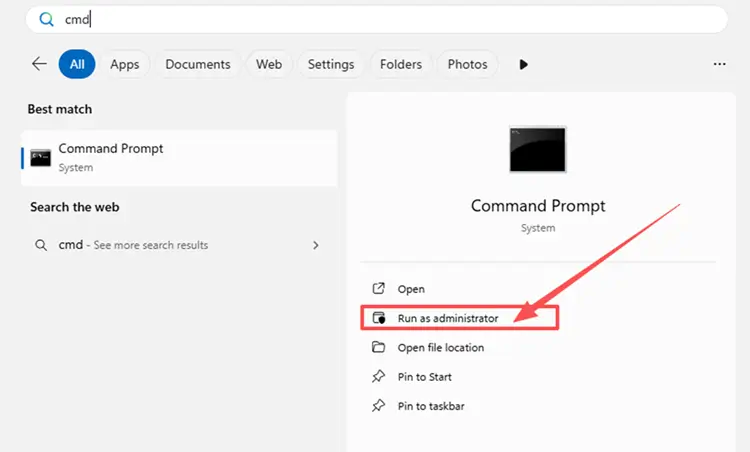
Step 2. Run the following commands one at a time:
- netsh winsock reset
- netsh int ip reset
- ipconfig /release
- ipconfig /renew
- ipconfig /flushdns
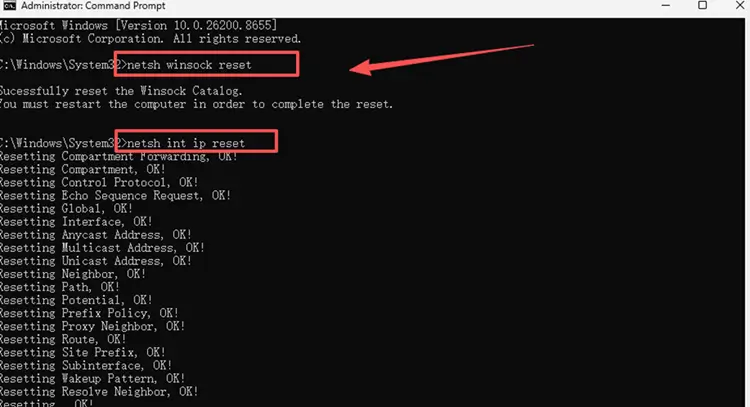
Step 3. Restart your PC, reconnect to the internet, and launch AION 2 again to check the connection.
Fix 7. Update the Network Adapter Driver
An outdated or unstable network adapter driver can affect your Wi-Fi or Ethernet connection, contributing to AION 2 packet loss, ping spikes, or intermittent disconnects. Follow the steps below to check your network adapter driver.
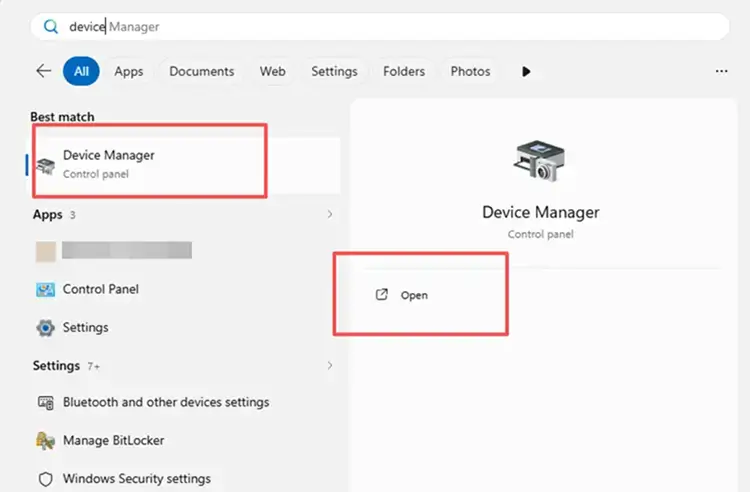
Step 1. Open Device Manager through the Windows search bar.
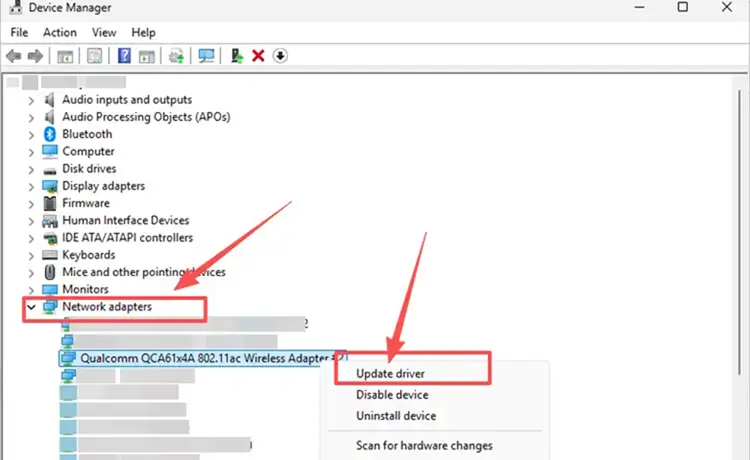
Step 2. Expand Network adapters, right-click your active Wi-Fi or Ethernet adapter, and select Update driver.
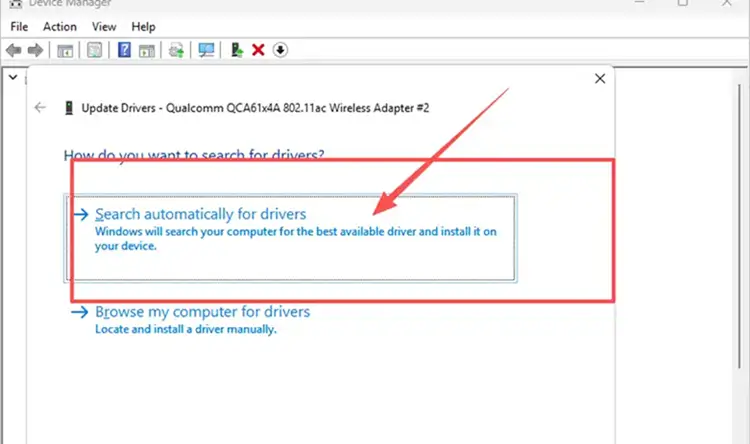
Step 3. Select Search automatically for drivers, install any available update, and restart your PC.
[Bonus] How to Reduce AION 2 High Ping with LagZapper
AION 2 relies on a stable connection for responsive combat, dungeons, and PvP. If local fixes do not resolve high ping, AION 2 ping spikes, or unstable routing, download LagZapper to optimize the connection route, reduce game lag and packet loss, and help lower ping during gameplay.
Why Use LagZapper for AION 2?
- Smart Route Optimization: Finds a faster and more stable route for AION 2, helping reduce high ping, packet loss, jitter, and unstable connections.
- Reduce Lag & Improve Stability: Helps lower ping, reduce game lag, minimize ping spikes, and improve connection stability during dungeons and PvP.
- One-Click Boost: Optimize the AION 2 connection with one click without manually changing complicated network or router settings.
- Support for 3,000+ Games: Use LagZapper for AION 2 and thousands of other supported online games.
How to Boost AION 2 with LagZapper
Follow the steps below to optimize the AION 2 connection before launching the game.
Step 1. Download and Install LagZapper
Download LagZapper for Windows and follow the on-screen instructions to complete the installation.
Step 2. Open LagZapper and Search for AION 2
Launch LagZapper, then use the search bar or browse the supported games list to find AION 2.

Step 3. Select an AION 2 Server and Click Boost
Select an AION 2 server or recommended node, then click Boost to optimize the connection before launching AION 2.

Also Read: AION 2 Keeps Crashing? Try 6 Useful Fixes
The Bottom Line
AION 2 high ping may result from server distance, congestion, inefficient ISP routing, unstable Wi-Fi, or background traffic. Check the server and region first, then work through the relevant local network fixes. If routing remains unstable, download LagZapper to optimize the AION 2 connection route and help reduce ping spikes and packet loss.
FAQs About AION 2 High Ping
Q1. What causes AION 2 high ping?
Server distance, congestion, inefficient ISP routing, unstable Wi-Fi, and background traffic can increase AION 2 latency.
Q2. How to reduce ping in AION 2?
Choose a nearby server region, stabilize the local connection, reduce network traffic, and improve routing.
Q3. Does the AION 2 server region affect ping?
Yes. Connecting to a more distant server region generally increases the minimum latency of the connection.
Q4. Does flushing DNS lower AION 2 ping?
It may fix local network issues, but cannot reduce latency caused by server distance or congestion.