
AION 2 Character Creation Restricted: 6 Fixes
Getting “Character Creation is Restricted on This Server” while trying to create an AION 2 character? Players are reporting the message on EU and North American servers, sometimes with one faction available while the other is locked. In other cases, both Elyos and Asmodians temporarily show restricted. This guide explains what AION 2 Character Creation Restricted means and what to do when your preferred server or faction does not allow a new character.
What Is AION 2 Character Creation Restricted?
AION 2 Character Creation Restricted usually means the selected server or faction is temporarily not accepting new characters. It is mainly a server-side availability restriction, rather than a damaged game installation.
Common situations include:
- AION 2 says Character Creation is Restricted on This Server
- All characters are locked on one server
- Asmodian or Elyos character creation is unavailable
- Several servers show Creation Restricted
- Character creation becomes available after refreshing
- Another server still allows character creation
AION 2 has used server creation restrictions before. NCSOFT previously increased server capacity and added new servers to support character creation, and in February 2026 officially announced that all existing server creation restrictions had been lifted.
Because the restriction is mainly controlled by the server, reinstalling AION 2 or changing graphics settings should not be the first fix.
How to Fix AION 2 Character Creation Restricted
Start with the server and faction status before troubleshooting your PC. Try the following fixes in order.
Fix 1. Check AION 2 Server Status
When many players receive Character Creation Restricted at the same time, the restriction is more likely coming from the AION 2 servers.
Step 1. Check the latest official AION 2 announcements.
Step 2. Look for current server maintenance, capacity, or new-server notices.
Step 3. Return to Server Selection and check whether other servers remain available.
NCSOFT has previously increased server capacity and opened additional servers when character creation demand was high.
Wait for the server to reopen when the restriction affects many players. Local PC changes cannot remove an active server-side lock.
Fix 2. Try Another AION 2 Server
Character creation may be restricted on one busy server while other servers remain open.
Step 1. Return to the Server Selection screen.
Step 2. Choose another server in the same region.
Step 3. Check whether Character Creation becomes available.
Current player reports show this behavior can differ between servers, with some remaining open while others become restricted.
Tip: Planning to play with friends or a guild? Confirm their server before creating your main character elsewhere.
Fix 3. Check the Other Faction
Sometimes the restriction applies to Elyos or Asmodians rather than the entire server.
Step 1. Stay on your preferred server.
Step 2. Check whether the opposite faction is available.
Step 3. Continue only when changing factions works with your plans.
Players have reported cases where Asmodian creation was restricted while Elyos remained available, as well as periods when both factions were locked.
Note: Do not switch factions only to bypass the restriction when your friends or guild already selected the other faction.
Fix 4. Refresh the Server List
Server availability can change quickly, so the server list may become outdated while the game remains open.
Step 1. Return to Server Selection.
Step 2. Refresh or reopen the server list.
Step 3. Select your preferred server again.
Some players reported getting into Character Creation after refreshing several times. This is a community workaround rather than an official guaranteed fix. When the restriction remains after several refreshes, stop repeatedly retrying and check another server instead.
Fix 5. Fully Restart AION 2 and the Launcher
A restart can reload the latest server availability when your current session is showing outdated information.
Step 1. Close AION 2 completely.
Step 2. Fully exit Steam or PURPLE.
Step 3. Reopen the launcher, start AION 2, and check Server Selection again.
Restarting can refresh your connection to the server list, but it cannot remove a restriction that NCSOFT has actively applied.
Fix 6. Check Your Connection to AION 2
Network troubleshooting becomes useful when the server is available but the server list fails to load, Character Creation times out, or you keep disconnecting.
Step 1. Pause large downloads and close bandwidth-heavy apps.
Step 2. Restart your router and use a stable Ethernet connection when possible.
Step 3. Reopen AION 2 and check the server again.
When the connection route to your AION 2 region remains unstable, LagZapper can help optimize the network route and reduce AION 2 lag. A network optimizer cannot unlock a restricted server. It is relevant only when connection instability appears alongside the server-selection problem.
[Bonus] Optimize Your Connection to AION 2
When Character Creation becomes available but AION 2 still has high ping, packet loss, login delays, or disconnects, the network route between your PC and the selected server may contribute to the problem.
LagZapper optimizes the connection route between your PC and the AION 2 server region. It cannot remove Character Creation Restricted, but it can help with network-related problems after the server becomes available.
Highlights of LagZapper for AION 2
- Lower and Stabilize Ping: Optimize your route to the selected server and troubleshoot AION 2 high ping.
- Reduce Lag and Connection Instability: Improve routing when AION 2 suffers from latency spikes or unstable connections.
- Reduce Packet Loss: Maintain a more stable connection and reduce packet loss during gameplay.
- Recommended Server Nodes: Select your AION 2 region and use recommended network nodes for a more stable route.
How to Use LagZapper for AION 2
Follow these steps when your AION 2 server is available but the network connection remains unstable.
Step 1. Download and Install LagZapper
Download LagZapper for Windows, install it, and sign in.
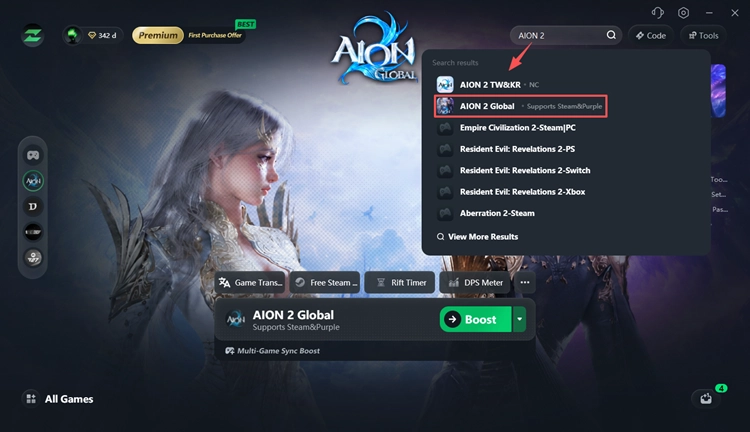
Step 2. Search for AION 2
Open LagZapper and search for AION 2. Select the game to open its boost settings.
Step 3. Select a Region and Boost
Choose your AION 2 server region and a recommended node, then click Boost.
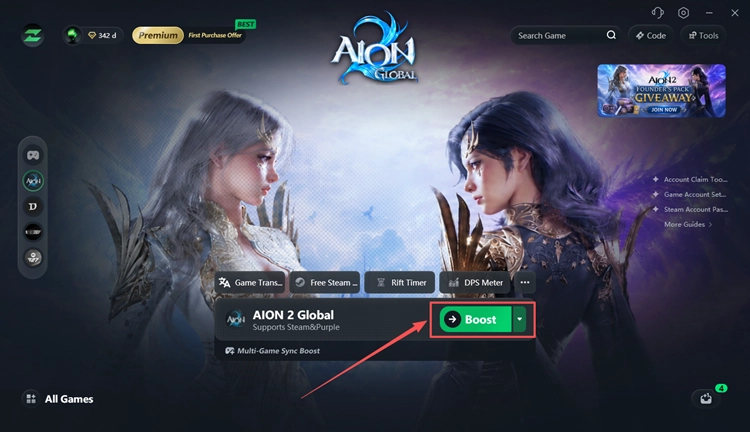
Once the connection is ready, launch AION 2 with the optimized network route.
The Bottom Line
AION 2 Character Creation Restricted usually means the selected server or faction is temporarily closed to new characters. Check server status, try another server or faction, refresh the server list, and restart AION 2 first.
Do not reinstall the game or update GPU drivers just for this message. When the server is available but high ping, packet loss, or unstable connections continue, download LagZapper and optimize your route to AION 2.
AION 2 Character Creation Restricted FAQs
Q1. What does AION 2 Character Creation Restricted mean?
It means the selected server or faction is temporarily not accepting new characters, usually because of server capacity or population controls.
Q2. Why is AION 2 character creation restricted on every server?
Several servers may be temporarily locked during heavy demand. Check official notices and refresh the server list for newly available servers.
Q3. How long does AION 2 Character Creation Restricted last?
There is no fixed duration. Character creation can reopen after server capacity changes or NCSOFT adjusts the restriction.
Q4. Why can I create Elyos but not Asmodian in AION 2?
The restriction may apply to only one faction. Current players have reported different Elyos and Asmodian availability on the same server.
Q5. Does restarting AION 2 fix Character Creation Restricted?
Restarting may refresh outdated server information, but it cannot remove an active server-side character creation restriction.
Q6. Can LagZapper fix AION 2 Character Creation Restricted?
No. LagZapper cannot unlock restricted servers. It helps with network-related high ping, packet loss, disconnects, and unstable routing.