
AION 2 DPS Meter Guide: Setup, Damage Stats & Rotation Tips
During AION 2 dungeons and boss fights, your rotation may feel smooth, yet it can be difficult to judge your actual damage or whether a gear upgrade made a difference. An AION 2 DPS meter gives you combat data to review after each test, helping you compare results and decide what to adjust.
This guide will show you how to enable the AION 2 DPS meter in LagZapper, read damage stats, test skill rotations, and compare combat performance.
What Is an AION 2 DPS Meter?
Before using a DPS meter, understand what its numbers represent and how built-in measurement differs from third-party tools for AION 2.
What Does a DPS Meter Track?
An AION 2 DPS meter records combat statistics, including DPS (damage per second) and total damage, the cumulative damage dealt during the recorded period. These numbers help you test skill rotations, compare equipment changes, and review party performance. The meter provides evidence for decisions; improving your output still depends on how you adjust your build and play.
Built-In DPS Measurement and Third-Party Tools
NC has announced personal DPS measurement, with availability varying by region and version. LagZapper’s third-party DPS Meter is a separate tool that displays real-time combat stats in an overlay, letting you review damage without switching windows.
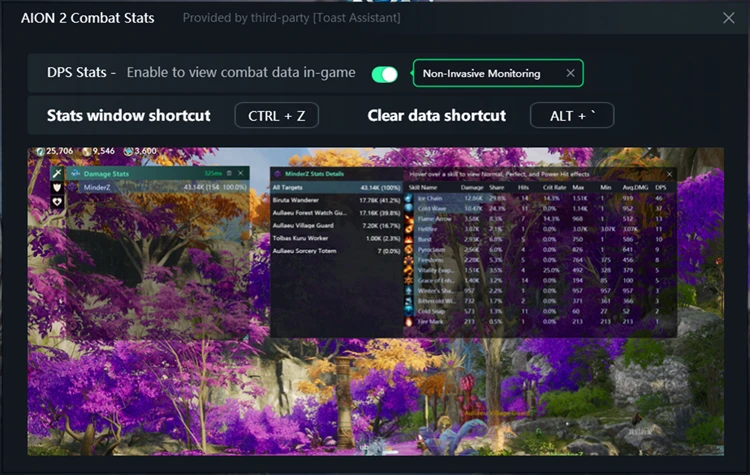
How to Use the AION 2 DPS Meter in LagZapper
Use LagZapper to view real-time combat stats, then follow the setup steps below to enable DPS Meter for AION 2.
Why Use LagZapper for AION 2 DPS Tracking?
- Real-Time Overlay: Displays live DPS and damage stats over the game, letting you monitor combat performance without switching windows.
- Boost Your FPS: FPS Master optimizes supported PC settings and system resources for smoother gameplay.
- Smart Route Optimization: Finds a more suitable route to AION 2 servers, helping reduce high ping, packet loss, jitter, and routing instability.
- Reduce Lag & Improve Stability: Helps reduce game lag, ping spikes, and connection instability during exploration, dungeons, and large-scale battles.
Tip: For additional ways to reduce frame drops and stuttering, check the AION 2 Low FPS guide.
How to Enable LagZapper DPS Meter
Follow these three steps to enable the AION 2 DPS meter and view combat stats while playing.
Step 1. Download and Install LagZapper
Download LagZapper for Windows and follow the on-screen instructions to complete the installation.
Step 2. Select AION 2 and Open DPS Meter
Launch LagZapper, search for and select AION 2, then turn on DPS Meter to enable combat tracking.
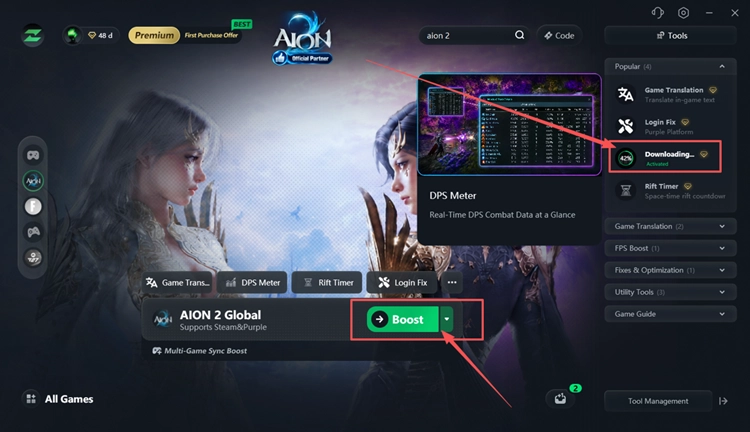
Step 3. Enter the Game and Check Your Combat Stats
Launch AION 2 and press Ctrl + Z during combat to view your stats.
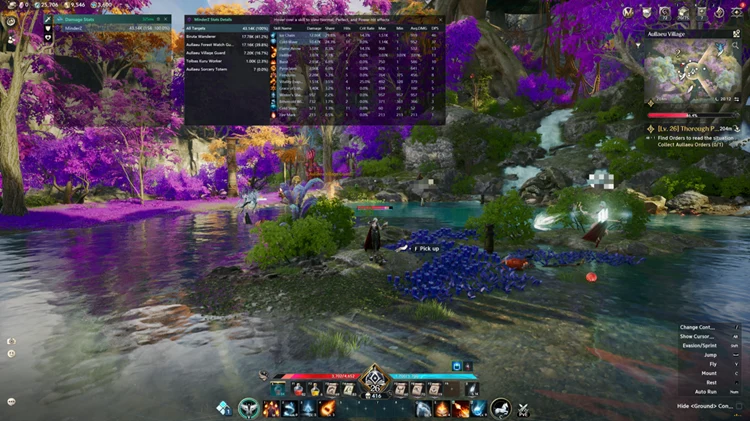
Tip: Boost AION 2 in LagZapper first, then open DPS Meter, and finally enter the game.
How to Read AION 2 DPS Meter Stats
The AION 2 DPS meter separates damage totals, damage rates, and skill details. Understanding each field helps you compare combat results more accurately.
Understand the Main Combat Stats
Check the table below to understand the main combat stats and how to use them when reviewing damage.
| Stat | Meaning | How to Use It |
|---|---|---|
| DPS | Damage dealt per second over the recorded period. | Compare damage rates under similar conditions. |
| Damage | Total damage recorded for the selected player, skill, or target. | Compare tests of equal duration. |
| Share | Damage percentage within the selected skill or target breakdown. | Identify main damage sources and check the comparison scope. |
| Hits | Number of hits recorded for the selected skill. | Compare hit counts with that skill’s damage contribution. |
| Crit Rate | Percentage of recorded hits that were critical. | Compare several tests to account for random variation. |
| Avg.DMG | Average damage dealt by each recorded hit. | Compare individual hit damage after gear or build changes. |
How to Use DPS Data to Improve Your Rotation
Damage stats help you check whether changes to your rotation or gear improve your output. Follow these tips to compare results and review your performance.
Compare Results Under Similar Conditions
Use the same target, test duration, and buffs when comparing results. Clear the meter before each attempt, and change only one factor, such as a gear item or skill order. Repeat the test several times to account for variation in critical hits.
Review Skill Usage and Damage Contribution
Review Hits, Damage, and Share together to see how often your main skills landed and how much damage they contributed. Then review delays in using available skills, movement, or boss mechanics that interrupted attacks. Choose one possible rotation change and test whether it improves results under similar conditions.
Compare Party Damage in Context
Party damage depends on class roles, gear, survival, and time spent handling mechanics. Use the AION 2 Classes guide to understand each role, then compare your own performance across similar attempts. A lower damage ranking alone does not show whether someone handled their role well.
The Bottom Line
An AION 2 DPS meter helps you review damage, test skill rotations, and compare gear changes. Enable DPS Stats and compare attempts under similar conditions. LagZapper also optimizes game server routes to help lower ping, reduce game lag, and limit packet loss. To track combat stats and optimize your connection, download LagZapper and select AION 2.
AION 2 DPS Meter FAQs
Q1. What Does an AION 2 DPS Meter Track?
An AION 2 DPS meter tracks DPS, total damage, hits, critical rate, and skill contribution.
Q2. How to Use AION 2 DPS Meter in LagZapper?
Select AION 2, open DPS Meter, enable DPS Stats, then enter combat to collect data.
Q3. Can I View AION 2 Real Time DPS Without Switching Windows?
AION 2 real time DPS appears in LagZapper’s overlay, showing combat stats without switching windows.
Q4. How Can an AION 2 DPS Tracker Help Compare Gear?
An AION 2 DPS tracker helps compare gear through repeated tests under the same conditions.
Q5. Why Do AION 2 Damage Meter Results Vary Between Fights?
AION 2 damage meter results vary with buffs, critical hits, movement, mechanics, and fight duration.