
AION 2 Not Launching? 7 Fixes for Error 0xE0000013
Is AION 2 not launching after you click Play on Steam or PURPLE? Some players report the AION 2 or NCGuard logo appearing briefly before the game closes, while others find error 0xE0000013 in the NCGuard log. The exact cause of 0xE0000013 has not been officially confirmed. Current player reports point to NCGuard conflicts, background software, security tools, Windows services, or damaged game files. Try the fixes below in order.
Why Is AION 2 Not Launching?
AION 2 startup problems can appear in several ways:
- Steam shows Running, then returns to Play
- The AION 2 or NCGuard logo appears, then disappears
- AION2.exe closes without an error window
- The game closes a few seconds after launch
- NCGuard fails before the game fully starts
- AION 2 still does not launch after verifying game files
One currently reported startup error is 0xE0000013, which appears in NCGuard logs when the game exits during startup.
What Is AION 2 Error 0xE0000013?
Based on player logs, AION 2 error 0xE0000013 appears to be related to NCGuard startup. Some logs reach AION2.exe initialization before ending with: Aion2.exe - 0xE0000013
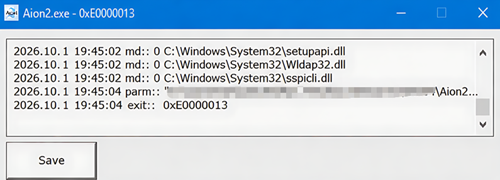
Steam may close the game without showing the code, while launching AION2.exe directly can reveal AION 2 0xE0000013. NCSoft has not confirmed a single cause; reported triggers include background apps, security software, Windows services, and corrupted or blocked files.
How to Fix AION 2 Not Launching and Error 0xE0000013
Try these fixes in order for AION 2 not launching, AION 2 error 0xE0000013, and related NCGuard startup errors.
Fix 1. Restart Steam or PURPLE and Your PC
Start with a full restart to clear temporary launcher or NCGuard conflicts.
Step 1. Fully close AION 2, Steam, or PURPLE from Task Manager.
Step 2. Restart your PC, reopen the launcher, and try AION 2 again.
This can clear a stuck launcher, NCGuard process, or temporary startup conflict.
Fix 2. Verify AION 2 Game Files on Steam
Corrupted or missing game files can cause AION 2 not launching on Steam or trigger startup errors such as 0xE0000013.
Step 1. Open Steam > Library > AION 2.
Step 2. Go to Properties > Installed Files > Verify integrity of game files.
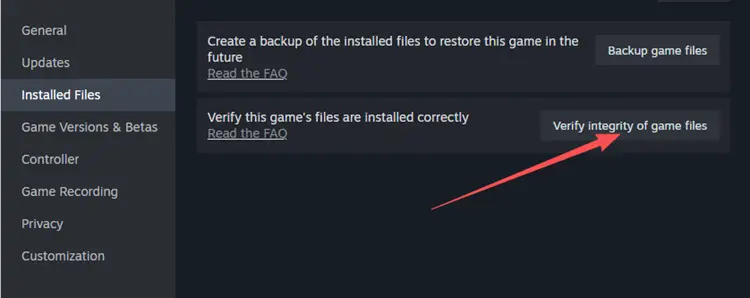
Step 3. Wait for the scan to finish, restart Steam, and launch AION 2 again.
If verification does not fix 0xE0000013, continue with the fixes below.
Fix 3. Close Conflicting Background Apps
Background software can interfere with NCGuard before AION 2 fully starts.
Step 1. Open Task Manager and close non-essential apps that hook into games or monitor system processes, such as RGB software, overlays, macro tools, process monitors, and performance utilities.
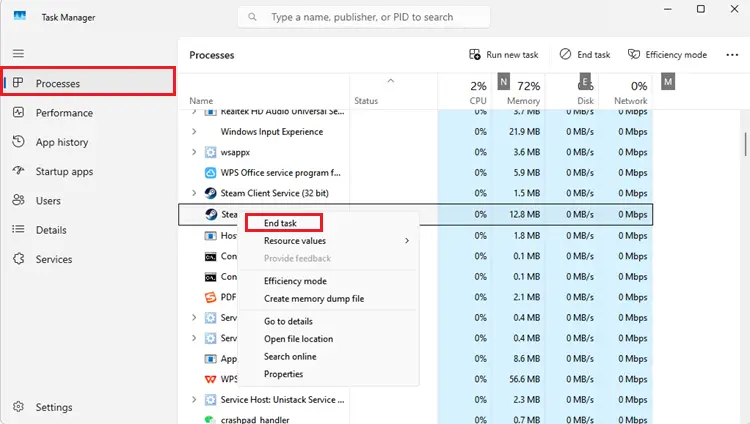
Step 2. Go to Task Manager > Startup apps and disable non-essential startup programs.
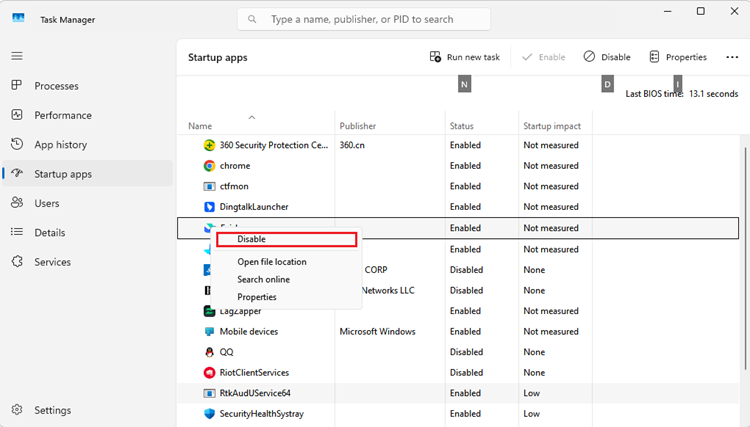
Step 3. Restart Windows and launch AION 2 again.
Some players have linked AION 2 launch problems to software such as Process Lasso, ASUS Aura Sync, iCUE, or certain Razer-related services. These are player-reported cases, and the conflicting app may vary between PCs.
Fix 4. Check Antivirus and Security Software
Security software may block AION 2 or NCGuard from accessing required files during startup.
Step 1. Check whether your antivirus or security software is blocking AION2.exe, Steam, PURPLE, or NCGuard.
Step 2. Add the official AION 2 executable and launcher to the software's allowed apps or exclusions, then restart the launcher.
Tip: Do not permanently disable Windows Defender, Firewall, or antivirus protection just to launch AION 2.
Fix 5. Make Sure Required Windows Services Are Enabled
Disabled Windows services may interfere with NCGuard or the AION 2 startup process, so check that key system services are enabled.
Step 1. Press Win + R, type services.msc, and press Enter.
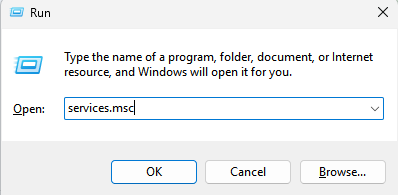
Step 2. Make sure Windows Time and Windows Defender Firewall are not disabled, then restart Windows and launch AION 2 again.
Fix 6. Run Steam or PURPLE as Administrator
Permission issues may prevent Steam, PURPLE, AION 2, or NCGuard from accessing required files and services.
Step 1. Close Steam or PURPLE, then right-click the launcher and select Run as administrator.
Step 2. Launch AION 2 again and check whether the startup issue is resolved.
Fix 7. Update Windows and Your Graphics Driver
Outdated Windows components or graphics drivers can cause AION 2 startup problems.
Step 1. Go to Settings > Windows Update > Check for updates, install available updates, and restart Windows.
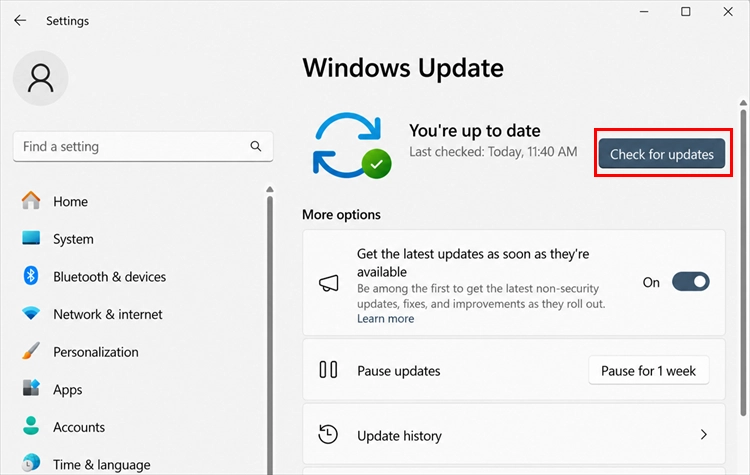
Step 2. Install the latest NVIDIA, AMD, or Intel graphics driver, restart your PC, and launch AION 2 again.
[Bonus] Optimize Your AION 2 Connection with LagZapper
LagZapper is a Windows PC game booster that optimizes the network route between your PC and the AION 2 server. With smart route optimization and one-click boosting, it helps improve connection stability and reduce high ping, packet loss, lag, and unstable routing.
Highlights of LagZapper for AION 2
- Reduce High Ping: Helps reduce AION 2 high ping and sudden latency spikes.
- Connection Stability: Helps reduce packet loss, jitter, and unstable routing.
- One-Click Boost: Optimizes your AION 2 connection with one simple click.
- Smart Route Optimization: Finds a more stable network route to your AION 2 server.
How to Use LagZapper for AION 2
You can optimize your AION 2 connection in three simple steps:
Step 1. Download and Install LagZapper
Download LagZapper on your Windows PC and open the app.
Step 2. Search for AION 2
Enter AION 2 in the search bar and select the game.
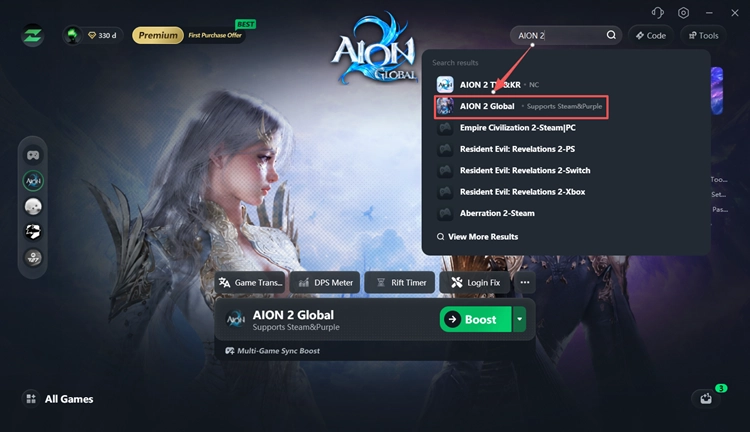
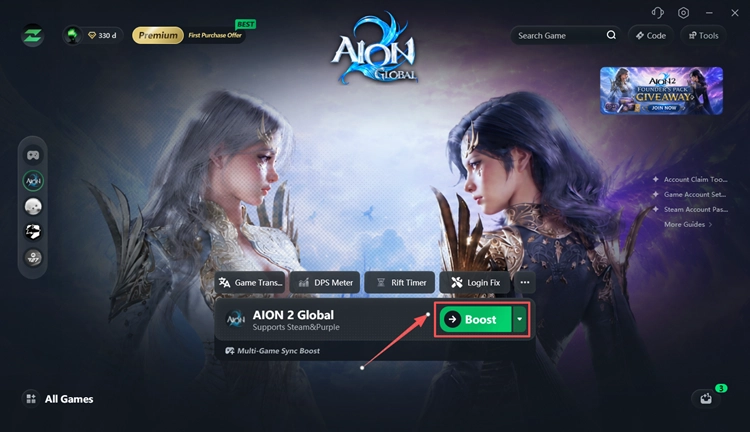
Step 3. Boost AION 2
Choose the recommended server or network route for your region, then click Boost to start route optimization.
The Bottom Line
If AION 2 is not launching or NCGuard exits with 0xE0000013, start with file verification and then check background apps, security software, Windows services, and launcher permissions. Because NCSoft has not confirmed one universal cause, the fix may differ between PCs.
Once the game launches normally, download LagZapper to optimize your AION 2 connection and reduce high ping, packet loss, and unstable routing.
FAQ: AION 2 Not Launching and Error 0xE0000013
Q1. Why is AION 2 not launching on Steam?
Common causes include NCGuard startup problems, corrupted files, background software, Windows services, or temporary launcher issues. Start by verifying the game files and closing unnecessary apps.
Q2. What is AION 2 error 0xE0000013?
AION 2 error 0xE0000013 has appeared in NCGuard logs when the game fails during startup. NCSoft has not confirmed one universal cause.
Q3. Why does AION 2 close after the NCGuard logo?
NCGuard may be stopping before the main AION 2 client fully starts. Check background apps, security software, Windows services, and game files.
Q4. Can background software cause AION 2 error 0xE0000013?
Yes, it may. Some players have reported conflicts with peripheral software, overlays, and process-management tools, but the conflicting app varies by PC.
Q5. Should I reinstall AION 2 to fix 0xE0000013?
Try Verify integrity of game files first. Reinstalling may not help when the issue comes from NCGuard, Windows services, or conflicting software.
Q6. Why does Steam show AION 2 running and then return to Play?
This usually means the startup process begins but AION 2 closes before reaching the main client. Check the NCGuard log and try the fixes above.