
Diablo 4 Error Code 300008: Login Timeout & Fixes
Getting Diablo 4 error code 300008 with the message “Your login attempt has timed out. Please try again.”? This Diablo 4 login error usually means the game cannot complete authentication with Blizzard’s servers, leaving players unable to log in.
The Diablo 4 login timeout became widely reported during the Season 15: Season of Hell's Legacy launch on September 15, 2026, affecting players across PC and consoles. Below, we explain what Diablo 4 error 300008 means and the fixes to try when Diablo 4 can't login.
What Is Diablo 4 Error Code 300008?
Diablo 4 error code 300008 is a login timeout that appears when Diablo IV cannot complete the login process with Blizzard’s authentication services. Players typically see “Your login attempt has timed out. Please try again.”
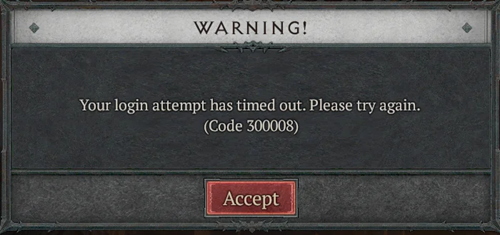
The error was widely reported during the Season 15: Season of Hell’s Legacy launch on September 15, 2026. Blizzard confirmed that some players were unable to log in and temporarily delayed Season 15 while working to resolve the login issues.
Why Does Diablo 4 Error 300008 Happen?
The most common causes of Diablo 4 error code 300008 include:
- Blizzard authentication server outages
- Heavy login traffic after a new season or major update
- Temporary Battle.net connection problems
- An outdated Diablo IV client
- Unstable local network connections
- DNS or IP-related connection issues
- Firewall or security software blocking Battle.net
During the Season 15 launch, Diablo 4 error 300008 was mainly a server-side issue, with Blizzard confirming login problems affecting players on PC and consoles.
How to Fix Diablo 4 Error Code 300008
Still getting a Diablo 4 login timeout? Try these fixes in order.
Fix 1. Check If Diablo 4 Servers Are Down
Check the servers first before changing anything on your PC.
Step 1. Check the Diablo IV forums and Blizzard support updates for login or authentication issues.
Step 2. Look for widespread reports of Diablo 4 error 300008 or players who can't login.
When many players get the same error at once, it is likely a server-side issue. During the Season 15 launch, Blizzard confirmed login problems and delayed the season while working on a fix.
Fix 2. Restart Diablo IV and Battle.net
A stuck login session may continue even after the servers recover.
Step 1. Close Diablo IV and fully exit Battle.net.
Step 2. Reopen Battle.net, launch Diablo IV, and try logging in again.
Console players can fully close the game and restart the console.
Tip: Still stuck on Connecting or Offline Mode? See how to fix Battle.net not connecting.
Fix 3. Update and Repair Diablo IV
An outdated or corrupted game client can also cause login problems after an update.
Step 1. Open Battle.net > Diablo IV and install any available update.
Step 2. Open the menu beside Play and select Scan and Repair.
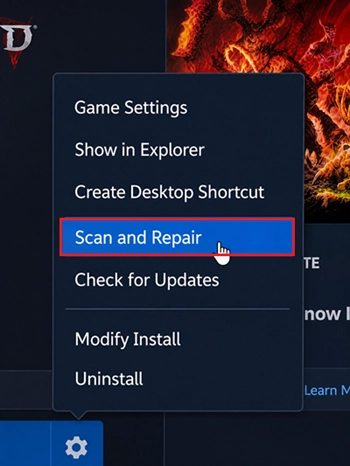
Step 3. Restart Battle.net, then launch Diablo IV again.
Fix 4. Restart Your Router and Stabilize the Connection
Once Blizzard’s servers are working normally, an unstable local connection may still cause a Diablo 4 login timeout.
Step 1. Turn off your router for about 30 seconds, then restart it.
Step 2. Reconnect your PC or console, use Ethernet when possible, and pause large downloads or streams.
Blizzard also recommends resetting network devices when troubleshooting connection problems.
Fix 5. Flush DNS and Renew Your IP
DNS or IP configuration issues can interfere with Battle.net authentication on PC.
Step 1. Search for Command Prompt, right-click it, and select Run as administrator.
Step 2. Run these commands one by one:
- ipconfig /flushdns
- ipconfig /release
- ipconfig /renew
Then restart Battle.net and launch Diablo IV again.
Fix 6. Check Firewall and Security Software
Firewall or security software may block Diablo IV or Battle.net from connecting properly.
Step 1. Open Windows Security > Firewall & network protection > Allow an app through firewall.
Step 2. Make sure Battle.net and Diablo IV are allowed, then restart Battle.net and try logging in again.
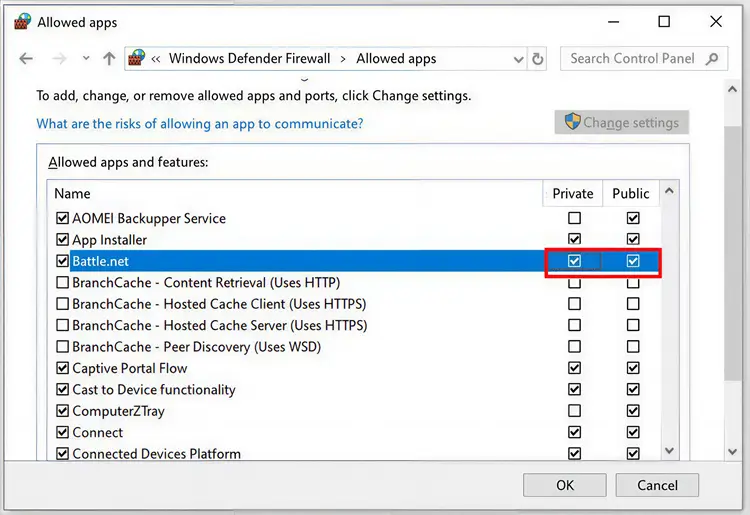
Tip: Do not permanently disable your firewall or antivirus. Add trusted apps to the allowed list instead.
[Bonus] Optimize Your Diablo 4 Connection with LagZapper
Diablo 4 error code 300008 is often tied to Blizzard login or authentication services, so widespread outages need to be resolved on the server side first. However, once Diablo 4 servers are back online, continued login instability, high ping, packet loss, or lag spikes may come from the network route between your PC and the game server.
LagZapper is a Windows game booster that optimizes your connection route to Diablo IV. It can help lower ping, reduce packet loss, stabilize routing, and improve connection quality during Helltides, Nightmare Dungeons, World Boss fights, and other online activities.
LagZapper Highlights for Diablo 4
- Lower and Stabilize Diablo 4 Ping: Optimize the route between your PC and Diablo IV servers to help reduce Diablo 4 high ping, sudden latency changes, and delayed skill responses during combat.
- Reduce Lag Spikes and Packet Loss: Improve connection stability to reduce packet loss, rubberbanding, and sudden lag spikes during Helltides, Nightmare Dungeons, World Boss events, and group play.
- Improve Unstable Network Routes: Avoid inefficient or congested routes that may contribute to Battle.net connection issues, especially when connecting to a distant Diablo IV server.
How to Use LagZapper for Diablo IV
Once Blizzard services are working normally, follow these steps to optimize your Diablo IV connection with LagZapper.
Step 1. Download and Install LagZapper
Download LagZapper for Windows, then follow the on-screen instructions to complete the installation.
Step 2. Open LagZapper and Sign In
Launch LagZapper and sign in to start optimizing your connection for Diablo IV.
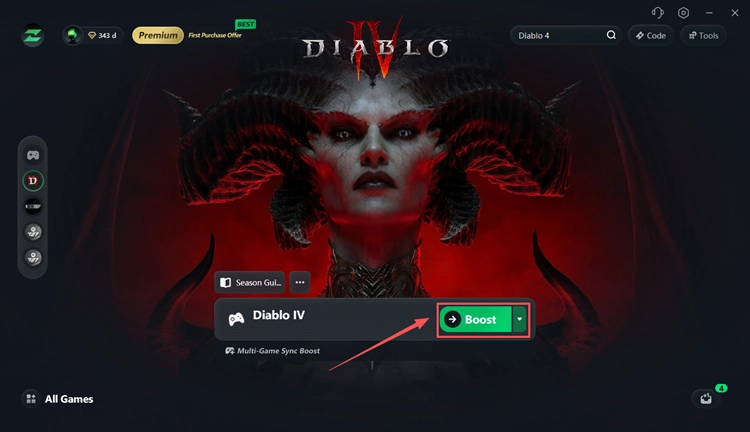
Step 3. Search for Diablo IV
Enter Diablo IV in the search bar or find it in the supported games list.
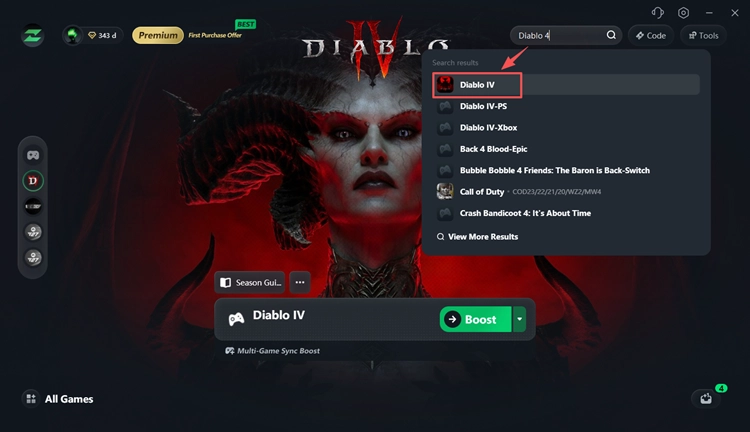
Step 4. Boost and Play Diablo IV
Choose your preferred server or node, click Boost, and then launch Diablo IV with the optimized connection route.
The Bottom Line
Diablo 4 error code 300008 means your login attempt timed out before connecting successfully. During the Season 15 launch, Blizzard confirmed widespread login problems and later restored access with Hotfix 3.2.1.
Still seeing error 300008 after the servers recover? Restart Diablo IV and Battle.net, update and repair the game, then check your network. For persistent routing, ping, or packet loss issues, download LagZapper to optimize your Diablo IV connection.
FAQs About Diablo 4 Error Code 300008
Q1. What does Diablo 4 error code 300008 mean?
Diablo 4 error code 300008 means your login attempt timed out before the game could connect successfully.
Q2. Why does Diablo 4 say “Your login attempt has timed out”?
This Diablo 4 login timeout can happen because of server outages, authentication problems, heavy login traffic, or an unstable connection.
Q3. Is Diablo 4 error 300008 a server issue?
Yes, it can be. During the Season 15 launch, Blizzard confirmed login issues preventing some players from accessing Diablo IV.
Q4. How do I fix Diablo 4 error code 300008?
Check the Diablo 4 server status first. Then restart Diablo IV and Battle.net, update or repair the game, and troubleshoot your network.
Q5. Does Diablo 4 error 300008 affect PS5 and Xbox?
Yes. Error 300008 has been reported on PC, PS5, and Xbox, including during the Season 15 login issues.
Q6. Should I reinstall Diablo 4 to fix error 300008?
Not at first. Try restarting Battle.net, repairing Diablo IV, resetting your network, and checking for server problems before reinstalling the game.