
FC 27 Connection Failed: 6 Fixes for EA Server Errors
Getting FC 27 connection failed, “Unable to connect to EA servers,” or “The connection to your opponent has been lost”? Some FC 27 players are reporting problems entering Ultimate Team, disconnecting before kickoff, or being kicked back to the menu during or after matches.
A connection error does not always mean the FC 27 servers are completely down. The cause can also be your local network, EA App files, packet loss, jitter, or the route between your ISP and the FC game data center.
Why Does FC 27 Keep Losing Connection?
Recent player reports show several different FC 27 connection problems:
- “Unable to connect to EA servers”
- “Connecting to Ultimate Team is not possible at the moment”
- “The connection to your opponent has been lost”
- FC 27 disconnect before kickoff
- Freezing or disconnecting during Rivals and Rush
- FC 27 lost connection after a match and returning to Ultimate Team
Some players report FC 27 Ultimate Team connection errors even on Ethernet with a good Connection Score. The problem may come from your local network, ISP routing, or the FC game data center rather than a full EA server outage.
How to Fix FC 27 Connection Failed
The fixes below also cover unable to connect to EA servers, lost connections, and Ultimate Team disconnects.
Fix 1. Check FC 27 Server Status
Check the official EA server-status page first. Server outages can cause FC 27 connection failed, Ultimate Team login errors, and sudden disconnects.
When FC 27 shows Online, also check your PlayStation, Xbox, Steam, or EA App service status. When many players report the same issue, wait for the affected service to recover before changing your network settings.
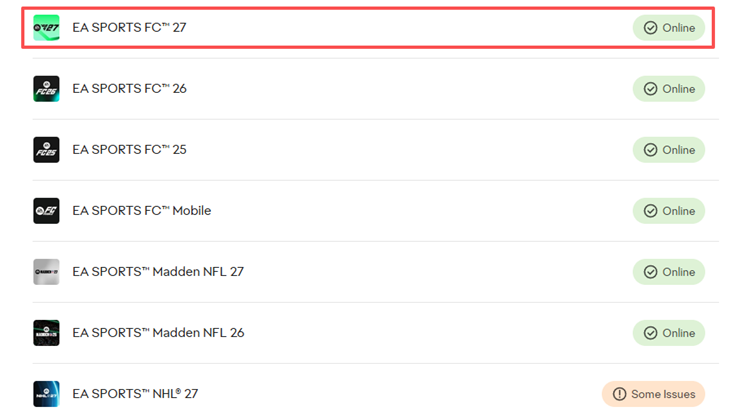
Fix 2. Show FC 27 Ping and Connection Indicators
FC 27’s Connection Monitoring is enabled automatically. You can customize it to show your current ping and connection warnings during matches.
Step 1. Go to Customise > Settings > Game Settings > Visual > Connection Monitoring.
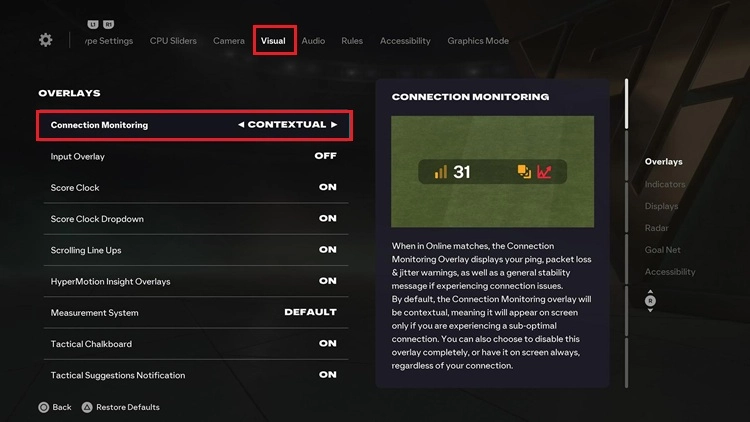
Step 2. Select Ping and connection indicators to display your ping together with high ping, packet loss, and jitter warnings.
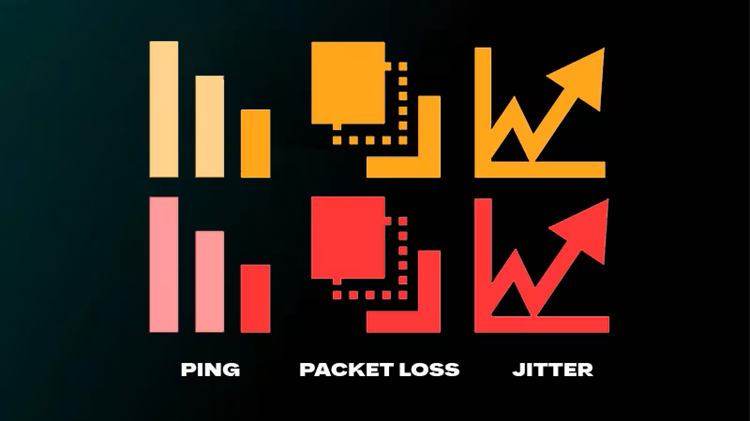
Tip: Orange icons indicate a possible issue, while red icons indicate a more serious connection problem.
Frequent warnings or sudden ping spikes can help explain FC 27 lost connection, Ultimate Team disconnects, or disconnects before kickoff.
Also Read: FC 27 Ping So High? 6 Fixes for Ping Spikes
Fix 3. Restart Your Network and Use Ethernet
Temporary game sessions or network congestion can trigger FC 27 connection failed errors and sudden disconnects.
Step 1. Close FC 27 completely and restart the game.
Step 2. Restart your router and modem. Wait at least 30 seconds before turning them back on.
Step 3. Pause large downloads, HD or 4K streaming, cloud sync, and other bandwidth-heavy activity.
Once your network reconnects, launch FC 27 and test Ultimate Team or another online mode again.
Fix 4. Repair FC 27 and Clear the EA App Cache
On PC, corrupted game files or EA App issues can cause FC 27 connection errors or prevent online services from loading correctly.
Step 1. Open EA app > Library, find FC 27, open the three-dot menu, and select Repair.
Step 2. Clear the EA App cache via EA app menu > Help > App Recovery > Clear cache.
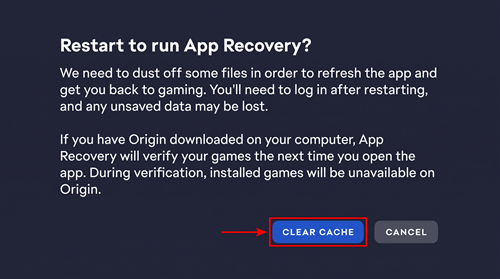
Step 3. Restart the EA app and launch FC 27 again.
This can fix local EA App problems, but it will not resolve an active EA server outage.
Fix 5. Use Ethernet Instead of Wi-Fi
Wi-Fi interference can cause packet loss, jitter, and unstable latency. Connect your PC or console to the router with an Ethernet cable when possible for a more stable connection.
When Ethernet is unavailable:
- Use 5 GHz Wi-Fi near the router.
- Move closer to the router.
- Reduce wireless interference.
- Limit heavy network use on other devices.
Test FC 27 again after switching connections. Better stability on Ethernet usually means Wi-Fi was contributing to the disconnects.
Fix 6. Contact Your ISP If FC 27 Keeps Disconnecting
If FC 27 servers are online and Ethernet does not solve the problem, the issue may involve your ISP or the route to the FC game data center. Contact your ISP and provide your normal ping, current ping, packet loss, jitter, and the times when disconnects usually occur.
[Bonus] Optimize FC 27 Connection with LagZapper
FC 27 servers can be online while connection failed errors, high ping, packet loss, or latency spikes continue. Poor or congested routing between your PC and the FC game data center may be part of the problem.
LagZapper is a Windows game booster that optimizes your connection route to FC 27 servers. It can help improve connection stability during Ultimate Team and other online matches.
Why Use LagZapper for FC 27?
- Lower FC 27 Ping: Lower ping and stabilize latency during online matches.
- Reduce FC 27 Lag: Reduce lag caused by congested or inefficient routes.
- Reduce Packet Loss: Improve connection stability and reduce sudden interruptions.
- Multi-Boost Support: Boost FC 27, Steam, Discord, and other apps at the same time.
How to Boost FC 27 with LagZapper
Boost FC 27 with LagZapper in three simple steps.
Step 1. Download and Install LagZapper
Download LagZapper for Windows and complete the installation.
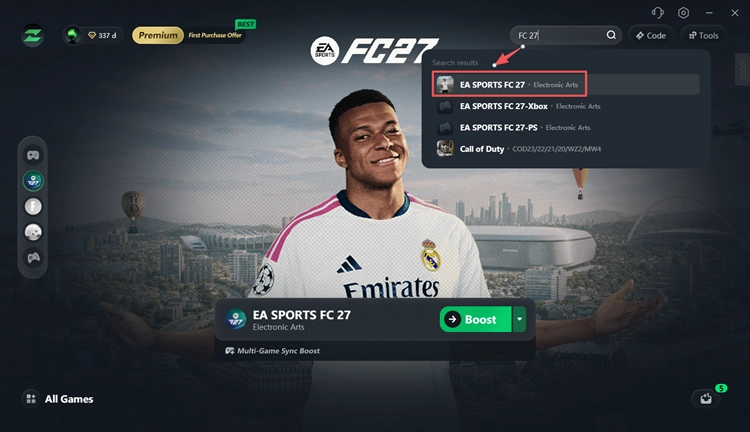
Step 2. Search for EA SPORTS FC 27
Open LagZapper, sign in, search for EA SPORTS FC 27, and select the game.
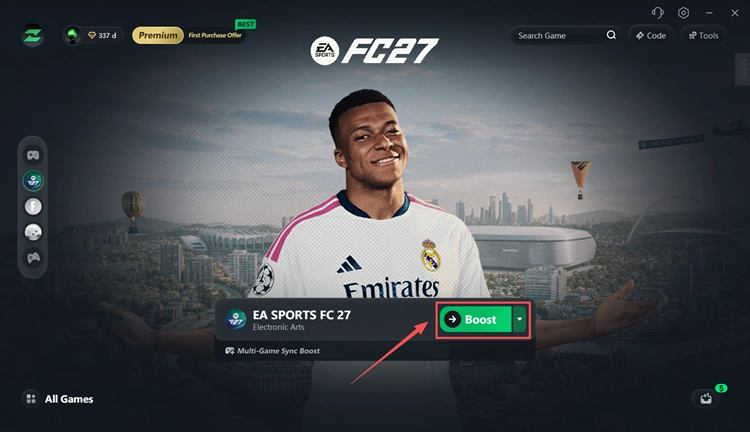
Step 3. Select a Node and Boost
Choose an optimized node, click Boost, then launch FC 27 and test your connection.
The Bottom Line
FC 27 connection failed errors can come from server outages, unstable Wi-Fi, packet loss, jitter, or routing problems. Start by checking EA server status and your Connection Quality, then restart your network and try Ethernet. If FC 27 servers are online but you still keep losing connection, download LagZapper to optimize the route between your PC and the game server and improve connection stability.
FAQs About FC 27 Connection Failed
Q1. Why does FC 27 say connection failed?
It can be caused by EA server issues, packet loss, jitter, unstable Wi-Fi, or routing problems.
Q2. Why can't I connect to Ultimate Team in FC 27?
Check FC 27 server status first. If servers are online, restart the game and router and test again.
Q3. Why does FC 27 keep disconnecting during matches?
High ping, packet loss, jitter, Wi-Fi instability, or server issues can cause disconnects.
Q4. How do I fix “The connection to your opponent has been lost”?
Check server status, restart your router, use Ethernet, stop background traffic, and check Connection Quality.
Q5. Why does FC 27 disconnect even with good internet?
Fast internet can still have packet loss, jitter, or unstable routing to the FC game server.
Q6. Can LagZapper fix FC 27 connection failed?
LagZapper can help with routing, latency, and network instability, but not an EA server outage.