
FC 27 High Ping & Lag: 6 Fixes for Ping Spikes
Dealing with FC 27 high ping, sudden ping spikes, or delayed controls during online matches? Some FC 27 players on Reddit report ping jumping from around 40–50ms to 100ms or even 200ms within the same match, leading to input delay, sluggish gameplay, and inconsistent responses.
FC 27 online matches rely on a stable connection between your PC or console and EA’s game data centers. High latency, jitter, packet loss, or unstable routing along that path can result in FC 27 lag, delayed actions, visual stutter, or other connection issues.
Why Is My Ping So High in FC 27?
FC 27 high ping does not always come from slow internet speed. Match data travels through your home network, ISP, internet route, and then to an FC game data center. Problems anywhere along this path can lead to FC 27 lag, high latency, or unstable gameplay.
Common causes include:
- Poor ISP routing: Your connection may take a longer or congested route to FC 27 servers.
- Ping spikes: Sudden jumps in latency can cause delayed or inconsistent responses.
- Packet loss: Missing game data may result in stuttering, input delay, or disconnects.
- Network congestion: Downloads, streaming, cloud sync, and uploads can increase latency.
- Unstable Wi-Fi: Interference, weak signal strength, or distance from the router can make FC 27 ping fluctuate.
- Server or data center issues: Temporary service problems or a distant FC data center can cause FC 27 connection issues.
EA evaluates connection quality using ping, packet loss, and jitter, so a normal internet speed test may still look fine while FC 27 has noticeable lag or latency problems.
Tip: New to the game? Check our EA FC 27 preload and download guide for download times, platforms, and installation details.
[Quick Way] Reduce FC 27 High Ping with LagZapper
FC 27 servers can be running normally while high ping, ping spikes, or packet loss still continue. In that case, poor or congested routing between your PC and the game data center may be causing the problem.
LagZapper is a Windows game booster that optimizes your connection route to FC 27 servers. It can help lower ping, reduce lag, and improve stability during online matches.
Why Use LagZapper for FC 27?
- Lower FC 27 Ping: Lower ping and stabilize latency during online matches.
- Reduce FC 27 Lag: Reduce lag caused by inefficient or congested routes.
- Reduce Packet Loss: Improve connection stability and reduce sudden interruptions.
- Optimize FC 27 Routing: Connect through a more efficient route to FC game data centers.
How to Boost FC 27 with LagZapper
Boost FC 27 in three steps.
Step 1. Download and Install LagZapper
Download LagZapper for Windows and complete the installation.
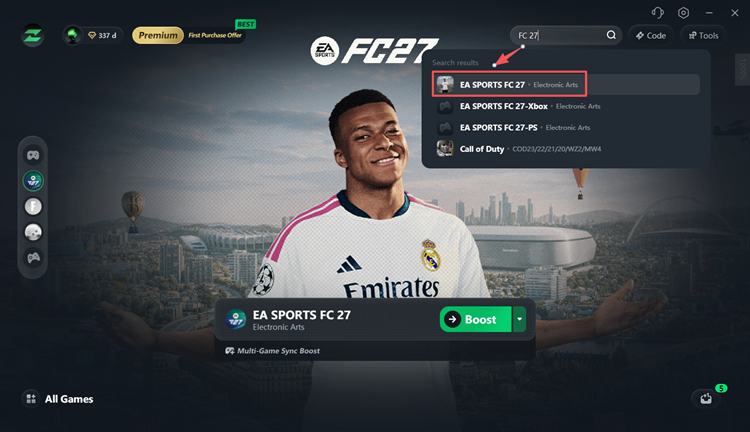
Step 2. Search for EA SPORTS FC 27
Open LagZapper, sign in, search for EA SPORTS FC 27, and select the game.
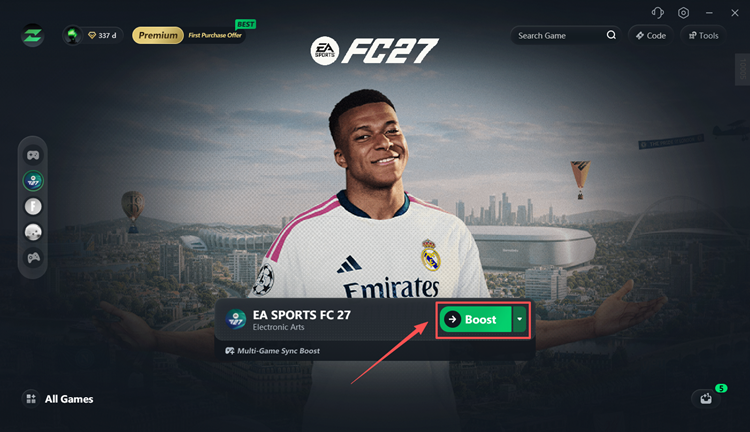
Step 3. Select a Node and Boost
Choose an optimized node, click Boost, then launch FC 27 and check your ping and latency.
How to Fix FC 27 High Ping and Lag
Still dealing with FC 27 high ping, unstable latency, ping spikes, or input delay? Work through these fixes in order.
Fix 1. Check FC 27 Server Status
Check the official EA Server Status page and select EA SPORTS FC 27 to see whether the game or platform servers are experiencing an outage.
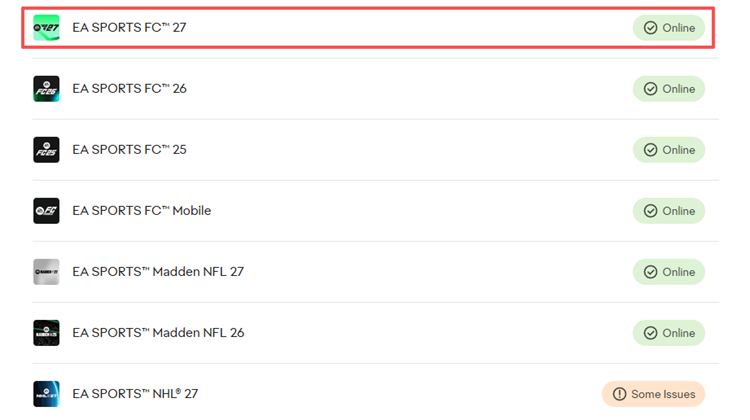
Server or matchmaking issues can cause FC 27 lag, disconnects, and other connection problems. When EA services are down, wait for them to recover before changing your local network settings.
Also Read: EA FC 26 Servers Down? Fix EA Servers Are Not Available
Fix 2. Show FC 27 Ping and Connection Indicators
Use FC 27’s built-in Connection Monitoring to track ping, packet loss, and jitter during online matches.
Step 1. Go to Customise > Settings > Game Settings > Visual > Connection Monitoring.
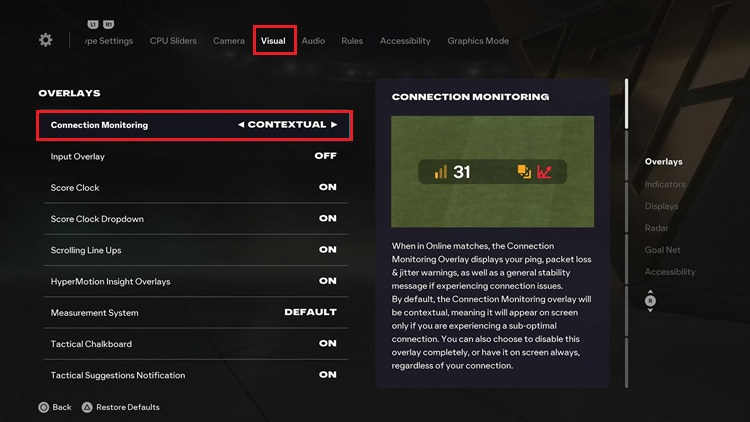
Step 2. Select Ping and connection indicators to display your current ping and connection warnings. Orange icons indicate a possible issue, while red icons indicate a more serious connection problem.
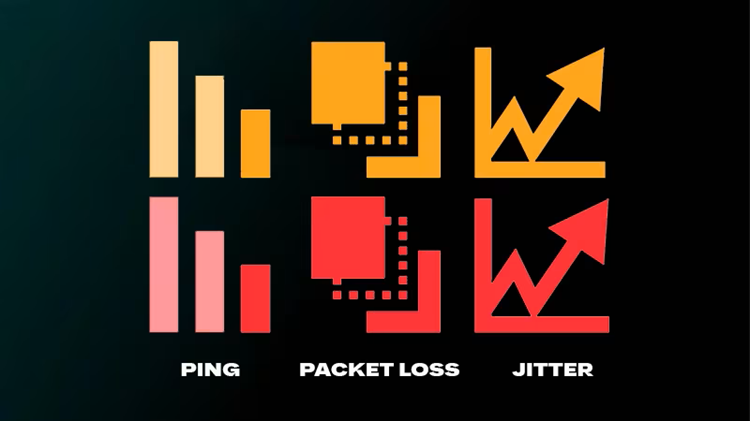
Ping jumping from 30ms to 80ms or 150ms usually indicates unstable latency, jitter, or ping spikes, even when your average FC 27 ping looks normal.
Fix 3. Restart Your Router and Stop Background Traffic
Restart your modem and router, then pause bandwidth-heavy tasks such as game downloads, cloud backups, video streaming, large uploads, and background updates.
Heavy network traffic can increase FC 27 ping, cause latency spikes, and make online matches feel less responsive. After clearing the network, launch FC 27 again and compare your ping and connection stability.
Fix 4. Use Ethernet Instead of Wi-Fi
Connect your PC or console directly to the router with an Ethernet cable when possible. A wired connection is generally more stable than Wi-Fi and is less affected by interference or signal drops.
When Ethernet is unavailable, use 5GHz Wi-Fi near the router. A clear improvement on Ethernet usually points to local Wi-Fi instability rather than an FC 27 server problem.
Fix 5. Check Ping, Packet Loss, and Jitter
Do not rely on download speed alone. FC 27 connection quality depends heavily on three metrics:
- Ping: The time game data takes to travel to the FC data center and back.
- Packet Loss: The percentage of game packets that fail to reach their destination.
- Jitter: How much your ping changes over time.
A stable 50ms connection can feel smoother than one constantly jumping between 20ms and 150ms. You can also use the EA Connection Quality Report to check your Connection Score, ping, packet loss, and jitter.
Fix 6. Contact Your ISP When FC 27 Ping Stays High
FC 27 ping can stay high even after server status, Ethernet, and local network checks. In that case, the problem may come from the route between your ISP and the FC game data center.
Share your current ping, usual ping, packet loss, and jitter with your ISP. When FC 27 is the only game affected, the issue may be related to ISP routing.
The Bottom Line
FC 27 high ping can come from server issues, ISP routing, network congestion, Wi-Fi instability, packet loss, or jitter. Start by checking FC server status and Connection Monitoring, then restart your network, stop background traffic, test Ethernet, and compare your ping, packet loss, and jitter.
When FC 27 servers are online but your PC-to-server route remains unstable, download LagZapper to optimize the connection route and help reduce FC 27 high ping, lag spikes, and packet loss.
FAQs About FC 27 High Ping
Q1. Why is my ping so high in FC 27?
Common causes include poor ISP routing, Wi-Fi instability, congestion, packet loss, jitter, or server issues.
Q2. Why does my FC 27 ping keep jumping?
Ping spikes usually indicate jitter, which can delay game data and make gameplay less responsive.
Q3. How do I fix high ping in FC 27?
Check server status, restart your router, stop background traffic, use Ethernet, and monitor ping, packet loss, and jitter.
Q4. Why is FC 27 lagging with good internet?
Fast internet can still have poor routing, packet loss, or jitter between you and the FC data center.
Q5. Why does FC 27 feel delayed with low ping?
Packet loss and jitter can still cause input delay even when your ping is low.
Q6. Can LagZapper lower FC 27 ping?
LagZapper can optimize inefficient PC-to-server routes to help lower ping, reduce lag, and reduce packet loss.