
Lord of Mysteries Game: How to Download & Play the CN Server
The Lord of Mysteries game launched in Mainland China on August 21, 2026 for PC, iOS, and Android. With no Global release date announced, overseas players interested in the CN version need to know where to download the game, which account to use, and how real-name verification works.
This guide covers the official Lord of Mysteries game download, PC and mobile access, Bilibili account setup, real-name verification, English translation, and how to play Lord of Mysteries outside China.
Lord of Mysteries Game Overview: Release, Platforms & Features
Lord of Mysteries launched in Mainland China on August 21, 2026 for PC, Android, and iOS. Developed by SPARK NEXA with Unreal Engine 5, the MMORPG adapts Cuttlefish That Loves Diving's novel into a large-scale online world.
| Game | Lord of Mysteries |
|---|---|
| Developer | SPARK NEXA |
| CN Release Date | August 21, 2026 |
| Platforms | PC, Android, iOS |
| Region | Mainland China |
| Language | Simplified Chinese |
| Global Release | Not announced |
Rather than traditional MMO classes, Lord of Mysteries uses the novel's Beyonder system. Players can progress through 22 Beyonder Pathways, each with 10 Sequences, using potions and the Acting Method to unlock new abilities. The game includes:
- Story and world exploration
- Dungeons and multiplayer PvE
- PvP and large-scale battles
- Beyonder Pathway and Sequence progression
The CN version currently supports Simplified Chinese. An official Global version and English release date have not been announced.
How to Download Lord of Mysteries Game
For a safe Lord of Mysteries game download, use the official Lord of Mysteries website or a recognized Chinese game distribution channel that matches your account. Avoid unofficial APKs, modified installers, and unknown download mirrors.
#1. Download Lord of Mysteries on PC
For the Lord of Mysteries PC download, visit the Lord of Mysteries Official Website.
Step 1. On the homepage, select PC Download to get the official launcher.

Step 2. Install the launcher and download the required game files.
Step 3. Sign in with the account supported by your client version.
The PC version requires at least 80 GB of free storage, so check your available drive space before downloading.
Tip: Different Chinese distribution channels may use different login systems. Download the client from the same platform you plan to use for your account.
#2. Download Lord of Mysteries on Mobile
For the Lord of Mysteries mobile download, visit the Lord of Mysteries Official Website or the supported app store for your device.
- Android: Select Android Download on the official website to get the mobile client.
- iOS: Select App Store Download to access Lord of Mysteries through Apple's Mainland China App Store.
Tip: Mobile availability can depend on your device and store region. When using a channel-specific account such as Bilibili, make sure you install the corresponding game client.
How to Play Lord of Mysteries Game Outside China
Players outside Mainland China may need a compatible Chinese game account and completed real-name verification before accessing the Lord of Mysteries CN server. One option for players using the Bilibili channel version is to create and verify a Bilibili account.
Step 1. Create a Bilibili Account
Open the Bilibili website, create or sign in to your Bilibili account, and use the same account for verification and game login.
Note: Bilibili supports account registration with selected overseas phone numbers, although availability can vary by country or region. Game access may still require real-name verification.
Step 2. Download Lord of Mysteries
Choose the version that matches your device:
- PC / Android: Use the Bilibili game channel when you plan to play with a Bilibili account.
- iOS: Download Lord of Mysteries (诡秘之主) through Apple's Mainland China App Store and follow the account options supported by that client.
Tip: Keep your game client and account channel consistent. Using an account from one distribution channel with a different client may prevent login.
Step 3. Find Your Bilibili UID
Open your Bilibili profile in a browser. Your numeric UID appears in your profile URL: space.bilibili.com/[UID]

Tip: Keep this number ready in case customer service requests it during verification.
Step 4. Complete Real-Name Verification
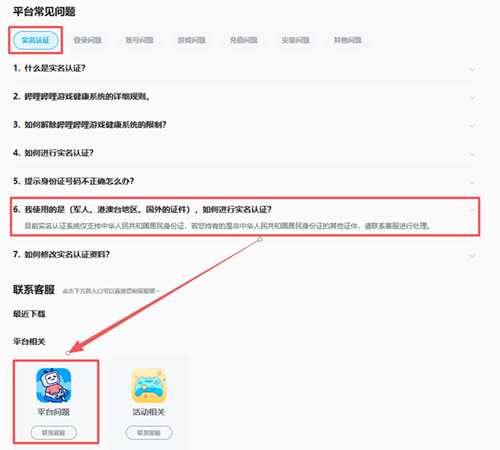
Open Bilibili Game Customer Service and go to: Platform FAQs (平台常见问题) > Real-Name Authentication (实名认证).
Players who cannot complete verification through the standard form may need to contact Bilibili Game Customer Service for additional verification. Requirements can vary depending on the identity document and account region.
For more detailed steps, see our Bilibili Identity Verification Guide.
Step 5. Launch Lord of Mysteries CN
After approval, open the corresponding Lord of Mysteries client, sign in with your verified account, complete any updates, and select a CN server to start playing.
Tip: When the real-name prompt remains after approval, restart the game and sign in again.
Can You Play Lord of Mysteries in English?
The Lord of Mysteries CN version currently supports Simplified Chinese only, so menus, quests, dialogue, and other in-game text appear in Chinese. For players who need English assistance, LagZapper's built-in Screenshot Translator can translate Chinese text shown on screen without replacing or modifying the game's language files.
How to Translate Lord of Mysteries CN with LagZapper
Follow these steps to translate Chinese text in Lord of Mysteries CN with LagZapper.
Step 1. Download and Install LagZapper
Download LagZapper for Windows, then follow the on-screen steps to complete the installation.
Step 2. Select Lord of Mysteries CN and Open Screenshot Translator
Search for Lord of Mysteries, select Lord of Mysteries CN, then go to Tools > Game Translation > Screenshot Translator.
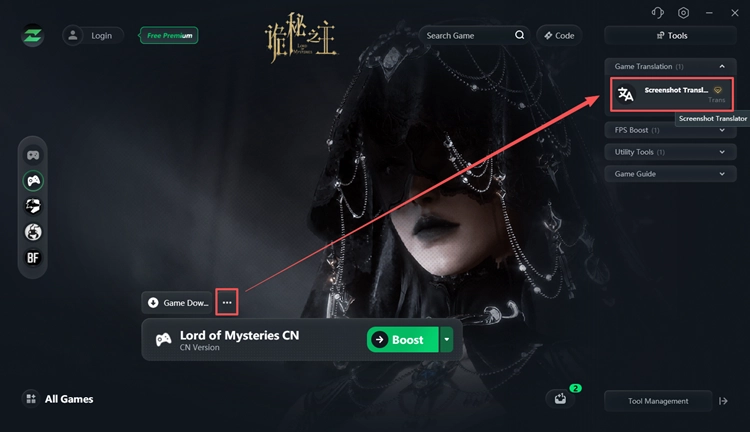
Step 3. Enable Screenshot Translator
Enable the tool and use it to translate Chinese menus, quests, dialogue, and other on-screen text whenever needed.
[Bonus] Reduce Lag When Playing Lord of Mysteries CN
Players outside Mainland China may experience higher latency when connecting to the Lord of Mysteries China server because of long-distance and cross-region routing. Before playing, pause unnecessary downloads and use a stable wired or Wi-Fi connection. For persistent high ping or unstable connections, LagZapper game booster can optimize the network route between your PC and the game server to help reduce lag and improve connection stability.
How to Reduce Lag When Playing Lord of Mysteries CN
Follow these steps to optimize your connection:
Step 1. Download or Open LagZapper
Download LagZapper for Windows, or open the app when it is already installed.
Step 2. Select Lord of Mysteries CN
Search for Lord of Mysteries and select Lord of Mysteries CN.
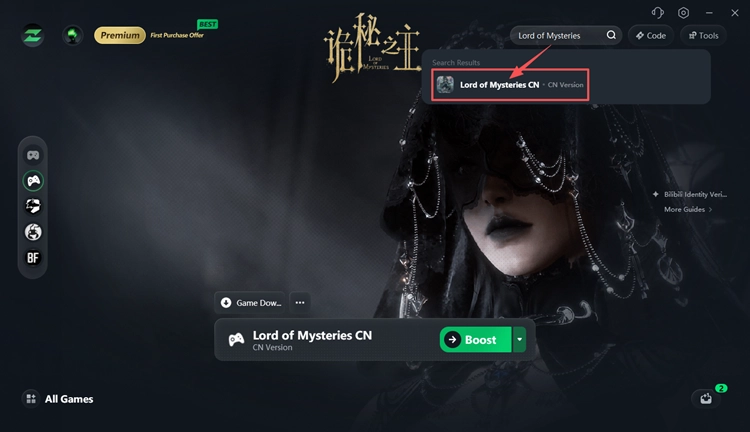
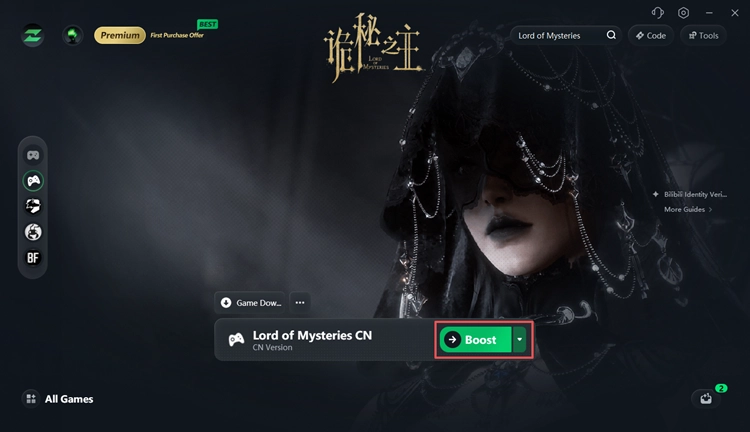
Step 3. Select a Node and Boost
Choose a suitable server node, click Boost, then launch the game.
LagZapper supports 3,000+ online games and can help improve connection stability when playing Lord of Mysteries CN across long-distance or cross-region routes.
The Bottom Line
Lord of Mysteries is now playable on PC and mobile in Mainland China, while players outside Mainland China need the correct client, account, and real-name verification to access the CN server. LagZapper can help make gameplay easier with built-in screen translation and network route optimization. Download LagZapper to translate Chinese in-game text, lower ping, and improve connection stability when playing Lord of Mysteries CN.
Lord of Mysteries Game FAQs
Q1. When did the Lord of Mysteries game release?
Lord of Mysteries launched in Mainland China on August 21, 2026 for PC, Android, and iOS.
Q2. How do I download the Lord of Mysteries game?
Download it from the official Lord of Mysteries website or a supported Chinese distribution channel that matches your account.
Q3. Can I play Lord of Mysteries outside China?
Yes. Overseas players can access the CN version when they have a compatible account, matching client, and any required real-name verification.
Q4. Do I need a Chinese ID to play Lord of Mysteries?
Not always. Verification requirements depend on the account channel and identity documents used. Bilibili users who cannot verify normally may need to contact game customer service.
Q5. Can you play Lord of Mysteries in English?
No official English interface is currently available for the CN version. The game currently supports Simplified Chinese.
Q6. When will Lord of Mysteries Global release?
No official Lord of Mysteries Global release date has been announced. August 21, 2026 applies to the Mainland China release only.