
PUBG High Ping? 6 Fixes for Lag, Ping Spikes & High Latency
PUBG high ping can cause delayed shots, rubberbanding, desync, and sudden PUBG ping spikes during matches. Recent players have reported PUBG high latency across regions such as OCE, Europe, and LATAM, with some OCE players seeing unusually high ping after routing or matchmaking changes.
High PUBG ping can come from poor server routing, ISP congestion, unstable Wi-Fi, or PUBG packet loss, not just slow internet. This guide explains why PUBG lag happens and shows six fixes to lower latency, reduce ping spikes, and improve connection stability.
Why Is My Ping So High in PUBG?
PUBG high ping means game data is taking too long to travel between your device and the game server. This can lead to PUBG high latency, delayed shots, rubberbanding, desync, and sudden PUBG ping spikes.
Common causes include:
- Poor ISP Routing: Traffic may take a longer or congested path to the PUBG server.
- Distant Server Region: Matchmaking can place you on a server farther from your location.
- Network Congestion: Downloads, streaming, cloud syncing, and background traffic can increase latency.
- PUBG Packet Loss: Lost packets can cause delayed actions, rubberbanding, and unstable gameplay.
- Unstable Wi-Fi: Weak signals and interference can increase PUBG ping or cause sudden spikes.
- PUBG Server Lag: Maintenance, outages, or temporary server problems can increase latency.
A fast speed test does not guarantee low gaming latency. PUBG can still show 100ms, 200ms, or higher ping because download speed and game-server latency measure different parts of your connection.
[Quick Way] Lower PUBG Ping and Reduce Lag with LagZapper
PUBG servers can stay online while PUBG high ping, ping spikes, lag, or packet loss continue. In many cases, the problem comes from an inefficient or congested route between your PC and the PUBG server.
LagZapper is a Windows game booster that optimizes the network route to PUBG servers and improves connection stability without complicated manual settings.
Why Use LagZapper for PUBG?
- Lower PUBG Ping: Optimize the route to PUBG servers to lower ping and keep latency more stable during matches.
- Reduce PUBG Lag: Improve route stability to reduce lag, sudden ping spikes, delayed actions, and gameplay stutter.
- Reduce PUBG Packet Loss: Maintain a steadier connection route to reduce packet loss, desync, and connection interruptions.
How to Boost PUBG with LagZapper
Using LagZapper for PUBG takes only three steps.
Step 1. Download and Install LagZapper
Download LagZapper for Windows and complete the installation.
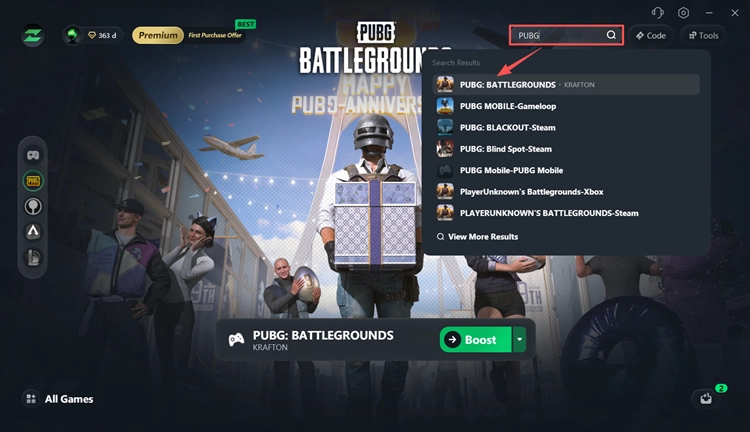
Step 2. Search for PUBG
Open LagZapper, search for PUBG: BATTLEGROUNDS, and select the available game route.
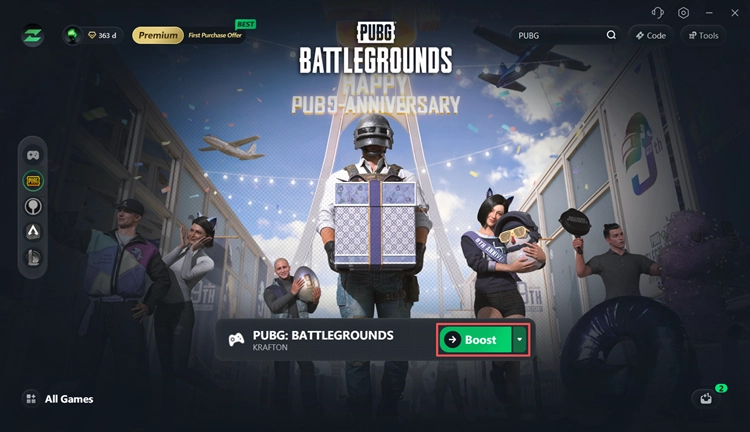
Step 3. Select a Node and Boost
Choose an optimized node and click Boost. Then launch PUBG and check whether your ping, ping spikes, and connection stability improve.
How to Fix PUBG High Ping and Lag - 6 Fixes
Still seeing PUBG high latency, ping spikes, packet loss, or server lag? Try the fixes below in order.
Fix 1. Check PUBG Server Status
Check PUBG servers down before changing your PC or network settings. Maintenance, updates, or temporary server issues can cause PUBG high ping, disconnects, and unstable matchmaking.
Check:
- PUBG official announcements
- Recent patch notes
- Scheduled maintenance
- Current player reports
When many players in the same region report sudden PUBG ping spikes, the issue is more likely related to PUBG servers, matchmaking, or regional routing.
Fix 2. Check Your PUBG Ping and Server
PUBG has a built-in network statistics tool that shows your ping and packet loss during a match.
Step 1. Open Settings > Gameplay > UI > Network Debug Statistics and turn it On.
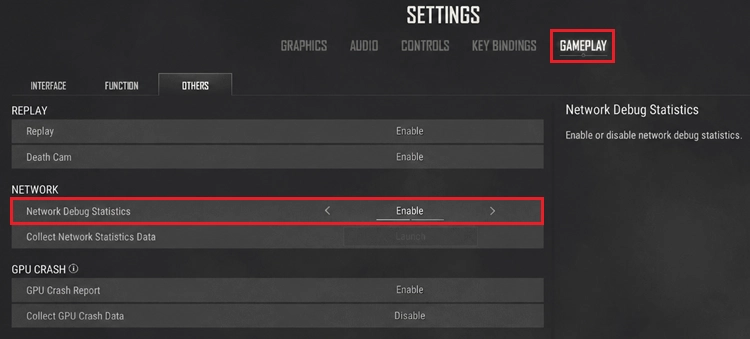
Step 2. Start a match and check the ping value shown in the top-left corner of the screen. Test 2–3 matches and watch for sudden PUBG ping spikes.
Compare your current PUBG ping with your normal baseline:
| Ping | Connection Quality |
|---|---|
| 30–50ms | Normal |
| 70–100ms | Higher than usual |
| 100–150ms | Noticeable delay |
| 200ms+ | Severe latency |
Note: These ranges are general references rather than official PUBG thresholds.
A sudden jump from 40ms to 150ms matters more than the number alone. When only PUBG shows high latency, regional routing or PUBG server lag may be the cause.
Fix 3. Restart Your Router and Stop Background Traffic
Network congestion can cause PUBG high ping, latency spikes, and packet loss. Restart your modem and router, then pause bandwidth-heavy activity such as:
- Steam downloads
- Windows updates
- Cloud backups
- Video streaming
- Large file uploads
- Background game updates
Launch PUBG again and test another match. A clear drop in ping usually means local network congestion was contributing to the problem.
Fix 4. Use Ethernet Instead of Wi-Fi
Wi-Fi interference can cause PUBG ping spikes, unstable latency, and packet loss even when your internet speed looks normal.
Connect your PC directly to the router with an Ethernet cable whenever possible. A wired connection usually provides more stable latency with less interference. When Ethernet is unavailable:
- Use a 5 GHz Wi-Fi connection.
- Move closer to the router.
- Avoid weak Wi-Fi signals.
- Reduce heavy network activity on other devices.
A stable 60ms connection often feels smoother than ping constantly jumping between 30ms and 120ms.
Fix 5. Check PUBG Packet Loss and Jitter
Ping is only one part of your PUBG connection. Check these three metrics:
- Ping: Delay between your PC and the PUBG server.
- Packet Loss: Game data that fails to reach its destination.
- Jitter: Changes in latency over time.
Even with low average ping, PUBG packet loss can cause rubberbanding, delayed hit registration, and unstable movement. High jitter can also trigger sudden PUBG ping spikes from normal levels to 100ms, 150ms, or higher.
Fix 6. Contact Your ISP When PUBG Ping Stays High
Persistent PUBG high ping may come from ISP routing, especially when PUBG is the only affected game and your local network remains stable.
Before contacting your ISP, note:
- Normal and current PUBG ping
- Your region
- When the issue started
- Packet loss results
- Whether other games are affected
Explain that the issue involves high latency or routing to PUBG servers. Normal download speeds can still coexist with poor game-server routing.
The Bottom Line
PUBG high ping can come from server issues, poor routing, network congestion, unstable Wi-Fi, jitter, or packet loss. Start with server status, compare your normal ping, restart the network, stop background traffic, and test Ethernet.
When PUBG servers are online but PUBG lag or ping spikes continue, download LagZapper to optimize the route between your PC and PUBG servers, lower ping, and reduce packet loss for a more stable connection.
FAQs About PUBG High Ping
Q1. Why is my ping so high in PUBG?
PUBG high ping can come from poor routing, distant servers, network congestion, unstable Wi-Fi, packet loss, jitter, or temporary server issues.
Q2. Why did my PUBG ping suddenly increase?
Sudden PUBG ping spikes can result from routing changes, ISP congestion, maintenance, or local network problems.
Q3. How do I lower my ping in PUBG?
Check PUBG server status, stop background traffic, restart your router, use Ethernet, test packet loss, and improve unstable routing to the game server.
Q4. Why is PUBG lagging even with good internet?
Fast download speed does not guarantee low latency. PUBG lag can still come from poor routing, jitter, packet loss, or Wi-Fi interference.
Q5. Why is PUBG ping so high in Australia/OCE?
PUBG OCE high ping can result from long server routes, regional matchmaking, ISP routing, or temporary server-side issues affecting Australia and Oceania players.
Q6. Can PUBG packet loss cause lag with low ping?
Yes. PUBG packet loss can cause rubberbanding, delayed actions, hit registration issues, and disconnects even when average ping looks normal.