
WARDOGS Error 1147405308: Fix Access Denied & Login Queue
WARDOGS error code 1147405308 can appear when the game fails to authenticate your session with online services, often alongside Access Denied, long login queues, or being sent back to the queue. During the previous Closed Beta, many players reported WARDOGS authentication failed errors while login services were under heavy load. With Closed Beta 02 starting September 3, server load, login queue issues, and authentication service problems are the main causes to check first.
Start by checking whether WARDOGS servers are available and whether other players are reporting the same issue. When the problem only affects your PC, restart Steam, confirm your Closed Beta 02 access, verify the game files, and troubleshoot your local connection. This guide explains what WARDOGS error 1147405308 means and how to fix it.
What Is WARDOGS Error Code 1147405308?
WARDOGS error 1147405308 means the game client failed to complete authentication with WARDOGS online services. The error usually appears as:
- Access Denied
- Error Code: 1147405308
- Failed to authenticate with online services
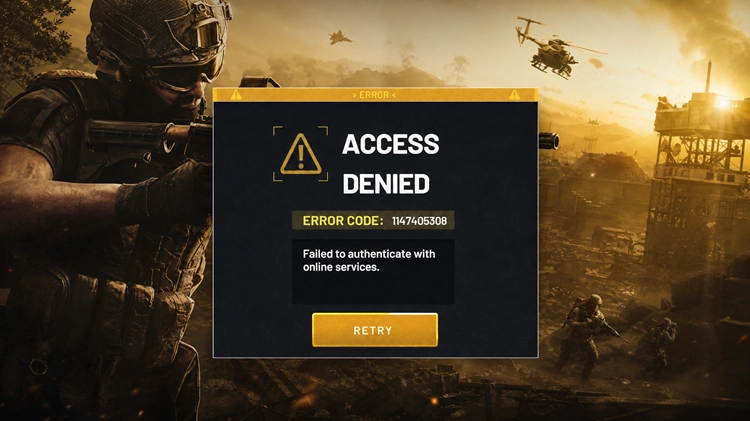
Current player reports mainly associate WARDOGS error 1147405308 with login and authentication failures. Server overload is one possible cause, while Steam session, game files, account access, or local network issues may also be involved.
Tip: BULKHEAD has not published a detailed definition for every WARDOGS error code. Current reports link 1147405308 to online authentication failure, but the exact cause can vary.
WARDOGS Login Queue and Access Denied
WARDOGS error 1147405308 can also appear after waiting in a long login queue. During the previous Closed Beta, some players reported reaching queues of more than 50,000 users, only to receive Access Denied or an authentication error and be sent back to the queue.
When many players experience the same issue at the same time, heavy server load or authentication service problems are more likely than a problem with your PC.
| Situation | Likely Cause | What to Do |
| Long queue + many player reports | Server overload | Check official updates and retry later |
| Access Denied after the queue | Authentication failure | Wait and reconnect after server recovery |
| Error 1147405308 during login | Online authentication issue | Check server status first |
| Only your PC is affected | Steam, files, or network issue | Continue with the local fixes below |
A long WARDOGS login queue does not necessarily mean the servers are completely down. Authentication capacity may simply be overloaded, so check official updates and recent community reports before reinstalling the game or changing network settings.
How to Fix WARDOGS Error Code 1147405308: 6 Fixes
Start by confirming that WARDOGS is currently available. Local troubleshooting cannot reopen a finished playtest or repair an overloaded authentication server.
Fix 1. Check Whether WARDOGS Servers Are Live
The WARDOGS Beta ran from August 21–23, with the servers closing at 02:00 UTC on August 24. The official Steam page now states that the playtest weekend has ended and that WARDOGS launches in Early Access on September 10.
Check the following sources for the latest status:
- Official WARDOGS Steam page for release and Playtest status
- Recent Steam announcements for maintenance or server updates
- Official WARDOGS Discord and social accounts for login or authentication issues
Note: WARDOGS Playtest may still show error 1147405308 after the Closed Beta because the test servers are closed. Reinstalling the game or changing network settings cannot restore access while the servers are offline.
Fix 2. Wait During Authentication Server Overload
During the Beta launch, multiple players reported the error at the same time. An official Discord message cited heavy login traffic and a new issue not seen during the Closed Alpha. Check the following before retrying:
- Look for recent Steam, Reddit, or Discord reports of the same WARDOGS server error
- Avoid repeatedly restarting the client during a widespread authentication issue.
- Wait for an official recovery update, then restart WARDOGS and rejoin the queue.
Tip: A large login queue does not necessarily mean the servers are fully offline. Authentication capacity may simply be overloaded.
Fix 3. Check Your Steam Access and WARDOGS Client
Pre-order players receive guaranteed Closed Beta 02 access, while Steam users who select Request Access may be admitted in waves. Having WARDOGS Playtest visible in Steam does not always mean access has already been granted.
Step 1. Open Steam and make sure you're using the account that received WARDOGS access.Step 2. Check whether WARDOGS Playtest appears in your Library.
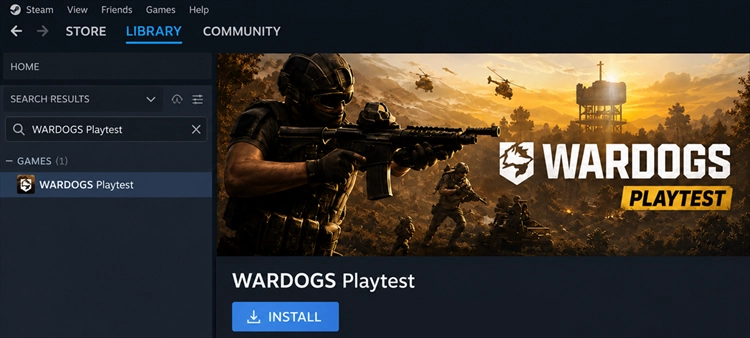
Step 3. Confirm that your Steam account has actually been admitted to the current test.
Steam notes that requesting Playtest access only means you will be notified when the developer accepts more participants. It does not grant immediate access.
Fix 4. Fully Restart WARDOGS and Steam
A stale Steam session may prevent WARDOGS from refreshing valid access. Here is how to fully restart WARDOGS and Steam to fix the authentication error.
Step 1. Close WARDOGS and fully exit Steam from the Windows system tray.
Step 2. Open Task Manager and end any remaining Steam or WARDOGS processes.
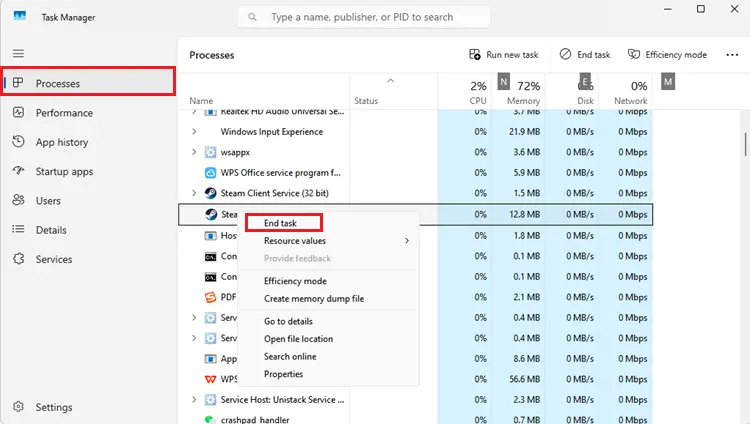
Step 3. Restart Steam, sign in to the correct account, and launch the active WARDOGS client.
Then check whether the game reaches the login queue or main menu without showing Failed to authenticate with online services. If the game closes, freezes, restarts your PC, or triggers a BSOD instead, see our WARDOGS crashing guide for additional fixes.
Fix 5. Verify the WARDOGS Game Files
Incomplete or damaged files may prevent WARDOGS from loading the correct authentication components. Verify the game files through Steam:
Step 1. Open Steam > Library, right-click WARDOGS, and select Properties.
Step 2. Go to Installed Files > Verify integrity of game files.
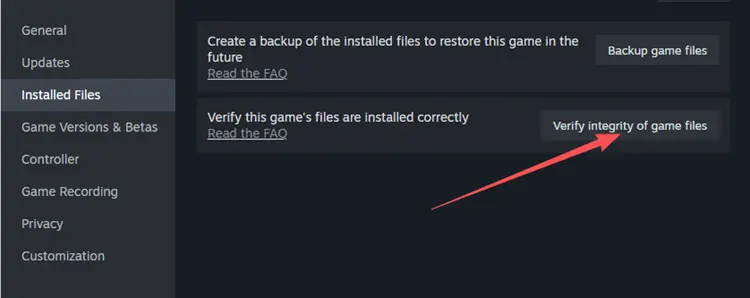
Step 3. Let Steam replace any missing or damaged files, then restart WARDOGS.
Note: Verification only checks local files. Error 1147405308 may remain during a server-side authentication outage.
Fix 6. Check Your Local Network Connection
Network troubleshooting is most useful when WARDOGS services are live and error 1147405308 only affects your PC.
Step 1. Pause downloads, cloud backups, and streaming, then use Ethernet when possible.
Step 2. Restart your router and wait for the connection to fully recover.
Step 3. Allow WARDOGS and Steam through Windows Firewall, then retry the login.
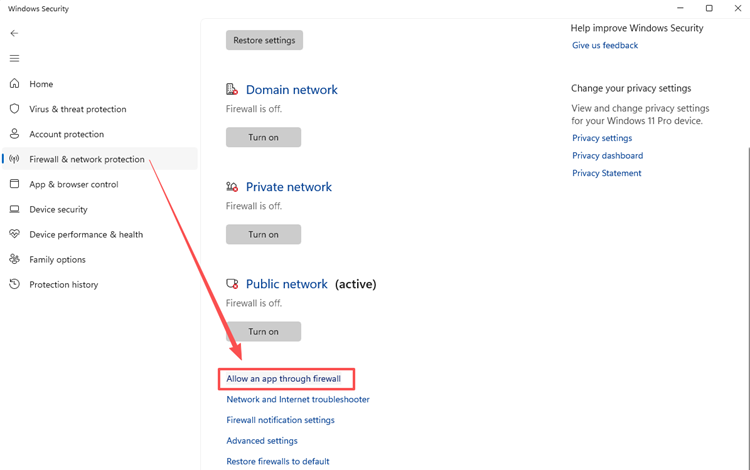
Step 4. Test another stable network to check whether the issue comes from your router, ISP, or local connection.
[Bonus] Improve WARDOGS Network Stability With LagZapper
Once WARDOGS services are live, authentication or connection problems can still be worsened by high ping, packet loss, or unstable routing. LagZapper is a PC game booster that optimizes the network route between your PC and the game server to help improve connection stability.
Why Use LagZapper for WARDOGS?
- Optimize the network route between your PC and WARDOGS servers.
- Help reduce packet loss during login and 100-player multiplayer sessions.
- Lower ping and reduce sudden latency spikes during online matches.
- Switch between available nodes to find a more stable route for your region.
How to Boost WARDOGS With LagZapper
To optimize your WARDOGS connection before launching the game, follow the steps below.
Step 1. Download and Install LagZapper
Download LagZapper for Windows and complete the installation.
Step 2. Search for WARDOGS
Open LagZapper, sign in and enter WARDOGS in the search bar.
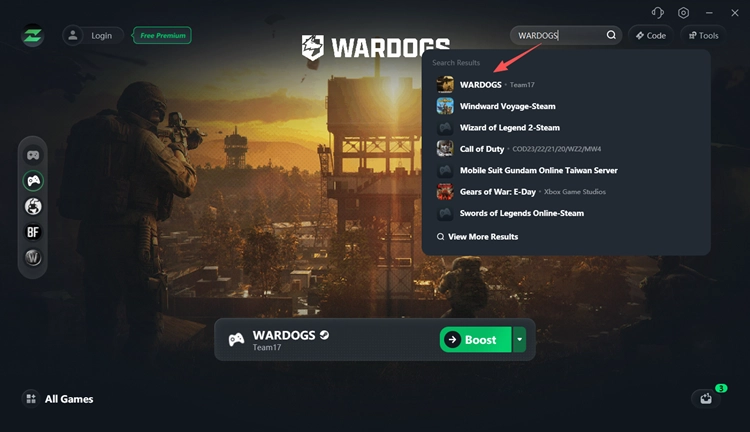
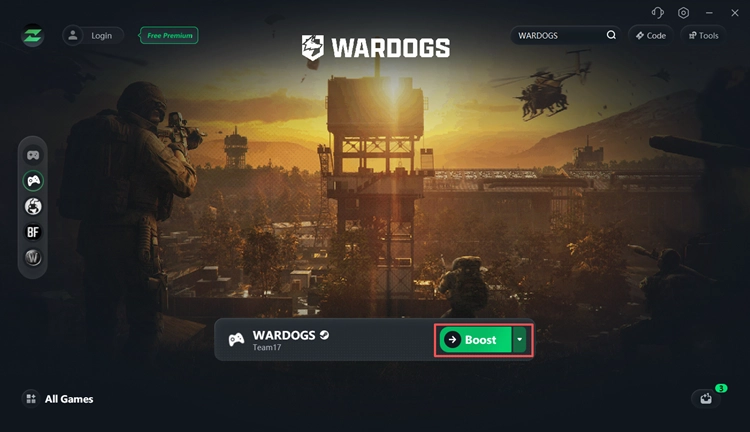
Step 3. Select a Node and Start Boosting
Choose a recommended node or one near the active WARDOGS server region, click Boost, then launch the game through Steam.
The Bottom Line
WARDOGS error code 1147405308 means the game failed to authenticate with online services. The August Closed Beta has ended, and WARDOGS enters Early Access on September 10, 2026. During an active service window, check server updates first, then confirm Steam access, restart Steam, verify game files, and stabilize your connection. For persistent high ping, packet loss, or routing issues, download LagZapper to optimize your connection to WARDOGS servers.
FAQs About WARDOGS Error Code 1147405308
Q1. What is WARDOGS error code 1147405308?
It means WARDOGS failed to authenticate your session with its online services, often showing Access Denied or Failed to authenticate with online services.
Q2. Why does WARDOGS say Access Denied after the login queue?
Heavy login traffic or authentication server load can cause Access Denied after reaching the end of the queue. This happened to multiple players during the previous Closed Beta.
Q3. Why does WARDOGS send me back to the queue?
An authentication or session failure can disconnect you during login and place you back in the queue. Players reported this behavior together with error 1147405308.
Q4. Is the WARDOGS login queue broken?
Not necessarily. Long queues can simply mean the servers are under heavy load, but repeated Access Denied or authentication errors may indicate a server-side login issue.
Q5. Does pre-ordering WARDOGS guarantee Closed Beta 02 access?
Yes, the current Closed Beta 02 announcement says pre-ordering guarantees access, while Steam Playtest requests are admitted in waves.
Q6. Can LagZapper fix WARDOGS error 1147405308?
LagZapper can help with unstable routing, high ping, or packet loss while WARDOGS servers are available, but it cannot fix server-side authentication outages or bypass access restrictions.