
AION 2 Download & Preload: PC, Steam & PURPLE Guide
Looking for the AION 2 download before the Launch Scale Test? AION 2 pre-download is now available on PC through both Steam and PURPLE. The preload runs before the September 17–18 Launch Scale Test, which is open to everyone with no key or invitation required.
Steam uses a separate AION 2 Playtest App, while PURPLE uses the regular game client. This difference also affects what players need to do after the test.
Is AION 2 Available to Download Now?
Yes. The AION 2 Launch Scale Test pre-download is available now on both Steam and PURPLE. The current preload window runs from September 16–17.
| Event | Date | Platform |
|---|---|---|
| Launch Scale Test Pre-download | Sept. 16–17 | Steam / PURPLE |
| Launch Scale Test | Sept. 17–18 | Steam / PURPLE |
| Founder’s Pack Advanced Access | Sept. 30 | Steam / PURPLE |
| Global Free-to-Play Launch | Oct. 5 | Steam / PURPLE |
Tip: Check our AION 2 Playtest Guide for the full test schedule, access rules, and level cap.
AION 2 Preload Time for the Launch Scale Test
The AION 2 preload is now live. Pre-download opened on September 16 at 6:00 AM PDT / 15:00 CEST and runs for 24 hours until Day 1 begins. Steam and PURPLE both support the AION 2 pre-download.
| Time Zone | AION 2 Preload Time |
|---|---|
| PDT | September 16, 6:00 AM – September 17, 6:00 AM |
| CEST | September 16, 15:00 – September 17, 15:00 |
Tip: This September 16 preload is for the Launch Scale Test. Steam uses a separate Playtest App, so it should not be confused with the regular AION 2 client used for Advanced Access or global launch.
AION 2 Download Size & Storage Requirements
Steam lists 100 GB of available storage for AION 2, but this is a storage requirement rather than a confirmed compressed Playtest download size.
| Item | Official Information |
|---|---|
| Available Storage | 100 GB |
| Storage Type | SSD recommended |
| Exact Playtest Download Size | Not officially announced |
| Platform | Windows PC |
Leave additional free space for installation, unpacking, patches, and future updates.
How to Download AION 2 on Steam
The AION 2 Steam download uses a separate Playtest App for the Launch Scale Test.
Step 1. Open the AION 2 Steam Page
Open Steam, search for AION 2, and open the official store page.
Step 2. Request AION 2 Playtest Access
Select Request Access under Join the AION 2 Playtest.
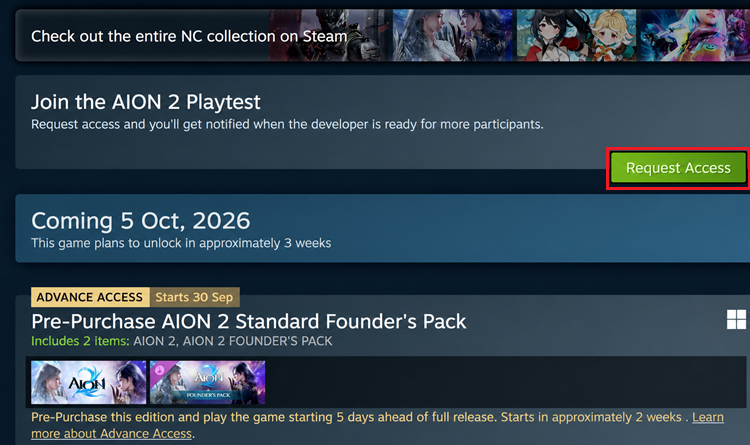
Note: Steam still uses the Request Access button, but the Launch Scale Test is open to everyone with no key or invitation required.
Step 3. Download the AION 2 Playtest
Open your Steam Library, find the separate AION 2 Playtest App, and select Install to complete the pre-download.
How to Download AION 2 on PURPLE
You can also complete the AION 2 download on PC through NC's PURPLE launcher. The AION 2 PURPLE download uses the regular game client rather than a separate Playtest app.
Step 1. Download PURPLE PC
Download and install PURPLE PC for Windows, then open NC's official PC launcher.
Step 2. Find AION 2
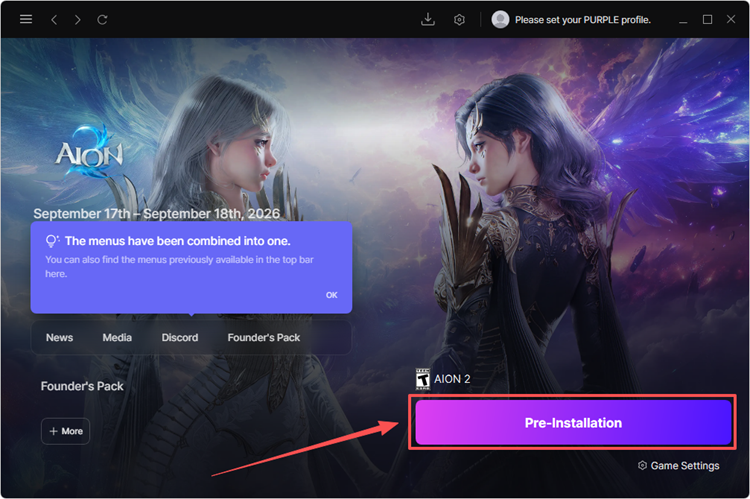
Open PURPLE, go to STORE > AION 2, and select the game to open its page.
Step 3. Pre-Install AION 2
Select Pre-Installation, choose your installation location, and complete the AION 2 download.
Steam vs PURPLE: Which Should You Use?
Both Steam and PURPLE support the AION 2 Launch Scale Test and preload, but the download process is slightly different.
| Feature | Steam | PURPLE |
|---|---|---|
| Launch Scale Test | Yes | Yes |
| Pre-download | Yes | Yes |
| Test Client | Separate Playtest App | Regular AION 2 client |
| Re-download After Test | Yes | No |
| PC Support | Yes | Yes |
Choose Steam if you prefer your existing Steam library, or PURPLE if you already use NC's launcher and want to avoid reinstalling a separate client after the test.
Tip: Can't find AION 2 on Steam or PURPLE? Check our AION 2 Region Lock guide for current regional availability.
[Bonus] Reduce AION 2 Lag and High Ping with LagZapper
After downloading AION 2, a stable connection is especially important when playing on a server farther from your location. LagZapper is a Windows game booster designed to optimize the network route between your PC and game servers. For AION 2, it can help improve connection stability, especially during cross-region play or when you experience high ping, lag, or packet loss.
Highlights of LagZapper for AION 2
- Lower ping by optimizing the route between your PC and AION 2 servers.
- Reduce lag and sudden latency spikes during combat, dungeons, and PvP.
- Reduce packet loss caused by unstable routes while playing AION 2 online.
- One-click boost to select an optimized node without complex network changes.
How to Use LagZapper for AION 2
Getting started takes only three steps:
Step 1. Download and Open LagZapper
Download LagZapper for Windows, complete the installation, and sign in to your account.
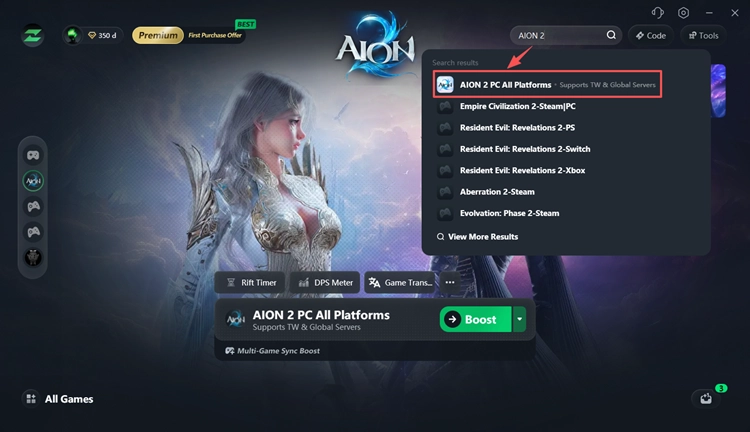
Step 2. Search for AION 2
Open LagZapper, search for AION 2, and select the game from the supported games list.
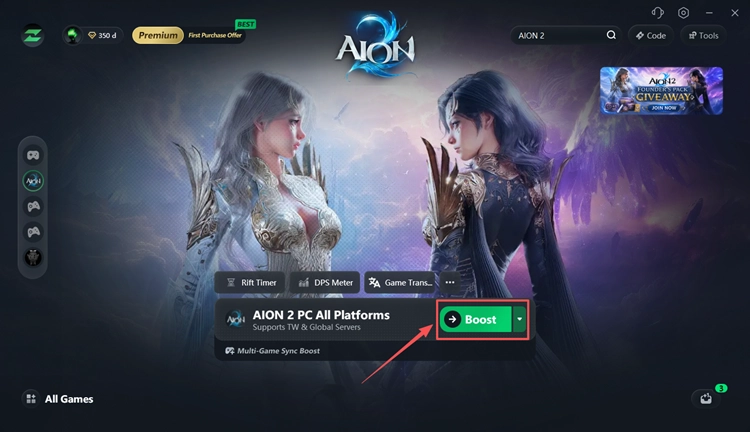
Step 3. Select a Node and Boost
Choose your preferred server or optimized node, click Boost, and launch AION 2 with the optimized connection.
The Bottom Line
AION 2 pre-download is now available on Steam and PURPLE for the September 17–18 Launch Scale Test. Steam uses a separate Playtest App, while PURPLE uses the regular AION 2 client. After the test, Steam players must uninstall the Playtest App and download the regular client separately; PURPLE players have no additional steps.
Experiencing high ping after installation? Download LagZapper to optimize your network route to AION 2 servers.
FAQs About AION 2 Download & Preload
Q1. Can I download AION 2 now?
Yes. The AION 2 Launch Scale Test pre-download is now available on Steam and PURPLE.
Q2. What time did AION 2 preload start?
Pre-download opened on September 16 at 6:00 AM PDT / 15:00 CEST.
Q3. Can I download AION 2 on Steam?
Yes. Steam uses a separate AION 2 Playtest App for the Launch Scale Test.
Q4. Can I download AION 2 on PURPLE?
Yes. PURPLE uses the regular AION 2 client and supports the Launch Scale Test.
Q5. Do I need to download AION 2 again after the Playtest?
Steam players must uninstall the Playtest App and download the regular AION 2 client separately. PURPLE players do not need to reinstall it.
Q6. What is the AION 2 download size?
Steam requires 100 GB of available storage and recommends an SSD. However, 100 GB is the storage requirement, not a confirmed compressed Playtest download size.