
AION 2 System Requirements: Minimum & Recommended PC Specs
Planning to play AION 2 on PC? Check the latest AION 2 system requirements first to see whether your CPU, GPU, RAM, and storage meet the official AION 2 PC requirements.
NC has published the AION 2 minimum requirements and recommended specs, while the Steam page also lists official AION 2 PC specs. Players need a 64-bit Windows 10 or 11 PC, DirectX 12, and up to 100 GB of available storage. An SSD is recommended. Below, you can also check the AION 2 download size and mobile requirements.
AION 2 System Requirements for PC
The official NC page lists the following AION 2 PC requirements for minimum and recommended configurations.
| Minimum Requirements | Recommended Requirements | |
|---|---|---|
| OS | Windows 10/11 64-bit | Windows 10/11 64-bit |
| CPU | AMD Ryzen 5 2600X / Intel Core i5-10500F or higher | AMD Ryzen 7 3700X / Intel Core i7-11700 or higher |
| RAM | 8 GB | 16 GB |
| GPU | GTX 1050 Ti 4GB / Radeon RX 470 4GB or higher | RTX 2070 8GB / Radeon RX 5700 XT 8GB or higher |
| DirectX | DirectX 12 | DirectX 12 |
| Storage | 100 GB available space | 100 GB available space |
| Drive | SSD recommended | SSD recommended |
| Resolution | FHD 1920 × 1080 | FHD 1920 × 1080 |
| Graphics Preset | Very Low | Normal |
If your PC is close to the AION 2 minimum requirements, expect to use lower graphics settings at 1080p. For more performance headroom, NC recommends hardware around an RTX 2070 or Radeon RX 5700 XT, Ryzen 7 3700X or Core i7-11700, and 16 GB RAM.
AION 2 Steam System Requirements
The AION 2 Steam page lists PC requirements that are very close to NC’s official specifications, with a few differences.
For the minimum requirements, Steam lists:
- AMD Ryzen 5 2600 / Intel Core i5-10500
- 8 GB RAM
- NVIDIA GTX 1050 Ti 4GB
- DirectX 12
- 100 GB available storage
- SSD recommended
For the recommended requirements, Steam lists:
- AMD Ryzen 7 3700X / Intel Core i7-11700
- 16 GB RAM
- NVIDIA RTX 2070 8GB
- DirectX 12
- 100 GB available storage
- SSD recommended
Steam recommends Very Low at FHD for the minimum configuration and Low at FHD for the recommended configuration, while NC lists Very Low and Normal and also includes AMD GPU alternatives.
AION 2 Storage and Download Size
AION 2 requires 100 GB of available storage on PC, and both NC and Steam recommend installing the game on an SSD. However, the AION 2 download size itself is smaller than the full storage requirement.
NC states that the initial client installation may need around 70 GB or more, while 100 GB of free space is recommended to leave room for installation files, updates, patches, and PURPLE PC. For a first-time install, prepare at least 100 GB of free SSD space before downloading AION 2.
AION 2 Mobile Requirements
NC has also published official AION 2 mobile requirements for supported mobile versions, including Android phones, iPhones, Android tablets, and iPads.
Android
- Minimum: Galaxy S10 / Android 12
- Recommended: Galaxy S23 / Android 15
iPhone
- Minimum: iPhone 12 Pro / iOS 15
- Recommended: iPhone 14 Series / iOS 18
Android Tablet
- Minimum: Galaxy Tab S7 / Android 12
- Recommended: Galaxy Tab S9 / Android 15
iPad
- Minimum: iPad Pro M1 / iPadOS 15
- Recommended: iPad Pro M4 / iPadOS 18
If your device is close to the minimum requirements, lowering graphics settings may help improve performance and stability. Devices below the minimum specs may experience compatibility or performance issues.
How to Install AION 2 on PC
Once your PC meets the minimum requirements above, you can download AION 2 on PC through Steam or PURPLE.
Step 1. Download and install PURPLE PC.
Step 2. Open PURPLE > Store, search for AION 2, and select the game.
Step 3. Start the installation and choose your preferred drive.
Tip: Use Windows 10/11 64-bit, DirectX 12, 100 GB+ free space, and an SSD if possible. Keep your GPU drivers updated.
If AION 2 does not appear in your Steam store, check the AION 2 region lock list before troubleshooting your PC.
[Bonus] Reduce AION 2 Lag and High Ping on PC
Meeting the recommended AION 2 PC specs can improve FPS, but it does not prevent network issues such as high ping, packet loss, latency spikes, or unstable routing.
If your FPS is normal but the connection still feels delayed or unstable, download LagZapper to optimize the route between your PC and the AION 2 server.
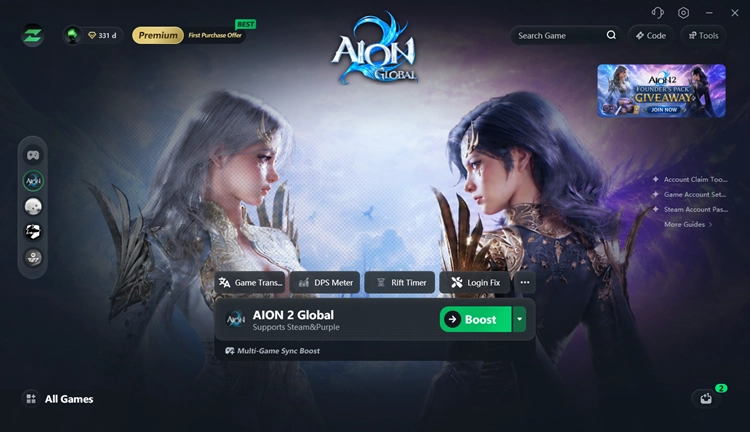
LagZapper can help with:
- Lower AION 2 Ping: Reduce AION 2 high ping by optimizing inefficient or congested network routes.
- Reduce AION 2 Lag: Reduce lag and improve connection stability during dungeons, PvP, and crowded areas.
- Reduce Packet Loss: Improve route stability to help reduce packet loss, lag spikes, rubber-banding, and disconnects.
- Optimize Game Routing: Find a more efficient network path between your PC and the AION 2 server.
The Bottom Line
AION 2 requires a 64-bit Windows 10 or 11 PC, DirectX 12, and 100 GB of available storage, with an SSD recommended. The minimum specs include 8 GB RAM and a GTX 1050 Ti, while the recommended configuration moves up to 16 GB RAM and an RTX 2070. Check your hardware before downloading, especially your GPU, RAM, CPU, and available SSD space.
FAQs About AION 2 System Requirements
Q1. What are the AION 2 minimum system requirements?
AION 2 requires Windows 10/11 64-bit, 8 GB RAM, a GTX 1050 Ti 4GB or Radeon RX 470 4GB, DirectX 12, and 100 GB of available storage.
Q2. How much storage does AION 2 require?
AION 2 requires 100 GB of available PC storage, with an SSD recommended.
Q3. What is the AION 2 download size?
NC states that the initial installation may require around 70 GB or more, although 100 GB of free space is recommended.
Q4. Does AION 2 require an SSD?
An SSD is recommended rather than strictly required and is the preferred option for installing AION 2.
Q5. Can a GTX 1050 Ti run AION 2?
Yes. The GTX 1050 Ti 4GB is listed in the official minimum PC configuration for FHD at Very Low settings.
Q6. Is an RTX 2070 enough for AION 2?
Yes. The RTX 2070 8GB is the NVIDIA GPU listed in the official recommended configuration.