
Battlefield 6 Wake Island Release Time, Date & Map Guide
The BF6 Wake Island release time was 12:00 UTC on August 18, 2026, marking the return of the classic map with Battlefield 6 Season 4's Top Gun update. Update 1.4.2.0 became available four hours earlier at 08:00 UTC, while Wake Island and the rest of the Top Gun content officially unlocked at 12:00 UTC.
With Wake Island now live, this guide covers more than the Battlefield 6 Wake Island release date and time. Below, you'll find the global launch schedule, where to find the map, how to play Wake Island in BF6, the key locations worth learning first, supported combat styles, and practical tips for navigating the island.
When Did Wake Island Release in Battlefield 6?
The Battlefield 6 Wake Island release date was August 18, 2026, with the map unlocking at 12:00 UTC. Update 1.4.2.0 was available earlier at 08:00 UTC, while Wake Island and the Top Gun content went live four hours later.
| Content | Date | Release Time |
|---|---|---|
| Battlefield 6 Update 1.4.2.0 | August 18, 2026 | 08:00 UTC |
| Wake Island | August 18, 2026 | 12:00 UTC |
| Top Gun content | August 18, 2026 | 12:00 UTC |
For players searching what time did Wake Island release in BF6, the key time is 12:00 UTC. The earlier 08:00 UTC time only marked the availability of the update download, not the Wake Island content unlock.
Battlefield 6 Wake Island Global Release Times
Here is the BF6 Wake Island release date time converted from the official 12:00 UTC content release:
| Region | Local Release Time |
|---|---|
| North America | Los Angeles: Aug 18, 5:00 AM PDT · New York: 8:00 AM EDT |
| South America | São Paulo: Aug 18, 9:00 AM BRT |
| Europe | London: 1:00 PM BST · Germany / France: 2:00 PM CEST · Moscow / Istanbul: 3:00 PM |
| Southeast Asia | Bangkok / Hanoi: Aug 18, 7:00 PM ICT |
| East Asia | Beijing: 8:00 PM CST · Tokyo / Seoul: 9:00 PM JST/KST |
| Australia | Sydney: Aug 18, 10:00 PM AEST |
Wake Island is now live worldwide, so these regional times are mainly useful as a reference for the original launch schedule.
How to Play Wake Island in BF6
Wake Island is available in Battlefield 6 after installing Update 1.4.2.0. You can play it through Multiplayer or Portal. Follow these steps to find and play the map:
Step 1. Update Battlefield 6
Before launching multiplayer, install Update 1.4.2.0, which added Wake Island to Battlefield 6.
Tip: Experiencing Battlefield 6 crashing after the update? Fix the stability issue first before trying to join a Wake Island match.
Step 2. Open Multiplayer
Launch Battlefield 6 and go to Play > Multiplayer to view the available modes and experiences.
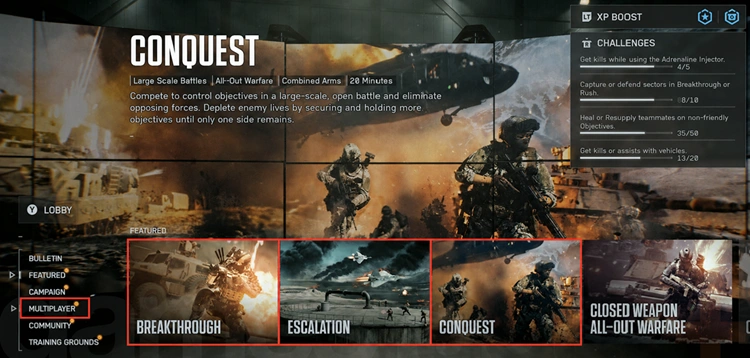
Step 3. Find a Wake Island Match
Look for Wake Island All Out Warfare or select a supported multiplayer mode featuring Wake Island.
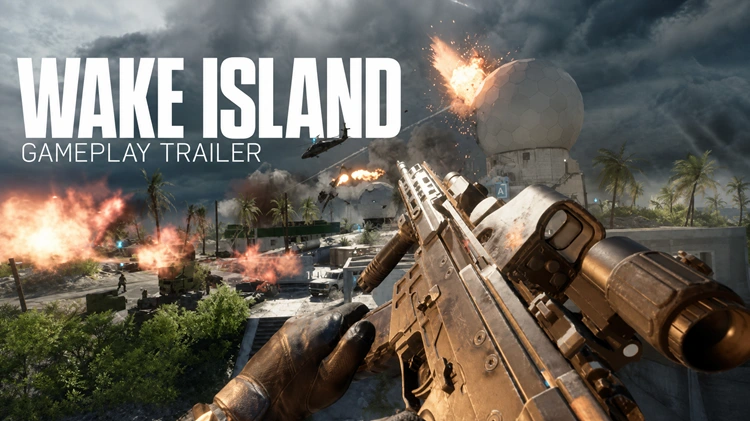
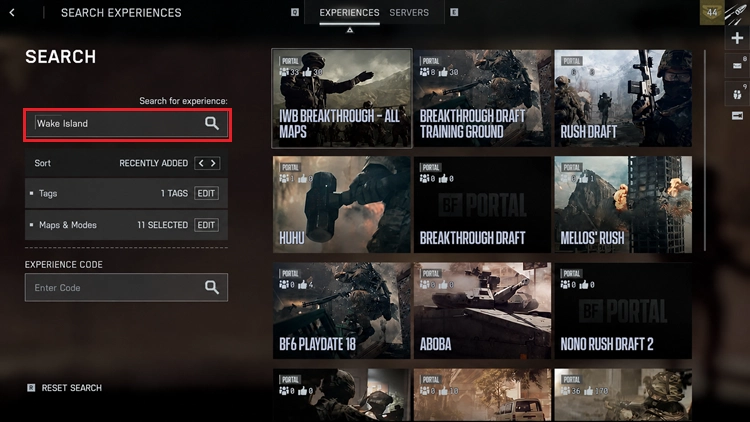
Step 4. Search for Wake Island in Portal
Open Portal > Search Experiences and search for Wake Island or browse available Verified Experiences.
Once in a match, Wake Island combines infantry, vehicles, boats, and aircraft across bridges, tunnels, waterways, and coastal objectives.
What Is Different About Wake Island in Battlefield 6?
Battlefield 6 keeps Wake Island's iconic horseshoe-shaped layout but improves how players move and fight across the map. After playtesting showed some routes were too long and certain Breakthrough sectors favored defenders, the team adjusted objective spacing, boundaries, cover, vehicles, and key POIs. Key changes include:
- Greater focus on naval warfare
- Revised objectives and map boundaries
- More infantry cover
- New underground tunnel routes
- Expanded boat traversal
- Ziplines across the central water
- Updated tactical destruction
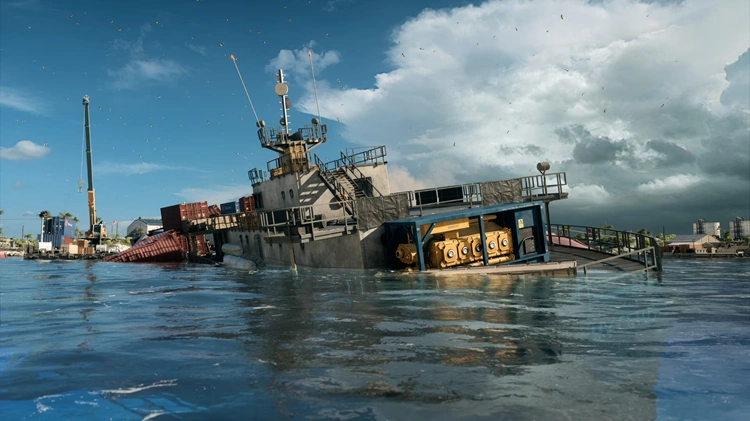
- The new MV Cetus Shipwreck
The MV Cetus Shipwreck adds cover to Wake Island’s exposed center, while new ziplines give infantry faster ways to cross without relying on swimming or boats.
Key Areas to Learn First on Wake Island
Wake Island has several POIs, but new players can start with these four key areas to understand the map more quickly.
1. MV Cetus Shipwreck
The MV Cetus Shipwreck is the biggest new POI in Battlefield 6's version of Wake Island. It adds cover to the exposed central water and includes waterways, ziplines, infantry cover, and an AA gun, making it one of the fastest routes across the center.
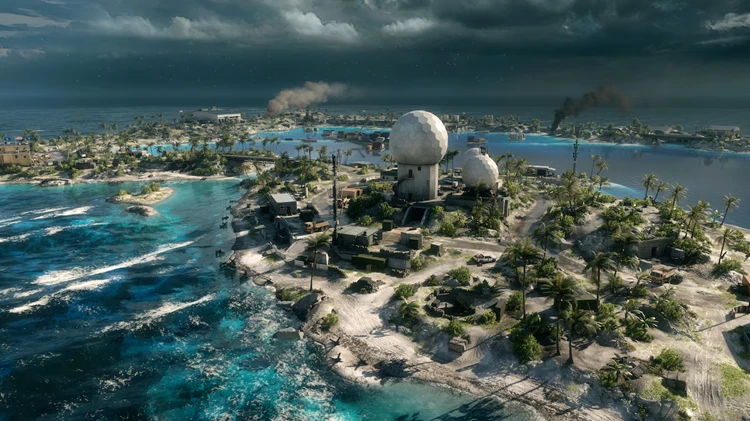
2. Taussig Radar Station
The Taussig Radar Station combines high-ground sightlines with underground combat. The tower favors longer-range engagements, while the tunnels below create tighter close-range fights.
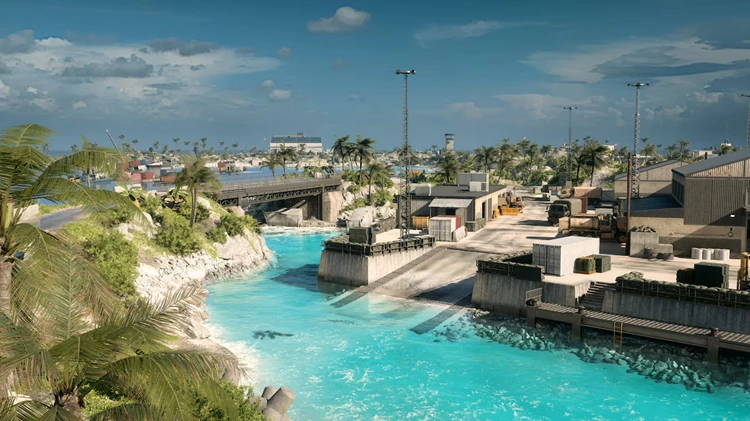
3. Toyoshima Docks
Toyoshima Docks is a key Naval Warfare area. In modes such as Conquest, Breakthrough, and Escalation, parts of the capture zone extend into the water, allowing boats to directly contest objectives.
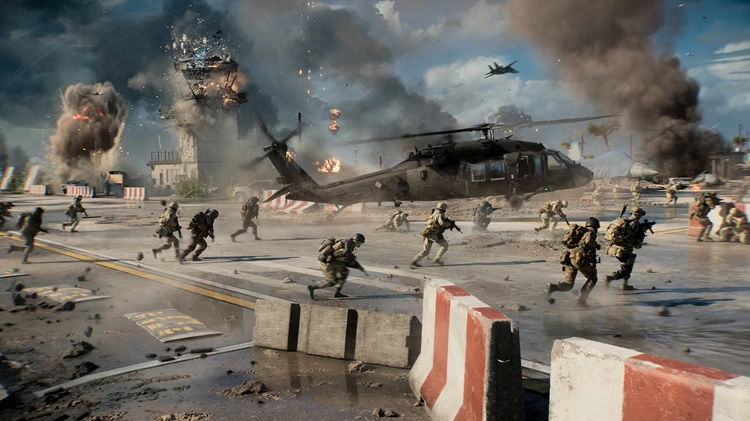
4. Hanger One
Hanger One is a busy central area that supports both infantry and armored vehicles. Its location connects several nearby routes, making it an important rotation point during matches.
5 Tips for Playing Wake Island in Battlefield 6
Wake Island rewards players who use boats, tunnels, ziplines, and terrain instead of relying only on the main roads.
Tip 1. Use Boats to Rotate
Boats can quickly move squads between objectives and even contest some capture zones from the water.
Tip 2. Learn the Tunnels
Underground routes provide safer movement between key areas and are especially useful for close-range loadouts.
Tip 3. Use the MV Cetus to Cross the Center
The MV Cetus Shipwreck adds cover and ziplines across the central water, giving infantry a safer alternative to swimming.
Tip 4. Use Tactical Destruction
Destroy structures to remove enemy cover, open sightlines, and force defenders into new positions.
Tip 5. Match Your Weapon to the Area
Use medium- or long-range weapons around open coastal areas and switch to SMGs or other close-range options for tunnels and buildings.
What Modes Can You Play on Wake Island?
Wake Island supports Battlefield 6's large-scale combined-arms gameplay across:
- Conquest
- Breakthrough
- Escalation
- Portal Verified Experiences
Boats also play a larger role on Wake Island, as some objective areas extend into the water around locations such as the Docks, Fuel Storage, and Shipwreck. For the latest BF6 Wake Island map rotation, check the current Multiplayer and Portal playlists.
[Bonus] How to Play BF6 Wake Island with Less Lag
Wake Island involves frequent movement between infantry fights, vehicles, boats, and aircraft, so connection instability can quickly affect multiplayer matches. For players experiencing high ping, lag, or packet loss in Battlefield 6, LagZapper can optimize the game connection before joining a Wake Island match.
Highlights of LagZapper for BF6 Wake Island
- One-Click BF6 Boost: Click Boost to optimize the connection before entering Wake Island.
- Optimized BF6 Connection: Improve game routing to reduce lag during Wake Island matches.
- Smoother Multiplayer: Connect through a suitable node to lower ping and improve responsiveness.
- More Stable Matches: Optimize the connection to help reduce packet loss during intense multiplayer combat.
How to Play BF6 Wake Island with LagZapper
Ready to optimize your connection before entering Wake Island? Follow these three steps:
Step 1. Download and Install LagZapper
Download LagZapper for Windows and complete the installation.
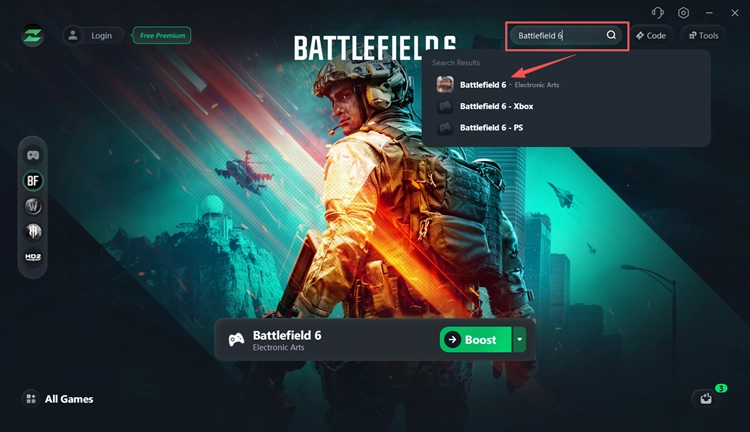
Step 2. Open LagZapper and Select Battlefield 6
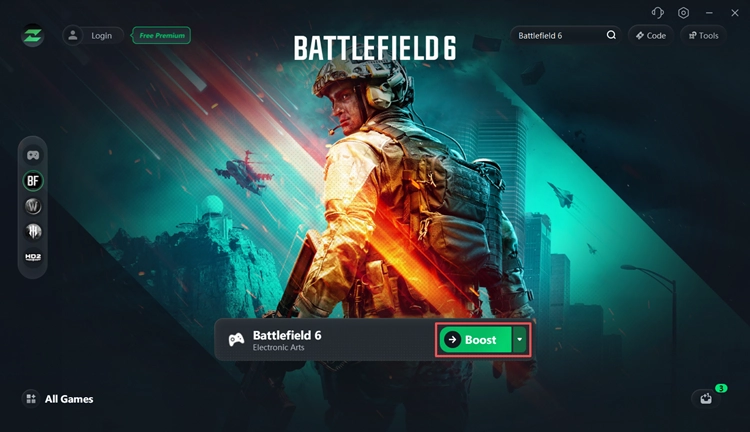
Launch LagZapper, sign in, then search for Battlefield 6 and select the game.
Step 3. Boost and Play Wake Island
Choose a suitable server or node, click Boost, and launch Battlefield 6.
Final Thoughts
Wake Island is now live in Battlefield 6, bringing updated naval combat, tunnels, ziplines, destructible areas, and the new MV Cetus Shipwreck. Learning these routes can make it easier to move between objectives and avoid exposed areas. For a smoother Battlefield 6 experience, download LagZapper to optimize your game connection, lower ping, and reduce packet loss before jumping into Wake Island.
Battlefield 6 Wake Island FAQs
Q1. When Did Wake Island Release in BF6?
Wake Island released on August 18, 2026 at 12:00 UTC. Update 1.4.2.0 became available earlier at 08:00 UTC.
Q2. How Do You Play Wake Island in BF6?
Update Battlefield 6, open Multiplayer, and look for a current experience featuring Wake Island. The map is also available through Portal.
Q3. Where Is Wake Island in BF6?
Check the current Battlefield 6 Multiplayer experiences or Portal Verified Experiences. Available playlists may change with live rotations.
Q4. Why Is BF6 Wake Island Not Showing?
Install the latest Battlefield 6 update, restart the game, and check the current Multiplayer playlists or Portal experiences. If BF6 won't launch, fix the startup issue first.
Q5. Is Wake Island Free in Battlefield 6?
Yes. Wake Island is included with Update 1.4.2.0 and does not require a separate map purchase.
Q6. What Modes Can You Play on Wake Island?
Wake Island supports Conquest, Breakthrough, and Escalation, with boats also able to contest some objectives from the water.