
ExitLag Not Working for Fortnite? Fixes & Best Alternative to Lower Ping
ExitLag is a popular game booster for Fortnite, but some players still report issues like ExitLag not working, not connecting, or causing packet loss in certain matches. When this happens, Fortnite may still have high ping, rubberbanding, matchmaking errors, login failures, or unstable routes.
For a fast-paced game like Fortnite, a stable connection route is essential. If basic troubleshooting does not fix “ExitLag not working for Fortnite”, LagZapper is one of the best ExitLag alternatives to help lower ping, reduce packet loss, and stabilize your Fortnite connection without modifying game files or bypassing anti-cheat systems.
Why Is ExitLag Not Working for Fortnite?
ExitLag may not work with Fortnite for several reasons, including app errors, unstable routes, local network issues, or Fortnite server changes. Before switching tools, check whether Fortnite servers are online. If servers are normal but the problem continues, the issue may come from your connection route. Common reasons include:
- ExitLag does not open or keeps loading
- ExitLag login fails or gets stuck
- ExitLag cannot connect to a route
- ExitLag does not detect Fortnite
- Firewall or antivirus blocks ExitLag
- ISP routing becomes unstable
- Fortnite ping stays high after boosting
- Matchmaking or server connection fails
- Packet loss or rubberbanding continues
Try LagZapper When ExitLag Is Not Working for Fortnite
If ExitLag is not working for Fortnite on your PC, LagZapper can be a practical option to test another optimized route. As a powerful game booster, LagZapper is designed to improve connection stability for online games by helping lower ping, reduce packet loss, and stabilize routes to Fortnite servers.
Connection results may vary depending on your country, ISP, selected server, and current routing conditions. If your Fortnite connection remains unstable after using ExitLag, trying LagZapper as the best ExitLag alternative may help reduce lag, lower ping, and improve your overall online experience.
Why Choose LagZapper for Fortnite?
- Lower Ping: LagZapper helps reduce routing delays between your PC and Fortnite servers, making actions feel faster and more responsive.
- Reduce Packet Loss: LagZapper helps stabilize data transmission, reducing packet loss that may cause stuttering, rubberbanding, or delayed actions.
- One-Click Boost: No complicated setup is needed. Search for Fortnite, choose a route, and click Boost to optimize your connection quickly.
- 3,000+ Games Supported: Besides Fortnite, LagZapper supports 3,000+ online games, including Valorant, CS2, Roblox, Apex Legends, PUBG, Dota 2, and more.
How to Use LagZapper to Play Fortnite
Follow these simple steps to boost Fortnite with LagZapper.
Step 1. Download and Install LagZapper
Download LagZapper for Windows, then follow the on-screen instructions to complete the installation.
Step 2. Open LagZapper and Sign In
Launch LagZapper and sign in to start optimizing your connection for online games.
Step 3. Search for Fortnite
Search for Fortnite in LagZapper or browse the supported games list to find it.
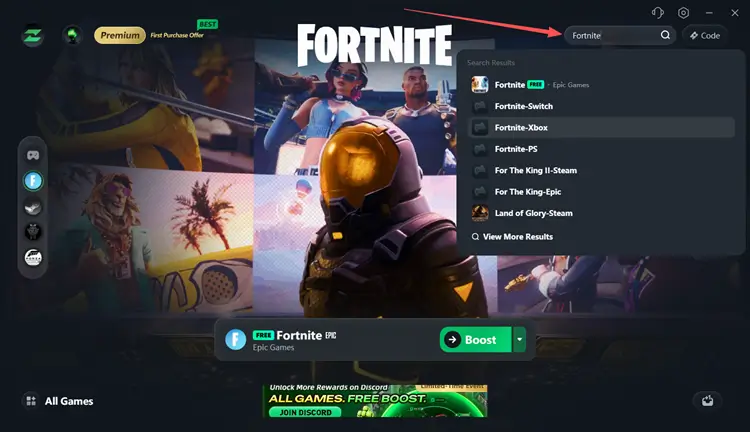
Step 4. Boost and Play Fortnite
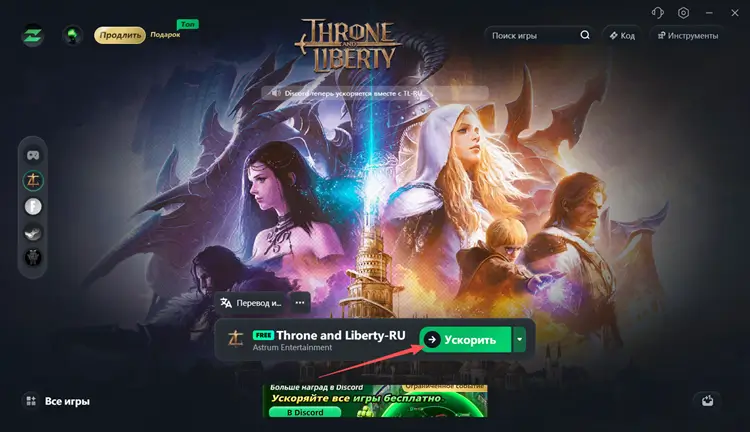
Select your preferred server or node, then click Boost to optimize your Fortnite connection and start playing with less lag.
ExitLag vs LagZapper for Fortnite: Feature and Performance Comparison
Both game boosters are designed to improve online game connections. ExitLag focuses on reducing delay and packet loss, while LagZapper helps lower ping, reduce lag, fix packet loss, and stabilize routes with one-click boost. ExitLag costs US$9.99/month, while LagZapper currently offers All Games Free Boost. If ExitLag is not working for Fortnite, LagZapper is worth testing.
| Feature | ExitLag | LagZapper |
|---|---|---|
| Supports Fortnite | Yes | Yes |
| Lower Ping | Yes | Yes |
| Reduce Packet Loss | Yes | Yes |
| Route Optimization | Yes | Yes |
| One-Click Boost | Yes | Yes |
| Supported Games | Multiple online games | 3,000+ PC games |
| Pricing | From US$9.99/month | All Games Free Boost currently promoted |
Quick Fixes When ExitLag Is Not Working for Fortnite
If ExitLag is not working for Fortnite, the issue is usually caused by temporary software glitches, routing conflicts, or network instability rather than a serious or permanent error. Before switching to another game booster, you can try the following quick fixes to restore stable performance and lower ping.
Fix 1. Restart ExitLag and Fortnite
Close Fortnite completely, then exit ExitLag from the system tray. Reopen ExitLag as administrator and launch Fortnite again. This helps reset the connection and ensures the routing configuration is properly applied.
Fix 2. Check Fortnite Server Status
If Fortnite is under maintenance or experiencing server issues, ExitLag cannot fix login, matchmaking, or connection problems. Before testing again, check whether Fortnite is down or undergoing maintenance using Fortnite Down status updates.
Fix 3. Change ExitLag Route
Some routes may become unstable due to congestion or ISP changes. Switch to another available route or node inside ExitLag and relaunch Fortnite. A stable route is often more important than the lowest ping value.
Fix 4. Check Firewall and Restart Router
Allow ExitLag and Fortnite through firewall or antivirus settings. If issues persist, restart your router or switch to a wired Ethernet connection for better stability.
Also Read: Fortnite Unable to Connect to Server: Login & Match Fixes >>
The Bottom Line
If ExitLag is not working for Fortnite, first check Fortnite server status, update ExitLag, allow it through your firewall, and try switching to another route. These steps can resolve common issues like connection failures, missing game detection, or route application errors.
However, if Fortnite still has high ping, packet loss, matchmaking issues, or unstable sessions, it may be related to ISP routing. In this case, LagZapper is worth trying as an ExitLag alternative for Fortnite to improve route stability, lower ping, and reduce packet loss. Why not try it? Download LagZapper for smoother Fortnite gameplay today.
FAQs About ExitLag Not Working for Fortnite
If ExitLag is not working for Fortnite, the following frequently asked questions can help you quickly identify the possible cause and understand the issue.
Q1: Why is ExitLag not detecting Fortnite?
This can happen if the game is not installed correctly, permissions are missing, or ExitLag failed to scan the game directory.
Q2: Why does ExitLag say “no route available” for Fortnite?
This usually means there is no stable optimized path available for your selected region or server at that moment.
Q3: Why does Fortnite still have high ping after using ExitLag?
This usually happens when the selected route is unstable or your ISP path to Fortnite servers is congested or inefficient.
Q4: Can ExitLag increase ping instead of lowering it?
Yes, in some cases, a poor route selection or unstable ISP path can result in a higher ping instead of improvement.
Q5: Does ExitLag need specific settings for Fortnite?
Yes, Fortnite requires proper detection and route selection. If the game is not detected correctly, the booster may not work as expected.
Q6: Does ExitLag work for Fortnite?
Yes, ExitLag can work for Fortnite by optimizing routing and reducing delay. However, performance depends on your ISP, selected route, and server conditions.