
Why Is My Ping So High in Fortnite After v42.20? 6 Fixes
Wondering why your ping is so high in Fortnite after v42.20? The update added Subregion Preference and merged NA-West, NA-Central, and NA-East into one North America matchmaking region.
Fortnite now prioritizes your preferred subregion but may expand matchmaking to other locations when needed. Some players have reported higher or less stable ping since the update, though Epic has not confirmed a universal v42.20 high-ping bug.
Why Is My Ping So High in Fortnite?
Fortnite high ping usually comes from matchmaking location, ISP routing, network congestion, Wi-Fi instability, or server issues, while v42.20’s new subregion system may also place some matches on a different datacenter within your matchmaking region.
Common reasons include:
- Subregion matchmaking: Your match may use a different datacenter than expected.
- ISP routing: Traffic may take a longer or congested route to Fortnite servers.
- Network congestion: Downloads, uploads, or streaming can increase latency.
- Wi-Fi instability: Signal interference can cause ping spikes and packet loss.
- Server issues: Fortnite matchmaking or game services may temporarily be unstable.
[Quick Way] Reduce Fortnite High Ping with LagZapper
When Fortnite servers are working normally but high ping, lag spikes, or packet loss continue, an inefficient or congested network route may be the cause. LagZapper, a powerful game booster, optimizes the connection route between your PC and Fortnite servers to help lower ping, reduce lag, and reduce packet loss.
Why Use LagZapper for Fortnite?
- Lower Fortnite Ping: Lower ping and stabilize latency during matches.
- Reduce Fortnite Lag: Reduce lag caused by unstable or congested network routes.
- Reduce Fortnite Packet Loss: Improve connection stability during fights.
- Optimize Fortnite Routes: Find a more efficient route to Fortnite servers.
How to Boost Fortnite with LagZapper
Boosting Fortnite only takes three steps.
Step 1. Download and Install LagZapper
Download LagZapper for Windows and complete the installation.
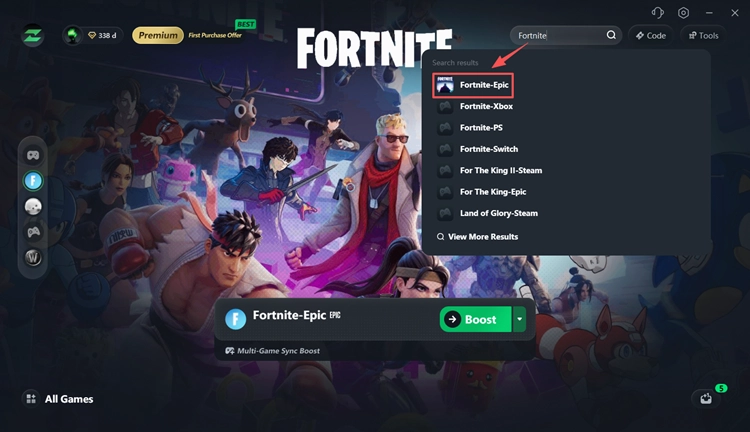
Step 2. Open LagZapper and Search for Fortnite
Open LagZapper, sign in, search for Fortnite, and select the game.
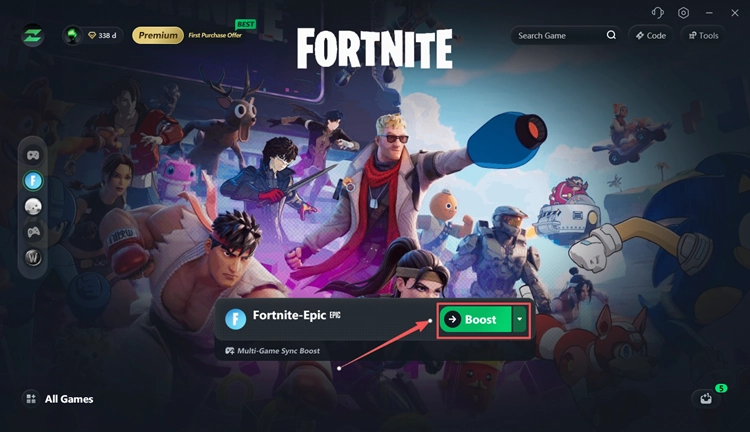
Step 3. Select a Server and Boost
Choose an optimized server or node, click Boost, then launch Fortnite and check your ping.
How to Fix Fortnite High Ping After v42.20
Still getting Fortnite high ping after v42.20? Try these fixes in order.
Fix 1. Check Fortnite Server Status
Start with Epic Games' official server status before changing any network settings.
Check these services:
- Fortnite > Game Services
- Fortnite > Matchmaking
- Epic Online Services
Server or matchmaking issues can increase ping and lag. Check our Fortnite server status guide for updates.
Fix 2. Change Fortnite Subregion Preference
Fortnite v42.20 added Subregion Preference for Battle Royale and Zero Build.
Step 1. Launch Fortnite, open the main menu, and click the Settings gear icon.
Step 2. Go to Game > Language and Region > Subregion Preference.
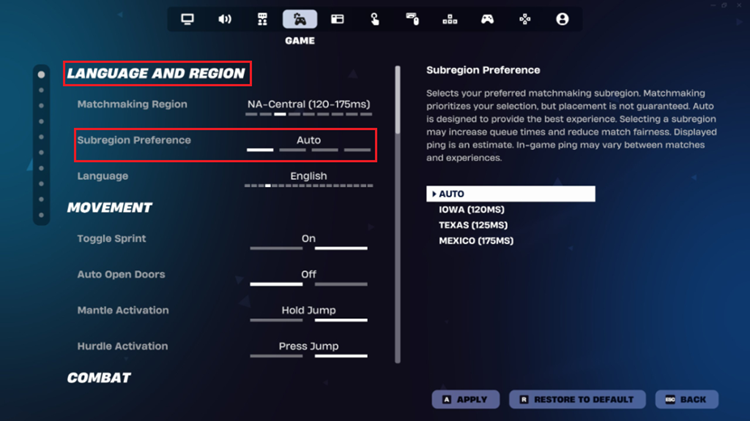
Step 3. Keep it on Auto first, then test the nearest available subregion when your ping remains high.
Epic recommends Auto for most players. A specific subregion may lower ping but can increase queue times. In a party, the player who starts matchmaking should also check their Subregion Preference.
Fix 3. Restart Your Router and Stop Background Traffic
Restart your modem and router, then pause large downloads, uploads, cloud backups, and video streaming.
Network congestion can increase Fortnite ping, especially when uploads use most of your available bandwidth. After clearing background traffic, launch Fortnite again and check whether your ping improves.
Fix 4. Use Ethernet Instead of Wi-Fi
Connect your PC or console directly to the router with Ethernet when possible. Wi-Fi interference, weak signals, walls, and crowded wireless channels can cause higher latency and ping spikes. Epic also recommends a wired connection when troubleshooting Fortnite high ping.
A noticeable ping drop over Ethernet usually points to your local Wi-Fi connection rather than the Fortnite server.
Fix 5. Test Your Fortnite Server Ping
First, enable Settings > Game UI > Net Debug Stats > ON to check your real-time Fortnite ping and packet loss in-game.
For a deeper test, use Epic's Fortnite ping endpoints on Windows:
Step 1. Press Windows + R, type cmd, and press Enter.
Step 2. Run a Fortnite ping command, such as: ping ping-va.ds.on.epicgames.com -n 50
Step 3. Check the Average ping, packet loss, and Minimum/Maximum latency.
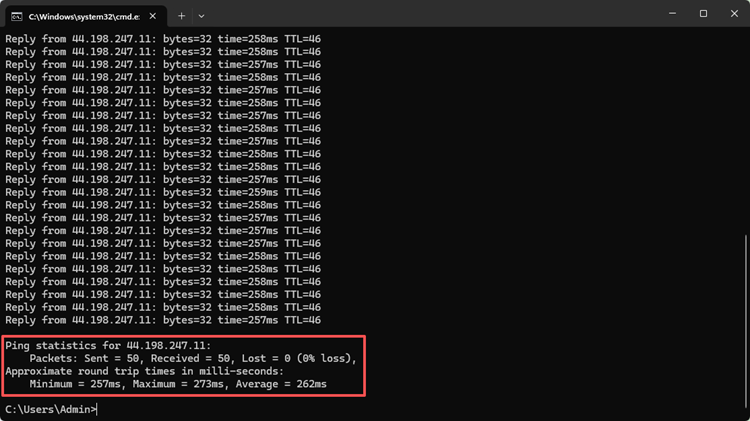
Packet loss should ideally stay at 0%; consistent packet loss can also cause lag and unstable matches.
Fix 6. Contact Your ISP When Ping Stays High
Still seeing 100ms, 200ms, or higher Fortnite ping after testing your subregion and local network? Contact your ISP and share:
- The Fortnite ping endpoint tested
- Your ping test results
- Your normal in-game ping
- The time the issue usually occurs
Epic notes that Command Prompt ping tests use ICMP, while Fortnite gameplay uses UDP. A normal ping test can still miss routing issues that affect the game itself.
Also Read: Fortnite Unable to Connect to Server: Login & Match Fixes
The Bottom Line
Fortnite high ping after v42.20 can come from the new Subregion Preference, server selection, ISP routing, congestion, or Wi-Fi instability. Start by checking Fortnite server status and your subregion, then restart your connection, stop background traffic, test Ethernet, and compare ping with Epic’s official endpoints.
When Fortnite servers are online but routing remains unstable, download LagZapper to optimize the connection route and help reduce Fortnite high ping, lag spikes, and packet loss.
FAQs About Fortnite High Ping After v42.20
Q1. Why is my ping so high in Fortnite after v42.20?
v42.20 changed matchmaking regions and added Subregion Preference. ISP routing, congestion, Wi-Fi, and server selection can also increase ping.
Q2. How do I fix high ping in Fortnite?
Check server status, test nearby subregions, restart your router, stop background traffic, use Ethernet, and test your Fortnite server ping.
Q3. Should I use Auto or a specific Fortnite subregion?
Epic recommends Auto for most players. If Auto gives unusually high ping, test the nearest available subregion.
Q4. What changed with Fortnite v42.20 subregions?
v42.20 merged NA-West, NA-Central, and NA-East into one North America region with selectable subregions. Fortnite may still expand matchmaking when needed.
Q5. Why is my Fortnite ping higher when playing with friends?
Fortnite uses the Subregion Preference of the player who starts matchmaking. A farther subregion may increase your ping.
Q6. Can LagZapper lower Fortnite ping?
LagZapper can optimize inefficient network routes to help lower ping, reduce lag, and reduce packet loss.