
MapleStory Classic World High Ping? 6 Fixes for Lag & Latency
MapleStory Classic World high ping can lead to delayed skills, slow item pickup, sudden lag spikes, and less responsive combat. The issue is especially noticeable for some EU and Nordic players, where long-distance routing can increase MapleStory Classic World latency and contribute to higher EU ping.
Even with smooth movement, MapleStory Classic World lag may still appear as skill delay, looting lag, or slower server responses. This guide covers the most common causes and six practical fixes to lower ping, reduce latency, and improve connection stability.
Why Is MapleStory Classic World Ping So High?
High ping can come from server distance, routing, congestion, or packet loss—not just slow internet.
- Distant Server Connection
Long-distance routes can increase MapleStory Classic World latency. Some EU players report around 150–180ms, while the impact on looting and skill response varies by connection.
- Unstable ISP Routing
Poor or congested ISP routes can cause MapleStory Classic World high ping even with fast internet.
- Server or Channel Congestion
Busy servers, maintenance, and crowded channels may trigger MapleStory Classic World lag spikes.
- Wi-Fi and Packet Loss
Weak Wi-Fi or packet loss can cause unstable ping, delayed actions, rubberbanding, or brief freezes.
[Quick Fix] Lower MapleStory Classic World Ping with LagZapper
MapleStory Classic World servers can stay online while high ping, lag spikes, skill delay, or looting lag continue. In many cases, the problem comes from a long-distance or unstable route between your PC and the game server.
LagZapper is a Windows game booster that optimizes network routes to MapleStory Classic World servers and helps keep latency more stable without complicated manual settings.
Why Use LagZapper for MapleStory Classic World?
- Lower MapleStory Classic World Ping: Optimize the route to game servers to lower ping and keep latency more stable.
- Reduce MapleStory Classic World Lag: Improve route stability to reduce lag, lag spikes, skill delay, and looting lag.
- Reduce MapleStory Classic World Packet Loss: Maintain a steadier connection to reduce packet loss, delayed actions, and disconnects.
How to Boost MapleStory Classic World with LagZapper
Using LagZapper takes only three steps.
Step 1. Download and Install LagZapper
Download LagZapper for Windows and complete the installation.
Step 2. Search for MapleStory Classic World
Open LagZapper, search for MapleStory Classic World, and select the available game route.

Step 3. Boost MapleStory Classic World
Click Boost, then launch MapleStory Classic World with the optimized route.

After boosting, launch MapleStory Classic World and check whether your ping and in-game response improve.
How to Fix MapleStory Classic World High Ping and Lag
Try these fixes to reduce MapleStory Classic World high ping, lag, and unstable latency.
Fix 1. Check MapleStory Classic World Server Status
Server maintenance, channel issues, or heavy traffic can cause MapleStory Classic World lag, a MapleStory Classic World queue, and other connection problems.
Check official MapleStory news, maintenance notices, and recent player reports. When many players report the same issue, wait for the server problem to be resolved first.
Fix 2. Restart Your Router and Network
Temporary router or ISP routing issues can increase MapleStory Classic World ping.
Step 1. Close MapleStory Classic World.
Step 2. Turn off your router for about 30 seconds.
Step 3. Restart the router and your PC.
Launch the game again and check the latency. This can clear temporary connection or routing problems, though it will not change the distance to the game server.
Fix 3. Use Ethernet Instead of Wi-Fi
Wi-Fi can cause unstable latency, packet loss, and MapleStory Classic World lag spikes. Connect your PC directly to the router with an Ethernet cable for:
- More stable latency
- Fewer ping spikes
- Lower packet loss
- More consistent skill and item pickup response
A wired connection is especially useful when lag spikes appear even though your average ping looks normal.
Fix 4. Close Bandwidth-Heavy Background Apps
Background downloads and syncing can increase MapleStory Classic World latency.
Step 1. Pause Steam, Nexon Launcher, or Windows updates.
Step 2. Stop cloud syncing, video streams, and large browser downloads.
Step 3. Relaunch MapleStory Classic World and check whether ping and lag become more stable.
Fix 5. Reset Windows Network
Resetting Windows network settings can help fix connection problems and unstable MapleStory Classic World latency.
Step 1. Open Command Prompt as Administrator.
Step 2. Run:
- netsh winsock reset
- netsh int ip reset
- ipconfig /flushdns
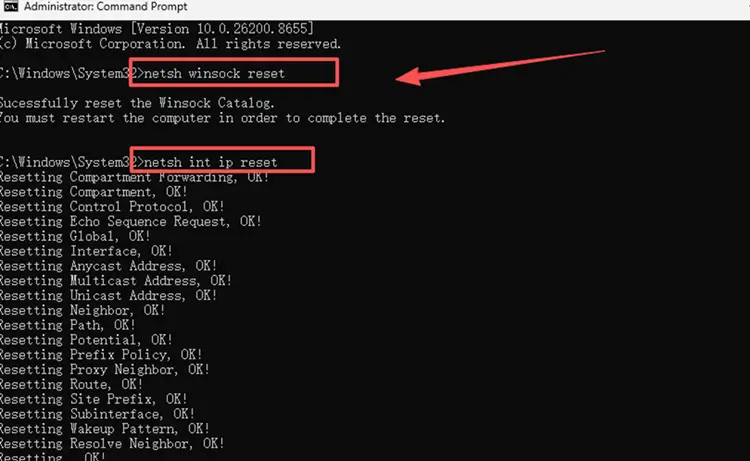
Step 3. Restart your PC, then launch MapleStory Classic World and test the connection again.
Fix 6. Test Another Network
Test MapleStory Classic World on another connection, such as a mobile hotspot. When ping drops significantly on another network, your original ISP route or local network may be contributing to the latency. This is also a quick way to identify whether your ISP route is the main cause of your high latency.
The Bottom Line
MapleStory Classic World high ping can come from long-distance routing, ISP congestion, server load, Wi-Fi, or packet loss. EU and Nordic players may notice it through looting lag, skill delay, or unstable latency.
Start with the fixes above to stabilize your connection. For persistent routing-related lag, download LagZapper to optimize the route to MapleStory Classic World servers and keep ping more stable.
FAQs About MapleStory Classic World High Ping
Q1. Why is my ping so high or unstable in MapleStory Classic World?
Long-distance routing, ISP congestion, server load, Wi-Fi, or packet loss can cause high ping and sudden ping spikes.
Q2. Is 150–180ms ping playable in MapleStory Classic World?
Yes. It can still be playable, but looting lag, skill delay, and slower server responses may become more noticeable.
Q3. Why does MapleStory Classic World have looting lag?
High latency can delay communication with the server, causing slower item pickup and MapleStory Classic World looting lag.
Q4. Why are my MapleStory Classic World skills delayed?
Skill delay can come from high latency, unstable routing, packet loss, or server congestion.
Q5. Does MapleStory Classic World have EU servers?
Nexon has not confirmed a complete physical server-location list with dedicated EU infrastructure.
Q6. How can I lower ping in MapleStory Classic World?
Check server status, use Ethernet, close background traffic, reset your network, and optimize unstable routing when high ping persists.