
Fix Throne and Liberty RU Server Not Working, Timeout & Disconnects
Throne and Liberty RU Server is now live for players in Russia, Eastern Europe, and Central Asia, but launch-week connection issues may still affect many players. Common problems include RU server connection timeout, GateServer Connection Timeout, login failed, server not responding, and disconnected from server errors.
These issues can happen because of server overload, maintenance, unstable routing, DDoS attacks, launcher errors, or local network problems. In this guide, you’ll learn why Throne and Liberty Russian server connection timeout happens and how to fix it step by step.
Why Does Throne and Liberty RU Server Connection Timeout Happen?
A Throne and Liberty RU server connection timeout means your game client cannot reach the Russian server in time. This may happen during login, server selection, character loading, or when entering the game world. In most cases, the issue is caused by one of the following reasons:
1. RU Server Is Overloaded During Launch
Throne and Liberty RU may face heavy launch traffic when many players try to log in at the same time. Server queues, login failures, character creation limits, and Throne and Liberty RU server connection timeout errors can happen even if your internet connection works normally.
2. Throne and Liberty GateServer Connection Timeout
GateServer Connection Timeout means the client cannot reach the gateway server for login or server entry. It may be caused by server overload, maintenance, DDoS attacks, unstable routing, packet loss, firewall blocking, or launcher login issues.
3. DDoS or Server-Side Instability
During major MMORPG launches, abnormal traffic spikes or Throne and Liberty RU DDoS attacks may cause login timeouts, server delays, failed loading, and random disconnects. If the issue is server-side, local fixes may not solve it immediately, but a more stable route can help once the server becomes reachable.
4. Wrong Launcher or Regional Client
Throne and Liberty RU is a separate regional service, so the wrong client, old global launcher, incorrect account region, or unsupported access path may cause “Throne and Liberty Russian server login error”.
5. Unstable Network Route to the RU Server
Even when the RU server is online, unstable ISP routing may affect players connecting from another country or region. Long-distance routes can cause high ping, packet loss, login timeout, server delay, long loading screens, failed connection after character selection, or Throne and Liberty disconnected from server errors.
How to Fix Throne and Liberty RU Server Connection Timeout
During launch week, RU servers may be unstable because many players are trying to log in at the same time. If you keep seeing a connection timeout, try the fixes below before reinstalling the game.
Fix 1. Check Throne and Liberty RU Server Status
Before changing your PC settings, first confirm whether the Throne and Liberty RU server is online, under maintenance, overloaded, or affected by DDoS attacks. Check the official Throne and Liberty Russia website, launcher notices, VK Play or Astrum Play updates, the official YouTube channel, community discussions, and maintenance announcements. If the server is down or full, wait for an official update.
Fix 2. Restart the Game and Launcher
Launcher errors can trigger connection timeout issues, especially when login sessions or update files fail to load correctly. Restarting the launcher can refresh login sessions, update files, and clear temporary connection problems. Follow these steps:
Step 1. Close Throne and Liberty and exit the RU launcher completely.
Step 2. Right-click the Windows icon, open Task Manager, and then end all related launcher and game processes.
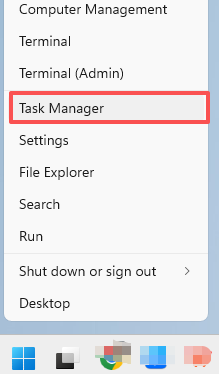
Step 3. Restart your PC, open the launcher as administrator, and launch Throne and Liberty RU again.
Fix 3. Check If You Are Using the Correct RU Client
Throne and Liberty RU is not the same as the global version. If you installed the wrong version, used the wrong launcher, or logged in with an unsupported account region, the game may fail to connect. Make sure you downloaded the Russian regional client, are using the correct launcher, have an account that supports the RU service, selected an open server, and fully updated the game.
Fix 4. Temporarily Disable Firewall or Antivirus Blocking
Sometimes, Windows Firewall, antivirus software, or third-party security apps may block Throne and Liberty or its launcher from connecting to the RU server. You can check the firewall settings and allow the game through your security protection.
Step 1. Press Windows + I to open Settings, then go to Privacy & security > Windows Security > Firewall & network protection.
Step 2. Click Allow an app through firewall, then allow both Throne and Liberty and its game launcher through the firewall.
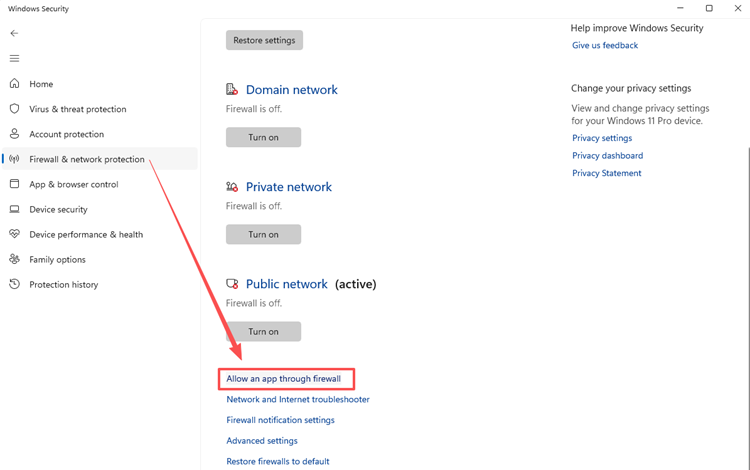
Step 3. Restart the launcher and test the connection again.
You can also temporarily disable third-party antivirus apps for testing. If Throne and Liberty connects successfully, add both the game and its launcher to your security allowlist.
Fix 5. Flush DNS and Reset Network Settings
DNS problems or outdated local network cache can sometimes cause the "can’t connect to Throne and Liberty RU server" error. Flushing DNS and resetting your network settings may help your PC reconnect to the server more smoothly.
Step 1. Open Command Prompt as administrator, then run the following commands one by one:
- ipconfig /flushdns
- ipconfig /release
- ipconfig /renew
- netsh winsock reset
Step 2. After the commands finish, restart your PC and launch Throne and Liberty RU again to test the connection.
Fix 6. Change DNS Server
If your current DNS provider is slow or unstable, the launcher may fail to resolve Throne and Liberty RU server addresses correctly. Try switching to Google DNS 8.8.8.8 / 8.8.4.4 or Cloudflare DNS 1.1.1.1 / 1.0.0.1, then restart your network connection and reopen the launcher.
[Bonus] Use LagZapper to Stabilize Your Throne and Liberty RU Connection
If the RU server is online but you still experience connection timeout, high ping, packet loss, or random disconnects, the issue may come from an unstable network route between your PC and the game server. LagZapper helps optimize your game connection by selecting a more stable route, reducing packet loss, and improving cross-region connectivity for smoother gameplay.
Why Use LagZapper for Throne and Liberty RU?
- Reduce high ping in Throne and Liberty RU
- Stabilize your route to the Russian server
- Reduce packet loss and random disconnects
- Improve login and server connection stability
- Boost supported PC games with one click
- Get a smoother connection before entering the game
How to Play Throne and Liberty RU with LagZapper
Before optimizing your connection, make sure Throne and Liberty RU is fully installed and updated on your PC. Once the game and launcher are ready, open LagZapper and boost your route before entering the RU server.
Step 1. Download and Open LagZapper
Download LagZapper for Windows, complete the installation, then launch LagZapper and sign in to your account.
Step 2. Search for Throne and Liberty RU
Use the search bar to find Throne and Liberty RU in the supported game list.
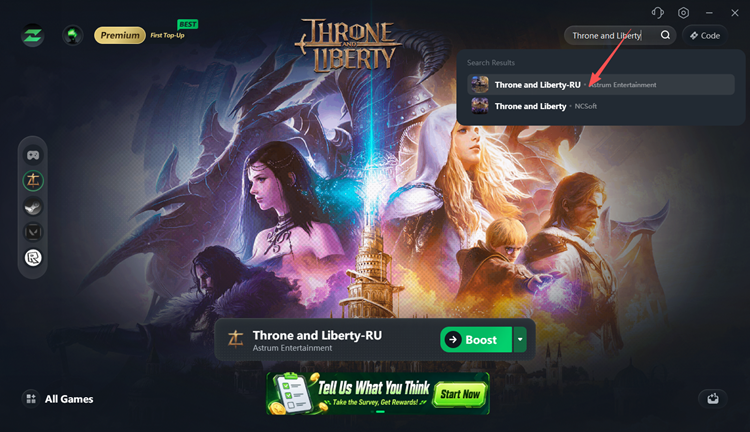
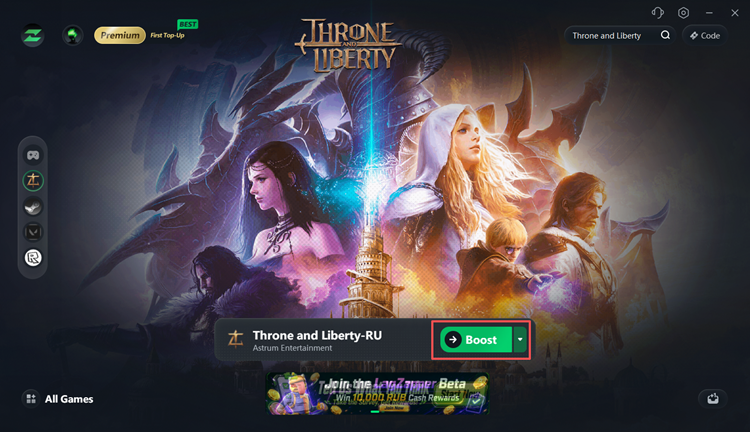
Step 3. Boost and Play Throne and Liberty RU
Select your preferred server or node, then click Boost to optimize your connection before launching the game.
The Bottom Line
Throne and Liberty RU server connection timeout is common during launch periods, especially when servers are overloaded, under maintenance, or affected by unstable traffic. If you see errors such as Throne and Liberty GateServer Connection Timeout, Throne and Liberty Russian server login error, failed to connect, or Throne and Liberty disconnected from server, check the official server status first.
If the RU server is online but your connection is still unstable, LagZapper can help optimize your route, reduce packet loss, lower ping, and create a smoother Throne and Liberty RU gameplay experience. Download LagZapper for Windows and boost Throne and Liberty RU with a more stable connection. If you regularly play other MMORPGs besides Throne and Liberty RU, such as RF Online Next, the same routing optimization may help improve connection stability across different game servers.
FAQ: Throne and Liberty RU Server Connection Timeout
Still have questions about Throne and Liberty RU server connection timeout? Here are quick answers to the most common connection, login, and ping issues.
Q1. What does Throne and Liberty RU server connection timeout mean?
It means the game cannot reach the RU server in time due to overload, routing, or network issues.
Q2. What is GateServer Connection Timeout in Throne and Liberty?
It means the game failed to connect with the gateway server during login, server selection, or entry.
Q3. Why can’t I connect to Throne and Liberty Russian server?
The RU server may be full, under maintenance, affected by DDoS, or blocked by local network settings.
Q4. Is Throne and Liberty RU server down?
It may be down, overloaded, or under maintenance. Check official notices before changing your PC settings.
Q5. How do I reduce high ping in Throne and Liberty RU?
Close background downloads, use wired internet, avoid peak hours, change DNS, or boost the route with LagZapper.
Q6. Why does Throne and Liberty RU keep disconnecting?
Disconnects may come from server overload, packet loss, unstable routing, firewall blocking, DNS errors, or launcher issues.