
WARDOGS Error 1628505085: Failed to Initialize Player Session Fix
Getting WARDOGS error code 1628505085 while entering the game? This WARDOGS login error usually appears with “Failed to initialize player session with the online services” when WARDOGS cannot create or restore an online session.
The WARDOGS failed to initialize player session error may appear after login, while waiting in a queue, or when WARDOGS is stuck on Fetching Game Data. It may also appear as a WARDOGS online services error or a failed to connect to online services message. So, how to fix WARDOGS error 1628505085? Read on for six practical fixes.
What Is WARDOGS Error 1628505085?
WARDOGS error code 1628505085 is an online player-session error that appears when the game cannot initialize your session with its online services.
The message usually reads:
Error Code: 1628505085
Failed to initialize player session with the online services.
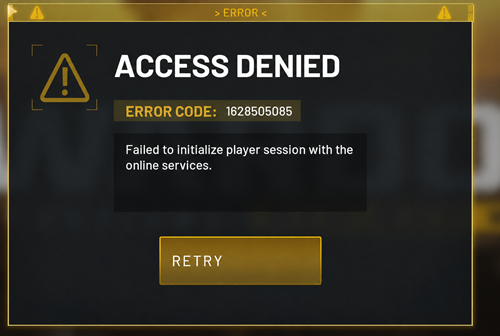
This means WARDOGS reaches the online connection stage but cannot complete the player-session setup, so the error may appear after the login queue, during Fetching Game Data, after returning to the main menu, or before reaching the Server Browser - even though the game itself launches successfully.
Tip: Seeing Access Denied or Failed to authenticate with online services instead? See our WARDOGS error code 1147405308 guide.
Why Does WARDOGS Error 1628505085 Happen?
WARDOGS error 1628505085 can result from server-side, client-side, or network problems. Common causes include:
- WARDOGS authentication services are overloaded or temporarily unavailable
- Your Steam or WARDOGS login session has expired or become stale
- An outdated or incorrect WARDOGS client is running
- WARDOGS game files are incomplete or corrupted
- Your internet connection is unstable
- Packet loss or poor routing interrupts communication with WARDOGS servers
When many players report the same error at the same time, the cause is more likely server-side.
How to Fix WARDOGS Error 1628505085
Try these fixes for WARDOGS error code 1628505085, including Failed to initialize player session, Fetching Game Data, and other online services errors.
Fix 1. Check WARDOGS Server Status First
Heavy login demand can overload WARDOGS authentication services and trigger session initialization errors. Multiple reports appearing at the same time usually point to a server-side issue. Check:
- Official WARDOGS announcements
- WARDOGS Steam Discussions
- Official Discord updates
- Recent Reddit reports about WARDOGS error 1628505085
Wait for the service to recover before reinstalling the game.
Fix 2. Launch the Correct WARDOGS Version
WARDOGS used separate Playtest builds during testing, so an outdated client may cause login or session errors. Open your Steam Library and make sure:
- WARDOGS is fully updated
- Steam is not launching an expired Playtest build
- You are using the current WARDOGS version
- Steam is online and signed into the correct account
Close the old Playtest client, then launch the current WARDOGS build.
Fix 3. Restart WARDOGS and Steam Completely
A failed login attempt can leave the current Steam or WARDOGS session stuck. Fully restart both applications before reconnecting.
Step 1. Close WARDOGS and exit Steam completely.
Step 2. Open Task Manager and end any remaining WARDOGS or Steam processes.
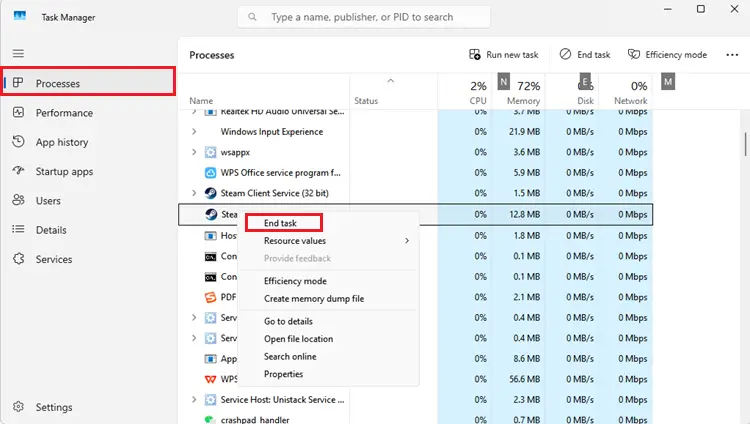
Step 3. Reopen Steam, sign in, and launch WARDOGS again.
Fix 4. Verify WARDOGS Game Files
Corrupted or incomplete files can interfere with WARDOGS online services. Verify the installation through Steam.
Step 1. Open Steam > Library, right-click WARDOGS, and select Properties.
Step 2. Go to Installed Files > Verify integrity of game files.
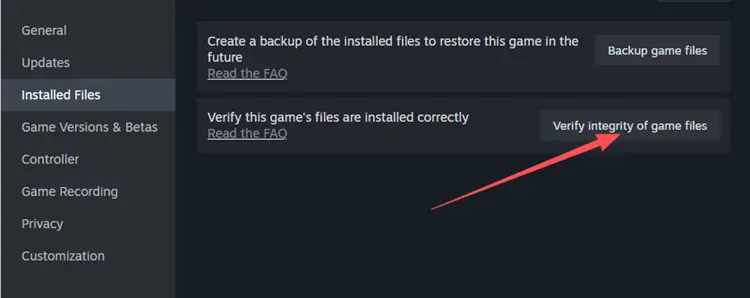
Step 3. Wait for Steam to finish, then restart Steam and launch WARDOGS again.
Fix 5. Check Your Internet Connection
An unstable connection can interrupt WARDOGS authentication or player-session setup and trigger error 1628505085. To rule out a local connection problem behind this WARDOGS online services error, try:
- Pause large downloads
- Close bandwidth-heavy apps
- Restart your router
- Use Ethernet instead of unstable Wi-Fi
- Reconnect Steam
- Avoid downloading other Steam games while launching WARDOGS
Packet loss or poor routing can still disrupt WARDOGS online services even when normal web browsing works fine.
Fix 6. Reset Your Windows Network Connection
A stale DNS cache or Windows network issue can interfere with WARDOGS online services. Reset the network connection with the commands below:
Step 1. Open Command Prompt as Administrator and run the following commands one at a time:
- ipconfig /flushdns
- netsh winsock reset
Step 2. Restart your PC, reopen Steam, and launch WARDOGS again.
This fix targets local network problems and will not resolve a WARDOGS server outage.
[Bonus] Reduce WARDOGS Connection Problems with LagZapper
WARDOGS is a large-scale online FPS, so a stable route to the selected game region is important for login, matchmaking, and gameplay. When WARDOGS servers are online but your connection remains unstable, LagZapper can optimize the network route between your PC and the selected WARDOGS region.
Highlights of LagZapper for WARDOGS
- Lower and Stabilize Ping: Optimize the route to your selected WARDOGS region to help lower ping and reduce unstable latency.
- Reduce Packet Loss: Improve route stability to reduce packet loss and prevent sudden connection interruptions in WARDOGS.
- Reduce Lag and Stuttering: Optimize inefficient network routes to reduce lag and minimize sudden latency spikes during gameplay.
- Recommended Server Nodes: Select your WARDOGS region and use recommended network nodes for a more stable connection.
How to Use LagZapper for WARDOGS
For connection-related WARDOGS issues, use LagZapper to optimize the network route before reconnecting.
Step 1. Download and Install LagZapper
Download LagZapper and complete the installation on your Windows PC.
Step 2. Search for WARDOGS
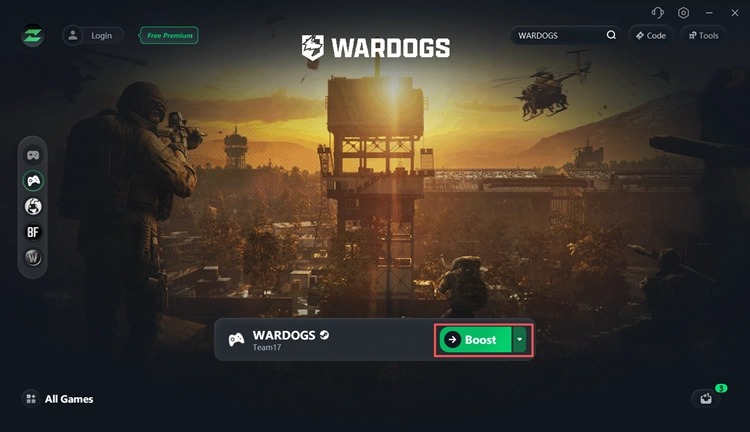
Launch LagZapper, search for WARDOGS, and select your server region.
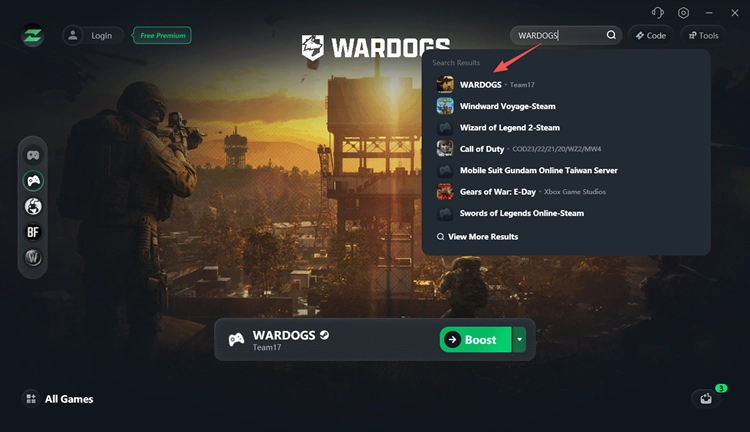
Step 3. Boost WARDOGS
Click Boost, then launch WARDOGS using the optimized connection route.
The Bottom Line
WARDOGS error 1628505085 means the game failed to initialize an online player session. Start by checking server status, then restart WARDOGS and Steam, confirm you are using the current client, verify game files, and test your connection. When WARDOGS services are online but packet loss, high ping, or unstable routing persists, download LagZapper to optimize the connection route, reduce network instability, and reconnect with a more stable path.
FAQs About WARDOGS Error 1628505085
Q1. What does WARDOGS error 1628505085 mean?
It means WARDOGS failed to initialize your player session with its online services.
Q2. Is WARDOGS error 1628505085 a server problem?
It can be. Multiple simultaneous player reports usually point to a server or authentication issue.
Q3. Why do I get error 1628505085 after waiting in the queue?
Finishing the queue does not guarantee successful player-session initialization. Authentication may still fail afterward.
Q4. Should I reinstall WARDOGS to fix error 1628505085?
Not first. Check the servers, restart Steam, confirm the correct client, and verify game files before reinstalling.
Q5. What should I do when WARDOGS is stuck on Fetching Game Data?
Check server status and restart WARDOGS and Steam. Reached the Server Browser but still can't enter a match? See our WARDOGS can't join server guide.
Q6. Can LagZapper fix WARDOGS error 1628505085?
LagZapper can help with packet loss, poor routing, and unstable connections, but it cannot fix a WARDOGS server outage.