
WARDOGS Can't Join Server? Fix Server Browser Issues
WARDOGS can't join server or the Server Browser is empty? During the latest Closed Beta, players on Reddit reported failed joins, missing servers, and being sent back to the main menu after the queue or Joining Server screen. Some players fixed the issue by refreshing the Server Browser or joining a less-crowded server. Try the fixes below before reinstalling WARDOGS.
Why Can't I Join a WARDOGS Server?
The most common WARDOGS server problems include:
- The Server Browser is empty or no servers are showing.
- Multiple server regions are selected.
- Server filters such as Show Official or Show Full are disabled.
- WARDOGS returns to Fetching Game Data after joining.
- The game sends you back to the menu after the queue.
- Busy or unavailable servers fail to connect.
For an empty server list, check the region and Server Browser filters first. For failed joins, try another less-crowded server.
How to Fix WARDOGS Can't Join Server: 7 Fixes
Try these fixes when the WARDOGS Server Browser is not working, the server list is empty, or you can't join a match.
Fix 1. Select Only One Server Region
If the WARDOGS Server Browser is empty, check your region filter first. BULKHEAD has confirmed that selecting multiple regions can cause no servers to appear.
Step 1. Open the Server Browser and select only one region.
Step 2. Refresh the server list and try joining again.
Fix 2. Check the Server Browser Filters
An empty WARDOGS server list may come from disabled Server Browser filters. Players on Reddit have restored missing servers by enabling the filters or selecting Show Official and refreshing the list.
Step 1. Open the Server Browser.
Step 2. Check Show Official, Show Community, Show Empty, and Show Full.
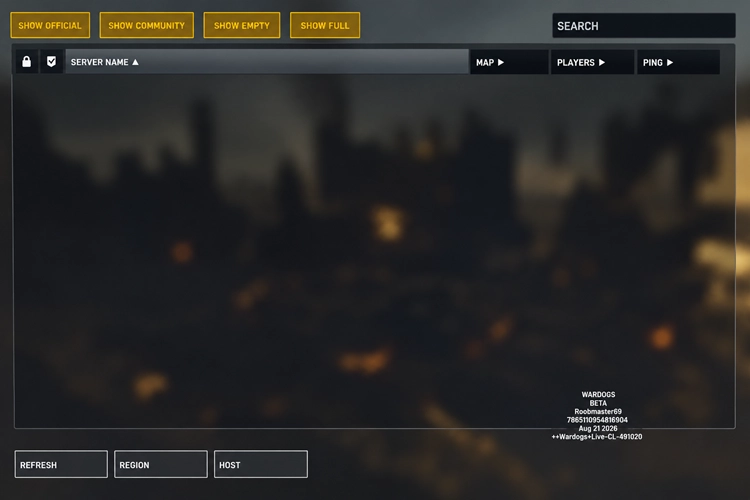
Step 3. Enable the server types you want to see, then click Refresh.
Fix 3. Refresh the Server List
The WARDOGS Server Browser may temporarily fail to load available servers.
Step 1. Open the Server Browser, wait a few seconds, then click Refresh.
Step 2. Choose another available server and try joining again.
Avoid switching between servers too quickly while the list is still updating.
Fix 4. Try a Less-Crowded Server
WARDOGS may send you back to the Server Browser or main menu when a server is near capacity. Some players reported failed joins on servers with around 90–100 players, while lower-population servers worked normally.
Step 1. Return to the Server Browser and choose a less-crowded server.
Step 2. Join the server and check whether the match loads normally.
Seeing Join Timed Out with error code 1628505091 after selecting a server? Follow our WARDOGS error 1628505091 troubleshooting guide.
Fix 5. Restart WARDOGS and Steam
Restarting WARDOGS and Steam can reset a temporary Server Browser or connection session.
Step 1. Close WARDOGS completely, then exit and reopen Steam.
Step 2. Launch WARDOGS, select one server region, and refresh the Server Browser.
Step 3. Try joining another server.
Tip: Seeing Access Denied or Failed to authenticate with online services? Check our WARDOGS error code 1147405308 guide.
Fix 6. Verify WARDOGS Game Files
Corrupted or missing files after a Playtest update may cause WARDOGS to fail when joining a server.
Step 1. Open Steam > Library, right-click WARDOGS, and select Properties.
Step 2. Go to Installed Files > Verify integrity of game files.
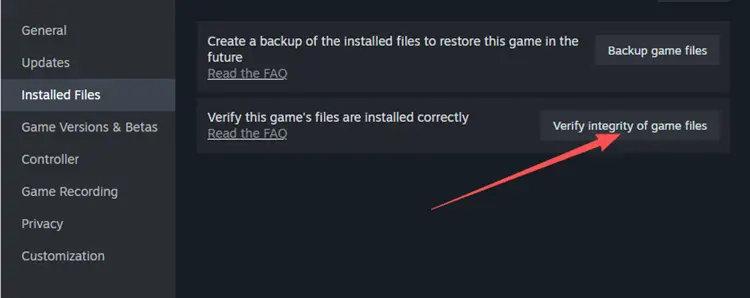
Step 3. Restart WARDOGS after verification finishes and try joining a server again.
Tip: For crashes, freezes, PC restarts, or BSODs, see our WARDOGS crashing guide.
Fix 7. Check Whether WARDOGS Servers Are Down
A server-side issue may be the cause when many players cannot join WARDOGS at the same time. Recent Closed Beta reports included:
- Being kicked from active matches.
- Getting sent back to the main menu.
- Returning to Fetching Game Data.
- Multiple servers failing at once.
Check the official WARDOGS Discord, WARDOGS Steam Discussions, or recent community reports for outages or maintenance. Widespread server issues need to be fixed on the WARDOGS side.
[Bonus] Reduce WARDOGS Lag and Connection Issues With LagZapper
Server Browser fixes do not address high ping, packet loss, or unstable connections during matches. LagZapper cannot fix a server outage or Server Browser issue, but it can help with high ping, packet loss, and unstable routing.
Key Features of LagZapper for WARDOGS
- Reduce lag and latency spikes during WARDOGS matches.
- Lower ping with an optimized route to WARDOGS servers.
- Reduce packet loss that can cause unstable gameplay or disconnects.
- Switch between available nodes to find a more stable route to your WARDOGS server region.
How to Boost WARDOGS With LagZapper
Follow these three steps to optimize your WARDOGS connection.
Step 1. Download and Install LagZapper
Download LagZapper for Windows, complete the installation, and sign in.
Step 2. Search for WARDOGS
Open LagZapper and enter WARDOGS in the search bar, then select the game from the results.
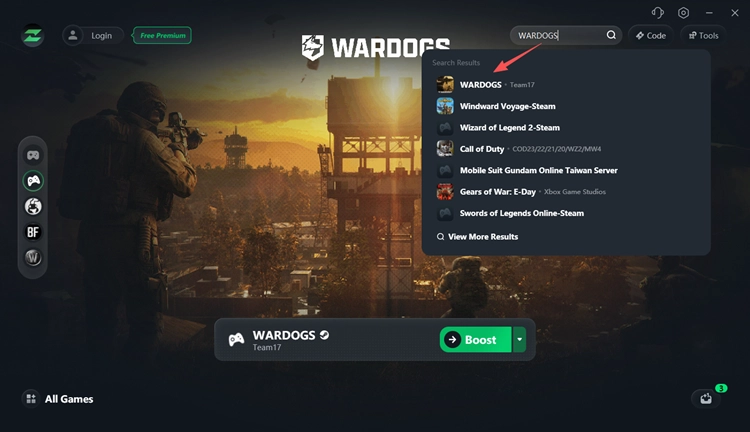
Step 3. Start Boosting WARDOGS
Choose a recommended node or one near your WARDOGS server region, click Boost, then launch the game through Steam.
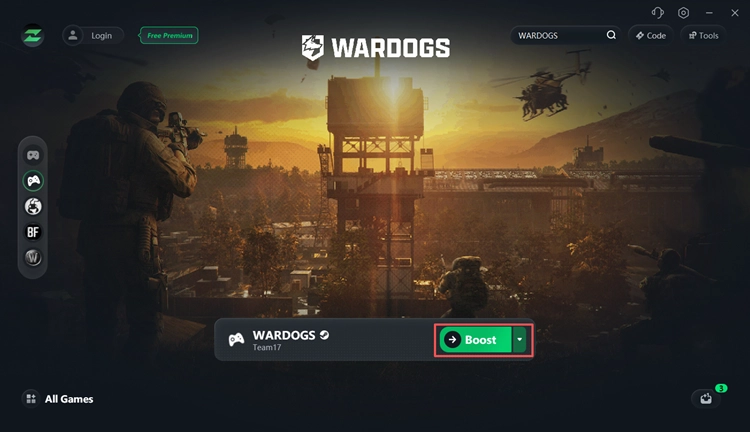
The Bottom Line
When WARDOGS can't join a server, start by selecting one region, checking the Server Browser filters, and refreshing the list. For failed joins or menu loops, try a less-crowded server, restart the game, and check for server outages. For separate high ping, packet loss, or routing issues, download LagZapper to optimize your WARDOGS connection.
WARDOGS Can't Join Server FAQ
Q1. Why can't I join a WARDOGS server?
WARDOGS may fail to join because of Server Browser settings, crowded servers, temporary outages, or corrupted game files.
Q2. Why is my WARDOGS Server Browser empty?
Make sure only one server region is selected. BULKHEAD has confirmed that selecting multiple regions can cause no servers to appear.
Q3. Why does WARDOGS send me back to the menu when joining a server?
The selected server may be full, overloaded, or temporarily unavailable. Try another server with fewer players and check whether other players are reporting the same issue.
Q4. Why are no servers showing in WARDOGS?
Check the region selection and make sure Show Official, Show Community, Show Empty, or Show Full are enabled, then refresh the Server Browser.
Q5. Are WARDOGS servers down?
Possibly. When many players cannot join at the same time, check the official WARDOGS Discord or Steam Discussions for outages or maintenance.