
How to Fix WARDOGS Error 1628505091: Join Timed Out
Seeing WARDOGS error 1628505091 after selecting a server? This WARDOGS error code 1628505091 usually appears as Join Timed Out, followed by a message saying WARDOGS failed to connect to the server within a reasonable time.
The issue drew widespread player reports around the September 10 Early Access launch. Reddit users specifically reported error 1628505091 when joining servers, while Steam Discussions also show players unable to enter available servers. Some could reach the Server Browser normally, but WARDOGS still failed to join the server or the server connection timed out.
What Is WARDOGS Error 1628505091?
WARDOGS error code 1628505091 is a server connection timeout that appears while joining a match. The typical sequence is:
Launch WARDOGS → Open Server Browser → Select a server → Join Match → Join Timed Out: Error 1628505091
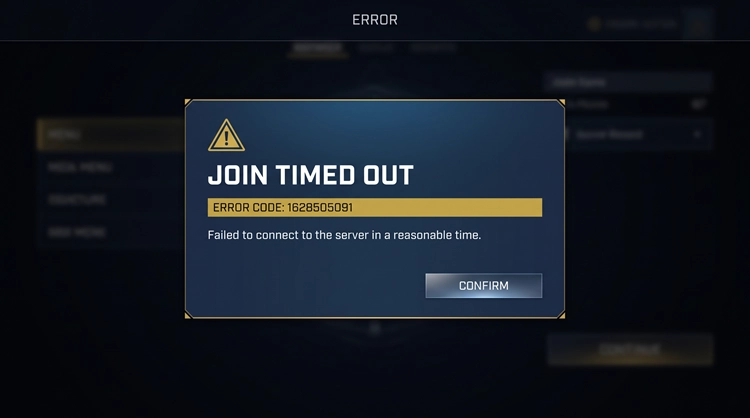
Launch-day reports also mentioned empty Server Browsers, sudden match disconnects, and repeated failures across multiple servers. In most cases, WARDOGS error 1628505091 appears after reaching the Server Browser, when WARDOGS fails to connect to the server or the server connection times out.
Tip: Getting Failed to initialize player session with the online services before reaching the Server Browser? This usually points to WARDOGS error 1628505085, a login-stage issue that occurs before server selection.
Is WARDOGS Error 1628505091 a Server Issue?
In many cases, yes. Players have reported WARDOGS Join Timed Out, sudden disconnects, and repeated failures across different servers at the same time. This suggests that server load, availability, or match-joining services can trigger WARDOGS error 1628505091.
Check WARDOGS server status first before reinstalling the game or changing Windows settings.
How to Fix WARDOGS Error 1628505091
So, how do you fix WARDOGS error 1628505091? Check the WARDOGS server status first, then work through the server region, Steam, game file, and local network fixes below.
Fix 1. Check WARDOGS Server Status First
A wave of reports at the same time usually points to a server-side issue. Check whether players are reporting:
- WARDOGS Join Timed Out
- Error 1628505091
- Empty Server Browser
- Failed to join server
- Match disconnects
- Server queue problems
When these issues appear widely, wait for the servers to stabilize or for a server restart, then try joining again.
Fix 2. Restart WARDOGS and Install the Latest Update
BULKHEAD has released client updates to address launch stability and server-joining problems. Fully restart WARDOGS to make sure you are using the latest version.
Step 1. Close WARDOGS completely and restart Steam.
Step 2. Install any available WARDOGS update.
Step 3. Relaunch the game, return to the Server Browser, and try joining again.
Fix 3. Refresh the Server Browser and Try Another Server
A server may show available slots but still fail to accept new connections. Refresh the Server Browser, then choose another server with:
- Available player slots
- A short or empty queue
- A nearby region
- A lower player count
Note: Still unable to enter a match without a specific error code? See our WARDOGS can't join server guide for Server Browser, region, filter, and failed-join troubleshooting.
Fix 4. Select Only One WARDOGS Server Region
BULKHEAD previously confirmed that selecting multiple regions could cause Server Browser problems. Use only one region before joining again.
Step 1. Open the WARDOGS Server Browser and region filters.
Step 2. Select only your closest server region, then refresh the server list.
Step 3. Choose a server and try Join Match again.
This fix is especially useful when WARDOGS error 1628505091 appears with an empty or unstable Server Browser.
Fix 5. Verify WARDOGS Game Files
Corrupted or incomplete files can cause connection or launch issues after a WARDOGS update or hotfix.
Step 1. Open Steam > Library, right-click WARDOGS, and select Properties.
Step 2. Go to Installed Files > Verify integrity of game files.
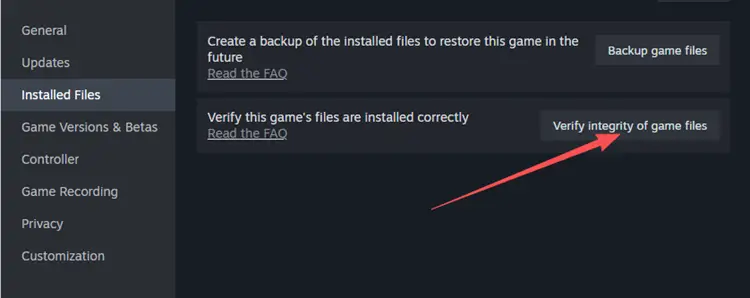
Step 3. Wait for the scan to finish, then restart WARDOGS and try joining again.
This will not fix an overloaded server, but it can rule out damaged or outdated local game files.
Fix 6. Stabilize Your Network Connection
Once WARDOGS servers are stable, repeated server connection timed out errors may come from an unstable local connection or poor routing to the selected region. Try these checks:
- Restart your router.
- Use Ethernet instead of Wi-Fi.
- Pause large downloads and background updates.
- Close bandwidth-heavy apps.
- Select the closest WARDOGS server region.
- Test another stable connection when available.
After making these changes, restart WARDOGS, reopen the Server Browser, and try joining a different server in the closest available region.
Optimize Your Connection to WARDOGS Servers with LagZapper
WARDOGS is a large-scale multiplayer FPS with matches supporting up to 100 players. Once the official servers are online and accepting connections, network routing between your PC and the selected server region can affect latency, packet loss, and overall connection stability.
LagZapper is a Windows game network optimizer designed to improve the connection route between your PC and game servers. It automatically selects optimized network nodes for supported games and regions, helping reduce unstable routing without requiring manual network configuration.
Highlights of LagZapper for WARDOGS
- Lower and Stabilize Ping: Optimize the route to your selected WARDOGS region to lower ping and reduce sudden latency changes during matches.
- Reduce Lag: Improve inefficient or unstable network routes to reduce lag during large-scale multiplayer sessions.
- Reduce Packet Loss: Improve route stability between your PC and the game server to reduce packet loss and connection interruptions.
- Improve Cross-Region Connections: Use optimized network nodes when connecting to a WARDOGS server region farther from your location.
- One-Click Boost: Select WARDOGS and your server region without manually changing DNS, routing, or other complex network settings.
How to Use LagZapper for WARDOGS
After confirming that WARDOGS servers are available, use LagZapper to optimize your connection before joining a match.
Step 1. Download and Install LagZapper
Download and install LagZapper on your Windows PC, then launch the app.
Step 2. Search for WARDOGS and Select a Server Region
Search for WARDOGS, choose the server region you want to play on, and select the recommended network node.
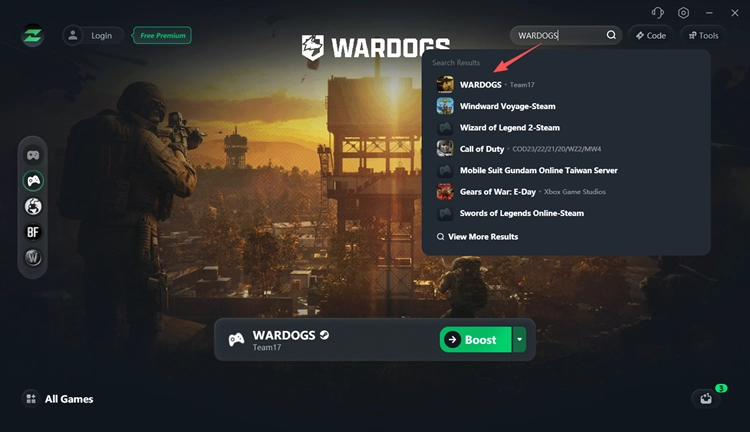
Step 3. Start Boosting WARDOGS
Click Boost, launch WARDOGS, open the Server Browser, and try joining a match again.
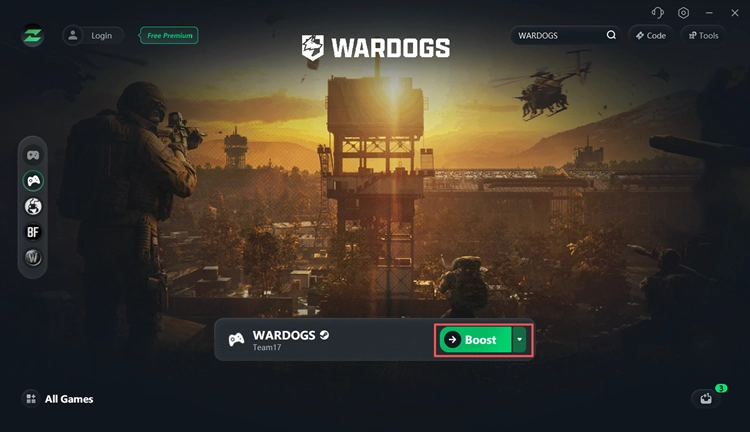
In addition to WARDOGS, LagZapper supports other online games such as Battlefield 6, Delta Force, and Escape from Tarkov, helping players optimize network routes across different games and server regions from one Windows app.
The Bottom Line
WARDOGS error 1628505091 means the game timed out while trying to join a server. Current reports show that server load and backend instability can trigger Join Timed Out, so check WARDOGS server conditions first. Then select one region, refresh the Server Browser, restart WARDOGS and Steam, verify game files, and stabilize your connection. When the servers are online, download LagZapper to optimize your route and reduce connection instability.
FAQs About WARDOGS Error 1628505091
Q1. What does WARDOGS error 1628505091 mean?
It means WARDOGS timed out while trying to connect to the selected game server.
Q2. Why does WARDOGS say Join Timed Out?
The server may be overloaded, unavailable, restarting, or unable to process your connection in time.
Q3. Is WARDOGS error 1628505091 a server issue?
Often, yes. Widespread reports of the same error usually point to server or backend instability.
Q4. Why can't I join a WARDOGS server with available slots?
Available slots do not guarantee that the server backend is accepting new connections. Players have reported timeouts even on low-population servers.
Q5. Is error 1628505091 the same as WARDOGS error 1628505085?
No. Error 1628505085 occurs during player-session initialization, while 1628505091 usually appears when joining a server.
Q6. Should I reinstall WARDOGS for error 1628505091?
Not first. Check the servers, restart and update WARDOGS, refresh the Server Browser, and verify game files before reinstalling.