
WARDOGS Error WD-L014: How to Fix Unable to Launch Error
WARDOGS error WD-L014 can appear when the game fails to launch through the WARDOGS Launcher. Players are reporting an Unable to launch WARDOGS message followed by codes such as WD-L014-474eb079e144, while others receive the same WD-L014 prefix with a different ending.
The exact cause has not been officially confirmed. Recent player reports suggest several possible local fixes, including repairing the Elytra anti-cheat installation and removing the old WARDOGS Playtest client. These methods do not work for everyone, so check current player reports first, then try the fixes below when the issue appears limited to your PC.
What Is WARDOGS Error WD-L014?
WARDOGS error WD-L014 appears when the WARDOGS Launcher fails to start the game successfully.
The error usually appears as:
- Unable to launch WARDOGS
- Error code: WD-L014-xxxxxxxxxxxx
- If this error persists, please contact support with the provided error code.
Players have reported several variants, including WD-L014-474eb079e144, WD-L014-43e1de31211e, and WD-L014-7ae7613bb3a.
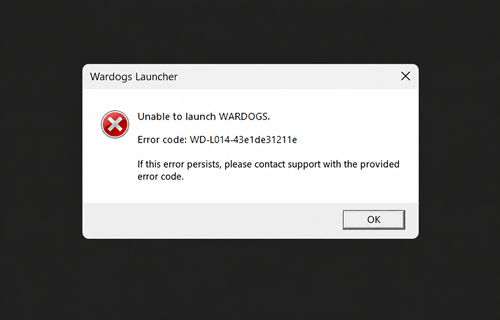
The common part is WD-L014, while the characters after it vary between reports. Current reports associate the error with the launcher or startup stage. Recent Elytra and Playtest workarounds provide additional troubleshooting options, but there is still not enough evidence to define WD-L014 as one specific anti-cheat, GPU, network, or server error.
Tip: Seeing Access Denied or Failed to authenticate with online services instead? See our WARDOGS error 1147405308 guide.
WARDOGS WD-L014 and Unable to Launch WARDOGS
The full WARDOGS WD-L014 code can vary between players. Steam reports have shown codes such as WD-L014-474eb079e144 and WD-L014-43e1de31211e alongside the message Unable to launch WARDOGS. Reddit players have also reported variants including WD-L014-7ae7613bb3a.
WARDOGS error WD-L014 still has no confirmed universal fix. Recent reports now include repairing Elytra, removing the old Playtest client, restarting the PC, verifying files, and other local troubleshooting. Results remain mixed, so use the situation below to decide where to start.
| Situation | Possible Cause | What to Do |
|---|---|---|
| Many players report WD-L014 at the same time | Launcher or online service issue | Check current reports first |
| Elytra may not start correctly | Anti-cheat installation issue | Repair Elytra-Setup.exe |
| WARDOGS Playtest is still installed | Old Playtest client may be involved | Remove WARDOGS Playtest |
| Relaunching temporarily fixes the error | Stuck launcher or Steam session | Fully restart WARDOGS, Steam, and Windows |
| Only your PC appears affected | Corrupted files or local system issue | Verify game files |
| WD-L014 started after a system change | GPU driver or security software issue | Check drivers and security software |
Avoid reinstalling WARDOGS immediately when many players are reporting the same error. Check current launch reports and the targeted fixes below first.
How to Fix WARDOGS Error WD-L014: 6 Fixes
Start by checking whether the WARDOGS unable to launch problem is widespread. WD-L014 is a new launcher error, and local troubleshooting may not help when the problem is affecting multiple players at the same time.
Fix 1. Check Current WARDOGS Launch Issues
Before changing your PC, check whether other players are also reporting WD-L014, WD-L014-474eb079e144, or Unable to launch WARDOGS.
Step 1. Check recent WARDOGS Steam announcements, Discussions, and official community updates.
Step 2. Look for a spike in WD-L014 reports after an update or maintenance.
When many players encounter the same launch error, the problem may require a launcher or game-side update rather than local troubleshooting.
Fix 2. Repair the WARDOGS Elytra Anti-Cheat
Some players report that repairing the Elytra anti-cheat installation helps with WD-L014, although the method does not work for everyone.
Step 1. Open Steam > Library, right-click WARDOGS, and select Manage > Browse local files.
Step 2. Open the Elytra folder and run Elytra-Setup.exe.
Step 3. Select Repair, then restart Steam and WARDOGS.
Note: This is a community-reported workaround, not a guaranteed WD-L014 fix.
Fix 3. Uninstall the Old WARDOGS Playtest
A current Steam report says removing the old WARDOGS Playtest fixed WD-L014 for that player. This remains a player-reported workaround rather than a confirmed universal solution.
Step 1. Find WARDOGS Playtest in your Steam Library.
Step 2. Right-click it and select Manage > Uninstall.
Step 3. Restart Steam and launch the current WARDOGS version.
Note: Uninstall only the old WARDOGS Playtest, not your current WARDOGS Early Access installation.
Fix 4. Fully Restart WARDOGS, Steam, and Windows
A stuck launcher, Steam session, or background process may prevent WARDOGS from starting correctly. Some current players also report that restarting the PC resolved WD-L014.
Step 1. Close WARDOGS and fully exit Steam.
Step 2. Open Task Manager and end any remaining WARDOGS or Steam processes.
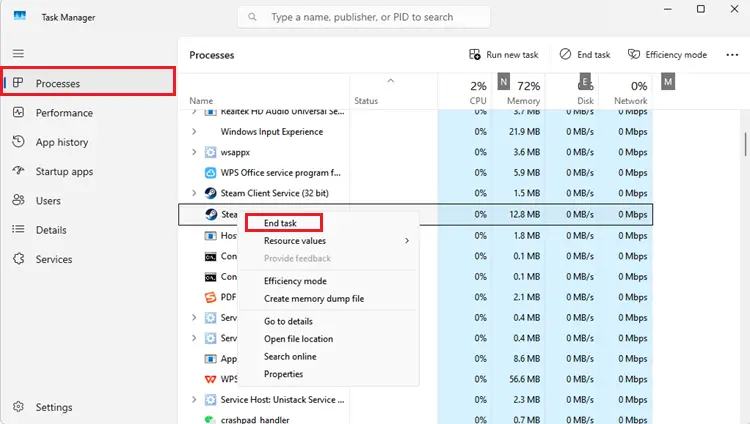
Step 3. Restart Windows, reopen Steam, and launch WARDOGS again.
Tip: WARDOGS launches but shows Failed to initialize player session with the online services instead? See our WARDOGS error 1628505085 guide.
Fix 5. Verify the WARDOGS Game Files
Missing or damaged files can prevent the WARDOGS Launcher from starting the game correctly.
Step 1. Open Steam > Library, right-click WARDOGS, and select Properties.
Step 2. Go to Installed Files > Verify integrity of game files.
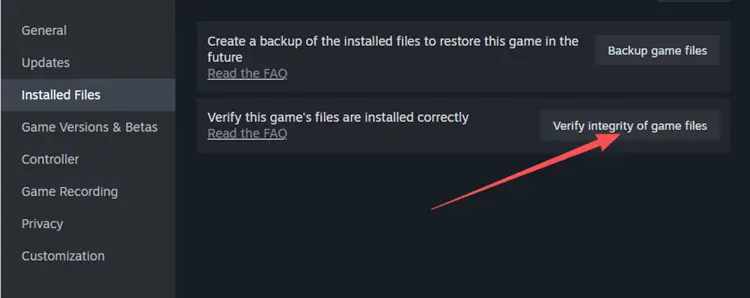
Step 3. Let Steam check and replace any missing or damaged files, then restart WARDOGS.
File verification does not guarantee a fix. One current WD-L014 player specifically reported that validation did not resolve the launch error.
Fix 6. Check GPU Drivers and Security Software
GPU drivers or security software may interfere with game startup, although WD-L014 has not been confirmed as a GPU-specific error.
Step 1. Update your NVIDIA, AMD, or Intel GPU driver, then restart Windows.
Step 2. Check whether antivirus or Windows Security has blocked WARDOGS, Steam, or Elytra.
Step 3. Allow legitimate game files when necessary, then launch WARDOGS again.
Do not permanently disable Windows security features to troubleshoot WD-L014. There is also no evidence that the error is specifically caused by NVIDIA or another GPU brand.
Fix 7. Check Your Local Network Connection
WD-L014 has not been confirmed as a network-specific error, so connection troubleshooting should come after the launch-related fixes above. The existing page currently treats network troubleshooting as Fix 6; moving it to Bonus gives more weight to the newer Elytra and Playtest methods.
Step 1. Pause large downloads and use Ethernet when possible.
Step 2. Restart your router and wait for the connection to recover.
Step 3. Relaunch Steam and WARDOGS.
When WD-L014 continues after these fixes, keep the complete error code shown by the launcher and contact official WARDOGS support.
[Bonus] Improve WARDOGS Network Stability With LagZapper
Once WARDOGS can launch normally, high ping, packet loss, and unstable routing can still affect login and large multiplayer matches. LagZapper is a PC game booster that optimizes the network route between your PC and the game server to help improve connection stability.
Why Use LagZapper for WARDOGS?
- Lower and Stabilize Ping: Optimize the network route between your PC to lower ping and improve connection stability.
- Reduce Packet Loss: Improve connection stability during login, matchmaking, and large 100-player battles.
- Reduce Lag and Ping Spikes: Optimize unstable network routes to reduce lag, sudden latency increases, and connection fluctuations.
- Improve Cross-Region Connections: Switch between available network nodes to find a more stable route to WARDOGS servers.
How to Boost WARDOGS With LagZapper
Once WARDOGS can launch normally, follow the steps below to optimize your WARDOGS connection.
Step 1. Download and Install LagZapper
Download LagZapper for Windows and complete the installation.
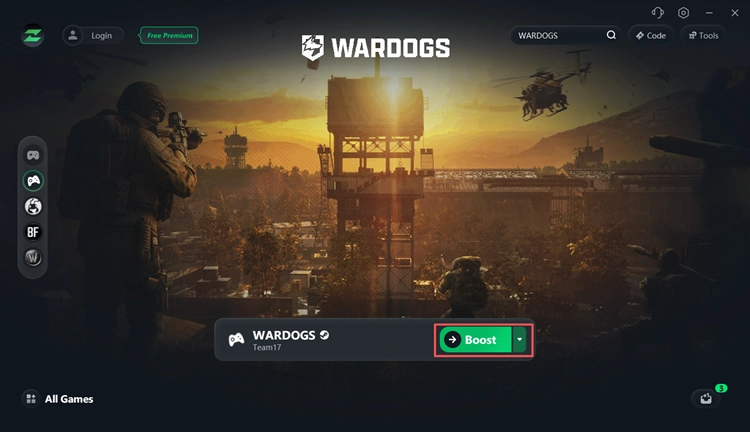
Step 2. Search for WARDOGS
Open LagZapper, sign in, and enter WARDOGS in the search bar.
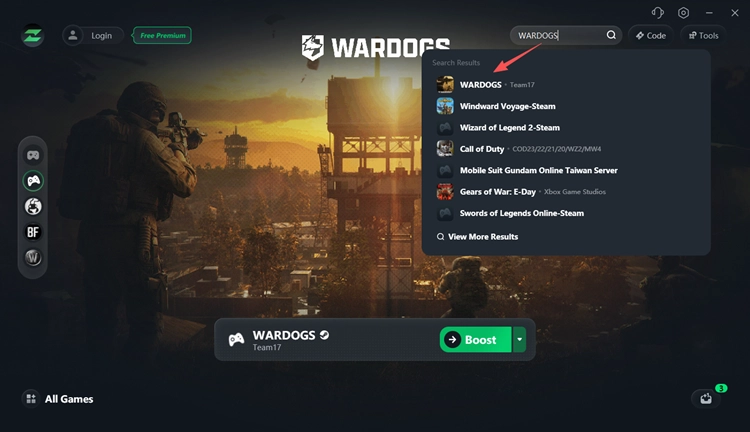
Step 3. Select a Node and Start Boosting
Choose a recommended node or one near the active WARDOGS server region, click Boost, then launch the game through Steam.
The Bottom Line
WARDOGS error WD-L014 is an Unable to launch WARDOGS error that appears during the launcher or startup stage. Different WD-L014 suffixes are currently being reported, while the exact cause remains unconfirmed. Check current launch issues first, restart WARDOGS and Steam, verify the game files, restart Windows, and check security or connection settings. Once the game launches normally, download LagZapper to reduce high ping, packet loss, and unstable routing.
FAQs About WARDOGS Error WD-L014
Q1. What is WARDOGS error WD-L014?
WARDOGS error WD-L014 is an Unable to launch WARDOGS error that appears when the WARDOGS Launcher fails to start the game.
Q2. What is WARDOGS error WD-L014-474eb079e144?
WD-L014-474eb079e144 is one reported variant of the WD-L014 launch error. Other players have reported the same WD-L014 prefix with different endings.
Q3. Why is WARDOGS not launching with WD-L014?
The exact cause has not been officially confirmed. Current reports point to possible launcher, Elytra, Steam session, game file, system, or service-related issues.
Q4. Can repairing Elytra fix WARDOGS WD-L014?
It may help. Some players report success after repairing Elytra-Setup.exe, while others still encounter WD-L014 afterward.
Q5. Should I uninstall WARDOGS Playtest to fix WD-L014?
Some players report that removing the old WARDOGS Playtest helped fix WD-L014. Remove only the Playtest client, not your current WARDOGS installation.
Q6. Can LagZapper fix WARDOGS error WD-L014?
LagZapper cannot directly repair a WARDOGS launcher or Elytra error. Once WARDOGS launches normally, it can help lower ping, reduce lag, reduce packet loss, and optimize unstable routing.