
WARDOGS Preload: Early Access Time & How to Download on Steam
WARDOGS is a tactical all-out warfare FPS developed by BULKHEAD and published by Team17, with Steam Early Access set for September 10, 2026. As launch day gets closer, players planning to jump in right away are already checking whether a WARDOGS preload will be available and when they can start downloading the game.
This guide will show you what to expect before launch, when Early Access begins, and how to get WARDOGS downloaded through Steam.
Can You Preload WARDOGS?
As of September 8, 2026, WARDOGS Early Access preload has not been officially announced, so there is no confirmed WARDOGS preload time yet. Pre-purchase is already available on Steam. Check the table below for the latest status.
| WARDOGS Detail | Current Status |
|---|---|
| Early Access date | September 10, 2026 |
| Platform | Windows PC via Steam |
| Pre-purchase | Available |
| Early Access preload | Not officially confirmed |
| Preload date | Not announced |
| Required storage | 50 GB available space |
WARDOGS Early Access Date, Time & Editions
WARDOGS enters Steam Early Access on September 10, 2026, with two editions already available for pre-purchase. Here is what players should know before launch.
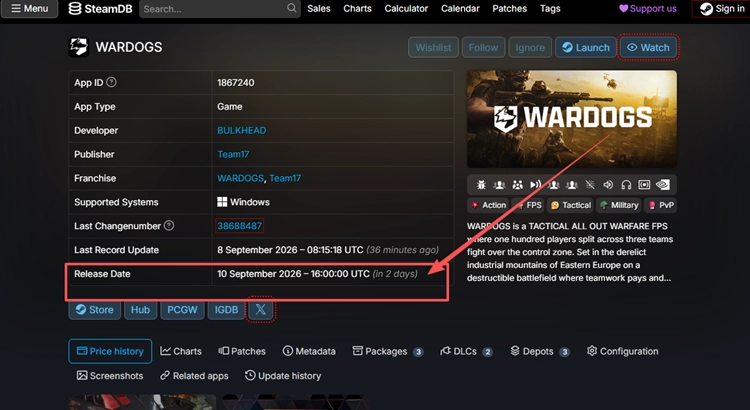
WARDOGS Early Access Release Time
WARDOGS is confirmed to enter Early Access on September 10, 2026. While BULKHEAD and Team17 have not provided a specific launch hour, SteamDB currently tracks the WARDOGS release time at 16:00 UTC on September 10. Players can use this as a reference for now, but the final unlock time may still change before release.
WARDOGS and Supporter Edition Prices
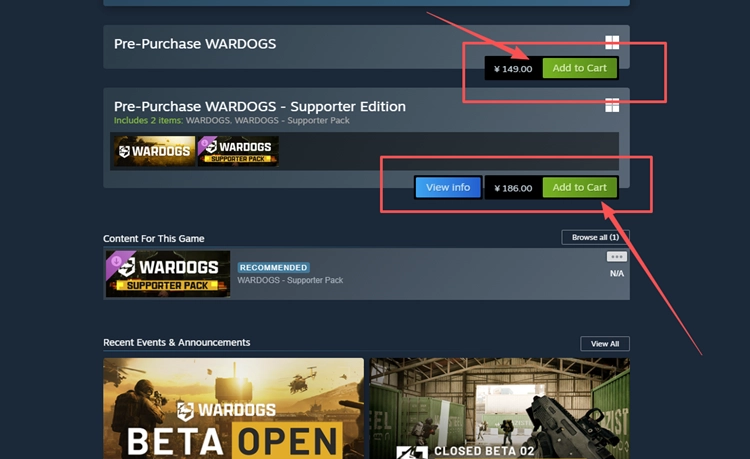
Steam currently offers two WARDOGS pre-purchase options, with the Supporter Edition adding cosmetic extras. Check the table below for current U.S. pricing and included content.
| Edition | U.S. Steam Price | Includes |
|---|---|---|
| WARDOGS | $39.99 | Base game |
| WARDOGS - Supporter Edition | $49.99 | Base game + Supporter Pack cosmetic content |
Tip: Prices above are based on the U.S. Steam Store and may vary by region and currency.
How to Check and Download WARDOGS on Steam
If the WARDOGS preload becomes available, players who have pre-purchased the game can start downloading it from their Steam Library. If no download option appears, preload is not available yet. Follow the steps below to check.
Step 1. Open the WARDOGS Steam page, choose your preferred edition, and complete the pre-purchase.
Step 2. Open Steam, select Library, and find WARDOGS in your game list.
Step 3. Select WARDOGS and check for a Preload or Install button. If neither appears, preload is not available yet.
Tip: If WARDOGS downloads successfully but Elytra prevents the game from launching, check our WARDOGS anti cheat error guide for common launcher, installation, and service issues.
Can Your PC Run WARDOGS Early Access?
Before Early Access begins, compare WARDOGS' minimum and recommended Steam requirements to see whether your Windows PC meets the hardware and storage targets listed below.
| System Requirement | Minimum | Recommended |
|---|---|---|
| OS | Windows 10 | Windows 11 |
| Processor | Intel Core i5-8600 / AMD Ryzen 5 3500 | Intel Core i7-12700K / AMD Ryzen 7 5700X |
| Memory | 16 GB RAM | 16 GB RAM |
| Graphics | Nvidia GTX 1660 / Radeon RX 590 | Nvidia RTX 3070 / AMD Radeon RX 6700 XT |
| Network | Broadband Internet connection | Broadband Internet connection |
| Storage | 50 GB available space | 50 GB available space |
| Performance Target | 1080p Low @ 60 FPS (Upscaled) | 1440p Medium @ 70 FPS+ (Native) or 4K Medium @ 60 FPS+ (Upscaled) |
[Bonus] Prepare Your Connection for WARDOGS Early Access
WARDOGS features large-scale online battles, so connection quality can matter once Early Access begins. If high ping, packet loss, or unstable routing affects your matches, LagZapper can optimize the route between your PC and the game server to help improve connection stability. It also includes dedicated WARDOGS tools for anti-cheat troubleshooting, FOV adjustment, sensitivity conversion, FPS optimization, and tactical support.
Why Use LagZapper for WARDOGS?
- Smart Route Optimization: Finds stable routes to reduce high ping, packet loss, jitter, and routing instability.
- Connection Stability: Helps reduce game lag, lower ping, and limit sudden latency spikes during online matches.
- One-Click Boost: Optimizes the WARDOGS connection without manually changing router, DNS, or Windows settings.
- 3,000+ Game Support: Works with WARDOGS and thousands of other online games.
- Built-In WARDOGS Tools: Provides dedicated utilities such as Elytra Fix, Vehicle FOV, Sens Converter, FPS Booster, and tactical tools for easier troubleshooting and game setup.
How to Boost WARDOGS with LagZapper
Follow these three steps to optimize your WARDOGS connection before joining an online match.
Step 1. Download and Install LagZapper
Download LagZapper for Windows and follow the on-screen instructions to complete the installation on your PC.
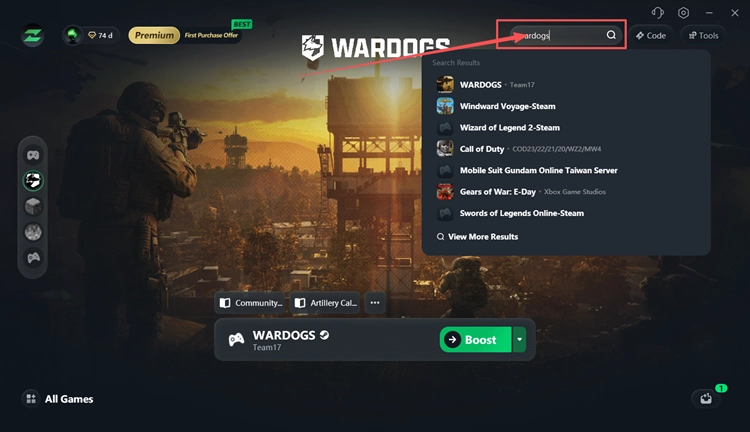
Step 2. Open LagZapper and Search for WARDOGS
Launch LagZapper and enter WARDOGS in the search bar to find the game.
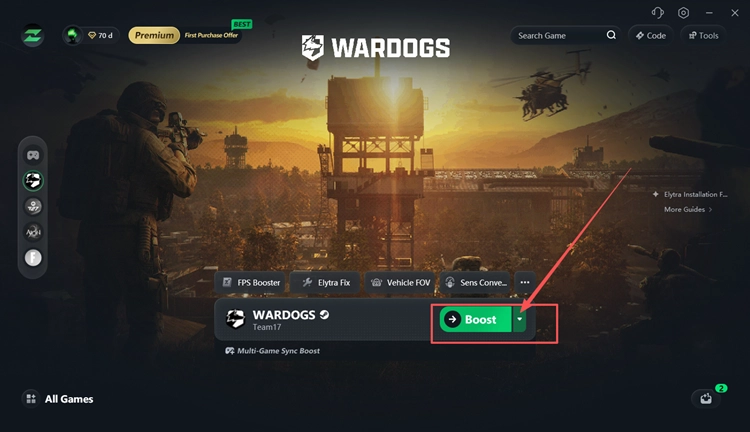
Step 3. Select a Recommended Node and Click Boost
Select a recommended WARDOGS server or node, then click Boost before launching the game.
The Bottom Line
WARDOGS is set to enter Steam Early Access on September 10, 2026, but an Early Access preload has not been officially announced yet. If you have already pre-purchased the game, keep an eye on your Steam Library for a download option as launch approaches. Steam lists 50 GB of available space in the system requirements, so make sure your PC has enough storage ready before installation.
If high ping, packet loss, or unstable routing affects your matches after launch, download LagZapper to optimize the connection route and improve stability.
FAQs About WARDOGS Preload
Q1. Can You Preload WARDOGS?
WARDOGS Early Access preload has not been officially announced.
Q2. What Is the WARDOGS Early Access Time?
WARDOGS launches on September 10, but BULKHEAD and Team17 have not announced an exact launch time.
Q3. How Do I Download WARDOGS Early Access on Steam?
Pre-purchase WARDOGS, open your Steam Library, then select Preload or Install when available.
Q4. What Is the WARDOGS Download Size?
Steam requires 50 GB available space, but the actual WARDOGS download size remains unconfirmed.