
WoW Forever High Ping & Lag: EU Latency Fixes
Getting WoW Forever high ping, delayed skills, frozen NPCs, or sudden disconnects? Since the Beta opened on September 17, EU players have reported World latency jumping from around 100–200ms to 800ms, 1000ms, or even several thousand milliseconds.
In many cases, Home latency stays relatively normal while World latency suddenly spikes, causing delayed abilities, frozen NPCs, or disconnects. Blizzard has addressed some connection problems, but affected players continue to report unstable latency.
Why Is WoW Forever Ping So High?
Current reports suggest that WoW Forever lag and high latency can come from Beta server load, unstable World connections, or inefficient cross-region routing. Common symptoms include:
- World latency reaching 1000ms or higher
- Delayed spells and abilities
- NPCs or enemies freezing
- Players running in place
- World: UNKNOWN under Communication Protocol
- Sudden disconnects
[Quick Way] Lower WoW Forever Ping with LagZapper
If the servers are online but you still experience high ping, lag spikes, packet loss, or unstable cross-region connections, the network route between your PC and the game server may be contributing to the problem. LagZapper can optimize that route, lower ping, and reduce lag caused by inefficient or congested network paths.
Why Use LagZapper for WoW Forever?
- Lower WoW Forever Ping: Lower ping and stabilize latency for smoother gameplay.
- Reduce WoW Forever Lag: Reduce lag caused by unstable or congested network routes.
- Reduce WoW Forever Packet Loss: Reduce packet loss and improve connection stability.
- Optimize WoW Forever Routes: Improve cross-region connections for EU and other distant regions.
How to Boost WoW Forever with LagZapper
Boosting WoW Forever only takes three steps:
Step 1. Download and Install LagZapper
Download LagZapper for Windows, then follow the on-screen instructions to complete the installation.
Step 2. Open LagZapper and Search for WoW Forever
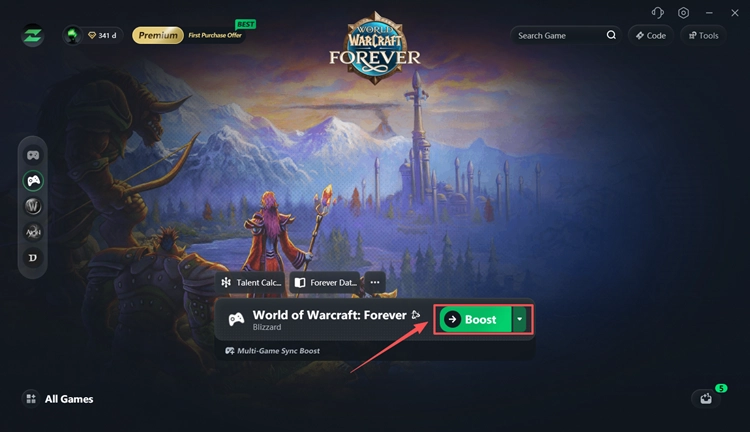
Launch LagZapper and sign in to your account. Use the search bar to find WoW Forever and select the game.

Step 3. Select a Server and Boost
Choose your preferred server or node, then click Boost to optimize the connection. Once boosting is active, launch WoW Forever through Battle.net and check your ping again.
Also Read: WoW Forever Green Screen? Fix Green Maps & Black Textures
How to Fix WoW Forever High Ping and Lag
If high ping continues, try these fixes in order.
Fix 1. Check WoW Forever Server Status
Check official Blizzard channels and recent player reports first. If many players are experiencing high World latency or disconnects at the same time, the problem is likely server-side.
If you are also stuck in a queue or seeing login errors, check our WoW Forever servers down guide.
Fix 2. Turn Off Optimize Network for Speed
Several WoW Forever Beta players reported lower World latency after disabling Optimize Network for Speed. One player reported dropping from around 1000ms to 99ms after changing the setting and restarting the client, while several others confirmed that it also helped their connection.
Step 1. Launch WoW Forever and enter the game. Press Esc to open the Game Menu, then select Options > Network.
Step 2. Under the Network settings, find Optimize Network for Speed and uncheck the option.
Step 3. Restart the game and test your latency.
This is a community workaround rather than a guaranteed official fix.
Fix 3. Enable IPv6 When World Shows UNKNOWN
Some WoW Forever players experiencing World: UNKNOWN and extremely high World latency reported improvements after enabling IPv6. In several cases, the World connection returned to TCP and latency dropped significantly.
Step 1. Launch WoW Forever, press Esc, then go to Options > Network.
Step 2. Find the Enable IPv6 when available option and turn it on.
Step 3. Reconnect to the game, then hover over the network icon and check Communication Protocol and your World latency.
Fix 4. Restart and Stabilize Your Connection
Close WoW Forever and Battle.net, then restart your router. Also pause downloads, streaming, or cloud syncing and use Ethernet instead of Wi-Fi when possible.
If another connection gives much lower ping, your normal network route may be contributing to the issue.
The Bottom Line
WoW Forever high ping is affecting Beta players, especially on EU and other cross-region connections. Common reports include 1000ms+ World latency, delayed abilities, frozen NPCs, World: UNKNOWN, and disconnects.
Check the server status first, then test Optimize Network for Speed, IPv6, and your local connection. If inefficient routing is contributing to the problem, download LagZapper to optimize the route and reduce WoW Forever ping and latency spikes.
FAQs About WoW Forever High Ping
Q1. Why is my WoW Forever ping so high?
Beta server load, cross-region routing, or an unstable World connection can cause unusually high latency.
Q2. Why does WoW Forever have 1000ms ping?
A sudden jump to 1000ms+ may come from server instability or an inefficient network route rather than your download speed.
Q3. Why is Home latency normal but World latency high?
Home and World use different game connections. High World latency usually means the connection to the active game world is unstable.
Q4. Can turning off Optimize Network for Speed fix WoW Forever lag?
Some Beta players reported improvements after disabling it under Options > Network.
Q5. Can LagZapper lower ping in WoW Forever?
Yes, when inefficient or congested routing is contributing to higher latency.
Q6. How do I reduce WoW Forever EU latency?
Check server status, disable Optimize Network for Speed, test IPv6, stop background downloads, and optimize the route to the game server.