
AION 2 Advanced Access Not Working? 6 Fixes to Try
AION 2 Advanced Access is now live from September 30 to October 4, 2026, before the October 5 global launch. Some players may still find AION 2 Advanced Access not working, AION 2 not unlocking, or AION 2 not launching after preloading the game.
Common causes include Founder’s Pack access, encrypted Steam preload files, AION 2 decrypting or unpacking, the old Playtest App, regional availability, and launch-day server issues. Use the fixes below to identify the cause and get AION 2 running.
Is AION 2 Advanced Access Live Yet?
AION 2 Advanced Access is now live for eligible Founder’s Pack owners and runs through October 4, before the October 5 free-to-play launch.
| Item | Details |
|---|---|
| Advanced Access Start | September 30, 2026 at 07:00 PDT / 14:00 UTC / 16:00 CEST |
| Advanced Access Period | September 30 – October 4, 2026 |
| Full Launch | October 5, 2026 |
| Access Requirement | Eligible Founder’s Pack |
| Platforms | Steam and PURPLE |
Tip: Preloading does not mean the game is immediately playable. Steam preload files are encrypted and need to be decrypted once Advanced Access opens.
Why Is AION 2 Advanced Access Not Working?
AION 2 Advanced Access may not work for several common reasons:
- Advanced Access has not unlocked for your account yet.
- Your account does not have an eligible Founder’s Pack.
- Steam is still decrypting or unpacking AION 2 preload files.
- The old Launch Scale Test Playtest App is still installed.
- Steam or PURPLE has not finished downloading or updating the game.
- AION 2 login services or game servers are having launch-day issues.
- Steam may show “unavailable in your region” for AION 2 Global.
These issues can cause AION 2 not unlocking, AION 2 not launching, or Founder’s Pack access to appear unavailable.
How to Fix AION 2 Advanced Access Not Working
When AION 2 Advanced Access is not working, the cause usually comes from access eligibility, game files, the launcher, or server issues. Try these fixes in order.
Fix 1. Check Whether Advanced Access Has Started
AION 2 Advanced Access began on September 30 at 7:00 AM PDT / 14:00 UTC / 16:00 CEST and runs through October 4. If the game still appears locked, restart Steam or PURPLE and check your Founder’s Pack access.
Fix 2. Make Sure You Own a Founder’s Pack
Preloading AION 2 does not include Advanced Access. To play from September 30, your Steam or PURPLE account needs an eligible Founder’s Pack.
If AION 2 is installed but still not unlocking:
- Confirm that you purchased an eligible Founder’s Pack.
- Make sure it is associated with the same Steam or PURPLE account.
- Restart the launcher and check AION 2 again.
Players without Advanced Access can enter when AION 2 officially launches on October 5.
Fix 3. Let Steam Decrypt and Unpack AION 2
Steam preload files are encrypted. When the game becomes playable, Steam must decrypt and unpack them before AION 2 can launch.
You may see:
- Decrypting
- Unpacking
- High disk usage
- The Play button still unavailable
Let the process finish before restarting Steam or reinstalling the game.
Tip: Do not delete the preload too early. AION 2 decrypting or unpacking can take longer on slower storage.
Fix 4. Remove the Old AION 2 Playtest App
Steam players who joined the September Launch Scale Test should remove the separate AION 2 Playtest App before launching the regular AION 2 client.
Step 1. Remove the AION 2 Playtest App from your Steam library.
Step 2. Open the main AION 2 Steam page and install the regular client.
Step 3. Launch AION 2 from the regular game entry, not the old Playtest App.
PURPLE players can skip this step. Make sure you are launching the regular AION 2 client.
Fix 5. Restart Steam or PURPLE and Check Game Files
When AION 2 is not launching, restart the launcher and make sure all game files are fully updated.
- For Steam:
Step 1. Fully exit and reopen Steam.
Step 2. Open Downloads and wait for any decrypting, unpacking, or update process to finish.
Step 3. Go to Steam > Library, right-click AION 2 > Properties > Installed Files > Verify integrity of game files.
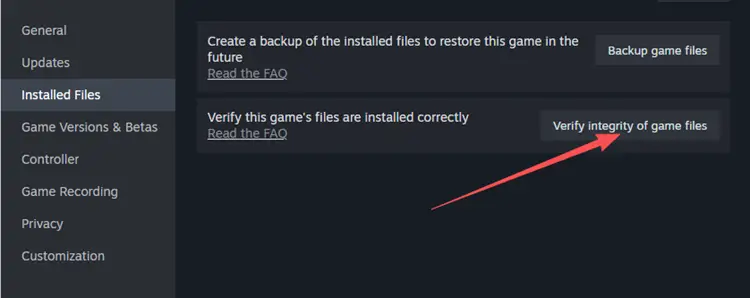
Wait for Steam to finish checking and repairing the files, then launch AION 2 again.
- For PURPLE:
Step 1. Close and restart PURPLE.
Step 2. Check the AION 2 update status and complete any remaining update.
Step 3. Run file verification if available, then try launching AION 2 again.
Restarting the launcher can refresh the game’s latest access and update status.
Fix 6. Check AION 2 Server and Login Status
If AION 2 launches but you cannot enter the game, the issue may be related to login servers, queues, maintenance, or server-side problems.
When many players report the same issue, wait for an official update before reinstalling the game.
Also Read: AION 2 Unable to Connect to Login Server: Fix Login Issues
[Bonus] Reduce High Ping or Packet Loss in AION 2
AION 2 may launch normally but still suffer from high ping, packet loss, unstable routing, or disconnects. LagZapper optimizes the network route between your PC and AION 2 servers to help lower ping, reduce packet loss, and improve connection stability.
Why Use LagZapper for AION 2?
- Network Optimization: Reduce AION 2 high ping, lag, packet loss, and unstable routing.
- Cross-Region Routing: Optimize connections to supported AION 2 servers in other regions.
- Multi-Game Sync Boost: Boost AION 2 with supported gaming apps in one session.
- Game Translation: Translate supported quests, menus, items, and other in-game text.
- Gameplay Tools: Track DPS, check Rift event timers, and optimize PC settings.
How to Boost AION 2 With LagZapper
Getting started takes only three steps.
Step 1. Download LagZapper
Download and install LagZapper for Windows.
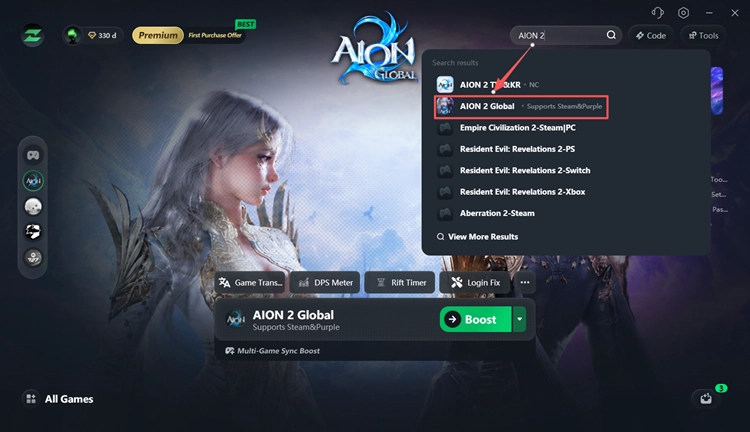
Step 2. Search for AION 2
Open LagZapper, sign in, search for AION 2, and select the game.
Step 3. Select a Node and Boost
Choose a recommended node and click Boost before launching AION 2.
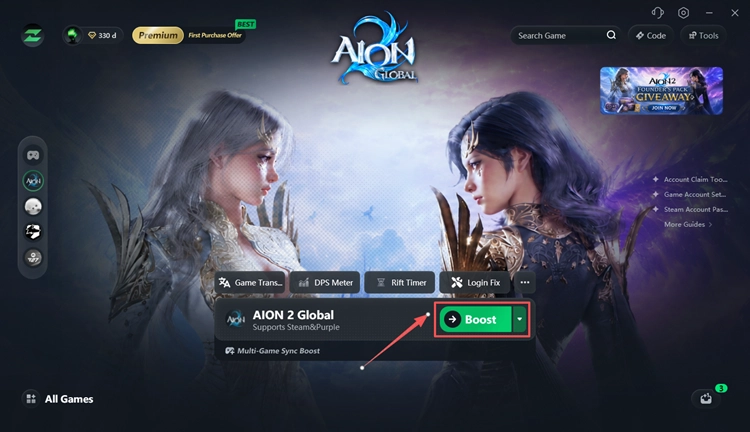
After boosting with LagZapper, you can play AION 2 with a smoother and more stable connection.
The Bottom Line
When AION 2 Advanced Access is not working, check your Founder’s Pack access, Steam decryption, game client, regional availability, and server status first. For high ping, packet loss, or unstable routing after you get in, download LagZapper to improve connection stability.
AION 2 Advanced Access Not Working FAQ
Q1. Why can I preload AION 2 but not play?
Preloading only downloads the files. Steam must decrypt them first, and Advanced Access requires an eligible Founder’s Pack.
Q2. Do I need a Founder’s Pack for AION 2 Advanced Access?
Yes. A Founder’s Pack is required to play during the September 30–October 4 Advanced Access period.
Q3. Why is AION 2 decrypting on Steam?
Steam encrypts preload files before launch and decrypts them when the game becomes playable.
Q4. Why is AION 2 stuck unpacking?
Steam may still be processing the preload. Slower storage can make unpacking take longer.
Q5. Do I need to uninstall the AION 2 Playtest App?
Yes, on Steam. Remove the Playtest App and install the regular AION 2 client. PURPLE players can skip this.
Q6. Why is AION 2 still locked after Advanced Access started?
Restart Steam or PURPLE, confirm your Founder’s Pack is on the correct account, and wait for Steam decryption or updates to finish. If the game still will not unlock, check AION 2 server status.