
WoW Forever Error WOW51900328: 6 Fixes for Connection Issues
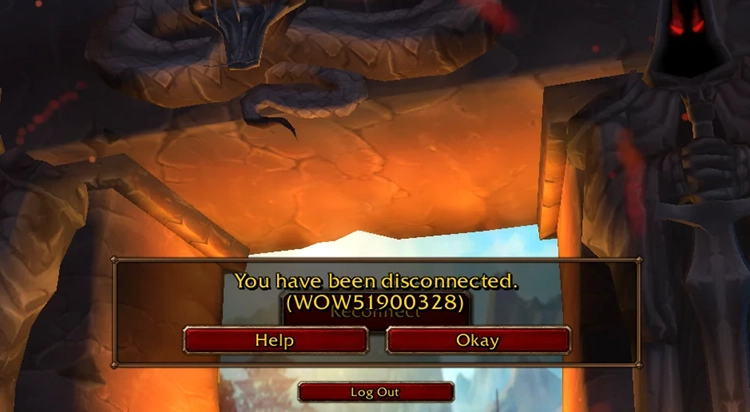
WoW Forever Error WOW51900328 is a connection error that prevents players from entering the game or causes them to become disconnected during login. Many reports describe WoW Forever getting stuck on “Logging into game server” before the connection drops and WOW51900328 appears.
Recent WoW Forever Beta discussions suggest the issue became more noticeable after October updates. Some players can still access other World of Warcraft versions, pointing to WoW Forever connection issues rather than a full Battle.net outage. Server problems, unstable network routing, firewall restrictions, or local connection errors can all cause WoW Forever to disconnect.
What Is WoW Forever Error WOW51900328?
WoW Forever Error WOW51900328 appears when the game cannot establish or maintain a stable connection with the game server.
Players commonly report symptoms such as:
- WoW Forever gets stuck on “Logging into game server.”
- The game suddenly shows “You have been disconnected.”
- The disconnect message includes WOW51900328.
- Reconnecting sends players back to the login screen or triggers the same error again.
Why Does WoW Forever Keep Showing WOW51900328?
Several issues can trigger WoW Forever Error WOW51900328 and cause login failures or disconnects.
- WoW Forever Server or Maintenance Issues
Beta maintenance, server changes, and stress tests can temporarily cause WoW Forever connection issues. Blizzard’s October 21 stress test may also affect server availability.
- Unstable ISP or Network Routing
Poor routing, congestion, or packet loss can cause long login times, high latency, WOW51900328, and sudden disconnects.
- Firewall or Security Software
Windows Firewall or security software may block Battle.net or WoW network traffic, especially after updates.
- Addon or Client Conflicts
Some players reported the error disappearing after removing updated addons, although WoW Forever WOW51900328 can also occur without addons.
Try LagZapper for WoW Forever WOW51900328 [Quick Fix]
When WoW Forever can't connect, gets stuck on Logging into game server, or keeps showing WOW51900328, unstable network routing may be contributing to the connection failure. LagZapper can optimize the network route between your PC and WoW Forever servers to improve connection stability.
Why Choose LagZapper for WoW Forever?
- Lower Ping: Optimize routes to reduce WoW Forever high ping and keep latency more stable during login and gameplay.
- Reduce Lag: Improve connection stability to reduce lag, delays, and sudden connection problems.
- Reduce Packet Loss: Stabilize the network path to reduce packet loss, disconnects, and failed login attempts.
How to Download and Use LagZapper
Getting started only takes three steps:
Step 1. Download, Install, and Sign In
Download LagZapper for Windows, complete the installation, then open the app and sign in.
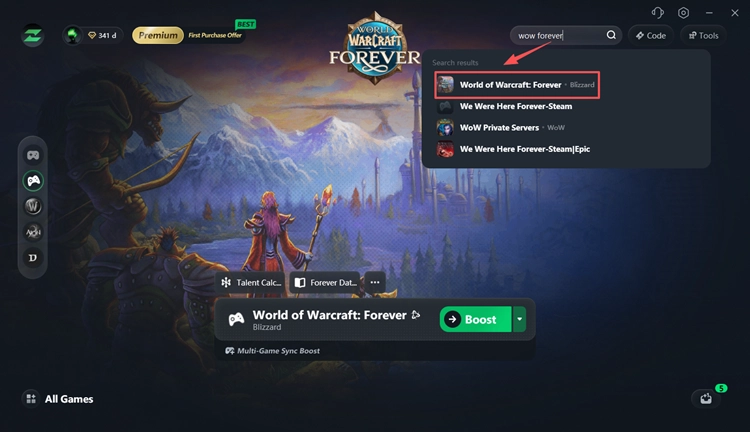
Step 2. Search for WoW Forever
Search for WoW Forever, select the game, and choose an available server or route.
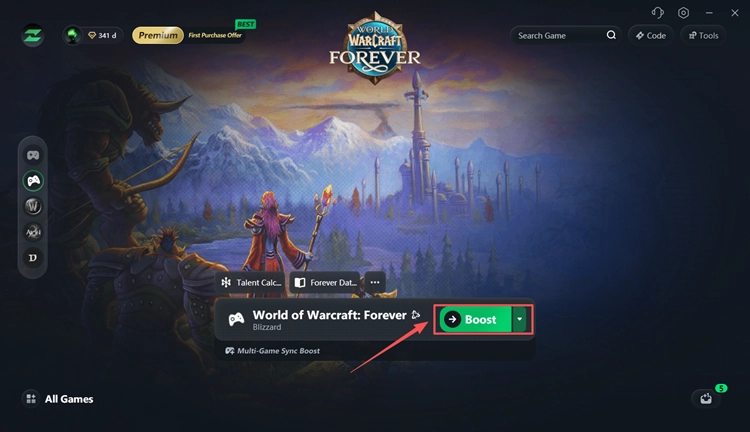
Step 3. Boost and Launch WoW Forever
Click Boost to optimize the connection route, then launch WoW Forever and try logging in again.
How to Fix WoW Forever WOW51900328
Try these fixes in order when WoW Forever can't connect or keeps disconnecting with WOW51900328.
Fix 1. Check WoW Forever Server Status
Check the WoW Forever server status first. Beta maintenance, new builds, stress tests, and regional server changes can temporarily cause login failures or disconnects.
Check:
- WoW Forever Beta Discussion
- Official WoW Forever News
- Recent player reports
- Blizzard maintenance or Beta announcements
Note: On October 21, Blizzard will take the normal Beta offline before opening WoW Forever on its regional production hardware for the WoW Forever Stress Test. The Beta will reopen after the test ends.
Fix 2. Test Another Network
Testing another connection can quickly show whether WoW Forever WOW51900328 is related to your current network route.
Step 1. Close WoW Forever and disconnect from your current Wi-Fi or Ethernet.
Step 2. Connect your PC to another network or a mobile hotspot.
Step 3. Open Battle.net and launch WoW Forever again.
When the game connects normally on another network, the original ISP or network route is more likely causing the connection issue. Use the hotspot only for testing; you do not need to keep playing on it.
Fix 3. Restart Battle.net and Your Router
A temporary Battle.net session or router issue can prevent WoW Forever from connecting correctly.
Step 1. Exit WoW Forever and fully close the Battle.net app.
Step 2. Restart your router and wait for the internet connection to return.
Step 3. Reopen Battle.net and launch WoW Forever.
This refreshes both the Battle.net session and your local network connection, which may clear temporary WoW Forever connection issues.
Fix 4. Allow WoW Forever Through Firewall
Windows Firewall may block Battle.net or WoW network traffic. Microsoft recommends allowing the app through the firewall instead of disabling the firewall completely.
Step 1. Search for Windows Defender Firewall and open Allow an app through firewall.
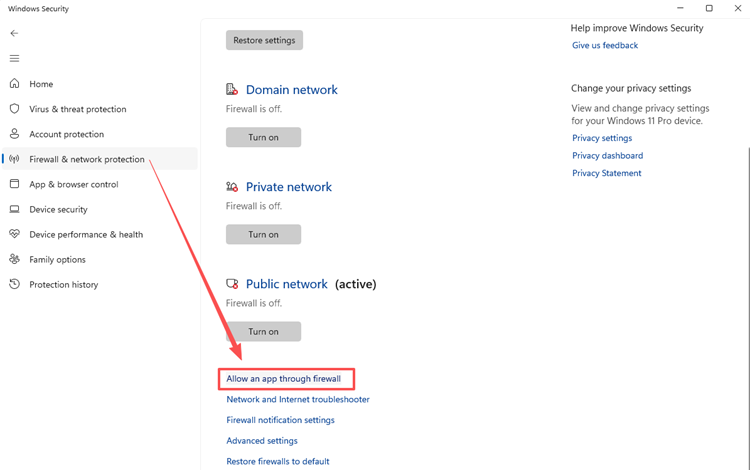
Step 2. Click Change settings, then allow Battle.net and World of Warcraft on the required Private and Public networks.
Step 3. Save the changes, restart Battle.net, and launch WoW Forever again.
Fix 5. Disable or Update WoW Addons
A recently updated or incompatible addon may contribute to WoW Forever WOW51900328. One player reported the error stopped after removing updated addons, although another affected player used no addons, so treat this as a useful fix.
Step 1. Close WoW Forever and temporarily disable all addons.
Step 2. Restart Battle.net, launch WoW Forever, and test the connection again.
When the game works normally, re-enable addons one at a time to find the conflicting addon.
Fix 6. Reset Windows Network
Resetting Windows network settings can clear DNS, Winsock, or TCP/IP problems that may contribute to WoW Forever connection issues. Microsoft recommends these commands for troubleshooting Windows connectivity.
Step 1. Search for Command Prompt, right-click it, and select Run as administrator.
Step 2. Run these commands one at a time:
- ipconfig /flushdns
- netsh winsock reset
- netsh int ip reset
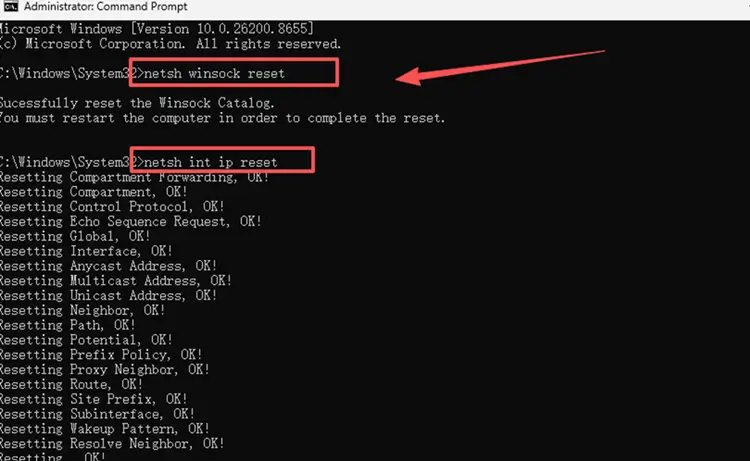
Step 3. Restart your PC, reopen Battle.net, and launch WoW Forever again.
The Bottom Line
WoW Forever Error WOW51900328 means the game is failing to establish or maintain a stable server connection. Start by checking the WoW Forever server status, especially during Beta maintenance or stress tests, then troubleshoot your network, firewall, addons, and Windows network settings. For unstable routing, downloading LagZapper can help optimize the connection path and reduce disconnects, lag, and packet loss.
FAQs About WoW Forever Error WOW51900328
Q1. What does WOW51900328 mean?
It means WoW Forever lost or failed to establish a connection with the game server.
Q2. Why is WoW Forever stuck on Logging into game server?
Server issues, unstable routing, or firewall problems can cause WOW51900328 during login.
Q3. Why does WoW Forever keep disconnecting?
Repeated disconnects usually come from server or network issues. For another connection error, check WoW Forever BLZ51901016.
Q4. Is WOW51900328 a server issue?
Not always. Server problems, routing, firewall settings, or addons may all contribute.
Q5. Did the October 8 update cause WOW51900328?
Some players reported WOW51900328 after the October update, but Blizzard has not confirmed the update as the direct cause.
Q6. Can changing networks help?
Yes. Testing another network can help identify ISP or routing problems.